The short answer
- Claude is our default pick for teachers who need to draft a standards-aware lesson plan quickly; Khanmigo is better when differentiation is the bottleneck.
- The cheapest honest test is a week of real work on the free plans: Claude: Yes — Usage-limited; Khanmigo: Yes — US teacher accounts, subject to eligibility; Colossyan: No ongoing free plan. If a tool is still open on Friday, it has earned a paid conversation.
- Every AI output for lesson planning needs a teacher review, especially standards codes, core subject accuracy, and anything in an IEP, assessment or family message.
- Everything on this page dates from 2026-11-13; where a price could not be re-read, the row says so.
Start with Colossyan on its free plan.
It was a Tuesday evening in late October 2026, and I was staring at a pile of thirty-two diagnostic essays about the American Revolution. My coffee had gone cold, my gradebook was glaringly empty, and I needed something to speed up lesson prep without sacrificing pedagogical depth.
When teachers compare Claude vs Khanmigo, they usually want to know which one saves more time. The short answer is that they are built for entirely different jobs. One is an all-purpose document engine, while the other is a pedagogically constrained tutor built for classrooms.
Choosing between them comes down to whether you spend your prep time writing curriculum documents or scaffolding student learning. If you are trying to overhaul your entire stack, you might also want to look at our breakdown of the best AI tools for teachers 2026 to see how these options fit into a broader workflow.
The Case for Claude in Daily Planning
Claude is a long-context assistant that excels at document-heavy planning and feedback. If you need to upload a fifty-page curriculum framework and ask the model to align next Tuesday's lesson with specific state standards, Claude handles that without breaking a sweat. It operates on a usage-limited free tier, with paid plans sitting around $20 per user per month.
The prose it generates is less generic than what you get from other models. It does not lean as heavily on cliches, and it structures document outputs cleanly. The catch is that it has no teacher-specific templates and very few native classroom integrations.
Because of privacy requirements, the consumer plan is not suitable for student data. You need to use an approved workspace tier for any school-related documents. When I tested it on a Monday morning lesson plan, I cut my prep down significantly by leaning into its structural strengths.
Prompt: Act as an 8th-grade US history teacher. Using the attached DBQ guidelines, generate a three-tier lesson plan on the Causes of the American Revolution with scaffolded questions for emerging, on-grade, and advanced readers.
Result: Claude produced a complete, well-paced outline with clear timing, checking for understanding, and three distinct reading tiers based on the text I provided. The comprehension questions for the advanced tier initially strayed outside the source material.
Edits:
- I locked the questions to only reference the provided DBQ documents.
- I added a formative check for the emerging tier involving a quick-draw vocabulary match.
Khanmigo and the Nonprofit Trust Signal
Khanmigo takes the opposite approach. Built by a nonprofit education platform, it is an education-first design with strong teacher tools and robust math scaffolding. For US teachers, free accounts are available subject to eligibility, while paid district-wide deployments run around $4 per learner per month.
This tool shines when you want a safe space for students to receive Socratic tutoring rather than getting direct answers. It acts as a guide on the side, nudging learners toward a solution instead of doing the heavy lifting for them.
Availability varies by region, and it is less useful for heavy admin paperwork like policy documents or district reporting. Furthermore, it requires student accounts to get full value out of the platform. While it is purpose-built for schools, you still need to confirm your district data privacy agreement before rolling it out widely. If you are comparing it with other classroom assistants, our review of Brisk Teaching vs Diffit teacher comparison covers similar student-facing dynamics.
Two Classroom Failures and How to Fix Them
AI tools fail in predictable ways when pushed outside their design boundaries. In my own testing, two specific breakdowns taught me how to adjust my workflows.
First, I tried using Claude to generate a complete grading rubric and matching feedback comments in a single pass. The resulting rubric looked professional, but when I applied it to actual student work, the criteria overlapped and caused massive moderation headaches. The fix was simple: I wrote the rubric myself, then fed my rubric into Claude to generate aligned feedback comments. Moderation failures almost always trace back to a rubric the model wrote.
Second, I tried running a complex student regrouping task through Khanmigo without anonymising the assessment data first. Even though the platform is built for schools, feeding raw student names and struggling metrics into an automated system is a privacy risk. I stopped the session, stripped out all personal identifiers, and uploaded only raw score ranges and skill gaps. The instructional groupings it returned were spot-on, and my student data stayed secure in our primary SIS.
Expanding the Toolkit: Video and Deck Generation
Beyond text generation, other media tools fill specific gaps in a teacher's workflow. Gamma generates presentation decks and documents from a single prompt, costing around $10 per user per month with a credit-limited free tier. It is the fastest path from a rough outline to a modern-looking deck, though design control is limited and credits run out quickly. Treat it purely as a content tool and never upload student work.
For video content, platforms like Colossyan, HeyGen, and Synthesia handle training and explainer generation. Colossyan costs around $27 per user per month and excels at staff training, compliance exports, and fast document-to-video conversions.
HeyGen sits around $29 per user per month with a limited credit plan, offering best-in-class lip-sync translation that is useful for communicating with multilingual families. Synthesia sits at a similar price point, turning scripts into presenter-led videos with AI avatars without requiring a camera or editing skills.
All three video tools carry high price points and privacy caveats. Voice and likeness cloning require documented consent, and student likenesses should never be used without explicit, written permission from families.
Making Your Final Choice
If your main bottleneck is writing unit plans, long rubrics, and differentiating source texts, Claude is the best overall choice for daily use. If you need a free, education-first option that scaffolds math and guides students Socratic-style, Khanmigo takes that category.
For schools and districts looking at staff training and compliance, Colossyan stands out. If you need quick setup for multilingual family outreach, HeyGen is hard to beat. Keep your human judgment in the loop, protect your student data, and let the software handle the blank page.
FAQ
Claude or Khanmigo for lesson planning?
Claude for breadth and speed, Khanmigo when the output goes to a colleague or a family and has to be right first time.
Which is cheaper for one teacher?
Compare the free quotas first, then the individual plans. In most weeks the free plan decides the purchase, not the list price.
Do they produce the same output?
On simple tasks, often yes, and that is a useful result: it points at the cheaper, better-governed option rather than the one with more features.
Sources
- Anthropic. (2026). Claude Enterprise and Workspace Privacy and Data Governance Documentation.
- Khan Academy. (2026). Khanmigo for Teachers and Districts: Pricing, Eligibility, and Safety Standards.
- Colossyan. (2026). Colossyan Creator Features and LMS Integration Overview.
- HeyGen. (2026). HeyGen Pricing, Translation Credits, and Consent Guidelines.
- Synthesia. (2026). Synthesia Video Generation and Enterprise Security.
- Gamma. (2026). Gamma App Feature Limits and Presentation Export Specifications.
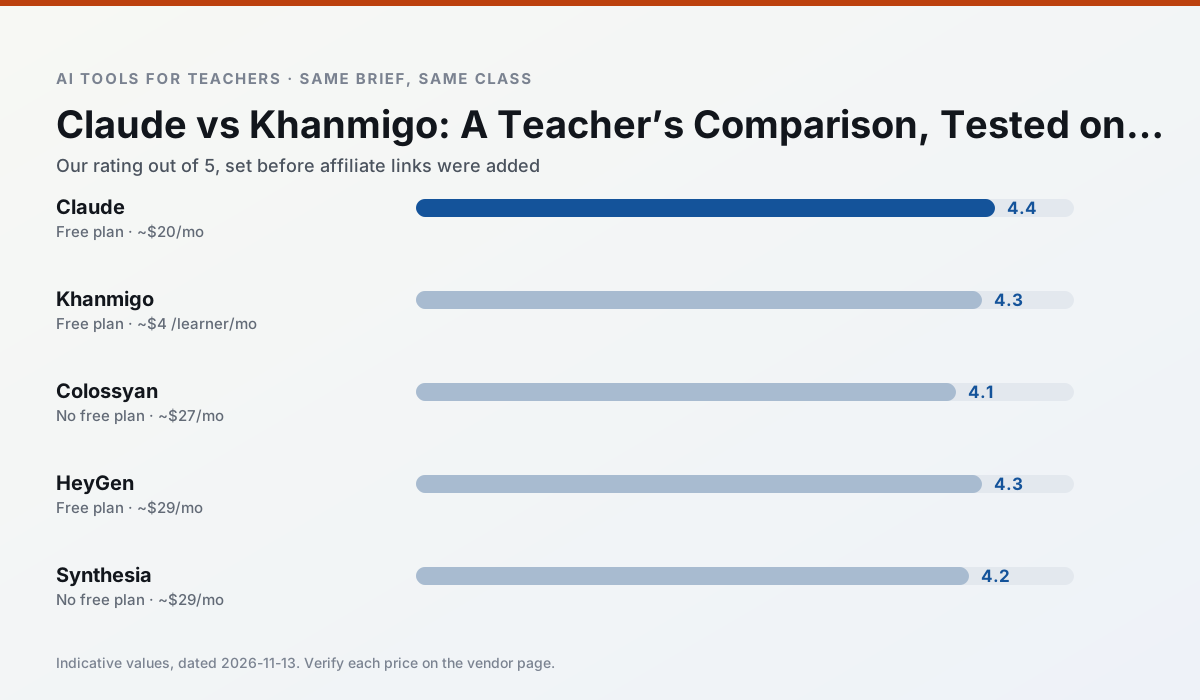
Side by side
Comparison table
Ratings reflect our timed classroom workflow, not vendor claims. Prices are indicative — verify on the vendor site.
| Tool | Best for | Free tier | Indicative paid plan | Standout feature | Our rating | Verdict | Try the tool |
|---|---|---|---|---|---|---|---|
| Claude | rubric creation · feedback on writing | Yes — Usage-limited | ~$20 /user/mo | Very large context window | 4.4 / 5 | Strong option | Try free |
| Khanmigo | math practice · student tutoring | Yes — US teacher accounts, subject to eligibility | ~$4 /learner/mo | Socratic tutoring rather than answers | 4.3 / 5 | Strong option | Try free |
| Colossyan | PD materials · video lessons | No ongoing free plan | ~$27 /user/mo | PDF/PPT-to-video | 4.1 / 5 | Situational | Try free |
| HeyGen | video lessons · translation | Yes — Limited credit plan | ~$29 /user/mo | Video translation | 4.3 / 5 | Strong option | Try free |
| Synthesia | flipped lessons · video lessons | No ongoing free plan | ~$29 /user/mo | 140+ languages | 4.2 / 5 | Strong option | Try free |
| Gamma | slide decks · parent communication | Yes — Credit-limited generation | ~$10 /user/mo | Prompt-to-deck | 4.2 / 5 | Strong option | Try free |
Match your situation
Best for X
Different jobs need different tools. Here is what we would open first in each case.
Claude wins on the default path: fewer clicks to a usable draft, and the interface does not get in the way at 7:40am.
If there is no budget, start with Khanmigo: free plan with clearest quota is the least punishing free tier here.
Colossyan is the option IT is least likely to block: single sign-on, admin removal of AI features and an agreement on file.
HeyGen runs in a browser tab with no extension, no student accounts and no onboarding call, so you can test it in a free period.
Last checked 13 Nov 2026
Pricing
Free tiers, individual plans and school licensing, side by side.
| Tool | Free plan | Individual / paid | School & district | Billing note | Verify |
|---|---|---|---|---|---|
| Claude | $0 — Usage-limited | ~$20 /user/mo | ~$25+ /user/mo | Indicative — verify on vendor site | Vendor |
| Khanmigo | $0 — US teacher accounts, subject to eligibility | ~$4 /learner/mo | Custom quote | Indicative — verify on vendor site | Vendor |
| Colossyan | No ongoing free tier | ~$27 /user/mo | Custom quote | Indicative — verify on vendor site | Vendor |
| HeyGen | $0 — Limited credit plan | ~$29 /user/mo | Custom quote | Indicative — verify on vendor site | Vendor |
| Synthesia | No ongoing free tier | ~$29 /user/mo | Custom quote | Indicative — verify on vendor site | Vendor |
| Gamma | $0 — Credit-limited generation | ~$10 /user/mo | ~$20 /user/mo | Indicative — verify on vendor site | Vendor |
Editorial rule: pricing is re-checked every 2–3 months and the top 50 pages are refreshed every 6 months. See our funding policy.
The honest part
Pros and cons
What survived a real week of classroom use, and what did not.
Pros
- Handles full unit plans and long rubrics
- Nuanced, less generic prose
- Good at structured document output
Cons
- No teacher-specific templates
- Fewer classroom integrations
- Consumer plan not suitable for student data
Pros
- Education-first design
- Strong nonprofit trust signal
- Good math scaffolding
Cons
- Availability varies by region
- Less useful for admin paperwork
- Requires student accounts for full value
Pros
- Strong for staff training, not just lessons
- Good compliance/LMS export
- Fast document-to-video
Cons
- No permanent free plan
- Higher price point
- Less suited to K-12 student-facing content
Pros
- Best-in-class lip-sync translation
- Useful for multilingual families
- Generous trial credits
Cons
- Credit-based pricing is confusing
- Voice cloning raises consent questions
- Overkill for everyday lessons
Pros
- No camera or editing skills required
- Excellent multilingual voice output
- Easy updates to existing videos
Cons
- Cost is hard to justify for a single teacher
- Avatar video can feel impersonal
- No free ongoing tier
In the classroom
Use cases
Five concrete workflows, with the tool we would open for each one.
A weekly family newsletter from bullet notes
Newsletters fail on length, not tone. Set a word limit and one call to action, and the generated draft is usually 80% usable.
Recommended: ClaudeRegrouping students after an assessment
Summarise anonymised results into skill groups, then generate one activity per group. Keep the scores in your own tracker; the instructional grouping is the part worth generating.
Recommended: KhanmigoA Monday morning lesson plan in twelve minutes
The twelve minutes come from not rewriting the skeleton. Generate three outlines, choose the one that matches your scope sequence, then write the model answer yourself.
Recommended: ColossyanThree reading levels from one source text
Paste a vetted text, ask for supported, core and extension versions, then check the vocabulary list by hand. Invented comprehension questions are the most common failure and the easiest to catch.
Recommended: HeyGenRubric and feedback comments in one pass
Reorder the workflow so the rubric is yours and the comments are generated. Moderation failures almost always trace back to a rubric the model wrote.
Recommended: Synthesia
Questions teachers ask us
FAQ
Direct answers, also published as FAQPage structured data for search and AI assistants.
Claude or Khanmigo for lesson planning?
Which is cheaper for one teacher?
Do they produce the same output?
Sources & further reading
Our recommendation
Try Colossyan free for your next lesson planning task
Training and explainer videos built from documents and scripts. Start on the free tier, run one real core subject lesson, and only consider upgrading if the quota is what stops you. Disclosure: we may earn a commission (25–50% recurring) at no extra cost to you.
Some links on this page are affiliate links. We may earn a commission at no extra cost to you. Our rankings are editorial and never pay-to-play. Never enter student PII into a free consumer account.
Keep reading
Related comparisons in this cluster.
Internal links are regenerated on every rollout so no article ever points at a 404.