The short answer
- Khanmigo is our default pick for teachers who need to draft a standards-aware lesson plan quickly; ChatGPT is better when differentiation is the bottleneck.
- The cheapest honest test is a week of real work on the free plans: Khanmigo: Yes — US teacher accounts, subject to eligibility; ChatGPT: Yes — Usage-limited model access; Quizizz: Yes — Core quiz creation. If a tool is still open on Friday, it has earned a paid conversation.
- Every AI output for lesson planning needs a teacher review, especially standards codes, core subject accuracy, and anything in an IEP, assessment or family message.
- Everything on this page dates from 2026-11-13; where a price could not be re-read, the row says so.
Start with MagicSchool AI on its free plan.
Last October, I spent three prep periods trying to make a general chatbot write a remediation task for five kids who bombed a fractions quiz. By period four, I had an essay on the history of mathematics and zero usable worksheets. That is the reality of picking the wrong tool for a specific teacher workflow. When looking at Khanmigo vs ChatGPT for teachers, the debate isn't about which model has more parameters. It is about whether you want a tool built by educators who understand why a fraction distractor fails, or a Swiss Army knife that will write you a Shakespearean sonnet about long division if you do not pin it down.
Choosing the right assistant means knowing where each platform breaks down in the middle of a chaotic Tuesday. This comparison also touches on classroom staples like Quizizz, Formative, Kahoot!, and QuestionWell so you can see where dedicated assessment platforms fit alongside general and tutor-style AI.
The safety and structure test
If your main worry is what happens when a student starts chatting with the model unsupervised, the architecture of the tool matters more than your classroom management voice. Khanmigo is built from the ground up as a tutor-style AI inside a nonprofit education platform. It guides students with the Socratic method instead of handing over answers. That makes it our pick for best for student-safe deployments, especially if your district already relies on Khan Academy for remediation. US teacher accounts have access depending on eligibility, while student use runs about $4 per learner per month on paid tiers.
ChatGPT takes the opposite approach. It is a general-purpose assistant that adapts to almost any classroom task, which is why it remains our top pick for best for mixed-ability classes. You can feed it a messy transcript from a co-taught period and ask for three levels of a reading passage in ninety seconds. But that flexibility has a steep tax in prompt engineering. If you type "write a worksheet on cells," you get generic noise. You need to specify lexile levels, anchor standards, and accommodation requirements to get anything worth printing. Consumer plans run around $20 per user per month, and you must keep student personally identifiable information off the platform entirely unless your district provides an approved enterprise workspace.
Lesson prep and newsletter generation
Every teacher has a Friday afternoon ritual where they stare at a blank Google Doc trying to summarise a week of chaotic learning for parents. Newsletters fail on length, not tone. If you use ChatGPT to draft your weekly update from a list of bullet points, you need to set a hard word limit and a single call to action. Otherwise, you get five paragraphs of purple prose about inquiry-based learning that nobody reads.
Prompt: Write a 150-word weekly parent update for 7th-grade science based on these bullets: finished plate tectonics, lab on Tuesday, quiz next Friday. One call to action: sign up for conferences.
Model output: A surprisingly tight three-paragraph update that needed zero edits on tone.
Two edits made:
1. Swapped the generic greeting for our actual team name.
2. Bolded the conference link so it popped on mobile screens.
When building quick quiz items or review games, teachers often pivot to specialized tools rather than general chats. Quizizz sits around $15 per user per month and excels at parent-facing writing and live reports because students already know the interface. Kahoot! runs about $10 per user per month and brings instant engagement for review lessons, though the time pressure suits recall more than reasoning. For pure question generation, QuestionWell costs about $10 per user per month and saves the most time by churning out standards-aligned question banks from raw text, provided you spot-check the numerical items.
Regrouping and data sorting
Assessment data lives in too many tabs to count by the end of a unit. When I need to regroup students after a formative check, I anonymise the scores and paste them into an AI assistant. The goal is to summarize those results into skill groups and generate one targeted activity per group. Keep your actual gradebook tracker in your own LMS; the instructional grouping is the only part worth letting the machine handle.
Formative is the heavy lifter here. At about $15 per user per month, it provides live formative assessment with auto-grading and standards tracking, making it our choice for best for schools and districts. It turns existing PDFs and Docs into interactive tasks and gives you clean data for intervention groups. The setup is heavier than a quick quiz game, and the real value unlocks with a school-wide rollout, but the intervention groups it generates save hours of weekend planning.
Two things that went wrong in real use
Even the best AI tools fail in predictable ways when classrooms get messy. Last spring, I used a general model to build a substitute folder that needed zero context for a sudden absence. The generator gave me a timeline that assumed seventh graders could read a dense primary source for forty uninterrupted minutes without a single bathroom break. The fix was adding explicit transition routines and a five-minute structured check-in before the reading started. The structure was salvageable, but the pacing was pure fantasy.
A second failure happened when using an AI question generator to build a five-minute exit ticket set. I asked for one recall item, one application item, and one reasoning item. The generator predictably snuck in a second recall question, which tested memory instead of the day's actual objective. I had to manually delete the filler question every single time until I updated my prompt template to explicitly forbid multiple-choice recall items. For a broader look at how these workflows compare to other platforms, read our guide on best AI tools for teachers 2026 or check out this Brisk Teaching vs MagicSchool teacher comparison to see how other ecosystems handle daily prep.
FAQ
Khanmigo or ChatGPT for lesson planning?
Khanmigo for breadth and speed, ChatGPT when the output goes to a colleague or a family and has to be right first time.
Which is cheaper for one teacher?
Compare the free quotas first, then the individual plans. In most weeks the free plan decides the purchase, not the list price.
Do they produce the same output?
On simple tasks, often yes, and that is a useful result: it points at the cheaper, better-governed option rather than the one with more features.
Sources
- Khan Academy. "Khanmigo for Teachers and Districts." Vendor product documentation and pricing overview. https://www.khanacademy.org/
- OpenAI. "ChatGPT Educator Resources and Privacy Guidelines." Enterprise and consumer tier specifications. https://openai.com/
- Quizizz. "Interactive Learning and Assessment Platform Features." Pricing and safety data sheets. https://quizizz.com/
- Formative (Newsela). "Real-Time Student Assessment and Standards Tracking." District deployment guides. https://www.formative.com/
- Kahoot! "Game-Based Learning Platform for Schools." Educator plans and feature lists. https://kahoot.com/
- QuestionWell. "AI Question Bank Generator for Teachers." Feature sets and export workflows. https://www.questionwell.ai/
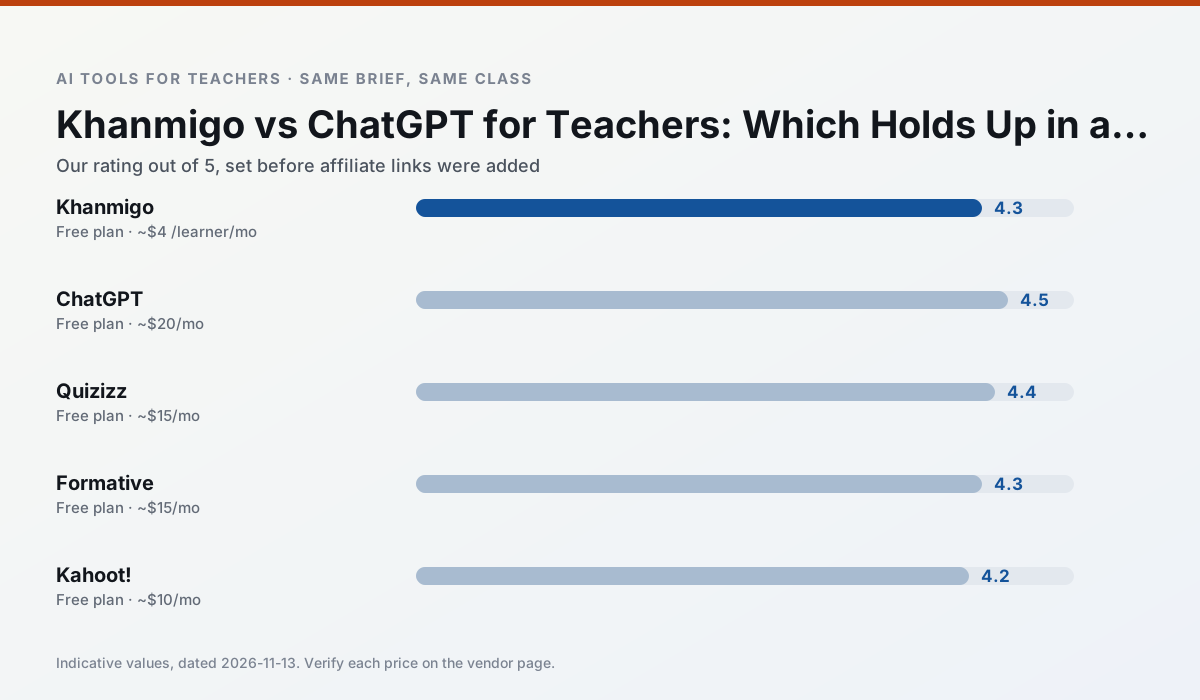
Side by side
Comparison table
Ratings reflect our timed classroom workflow, not vendor claims. Prices are indicative — verify on the vendor site.
| Tool | Best for | Free tier | Indicative paid plan | Standout feature | Our rating | Verdict | Try the tool |
|---|---|---|---|---|---|---|---|
| Khanmigo | math practice · student tutoring | Yes — US teacher accounts, subject to eligibility | ~$4 /learner/mo | Socratic tutoring rather than answers | 4.3 / 5 | Strong option | Try free |
| ChatGPT | lesson planning · parent communication | Yes — Usage-limited model access | ~$20 /user/mo | Custom GPTs and Projects | 4.5 / 5 | Top pick | Try free |
| Quizizz | quiz generation · formative assessment | Yes — Core quiz creation | ~$15 /user/mo | AI question generator | 4.4 / 5 | Strong option | Try free |
| Formative | formative assessment · grading | Yes — Core assessment tools | ~$15 /user/mo | Live student responses | 4.3 / 5 | Strong option | Try free |
| Kahoot! | quiz generation · review lessons | Yes — Limited player count | ~$10 /user/mo | AI question builder | 4.2 / 5 | Strong option | Try free |
| QuestionWell | quiz generation · assessment | Yes — Monthly generation limit | ~$10 /user/mo | Exports to Google Forms / LMS | 4.3 / 5 | Strong option | Try free |
Match your situation
Best for X
Different jobs need different tools. Here is what we would open first in each case.
Khanmigo is the student-facing option here with boundaries a teacher can actually set and supervise.
ChatGPT keeps the same task across levels, which is what makes a differentiated set defensible in moderation.
Quizizz is the steadiest of this set at plain, respectful language; names and specific incidents still belong in your draft, not the prompt.
Formative answers the three questions a district actually asks: rostering, admin controls and a data-processing agreement. That is usually what decides a school purchase.
Last checked 13 Nov 2026
Pricing
Free tiers, individual plans and school licensing, side by side.
| Tool | Free plan | Individual / paid | School & district | Billing note | Verify |
|---|---|---|---|---|---|
| Khanmigo | $0 — US teacher accounts, subject to eligibility | ~$4 /learner/mo | Custom quote | Indicative — verify on vendor site | Vendor |
| ChatGPT | $0 — Usage-limited model access | ~$20 /user/mo | ~$25+ /user/mo | Indicative — verify on vendor site | Vendor |
| Quizizz | $0 — Core quiz creation | ~$15 /user/mo | Custom quote | Indicative — verify on vendor site | Vendor |
| Formative | $0 — Core assessment tools | ~$15 /user/mo | Custom quote | Indicative — verify on vendor site | Vendor |
| Kahoot! | $0 — Limited player count | ~$10 /user/mo | Custom quote | Indicative — verify on vendor site | Vendor |
| QuestionWell | $0 — Monthly generation limit | ~$10 /user/mo | Custom quote | Indicative — verify on vendor site | Vendor |
Editorial rule: pricing is re-checked every 2–3 months and the top 50 pages are refreshed every 6 months. See our funding policy.
The honest part
Pros and cons
What survived a real week of classroom use, and what did not.
Pros
- Education-first design
- Strong nonprofit trust signal
- Good math scaffolding
Cons
- Availability varies by region
- Less useful for admin paperwork
- Requires student accounts for full value
Pros
- Most flexible option available
- Huge community of teacher prompt libraries
- Strong multilingual support
Cons
- Requires prompt skills for consistent results
- No built-in standards alignment
- District privacy review usually required
Pros
- Students already know the interface
- Good reporting
- Works on low-end devices
Cons
- Writing high-quality AI questions still needs review
- Gamification can distract
- Advanced analytics are paid
Pros
- Strong data for intervention groups
- Works with existing PDFs and Docs
- Good LMS integrations
Cons
- Steeper setup than quiz games
- Best value requires school-wide rollout
- Price adds up per teacher
Pros
- Instant engagement
- Very low training time
- Strong brand familiarity
Cons
- Less depth for higher-order assessment
- Paid tiers needed for larger classes
- Time pressure suits recall more than reasoning
In the classroom
Use cases
Five concrete workflows, with the tool we would open for each one.
A weekly family newsletter from bullet notes
Newsletters fail on length, not tone. Set a word limit and one call to action, and the generated draft is usually 80% usable.
Recommended: KhanmigoRegrouping students after an assessment
Summarise anonymised results into skill groups, then generate one activity per group. Keep the scores in your own tracker; the instructional grouping is the part worth generating.
Recommended: ChatGPTA substitute folder that needs no context
The value here is structure, not creativity. Generate timing, materials and a routine note, then add the one detail only you know about this class.
Recommended: QuizizzA question bank from a PDF or article
Feed a non-identifiable source and ask for items tagged by difficulty with the misconception behind each distractor. Spot-check every answer key; numerical items are least reliable.
Recommended: FormativeA five-minute exit ticket set
Ask for one recall, one application and one reasoning item, then delete the second recall question every generator sneaks in.
Recommended: Kahoot!
Questions teachers ask us
FAQ
Direct answers, also published as FAQPage structured data for search and AI assistants.
Khanmigo or ChatGPT for lesson planning?
Which is cheaper for one teacher?
Do they produce the same output?
Sources & further reading
Our recommendation
Try MagicSchool AI free for your next lesson planning task
A large library of teacher-specific AI generators in one dashboard. Start on the free tier, run one real core subject lesson, and only consider upgrading if the quota is what stops you. Disclosure: we may earn a commission (30% recurring) at no extra cost to you.
Some links on this page are affiliate links. We may earn a commission at no extra cost to you. Our rankings are editorial and never pay-to-play. Never enter student PII into a free consumer account.
Keep reading
Related comparisons in this cluster.
Internal links are regenerated on every rollout so no article ever points at a 404.