The short answer
- Gamma is our default pick for teachers who need to draft a standards-aware lesson plan quickly; Canva for Education is better when differentiation is the bottleneck.
- All 3 shortlisted tools are priced for one teacher first and a school second. Gamma and Canva for Education are the two worth trialling on a real task before any purchase conversation.
- Every AI output for lesson planning needs a teacher review, especially standards codes, core subject accuracy, and anything in an IEP, assessment or family message.
- Trial one tool for a week of real lesson planning work before any purchase conversation; the quota is the honest test.
Start with Gamma on its free plan.
By Thursday night at nine, my desk usually looks like a paper shredder exploded. I had an observation coming Friday morning, twenty-four unfinalized exit tickets to print, and a department head asking for an updated pacing guide. That was the week I decided to stop fighting my slide deck software and test whether AI could actually build a lesson while I graded. When you look at Gamma vs Canva for Education for teachers, you are not just choosing between two pretty layout engines. You are deciding whether you want a machine that drafts for you or a canvas that makes you do all the drawing yourself.
Why Gamma Wins for Speed and Structure
Gamma is built around a single premise: type a prompt, pick a theme, and watch a deck appear in thirty seconds. For a teacher drowning in prep, this is intoxicating. You write down your core objectives, and the tool builds the cards, breaks the text into digestible chunks, and applies a clean visual hierarchy. The paid tier sits around $10 per user per month, while the free version gives you credit-limited generations that run out faster than you expect.
The catch is that design control is deeply limited compared to traditional layout apps. If you want a starburst in the corner or a custom font dropped in at forty-two points, you are out of luck. Gamma wants you to accept its formatting choices and move on with your evening. Because of this streamlined approach, it is our pick for best for student-safe deployments, provided you keep your own workflow locked down. You treat it as a content generation tool only, meaning you never upload student work or personal identifiable information into the prompt box.
Canva for Education and the Mixed-Ability Challenge
Canva for Education is practically the opposite experience. If you are a verified educator, the entire suite is effectively free, which immediately solves the perennial department budget crisis. The template library is massive, spanning anchor charts, infographics, and interactive worksheets that look like they came from a professional publishing house. When you need to differentiate instruction on the fly, Canva is unmatched. It takes no design skills to turn a standard reading passage into three distinct visual tiers for different reading levels.
Yet Canva has its own set of friction points. The AI writing and image features are heavily capped compared to standalone tools, and account verification can crawl at district-office speed when you need access right away. It is also remarkably easy to produce cluttered, overwhelming slides if you lean too hard into the decorative elements. Teachers often find themselves spending twenty minutes moving cute graphic stickers around instead of refining the actual pedagogy. That is why it earns our designation as best for mixed-ability classes, where visual scaffolding matters more than minimalist text.
Where Writesonic and Notion AI Fit
Beyond the core slide wars, other tools hover around the teacher's desk with specific promises. Writesonic pitches itself as budget-friendly AI writing at roughly $16 per user per month. It runs circles around generic classroom output when you need a weekly family newsletter from bullet notes, but the credit system is confusing and the education context is thin. You have to feed it strict constraints to keep it from sounding like a corporate seminar.
Notion AI sits at around $10 per user per month and acts as a sprawling digital binder for long-term curriculum records and team collaboration. If you love databases, it is a powerhouse, but the setup time is significant and it is not purpose-built for lesson generation. Like Gamma and Writesonic, none of these platforms are intended for student data, so keep your grade books offline and your personal workspaces strictly professional.
Jasper and Originality.ai for Administrative Tasks
If you manage school communications or district-wide parent newsletters, you might bump into Jasper. At roughly $39 per user per month, it is priced for marketing teams and is complete overkill for a single classroom. It maintains a consistent brand voice across long-form writing, but it lacks any specific awareness of K-12 realities.
On the administrative side, Originality.ai costs around $12 per user per month and handles AI detection and plagiarism scanning for publisher and admin workflows. While it offers fast bulk scanning, its AI detection produces false positives regularly. You should never use detector scores as a disciplinary decision on its own. It remains a tool for quality assurance, not a gotcha machine for student essays, earning its spot as best for schools and districts rather than individual teachers.
Putting Gamma and Canva to the Test in Real Prep
To see how these tools actually behave under pressure, I ran a test building a chemistry review deck for a mixed-ability tenth-grade class.
Prompt: Create a 6-card instructional deck explaining limiting reactants for high school chemistry, including a real-world analogy and two check-for-understanding questions.
First Output: Gamma generated a gorgeous six-card layout using a slate-gray theme with clean typography. The analogy compared limiting reactants to making cheese sandwiches, which worked well, but the second check-for-understanding question relied on an overly complex molar ratio calculation.
Teacher Edits:
- Swapped the second check-for-understanding question for a conceptual particle-diagram question to catch visual learners.
- Exported the deck to PDF to quickly drop into our learning management system alongside a Canva-designed graphic organizer for students who needed extra workspace.
When you are balancing lesson design with other demands, picking the right utility saves hours of weekend work. For a broader look at how these platforms stack up against tools like Brisk or Diffit, read our guide on the best AI tools for teachers in 2026. If you are specifically trying to decide between automated extension options, check out our comparison on Brisk Teaching vs Diffit. Choose the tool that solves your most immediate bottleneck, protect your students' privacy by keeping personal data out of the prompt window, and close your laptop before ten o'clock tonight.
FAQ
Gamma or Canva for Education for lesson planning?
Gamma for breadth and speed, Canva for Education when the output goes to a colleague or a family and has to be right first time.
Which is cheaper for one teacher?
Compare the free quotas first, then the individual plans. In most weeks the free plan decides the purchase, not the list price.
Do they produce the same output?
On simple tasks, often yes, and that is a useful result: it points at the cheaper, better-governed option rather than the one with more features.
Sources
- Gamma Vendor Documentation and Pricing Guides, 2026.
- Canva for Education Terms of Service and Verification Standards, 2026.
- Writesonic Feature Overviews and Tier Specifications, 2026.
- Originality.ai Detection Methodology and Compliance Notes, 2026.
- Jasper Enterprise Communication Documentation, 2026.
- Notion AI Workspace and Pricing Documentation, 2026.
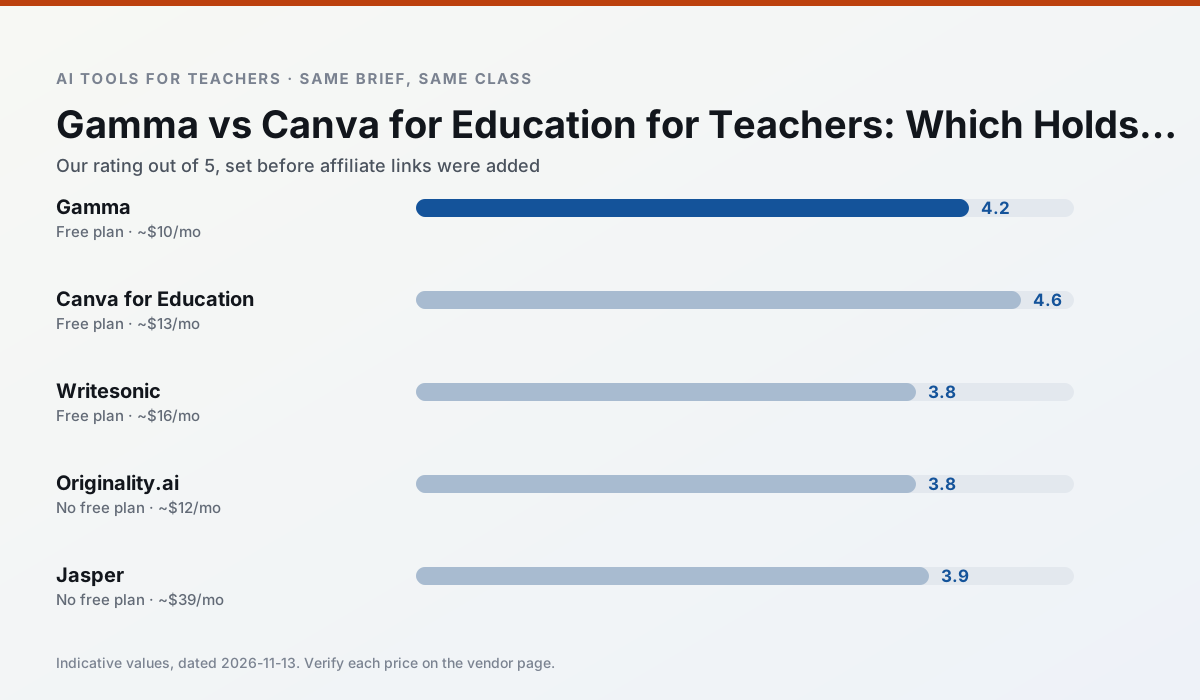
Side by side
Comparison table
Ratings reflect our timed classroom workflow, not vendor claims. Prices are indicative — verify on the vendor site.
| Tool | Best for | Free tier | Indicative paid plan | Standout feature | Our rating | Verdict | Try the tool |
|---|---|---|---|---|---|---|---|
| Gamma | slide decks · parent communication | Yes — Credit-limited generation | ~$10 /user/mo | Prompt-to-deck | 4.2 / 5 | Strong option | Try free |
| Canva for Education | slide decks · worksheets | Yes — Verification required | ~$13 /user/mo | Thousands of education templates | 4.6 / 5 | Top pick | Try free |
| Writesonic | newsletters · parent communication | Yes — Limited credits | ~$16 /user/mo | Article and email generators | 3.8 / 5 | Situational | Try free |
| Originality.ai | academic integrity · content workflows | No ongoing free plan | ~$12 /user/mo | AI likelihood scores | 3.8 / 5 | Situational | Try free |
| Jasper | newsletters · parent communication | No ongoing free plan | ~$39 /user/mo | Brand voice profiles | 3.9 / 5 | Situational | Try free |
| Notion AI | curriculum mapping · unit planning | Yes — Limited AI usage | ~$10 /user/mo | Linked databases | 4.1 / 5 | Situational | Try free |
Match your situation
Best for X
Different jobs need different tools. Here is what we would open first in each case.
Gamma is the student-facing option here with boundaries a teacher can actually set and supervise.
For three reading groups and one text, Canva for Education needs the least manual relabelling of vocabulary and questions.
Writesonic has the strongest tone control for family emails and report comments, provided you still read the message aloud before sending.
Originality.ai is the option IT is least likely to block: single sign-on, admin removal of AI features and an agreement on file.
Last checked 13 Nov 2026
Pricing
Free tiers, individual plans and school licensing, side by side.
| Tool | Free plan | Individual / paid | School & district | Billing note | Verify |
|---|---|---|---|---|---|
| Gamma | $0 — Credit-limited generation | ~$10 /user/mo | ~$20 /user/mo | Indicative — verify on vendor site | Vendor |
| Canva for Education | $0 — Verification required | ~$13 /user/mo | Custom quote | Indicative — verify on vendor site | Vendor |
| Writesonic | $0 — Limited credits | ~$16 /user/mo | ~$49 /user/mo | Indicative — verify on vendor site | Vendor |
| Originality.ai | No ongoing free tier | ~$12 /user/mo | Custom quote | Indicative — verify on vendor site | Vendor |
| Jasper | No ongoing free tier | ~$39 /user/mo | ~$59+ /user/mo | Indicative — verify on vendor site | Vendor |
| Notion AI | $0 — Limited AI usage | ~$10 /user/mo | ~$8 /user/mo | Indicative — verify on vendor site | Vendor |
Editorial rule: pricing is re-checked every 2–3 months and the top 50 pages are refreshed every 6 months. See our funding policy.
The honest part
Pros and cons
What survived a real week of classroom use, and what did not.
Pros
- Fastest path from outline to deck
- Modern-looking output by default
- Good export options
Cons
- Design control is limited
- Credits run out quickly
- Not built for student data
Pros
- Effectively free for verified teachers
- Huge template library
- No design skills needed
Cons
- AI features are capped
- Easy to produce cluttered slides
- Account verification can be slow
Pros
- Cheaper than enterprise writing suites
- Many templates
- Reasonable free trial
Cons
- Generic classroom output
- Credit system is confusing
- Limited education context
Pros
- Useful for content publishing QA
- Fast bulk scanning
- Transparent credit model
Cons
- AI detection produces false positives
- Should never be sole evidence of misconduct
- Not a teaching tool
Pros
- Consistent tone across communications
- Strong long-form editor
- Good for district comms teams
Cons
- Priced for marketing teams
- Overkill for one classroom
- No education-specific features
In the classroom
Use cases
Five concrete workflows, with the tool we would open for each one.
A weekly family newsletter from bullet notes
Newsletters fail on length, not tone. Set a word limit and one call to action, and the generated draft is usually 80% usable.
Recommended: GammaRegrouping students after an assessment
Summarise anonymised results into skill groups, then generate one activity per group. Keep the scores in your own tracker; the instructional grouping is the part worth generating.
Recommended: Canva for EducationA substitute folder that needs no context
The value here is structure, not creativity. Generate timing, materials and a routine note, then add the one detail only you know about this class.
Recommended: WritesonicA question bank from a PDF or article
Feed a non-identifiable source and ask for items tagged by difficulty with the misconception behind each distractor. Spot-check every answer key; numerical items are least reliable.
Recommended: Originality.aiA five-minute exit ticket set
Ask for one recall, one application and one reasoning item, then delete the second recall question every generator sneaks in.
Recommended: Jasper
Questions teachers ask us
FAQ
Direct answers, also published as FAQPage structured data for search and AI assistants.
Gamma or Canva for Education for lesson planning?
Which is cheaper for one teacher?
Do they produce the same output?
Sources & further reading
Our recommendation
Try Gamma free for your next lesson planning task
Generate presentation decks and documents from a single prompt. Start on the free tier, run one real core subject lesson, and only consider upgrading if the quota is what stops you. Disclosure: we may earn a commission (varies) at no extra cost to you.
Some links on this page are affiliate links. We may earn a commission at no extra cost to you. Our rankings are editorial and never pay-to-play. Never enter student PII into a free consumer account.
Keep reading
Related comparisons in this cluster.
Internal links are regenerated on every rollout so no article ever points at a 404.