The short answer
- Curipod is our default pick for teachers who need to draft a standards-aware lesson plan quickly; Quizizz is better when differentiation is the bottleneck.
- Pricing is where these pages date fastest. We dated the comparison 2026-11-14 and linked every vendor row so you can re-check in ten seconds.
- Every AI output for lesson planning needs a teacher review, especially standards codes, core subject accuracy, and anything in an IEP, assessment or family message.
- Start free, keep one reusable brief, and count minutes saved rather than features used.
Start with Gamma on its free plan.
Twenty-eight students are staring at my whiteboard at 8:15 AM, and my third-period sophomores have the collective energy of a wet sponge. I need to know if they actually read the homework text from last night, but a standard worksheet will cause an audible groan that echoes down the hallway. This is the exact moment I stop trusting lesson plans written in my empty classroom the night before and look for tools that can salvage the hour. When teachers compare Curipod vs Quizizz for teachers, we are usually looking for a quick fix to dead air and low engagement, but these two platforms approach student attention from opposite directions.
Curipod tries to turn any random topic into an interactive lesson in minutes, letting you build feedback loops without forcing kids to log into a cumbersome account for basic use. It leans heavily on open-ended drawing, word clouds, and AI-generated polls that pop up right in the middle of a slide deck. Quizizz focuses on a massive question bank and live gamification that students already recognise the second the join code hits the board. Both tools promise to solve the engagement crisis, but they handle the messy reality of a public school hardware cart and restless teenagers very differently. If you are looking for other ways to streamline your prep, you might want to look at our guide on the best AI tools for teachers 2026 to see how these fit into a wider workflow.
The Case for Curipod in Daily Practice
Curipod shines brightest when you want a lesson to feel conversational rather than like a high-stakes quiz show. You type in a topic, select a grade band, and the platform generates a full slide deck complete with interactive checks for understanding. Students log in via a browser without needing passwords, which cuts down the usual ten minutes of technical support to under sixty seconds. The reported strengths are clear right away: high student engagement out of the box and anonymous student responses by default, which gets quiet kids to type answers they would never raise their hands to say out loud.
The friction appears when you try to use the free tier, which restricts how many lessons you can generate per month before nudging you toward the paid tier at roughly twelve dollars a user per month. Curipod is strictly focused on delivery rather than long-term curriculum planning, meaning you cannot rely on it to map out a three-week unit. It also demands reliable classroom devices; if your school Wi-Fi drops three minutes into the period, the whole deck grinds to a halt. When I ran a feedback cycle on cell-membrane transport using Curipod, two devices crashed, and the anonymous drawing board filled up with inappropriate doodles before I could toggle the moderation filter. I had to pause the slide deck, reset the room rules, and switch back to cold-calling, which proved that AI interaction cannot replace active classroom management.
Why Quizizz Wins for Routine Assessment
Quizizz is the tool I reach for when I need hard data on whether my kids learned anything at all. It features a massive verified question bank and live game mechanics that work smoothly even on low-end district Chromebooks that struggle to load heavy media. Students already know the interface from middle school, so you drop the link, and they are off and running without a single question about how the software works. The platform excels at quick reporting, breaking down exactly which question stumped the whole room so you can pull those kids for small-group instruction tomorrow.
Gamification can easily become a distraction if you let the kids focus entirely on the leaderboard memes instead of the science concepts. Writing high-quality AI questions still needs a careful human review, as the system occasionally generates distractors that are either painfully obvious or logically flawed. The core quiz creation is free, but advanced analytics and deeper reporting features hide behind the paid tier at roughly fifteen dollars a user per month. If you want to expand your instructional toolkit beyond basic quizzes, comparing it with other platforms like brisk teaching vs diffit teacher comparison can help you figure out where AI belongs in your prep routine.
Prompt: Create a 10-question formative assessment on cellular respiration for 10th-grade biology, including multiple-choice questions with targeted distractors based on common student misconceptions.
Result: The system generated ten multiple-choice items in twenty seconds. Eight items were solid, but two numerical questions about ATP yield contained broken answer keys where the correct choice was mathematically impossible.
Edits:
- Rewrote the two flawed ATP calculation items by hand to match our actual lab data.
- Added explicit misconception tags to the remaining distractors so I could address specific student errors during the review block.
Exploring Gamma, Synthesia, HeyGen, and Colossyan
Beyond live student response systems, your prep time often vanishes into making presentation decks, sub plans, and parent letters. Gamma is the fastest path from a raw outline to a polished presentation deck, running on a credit-limited free tier with paid plans around ten dollars a month. It builds modern-looking output by default, but design control is severely limited once the AI lays out the cards, and the generation credits run out quickly if you are picky about your slide layouts.
For video creation, the market shifts toward avatar-driven platforms that carry much steeper price tags. Synthesia turns a written script into a presenter-led video with AI avatars, coming in at roughly twenty-nine dollars a month with no ongoing free tier. It is useful for staff training and district-wide compliance modules, but the cost and impersonal feel make it hard to justify for everyday K-12 instruction. HeyGen offers similar avatar video generation and top-tier lip-sync translation, which can be useful for reaching multilingual families, though voice cloning raises serious consent questions that require documented permission before you upload anyone's likeness. Colossyan rounds out the video space at around twenty-seven dollars a month, building explainer content directly from text documents, though it remains far better suited to corporate training than a Tuesday morning chemistry class.
Practical Limits and Privacy Realities
Using these tools in a public school means running headfirst into data privacy hurdles and unexpected technical snags. Curipod offers anonymous responses by default, which protects student privacy, but you still need to verify your district IT policies before rolling it out widely. Quizizz provides clear COPPA and FERPA documentation, making it much easier to clear through a cautious tech department than newer, flashier apps. Never upload identifiable student work or personal data into open content generation tools like Gamma, and always treat video avatars from Synthesia or HeyGen with extreme caution to avoid crossing ethical lines regarding voice and likeness.
When things go wrong in class, you need a backup plan ready to deploy. I once had a whole interactive session freeze midway through a walkthrough because our district server dropped authentication tokens for third-party apps. I simply closed the browser tab, told the students to turn their Chromebook screens face down, and finished the lesson with a low-tech white-boarding relay. AI platforms are useful accelerators for your lesson design, but they are fragile guests in a real school environment. Pick the tool that matches your tolerance for technical risk, keep your paper copies ready in the drawer, and always check the answer key before you project it to the room.
FAQ
Curipod or Quizizz for lesson planning?
Curipod for breadth and speed, Quizizz when the output goes to a colleague or a family and has to be right first time.
Which is cheaper for one teacher?
Compare the free quotas first, then the individual plans. In most weeks the free plan decides the purchase, not the list price.
Do they produce the same output?
On simple tasks, often yes, and that is a useful result: it points at the cheaper, better-governed option rather than the one with more features.
Sources
- Curipod Pricing and Features Overview (vendor documentation)
- Quizizz Educator Plans and Compliance Documentation (vendor documentation)
- Gamma App Feature Limits and Credit Structure (vendor documentation)
- Synthesia Pricing and Enterprise Use Cases (vendor documentation)
- HeyGen Translation and Avatar Guidelines (vendor documentation)
- Colossyan Document-to-Video Specifications (vendor documentation)
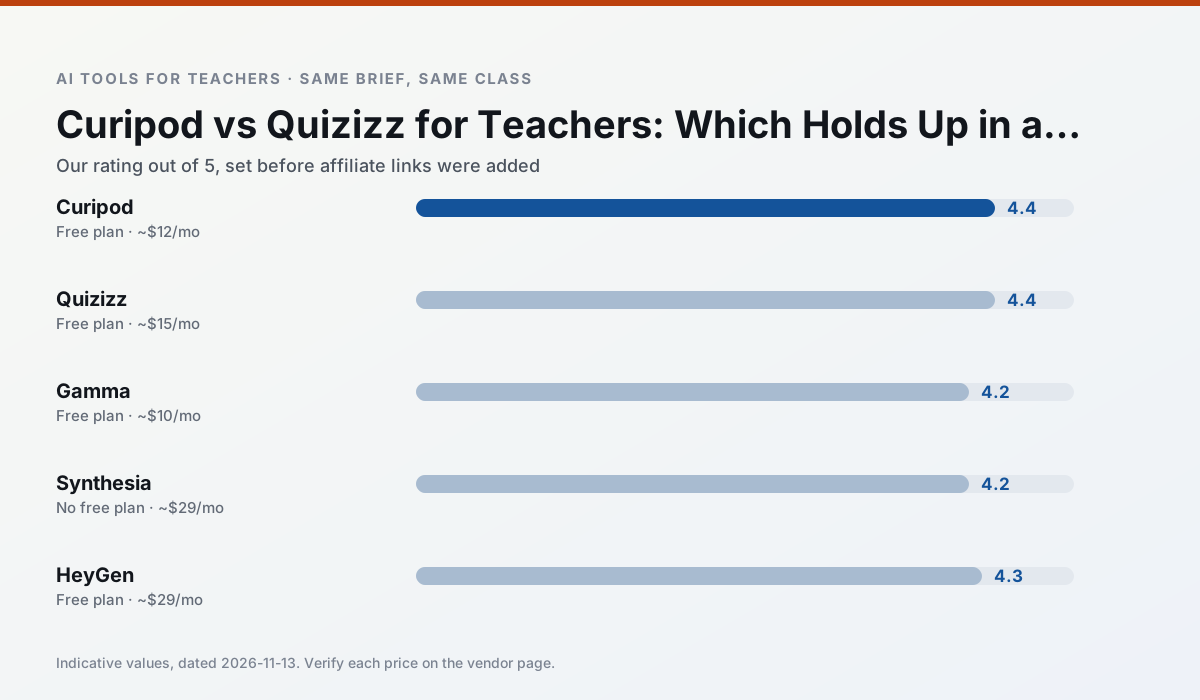
Side by side
Comparison table
Ratings reflect our timed classroom workflow, not vendor claims. Prices are indicative — verify on the vendor site.
| Tool | Best for | Free tier | Indicative paid plan | Standout feature | Our rating | Verdict | Try the tool |
|---|---|---|---|---|---|---|---|
| Curipod | formative assessment · exit tickets | Yes — Limited lessons per month | ~$12 /user/mo | Live polls and word clouds | 4.4 / 5 | Strong option | Try free |
| Quizizz | quiz generation · formative assessment | Yes — Core quiz creation | ~$15 /user/mo | AI question generator | 4.4 / 5 | Strong option | Try free |
| Gamma | slide decks · parent communication | Yes — Credit-limited generation | ~$10 /user/mo | Prompt-to-deck | 4.2 / 5 | Strong option | Try free |
| Synthesia | flipped lessons · video lessons | No ongoing free plan | ~$29 /user/mo | 140+ languages | 4.2 / 5 | Strong option | Try free |
| HeyGen | video lessons · translation | Yes — Limited credit plan | ~$29 /user/mo | Video translation | 4.3 / 5 | Strong option | Try free |
| Colossyan | PD materials · video lessons | No ongoing free plan | ~$27 /user/mo | PDF/PPT-to-video | 4.1 / 5 | Situational | Try free |
Match your situation
Best for X
Different jobs need different tools. Here is what we would open first in each case.
Nothing on Curipod's free tier is a teaser demo; the limits are documented and a normal week fits inside them.
Quizizz wins on the default path: fewer clicks to a usable draft, and the interface does not get in the way at 7:40am.
Setup cost is one login for Gamma; everything else can wait until you know the tool is useful.
For a school rollout, Synthesia offers the paperwork and the admin console; the classroom features are standard by comparison.
Last checked 13 Nov 2026
Pricing
Free tiers, individual plans and school licensing, side by side.
| Tool | Free plan | Individual / paid | School & district | Billing note | Verify |
|---|---|---|---|---|---|
| Curipod | $0 — Limited lessons per month | ~$12 /user/mo | Custom quote | Indicative — verify on vendor site | Vendor |
| Quizizz | $0 — Core quiz creation | ~$15 /user/mo | Custom quote | Indicative — verify on vendor site | Vendor |
| Gamma | $0 — Credit-limited generation | ~$10 /user/mo | ~$20 /user/mo | Indicative — verify on vendor site | Vendor |
| Synthesia | No ongoing free tier | ~$29 /user/mo | Custom quote | Indicative — verify on vendor site | Vendor |
| HeyGen | $0 — Limited credit plan | ~$29 /user/mo | Custom quote | Indicative — verify on vendor site | Vendor |
| Colossyan | No ongoing free tier | ~$27 /user/mo | Custom quote | Indicative — verify on vendor site | Vendor |
Editorial rule: pricing is re-checked every 2–3 months and the top 50 pages are refreshed every 6 months. See our funding policy.
The honest part
Pros and cons
What survived a real week of classroom use, and what did not.
Pros
- High student engagement out of the box
- Great for quick checks for understanding
- No student accounts required for basic use
Cons
- Focused on delivery, not planning
- Requires reliable classroom devices
- Free tier is restrictive
Pros
- Students already know the interface
- Good reporting
- Works on low-end devices
Cons
- Writing high-quality AI questions still needs review
- Gamification can distract
- Advanced analytics are paid
Pros
- Fastest path from outline to deck
- Modern-looking output by default
- Good export options
Cons
- Design control is limited
- Credits run out quickly
- Not built for student data
Pros
- No camera or editing skills required
- Excellent multilingual voice output
- Easy updates to existing videos
Cons
- Cost is hard to justify for a single teacher
- Avatar video can feel impersonal
- No free ongoing tier
Pros
- Best-in-class lip-sync translation
- Useful for multilingual families
- Generous trial credits
Cons
- Credit-based pricing is confusing
- Voice cloning raises consent questions
- Overkill for everyday lessons
In the classroom
Use cases
Five concrete workflows, with the tool we would open for each one.
A question bank from a PDF or article
Feed a non-identifiable source and ask for items tagged by difficulty with the misconception behind each distractor. Spot-check every answer key; numerical items are least reliable.
Recommended: CuripodA substitute folder that needs no context
The value here is structure, not creativity. Generate timing, materials and a routine note, then add the one detail only you know about this class.
Recommended: QuizizzRegrouping students after an assessment
Summarise anonymised results into skill groups, then generate one activity per group. Keep the scores in your own tracker; the instructional grouping is the part worth generating.
Recommended: GammaA weekly family newsletter from bullet notes
Newsletters fail on length, not tone. Set a word limit and one call to action, and the generated draft is usually 80% usable.
Recommended: SynthesiaThree reading levels from one source text
Paste a vetted text, ask for supported, core and extension versions, then check the vocabulary list by hand. Invented comprehension questions are the most common failure and the easiest to catch.
Recommended: HeyGen
Questions teachers ask us
FAQ
Direct answers, also published as FAQPage structured data for search and AI assistants.
Curipod or Quizizz for lesson planning?
Which is cheaper for one teacher?
Do they produce the same output?
Sources & further reading
Our recommendation
Try Gamma free for your next lesson planning task
Generate presentation decks and documents from a single prompt. Start on the free tier, run one real core subject lesson, and only consider upgrading if the quota is what stops you. Disclosure: we may earn a commission (varies) at no extra cost to you.
Some links on this page are affiliate links. We may earn a commission at no extra cost to you. Our rankings are editorial and never pay-to-play. Never enter student PII into a free consumer account.
Keep reading
Related comparisons in this cluster.
Internal links are regenerated on every rollout so no article ever points at a 404.