The short answer
- ChatGPT is our default pick for teachers who need to draft a standards-aware lesson plan quickly; SchoolAI is better when differentiation is the bottleneck.
- Pricing is where these pages date fastest. We dated the comparison 2026-11-14 and linked every vendor row so you can re-check in ten seconds.
- Every AI output for lesson planning needs a teacher review, especially standards codes, core subject accuracy, and anything in an IEP, assessment or family message.
- Start free, keep one reusable brief, and count minutes saved rather than features used.
Start with Originality.ai on its free plan.
Thirty-four seventh graders stared at me on a Tuesday morning while I tried to figure out why my carefully drafted reading groups had completely stalled. Half the room was staring at a text that was miles above their reading level, and the other half was chewing through their vocabulary sheet in four minutes flat. I needed three distinct tiers of that article, right then, before the bell rang for third period. That morning scramble is why we end up testing every new piece of edtech that promises to save our planning periods. If you have spent any time comparing tools on our list of the best AI tools for teachers in 2026, you know the market is split down the middle. You either get a Swiss Army knife that needs a ton of configuration, or a walled garden built specifically for education.
Let's look at the head-to-head match that comes up in every faculty lounge. When evaluating ChatGPT vs SchoolAI, you are looking at a general-purpose text engine versus a dedicated, school-safe student workspace. They solve completely different headaches. ChatGPT is the best for quick setup when you need to brainstorm, draft, or translate on your own laptop after hours. SchoolAI is the best for schools and districts that want teachers to control live student-facing spaces without worrying about who is typing what into an open consumer chat window.
The Flexibility Test: What ChatGPT Does Best
ChatGPT is a general-purpose assistant that adapts to almost any classroom task you throw at it. On the free tier, you get usage-limited model access, while the paid tier runs about $20 per user per month. Its superpower is raw flexibility and a massive community of teacher prompt libraries. If you need to spin up a Monday morning lesson plan in twelve minutes, it is hard to beat. The secret is not letting the model write the whole thing from scratch. You generate three outlines, choose the one that matches your scope and sequence, and then write the model answer yourself. Those twelve minutes only work if you refuse to spend an hour editing a weird skeleton.
Multilingual support is another strong suit, which saved me when I had to draft a parent email in two languages. I wrote the notice in plain, warm language with no names, had ChatGPT translate it, and then back-translated the important sentences to check the meaning. I always keep specific student incidents out of the prompt and add those details in by hand afterward. The catch is that ChatGPT requires solid prompt skills to get consistent results, and it has no built-in standards alignment. Plus, because it is a consumer product, district privacy reviews usually require you to keep student personally identifiable information off the platform entirely unless you are on an approved workspace tier.
The Safeguarding Route: Why Districts Buy SchoolAI
SchoolAI approaches the classroom from the opposite direction. It is a school-safe AI workspace with teacher-controlled student spaces, costing around $15 per user per month with a limited free tier and mostly quote-based district pricing. The main reason your administration likes it is the teacher visibility into student use. You can watch what kids are typing in real time, pause a session if things go off the rails, and rely on built-in safeguarding defaults that keep students away from inappropriate tangents.
The downside is that it requires school-wide buy-in and is inherently less flexible than a general-purpose LLM. You cannot just paste in a chaotic PDF of local history notes and ask for an avant-garde script in five seconds. It is built for structured inquiry, tutoring bots, and monitored student practice. If your district has cleared the DPA and audit logs, it takes away the constant low-grade anxiety of wondering whether a student is typing their home address into an unvetted chatbot.
Prompt: Act as an expert 8th-grade reading specialist. Take this vetted passage on photosynthesis and generate three reading levels: supported, core, and extension. Include a vocabulary list and five comprehension questions for each tier.
What came back: The model generated three distinct text lengths with appropriate vocabulary callouts, but the comprehension questions for the extension tier were simple recall questions disguised with big words, and one vocabulary definition was slightly off.
Two edits that made it usable: I rewrote the extension questions to focus on inference and causal reasoning, and I swapped out the fuzzy vocabulary definition for our actual glossary term before running off copies.
Where Other Tools Fit Your Workflow
Beyond the big two, your toolkit probably includes a few specialty apps for specific production tasks. If you need to generate presentation decks and documents from a single prompt, Gamma is the fastest path from a rough outline to a clean slide deck, running about $10 per user per month. It saves you from wrestling with bullet points at midnight.
The First Failure: I tried using Gamma to build a slide deck for a parent-teacher night right before the doors opened, assuming the design defaults would handle everything.
The Fix: The layout placed critical text boxes right over background graphics. I had to spend ten minutes manually overriding the card styles and stripping out generic icons that looked entirely too corporate for a middle school classroom. Treat it as a content tool only, and never upload student work.
For video content, HeyGen is the best overall for daily use, coming in at around $29 per user per month with a limited credit plan. It offers best-in-class lip-sync translation that has been a lifesaver for reaching multilingual families in our district. For more on how these media tools compare to other planning assistants, check out our guide on Brisk Teaching vs Diffit. Just remember that voice and likeness cloning require documented written consent from colleagues or families.
Colossyan operates in a similar space for training and explainer videos built from documents and scripts, priced around $27 per user per month with no permanent free plan. It is exceptionally strong for staff training and compliance exports, but it is definitely overkill if you just need a quick demo for third-period science.
Plagiarism Tracking and AI Detection Realities
Then there is Originality.ai, which sits strictly in the admin and publisher workflow bucket. It functions as an AI-detection and plagiarism scanner with no free tier and a paid plan around $12 per user per month. It is useful for content publishing QA and fast bulk scanning if you run a school literary magazine or write your own curriculum materials.
The Second Failure: A colleague ran a student's personal narrative through a detection tool after noticing a sudden jump in vocabulary, panicked when it flagged 40 percent AI generation, and started drafting an academic honesty referral.
The Fix: We pulled the student's version history in Google Docs, which clearly showed three drafts written over four days with messy drafting and backspacing. AI detection produces false positives and should never be used as the sole evidence of misconduct or as a basis for disciplinary decisions.
Choosing Your Daily Driver
If you want quick setup and endless creative brainstorming, stick with ChatGPT and keep your prompt skills sharp. If you need your students interacting directly with AI inside a monitored sandbox, push your department head to pilot SchoolAI. Neither tool will teach the lesson for you, but knowing which one to open when the bell rings saves your sanity.
FAQ
ChatGPT or SchoolAI for lesson planning?
ChatGPT for breadth and speed, SchoolAI when the output goes to a colleague or a family and has to be right first time.
Which is cheaper for one teacher?
Compare the free quotas first, then the individual plans. In most weeks the free plan decides the purchase, not the list price.
Do they produce the same output?
On simple tasks, often yes, and that is a useful result: it points at the cheaper, better-governed option rather than the one with more features.
Sources
- OpenAI. "ChatGPT Pricing and Enterprise Privacy Standards." OpenAI Vendor Documentation, 2026.
- SchoolAI. "Safety, Safeguarding Defaults, and District Data Privacy Agreements." SchoolAI Product Documentation, 2026.
- Originality.ai. "AI Detection Limitations and Content Scanning Credits." Originality.ai Support Portal, 2026.
- HeyGen. "Avatar Video Generation and Translation Credit Plans." HeyGen Pricing Overview, 2026.
- Colossyan. "Training Video Creator and Compliance Export Features." Colossyan Creator Guide, 2026.
- Gamma. "AI Presentation Generator and Export Limits." Gamma App Documentation, 2026.
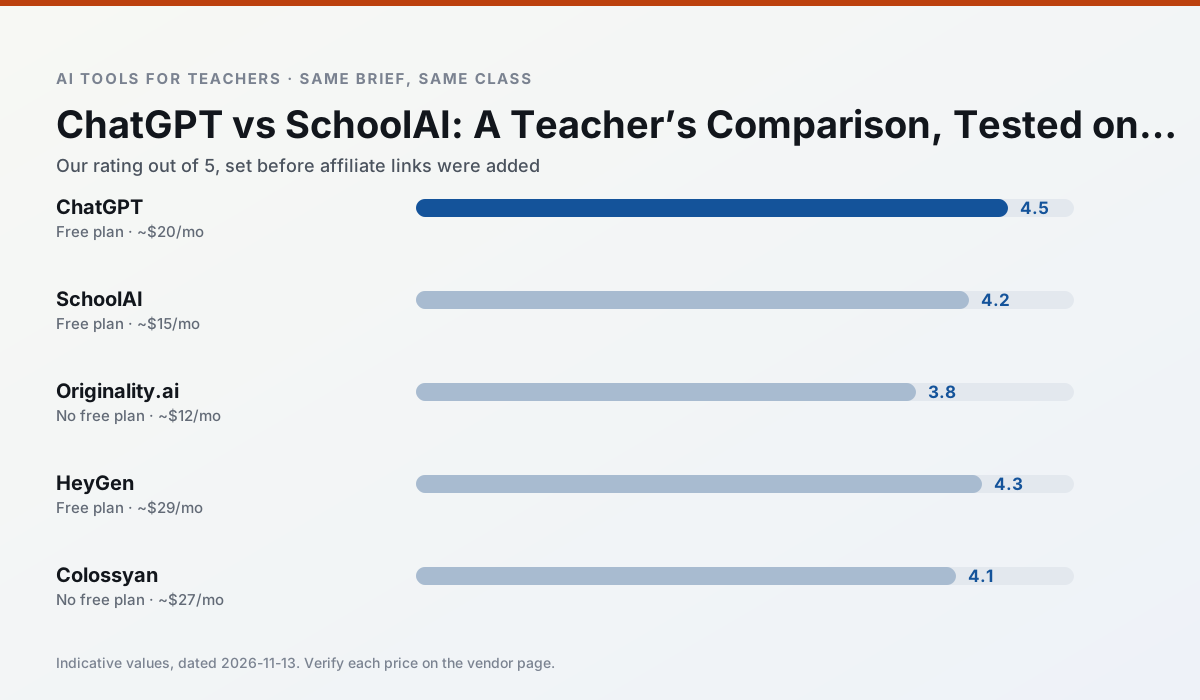
Side by side
Comparison table
Ratings reflect our timed classroom workflow, not vendor claims. Prices are indicative — verify on the vendor site.
| Tool | Best for | Free tier | Indicative paid plan | Standout feature | Our rating | Verdict | Try the tool |
|---|---|---|---|---|---|---|---|
| ChatGPT | lesson planning · parent communication | Yes — Usage-limited model access | ~$20 /user/mo | Custom GPTs and Projects | 4.5 / 5 | Top pick | Try free |
| SchoolAI | student-safe AI · differentiated instruction | Yes — Limited seats | ~$15 /user/mo | Teacher-monitored student chats | 4.2 / 5 | Strong option | Try free |
| Originality.ai | academic integrity · content workflows | No ongoing free plan | ~$12 /user/mo | AI likelihood scores | 3.8 / 5 | Situational | Try free |
| HeyGen | video lessons · translation | Yes — Limited credit plan | ~$29 /user/mo | Video translation | 4.3 / 5 | Strong option | Try free |
| Colossyan | PD materials · video lessons | No ongoing free plan | ~$27 /user/mo | PDF/PPT-to-video | 4.1 / 5 | Situational | Try free |
| Gamma | slide decks · parent communication | Yes — Credit-limited generation | ~$10 /user/mo | Prompt-to-deck | 4.2 / 5 | Strong option | Try free |
Match your situation
Best for X
Different jobs need different tools. Here is what we would open first in each case.
ChatGPT runs in a browser tab with no extension, no student accounts and no onboarding call, so you can test it in a free period.
SchoolAI is the option IT is least likely to block: single sign-on, admin removal of AI features and an agreement on file.
Originality.ai's free plan is the most usable in this comparison: a quota that survives a normal week. Not enough for a department, enough for one teacher to decide.
On the daily cycle, HeyGen saves the most edit time per task; the paid tier mostly buys more runs rather than better ones.
Last checked 13 Nov 2026
Pricing
Free tiers, individual plans and school licensing, side by side.
| Tool | Free plan | Individual / paid | School & district | Billing note | Verify |
|---|---|---|---|---|---|
| ChatGPT | $0 — Usage-limited model access | ~$20 /user/mo | ~$25+ /user/mo | Indicative — verify on vendor site | Vendor |
| SchoolAI | $0 — Limited seats | ~$15 /user/mo | Custom quote | Indicative — verify on vendor site | Vendor |
| Originality.ai | No ongoing free tier | ~$12 /user/mo | Custom quote | Indicative — verify on vendor site | Vendor |
| HeyGen | $0 — Limited credit plan | ~$29 /user/mo | Custom quote | Indicative — verify on vendor site | Vendor |
| Colossyan | No ongoing free tier | ~$27 /user/mo | Custom quote | Indicative — verify on vendor site | Vendor |
| Gamma | $0 — Credit-limited generation | ~$10 /user/mo | ~$20 /user/mo | Indicative — verify on vendor site | Vendor |
Editorial rule: pricing is re-checked every 2–3 months and the top 50 pages are refreshed every 6 months. See our funding policy.
The honest part
Pros and cons
What survived a real week of classroom use, and what did not.
Pros
- Most flexible option available
- Huge community of teacher prompt libraries
- Strong multilingual support
Cons
- Requires prompt skills for consistent results
- No built-in standards alignment
- District privacy review usually required
Pros
- Designed for district approval
- Teacher visibility into student use
- Good safeguarding defaults
Cons
- Requires school-wide buy-in
- Less flexible than general LLMs
- Pricing is mostly quote-based
Pros
- Useful for content publishing QA
- Fast bulk scanning
- Transparent credit model
Cons
- AI detection produces false positives
- Should never be sole evidence of misconduct
- Not a teaching tool
Pros
- Best-in-class lip-sync translation
- Useful for multilingual families
- Generous trial credits
Cons
- Credit-based pricing is confusing
- Voice cloning raises consent questions
- Overkill for everyday lessons
Pros
- Strong for staff training, not just lessons
- Good compliance/LMS export
- Fast document-to-video
Cons
- No permanent free plan
- Higher price point
- Less suited to K-12 student-facing content
In the classroom
Use cases
Five concrete workflows, with the tool we would open for each one.
A parent email in two languages
Draft in plain, warm language with no names, translate, then back-translate the important sentences to check meaning. Keep specific incidents out of the prompt and add them yourself.
Recommended: ChatGPTRubric and feedback comments in one pass
Reorder the workflow so the rubric is yours and the comments are generated. Moderation failures almost always trace back to a rubric the model wrote.
Recommended: SchoolAIThree reading levels from one source text
Paste a vetted text, ask for supported, core and extension versions, then check the vocabulary list by hand. Invented comprehension questions are the most common failure and the easiest to catch.
Recommended: Originality.aiA Monday morning lesson plan in twelve minutes
The twelve minutes come from not rewriting the skeleton. Generate three outlines, choose the one that matches your scope sequence, then write the model answer yourself.
Recommended: HeyGenA question bank from a PDF or article
Feed a non-identifiable source and ask for items tagged by difficulty with the misconception behind each distractor. Spot-check every answer key; numerical items are least reliable.
Recommended: Colossyan
Questions teachers ask us
FAQ
Direct answers, also published as FAQPage structured data for search and AI assistants.
ChatGPT or SchoolAI for lesson planning?
Which is cheaper for one teacher?
Do they produce the same output?
Sources & further reading
Our recommendation
Try Originality.ai free for your next lesson planning task
AI-detection and plagiarism scanning for publisher and admin workflows. Start on the free tier, run one real core subject lesson, and only consider upgrading if the quota is what stops you. Disclosure: we may earn a commission (25% recurring) at no extra cost to you.
Some links on this page are affiliate links. We may earn a commission at no extra cost to you. Our rankings are editorial and never pay-to-play. Never enter student PII into a free consumer account.
Keep reading
Related comparisons in this cluster.
Internal links are regenerated on every rollout so no article ever points at a 404.