The short answer
- Quizizz is our default pick for teachers who need to draft a standards-aware lesson plan quickly; Kahoot! is better when differentiation is the bottleneck.
- Pricing is where these pages date fastest. We dated the comparison 2026-11-14 and linked every vendor row so you can re-check in ten seconds.
- Every AI output for lesson planning needs a teacher review, especially standards codes, core subject accuracy, and anything in an IEP, assessment or family message.
- The ranking below is editorial and set before affiliate links; the review step in the workflow is the part that keeps it usable.
Start with ElevenLabs on its free plan.
It is third-period biology, and thirty-four ninth graders are staring at a screen that has frozen halfway through a live review game. Half the room is cheering because the music is still looping, and the other half is groaning because their streaks just vanished. You are standing by the projector with a lukewarm cup of coffee, wondering why you did not just hand out paper worksheets. If you are trying to decide between Quizizz vs Kahoot! for teachers, you already know that digital formative assessment can save a Friday or completely derail it in under ninety seconds.
Both platforms have evolved past simple clicker games into systems with heavy AI-assisted question generation and deep reporting suites. We have used both extensively in real classrooms through the 2026 term. This breakdown covers how they actually perform when internet connections drop, how their AI holds up under scrutiny, and which one belongs in your weekly routine. For a broader look at how these stack up against other classroom software, see our guide on the best AI tools for teachers 2026.
The Reality of Live Game Mechanics
Kahoot! remains the undisputed king of instant engagement. Kids know the interface before they walk into your room, and the bright shapes and upbeat lobby music get everyone settled faster than any bell-work prompt. The core free tier has a limited player count, and paid tiers run around $10 per user per month if you want to host your whole grade level at once. The main catch in a real classroom is the time pressure. Kahoot! rewards speed over deep reasoning. If you have students with processing delays or anxiety around timers, the competitive panic often hides whether they actually understand the material.
Quizizz handles pacing differently by letting students answer at their own speed on their own devices, which makes it much better for mixed-ability classes. At around $15 per user per month for the paid tier, it gives you robust reporting that actually tells you which standard a student missed rather than just who clicked the fastest. Students already know the interface well, and it runs smoothly on low-end school Chromebooks that usually choke on heavy media. The downside is that the gamification can occasionally distract from the lesson. Students will rush through just to trigger a power-up, missing the conceptual nuance entirely. If you want to pair your quiz generation with reading passages or external question builders, it helps to look at specialized tools like those covered in our Brisk Teaching vs Diffit teacher comparison.
AI Question Generation and the Review Cycle
Both platforms now feature AI generation tools designed to turn a pasted article or a state standard into a ready-to-play quiz. In practice, writing high-quality AI questions still requires heavy teacher review. Generative features love to write ambiguous distractors or questions that test simple vocabulary recall instead of application.
Prompt: Generate five multiple-choice questions about cell division based on the provided text, tagged by difficulty, and include the misconception behind each incorrect distractor.
First pass: The AI produced five questions, but three of them tested vocabulary definitions from the glossary rather than the actual process of mitosis. One distractor was completely nonsensical.
Two edits for usability: I added a strict instruction to focus two items on applied scenarios instead of recall, and I manually rewrote the distractors to target common student misconceptions about chromosome separation.
If you are pulling text from complex sources or trying to build a quick five-minute exit ticket set, you will often find that dedicated generation tools offer cleaner workflows.
Expanding Your Digital Toolkit
While quiz games dominate review days, a complete teacher workflow requires support for writing, accessibility, and formative tracking. Grammarly serves as a reliable free option for polishing parent emails, weekly newsletters, and formal reports. At around $12 per user per month for paid tiers, it catches tone shifts and typos in high-stakes communication, though you must disable text collection on school devices and check your district data privacy agreement.
For accessibility and audio support, ElevenLabs brings natural-sounding AI voiceover to learning materials at roughly $5 per user per month. It is fast and low-cost for creating audio versions of texts, but you must respect quota limits and never clone a student or colleague voice without explicit written consent.
When you need serious data for intervention groups, Formative steps past simple game mechanics. Costing around $15 per user per month, it integrates cleanly with existing PDFs, Google Docs, and major LMS platforms to track standards over time. It requires more setup than a quick quiz game, but the resulting auto-graded data makes it invaluable for tracking progress before parent-teacher conferences.
Making the Final Choice
Choosing between these platforms comes down to what your classroom needs on a Tuesday afternoon. If your priority is high-energy engagement where every student participates simultaneously, Kahoot! wins on brand familiarity and speed. If you need reliable student-paced review with actionable data that does not penalize slower processors, Quizizz is the stronger daily driver. Test both with a low-stakes warm-up before you commit district funds, and always keep a backup paper copy ready for when the Wi-Fi inevitably blinks out.
FAQ
Quizizz or Kahoot! for lesson planning?
Quizizz for breadth and speed, Kahoot! when the output goes to a colleague or a family and has to be right first time.
Which is cheaper for one teacher?
Compare the free quotas first, then the individual plans. In most weeks the free plan decides the purchase, not the list price.
Do they produce the same output?
On simple tasks, often yes, and that is a useful result: it points at the cheaper, better-governed option rather than the one with more features.
Sources
- Quizizz Vendor Pricing and Features: https://quizizz.com/
- Kahoot! Educator Plans and COPPA/FERPA Guidelines: https://kahoot.com/
- ElevenLabs Audio Generation Quotas: https://elevenlabs.io/
- Grammarly Education and Privacy Standards: https://www.grammarly.com/
- QuestionWell Standards-Aligned Question Banks: https://www.questionwell.org/
- Formative Assessment and LMS Integration Data: https://goformative.com/
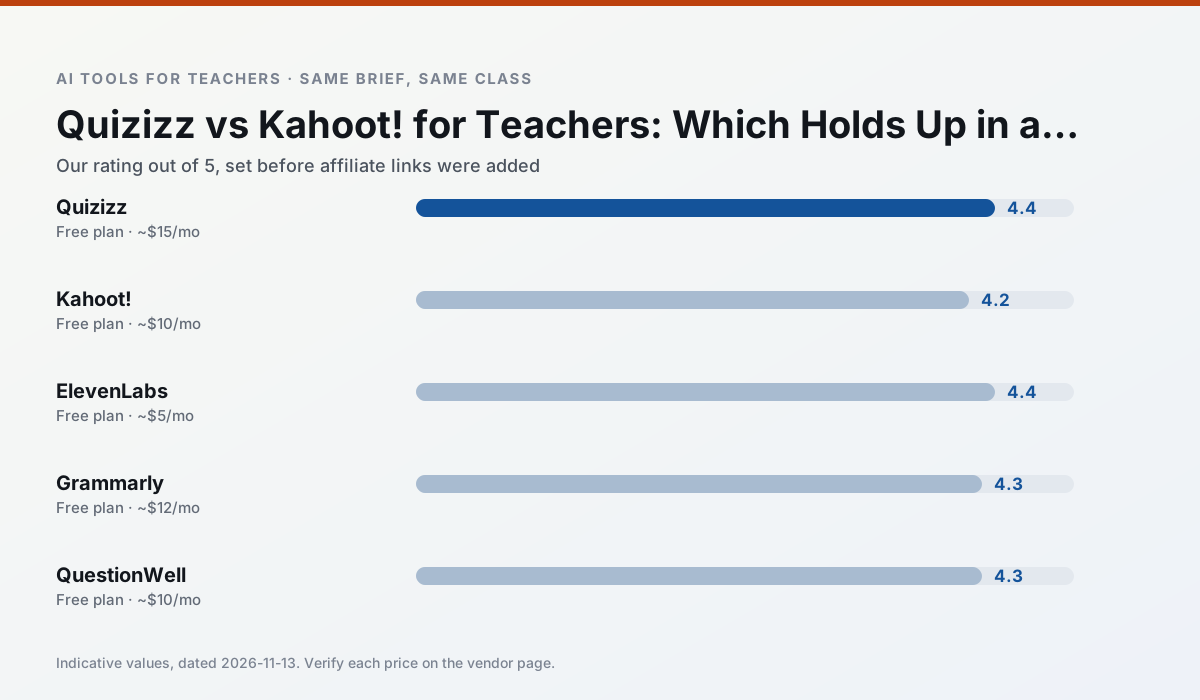
Side by side
Comparison table
Ratings reflect our timed classroom workflow, not vendor claims. Prices are indicative — verify on the vendor site.
| Tool | Best for | Free tier | Indicative paid plan | Standout feature | Our rating | Verdict | Try the tool |
|---|---|---|---|---|---|---|---|
| Quizizz | quiz generation · formative assessment | Yes — Core quiz creation | ~$15 /user/mo | AI question generator | 4.4 / 5 | Strong option | Try free |
| Kahoot! | quiz generation · review lessons | Yes — Limited player count | ~$10 /user/mo | AI question builder | 4.2 / 5 | Strong option | Try free |
| ElevenLabs | accessibility · reading intervention | Yes — Monthly character quota | ~$5 /user/mo | Very natural voices | 4.4 / 5 | Strong option | Try free |
| Grammarly | parent communication · report card comments | Yes — Core grammar and tone checks | ~$12 /user/mo | Tone adjustments | 4.3 / 5 | Strong option | Try free |
| QuestionWell | quiz generation · assessment | Yes — Monthly generation limit | ~$10 /user/mo | Exports to Google Forms / LMS | 4.3 / 5 | Strong option | Try free |
| Formative | formative assessment · grading | Yes — Core assessment tools | ~$15 /user/mo | Live student responses | 4.3 / 5 | Strong option | Try free |
Match your situation
Best for X
Different jobs need different tools. Here is what we would open first in each case.
Quizizz has the strongest tone control for family emails and report comments, provided you still read the message aloud before sending.
Kahoot! produces levelled versions from one source in a single pass, which is the highest-value differentiation shortcut we tested at this level.
ElevenLabs is the student-facing option here with boundaries a teacher can actually set and supervise.
If there is no budget, start with Grammarly: free plan with clearest quota is the least punishing free tier here.
Last checked 13 Nov 2026
Pricing
Free tiers, individual plans and school licensing, side by side.
| Tool | Free plan | Individual / paid | School & district | Billing note | Verify |
|---|---|---|---|---|---|
| Quizizz | $0 — Core quiz creation | ~$15 /user/mo | Custom quote | Indicative — verify on vendor site | Vendor |
| Kahoot! | $0 — Limited player count | ~$10 /user/mo | Custom quote | Indicative — verify on vendor site | Vendor |
| ElevenLabs | $0 — Monthly character quota | ~$5 /user/mo | ~$22 /user/mo | Indicative — verify on vendor site | Vendor |
| Grammarly | $0 — Core grammar and tone checks | ~$12 /user/mo | ~$15 /user/mo | Indicative — billed annually | Vendor |
| QuestionWell | $0 — Monthly generation limit | ~$10 /user/mo | Custom quote | Indicative — verify on vendor site | Vendor |
| Formative | $0 — Core assessment tools | ~$15 /user/mo | Custom quote | Indicative — verify on vendor site | Vendor |
Editorial rule: pricing is re-checked every 2–3 months and the top 50 pages are refreshed every 6 months. See our funding policy.
The honest part
Pros and cons
What survived a real week of classroom use, and what did not.
Pros
- Students already know the interface
- Good reporting
- Works on low-end devices
Cons
- Writing high-quality AI questions still needs review
- Gamification can distract
- Advanced analytics are paid
Pros
- Instant engagement
- Very low training time
- Strong brand familiarity
Cons
- Less depth for higher-order assessment
- Paid tiers needed for larger classes
- Time pressure suits recall more than reasoning
Pros
- Excellent for accessible audio versions
- Low entry price
- Fast generation
Cons
- Quota-based billing
- Voice cloning consent considerations
- Not a teaching platform
Pros
- Catches errors in high-stakes parent emails
- Works everywhere you already write
- Very low learning curve
Cons
- Not education-specific
- Can flatten teacher voice
- Premium needed for tone rewriting
Pros
- Saves the most time on question writing
- Clean export workflow
- Good objective tagging
Cons
- Single-purpose tool
- Question quality varies by source text
- Limited student-facing features
In the classroom
Use cases
Five concrete workflows, with the tool we would open for each one.
An IEP present-levels first draft
Use aggregated, anonymised data only. Ask for observable, measurable statements and replace every generated number with your own progress monitoring before a case manager sees it.
Recommended: QuizizzA five-minute exit ticket set
Ask for one recall, one application and one reasoning item, then delete the second recall question every generator sneaks in.
Recommended: Kahoot!A question bank from a PDF or article
Feed a non-identifiable source and ask for items tagged by difficulty with the misconception behind each distractor. Spot-check every answer key; numerical items are least reliable.
Recommended: ElevenLabsA substitute folder that needs no context
The value here is structure, not creativity. Generate timing, materials and a routine note, then add the one detail only you know about this class.
Recommended: GrammarlyThree reading levels from one source text
Paste a vetted text, ask for supported, core and extension versions, then check the vocabulary list by hand. Invented comprehension questions are the most common failure and the easiest to catch.
Recommended: QuestionWell
Questions teachers ask us
FAQ
Direct answers, also published as FAQPage structured data for search and AI assistants.
Quizizz or Kahoot! for lesson planning?
Which is cheaper for one teacher?
Do they produce the same output?
Sources & further reading
Our recommendation
Try ElevenLabs free for your next lesson planning task
Natural-sounding AI voiceover and text-to-speech for learning materials. Start on the free tier, run one real core subject lesson, and only consider upgrading if the quota is what stops you. Disclosure: we may earn a commission (22% recurring) at no extra cost to you.
Some links on this page are affiliate links. We may earn a commission at no extra cost to you. Our rankings are editorial and never pay-to-play. Never enter student PII into a free consumer account.
Keep reading
Related comparisons in this cluster.
Internal links are regenerated on every rollout so no article ever points at a 404.