The short answer
- Diffit is our default pick for teachers who need to draft a standards-aware lesson plan quickly; ChatGPT is better when differentiation is the bottleneck.
- Diffit handles the broad case; ChatGPT handles the narrow one. Anything beyond that pair should be justified by a recurring weekly job, not a feature demo.
- Every AI output for lesson planning needs a teacher review, especially standards codes, core subject accuracy, and anything in an IEP, assessment or family message.
- Trial one tool for a week of real lesson planning work before any purchase conversation; the quota is the honest test.
Start with MagicSchool AI on its free plan.
At 7:45 on a Tuesday morning, I sat at my desk staring at a thirty-five-student tenth-grade history block. Four students read at a fifth-grade level, six were designated English language learners, and the rest spanned the typical middle-school spectrum. I had a complex two-page article on the industrial revolution and zero differentiated materials. That morning crunch is why teachers start looking for shortcuts. When you evaluate Diffit vs ChatGPT for teachers, you are not looking for a magic wand. You are looking for something that saves you from spending your Sunday night rewriting articles or wrestling with blank document templates.
What Diffit Does Well and Where It Stalls
Diffit is built for one specific, heavy-duty task: taking any text, URL, or YouTube video and leveling it into differentiated reading materials. It is arguably the best tool for mixed-ability classes because it strips out the guesswork of Lexile leveling. You paste an article link, pick a target grade level, and the system kicks out a leveled summary, vocabulary lists, and comprehension questions. It feels miraculous the first five times you use it.
The limits become obvious during heavy planning sessions. The free tier offers a limited number of generations per month, and a busy teacher burns through that quota before the first grading period ends. At roughly $15 per user per month, the paid version removes the friction, but the underlying leveling is still approximate rather than a formal psychometric assessment. It is a fantastic scaffold, but it is not a clinical reading instrument. You also need to watch your inputs and avoid pasting identifiable student work, sticking instead to source texts and public articles.
Diffit Source Prompt: "Level this article on the industrial revolution to a 6th-grade reading level, add 4 vocabulary words with student-friendly definitions, and generate 3 short-answer comprehension questions."
What came back: A clean 600-word passage, solid definitions for "mechanization" and "urbanization," and three straightforward retrieval questions that entirely missed the analytical depth I needed for my afternoon discussion.
Two edits that made it usable:
- Swapped two of the recall questions for a single claim-evidence-reasoning prompt.
- Added a sentence to the final paragraph connecting the text to our local river basin so the reading felt grounded in our region.
The Flexibility and Frustration of ChatGPT
ChatGPT is the Swiss Army knife of classroom AI. If you want a general-purpose assistant that adapts to almost any task, it remains unmatched. It shines when you need parent-facing writing, such as translating a sensitive behavioral email into supportive, professional prose, or when you are drafting a Monday morning lesson plan in twelve minutes. Those twelve minutes come from not rewriting the skeleton: you generate three outlines, choose the one that matches your scope and sequence, and then write the actual model answer yourself.
The catch is that ChatGPT requires active prompt engineering to get consistent results. It has no built-in standards alignment, meaning you have to feed it your state standards or district curriculum guide every time you start a new unit. Furthermore, student data privacy requires strict boundaries. You must never enter student PII on consumer plans, and your district will likely require an approved workspace tier. If you want a deeper look at how specialized tools stack up against general assistants, our guide on the best AI tools for teachers in 2026 breaks down the shifting software landscape.
Where Canva, QuestionWell, and Formative Fit
While Diffit and ChatGPT handle text transformation and drafting, other tools fill specific gaps in your daily workflow. Canva for Education is effectively free for verified teachers, offering a massive template library paired with AI writing and image features. It is our top pick for student-safe deployments because the education tier has specific student-data terms. The risk is that its AI features are capped, and it is dangerously easy for students to spend forty minutes making a pretty slide deck with zero academic substance.
QuestionWell is a narrower utility that saves massive amounts of time on question writing. You feed it a PDF or article, and it generates standards-aligned question banks tagged by difficulty, complete with the misconception behind each distractor. You still need to spot-check every answer key, because numerical items are notoriously unreliable in raw AI output. For live assessment, Formative provides strong data for intervention groups by working with existing PDFs and Docs, though the best features require a school-wide rollout.
If you are transitioning away from paper entirely, Gradescope is our overall pick for daily use. It handles AI-assisted rubric grading for scanned and handwritten assessments, saving hours of weekend grading time. It is overkill for elementary classrooms, and the setup effort is real, but the item analytics are unmatched. For a related perspective on workflow automation, read our breakdown of Brisk Teaching vs Diffit.
Making Your Daily Workflow Sustainable
When building a substitute folder that needs no context, the value of AI is structure, not creativity. You generate timing, materials, and a routine note, then add the one detail only you know about this class, such as where Jimmy sits when he gets overwhelmed. The same goes for five-minute exit ticket sets. You ask the model for one recall, one application, and one reasoning item, then immediately delete the second recall question every generator sneaks in.
When drafting an IEP present-levels first draft, use aggregated, anonymized data only. Ask the system for observable, measurable statements, and then replace every generated number with your own progress monitoring before a case manager ever sees the document. AI does not know your students. It only knows patterns of text.
Choosing Your Main Engine
If your primary bottleneck is differentiation and making complex text accessible to mixed-ability classes, Diffit earns its keep immediately. If your day involves everything from writing newsletter updates to drafting unit frameworks from scratch, ChatGPT is the more versatile investment. Neither tool replaces your professional judgment. They simply buy you enough breathing room to remember why you wanted to teach in the first place.
FAQ
Diffit or ChatGPT for lesson planning?
Diffit for breadth and speed, ChatGPT when the output goes to a colleague or a family and has to be right first time.
Which is cheaper for one teacher?
Compare the free quotas first, then the individual plans. In most weeks the free plan decides the purchase, not the list price.
Do they produce the same output?
On simple tasks, often yes, and that is a useful result: it points at the cheaper, better-governed option rather than the one with more features.
Sources
- Diffit Product Overview and Feature Set, Diffit.io
- ChatGPT Education Use Guidelines, OpenAI
- Canva for Education Privacy and Features, Canva.com
- Gradescope Documentation and Pricing, Gradescope.com
- Formative Assessment Platform Features, SmartFormative.com
- QuestionWell Question Generation Specs, QuestionWell.org
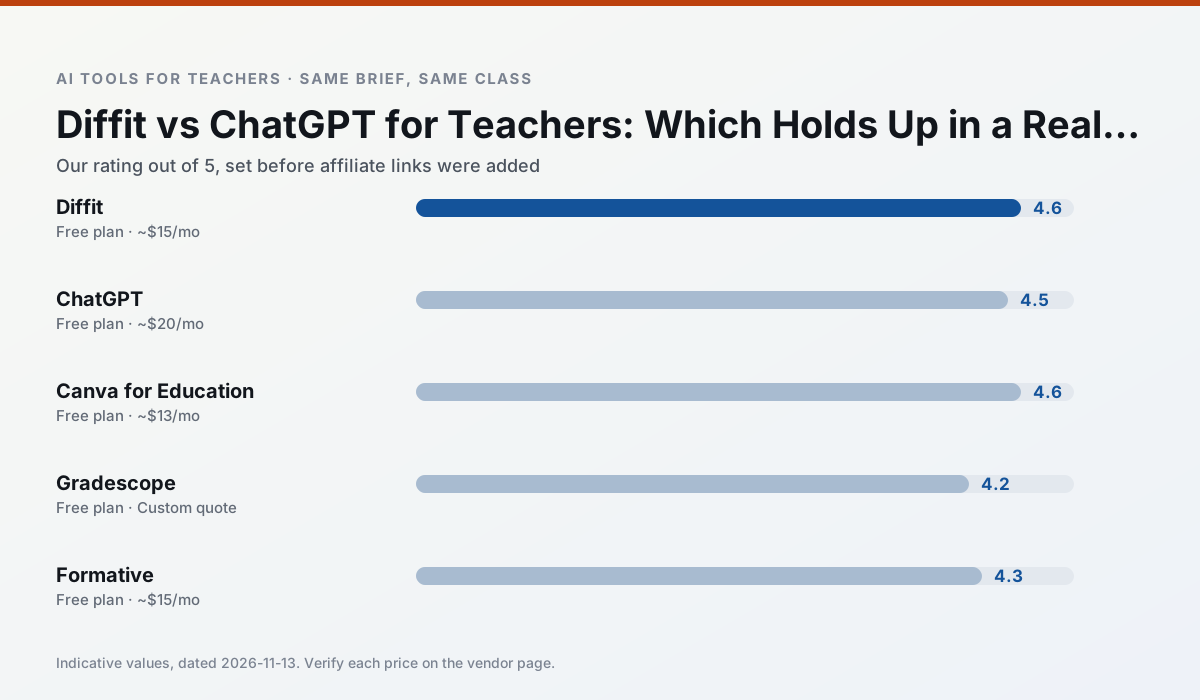
Side by side
Comparison table
Ratings reflect our timed classroom workflow, not vendor claims. Prices are indicative — verify on the vendor site.
| Tool | Best for | Free tier | Indicative paid plan | Standout feature | Our rating | Verdict | Try the tool |
|---|---|---|---|---|---|---|---|
| Diffit | differentiated instruction · reading intervention | Yes — Limited generations per month | ~$15 /user/mo | Lexile-style leveling | 4.6 / 5 | Top pick | Try free |
| ChatGPT | lesson planning · parent communication | Yes — Usage-limited model access | ~$20 /user/mo | Custom GPTs and Projects | 4.5 / 5 | Top pick | Try free |
| Canva for Education | slide decks · worksheets | Yes — Verification required | ~$13 /user/mo | Thousands of education templates | 4.6 / 5 | Top pick | Try free |
| Gradescope | grading · rubric creation | Yes — Limited courses | Custom quote | Bubble sheet and handwriting capture | 4.2 / 5 | Strong option | Try free |
| Formative | formative assessment · grading | Yes — Core assessment tools | ~$15 /user/mo | Live student responses | 4.3 / 5 | Strong option | Try free |
| QuestionWell | quiz generation · assessment | Yes — Monthly generation limit | ~$10 /user/mo | Exports to Google Forms / LMS | 4.3 / 5 | Strong option | Try free |
Match your situation
Best for X
Different jobs need different tools. Here is what we would open first in each case.
Diffit produces levelled versions from one source in a single pass, which is the highest-value differentiation shortcut we tested at this level.
Family-facing drafts from ChatGPT need the fewest rewrites for warmth without overpromising, which is the usual failure mode.
For anything students touch directly, Canva for Education offers the supervision controls and logging that IT will ask about first.
Gradescope is the one we would open on a normal planning day because the first output is editable rather than restructurable, and the free plan covers a single teacher's routine.
Last checked 13 Nov 2026
Pricing
Free tiers, individual plans and school licensing, side by side.
| Tool | Free plan | Individual / paid | School & district | Billing note | Verify |
|---|---|---|---|---|---|
| Diffit | $0 — Limited generations per month | ~$15 /user/mo | Custom quote | Indicative — verify on vendor site | Vendor |
| ChatGPT | $0 — Usage-limited model access | ~$20 /user/mo | ~$25+ /user/mo | Indicative — verify on vendor site | Vendor |
| Canva for Education | $0 — Verification required | ~$13 /user/mo | Custom quote | Indicative — verify on vendor site | Vendor |
| Gradescope | $0 — Limited courses | Custom quote | Custom quote | LMS integration and support | Vendor |
| Formative | $0 — Core assessment tools | ~$15 /user/mo | Custom quote | Indicative — verify on vendor site | Vendor |
| QuestionWell | $0 — Monthly generation limit | ~$10 /user/mo | Custom quote | Indicative — verify on vendor site | Vendor |
Editorial rule: pricing is re-checked every 2–3 months and the top 50 pages are refreshed every 6 months. See our funding policy.
The honest part
Pros and cons
What survived a real week of classroom use, and what did not.
Pros
- Excellent for mixed-ability classes
- Produces printable and digital versions
- Minimal setup
Cons
- Narrower scope than all-in-one suites
- Leveling is approximate, not a formal assessment
- Heavy use burns through the free quota
Pros
- Most flexible option available
- Huge community of teacher prompt libraries
- Strong multilingual support
Cons
- Requires prompt skills for consistent results
- No built-in standards alignment
- District privacy review usually required
Pros
- Effectively free for verified teachers
- Huge template library
- No design skills needed
Cons
- AI features are capped
- Easy to produce cluttered slides
- Account verification can be slow
Pros
- Large time savings on paper assessments
- Consistent rubric application
- Detailed item analytics
Cons
- Overkill for elementary classrooms
- Institutional pricing is opaque
- Setup effort is real
Pros
- Strong data for intervention groups
- Works with existing PDFs and Docs
- Good LMS integrations
Cons
- Steeper setup than quiz games
- Best value requires school-wide rollout
- Price adds up per teacher
In the classroom
Use cases
Five concrete workflows, with the tool we would open for each one.
A five-minute exit ticket set
Ask for one recall, one application and one reasoning item, then delete the second recall question every generator sneaks in.
Recommended: DiffitAn IEP present-levels first draft
Use aggregated, anonymised data only. Ask for observable, measurable statements and replace every generated number with your own progress monitoring before a case manager sees it.
Recommended: ChatGPTA substitute folder that needs no context
The value here is structure, not creativity. Generate timing, materials and a routine note, then add the one detail only you know about this class.
Recommended: Canva for EducationA question bank from a PDF or article
Feed a non-identifiable source and ask for items tagged by difficulty with the misconception behind each distractor. Spot-check every answer key; numerical items are least reliable.
Recommended: GradescopeA Monday morning lesson plan in twelve minutes
The twelve minutes come from not rewriting the skeleton. Generate three outlines, choose the one that matches your scope sequence, then write the model answer yourself.
Recommended: Formative
Questions teachers ask us
FAQ
Direct answers, also published as FAQPage structured data for search and AI assistants.
Diffit or ChatGPT for lesson planning?
Which is cheaper for one teacher?
Do they produce the same output?
Sources & further reading
Our recommendation
Try MagicSchool AI free for your next lesson planning task
A large library of teacher-specific AI generators in one dashboard. Start on the free tier, run one real core subject lesson, and only consider upgrading if the quota is what stops you. Disclosure: we may earn a commission (30% recurring) at no extra cost to you.
Some links on this page are affiliate links. We may earn a commission at no extra cost to you. Our rankings are editorial and never pay-to-play. Never enter student PII into a free consumer account.
Keep reading
Related comparisons in this cluster.
Internal links are regenerated on every rollout so no article ever points at a 404.