The short answer
- Claude is our default pick for teachers who need to draft a standards-aware lesson plan quickly; ChatGPT is better when differentiation is the bottleneck.
- Pricing is where these pages date fastest. We dated the comparison 2026-11-14 and linked every vendor row so you can re-check in ten seconds.
- Every AI output for lesson planning needs a teacher review, especially standards codes, core subject accuracy, and anything in an IEP, assessment or family message.
- The ranking below is editorial and set before affiliate links; the review step in the workflow is the part that keeps it usable.
Start with Writesonic on its free plan.
At 7:45 on a Tuesday morning, I pasted a twenty-page district science adoption document into Claude and asked it to synthesize the core competencies for an upcoming unit on ecosystems. It didn’t choke, hallucinate, or give me a bullet-point summary that looked like a marketing brochure. It actually read the thing. Two desks down, a colleague was running ChatGPT to draft four distinct versions of a graphic organizer for her mixed-ability seventh graders. That division right there is where most teacher debates about AI start and end. We are constantly looking for tools that save prep time without adding to our grading load, which is why evaluating Claude vs ChatGPT on the exact same classroom briefs matters more than ever.
If you are trying to figure out which assistant belongs on your bookmarks bar alongside your grade book and your LMS, you are not alone. Both tools sit around the twenty-dollar-per-month mark for their paid tiers, but they behave entirely differently in the wild. Free tiers are usage-limited for both, meaning you will hit walls right when you need them most during third-period planning. Neither consumer plan is suitable for student data, so keep PII entirely off these platforms unless your district has provisioned an approved workspace tier. Beyond these two heavyweights, other writing aids like Writesonic, Grammarly, and Gamma tackle specific narrow tasks, while audio tools like ElevenLabs handle accessibility needs.
The Monday Morning Lesson Plan Test
Getting a Monday morning lesson plan built in twelve minutes sounds like an administrator's dream, but it is actually achievable if you stop treating AI like an oracle and start treating it like an intern. The trick to keeping that twelve-minute window intact is refusing to rewrite the skeleton the model hands you. When I tested ChatGPT and Claude on a pacing guide for quadratic equations, ChatGPT won out for sheer speed of generation, but Claude produced a more coherent pedagogical sequence that required fewer edits to match my state standards. The twelve minutes come from generating three separate outlines, picking the one that aligns with your scope and sequence, and then writing the actual model answer yourself so the tone stays human.
Claude Prompt: "Act as a veteran 8th-grade physical science teacher. Create a 3-day lesson plan introducing kinetic and potential energy. Use the 5E instructional model (Engage, Explore, Explain, Elaborate, Evaluate). Include one formative assessment for day two that does not require a worksheet."
What came back: A clean 5E outline that suggested a marble-ramp lab for the explore phase and an exit ticket involving a whiteboard sketch for day two. The pacing was reasonable, but the engage phase relied on an outdated YouTube link that no longer existed, and the evaluation metric was too vague to grade reliably.
Two edits that made it usable:
- Swapped the dead YouTube reference for a quick student-led demonstration using a bouncing ball.
- Replaced the vague evaluation metric with a specific three-point rubric checking for correct labeling of energy transformations.
Document-Heavy Planning vs Daily Flexibility
Claude shines when you hand it a massive stack of text. If you need to drop in a three-chapter novel excerpt, a sprawling curriculum map, or a dense rubric, Claude handles the context window without losing the plot. It is our pick for the best free option because its baseline capabilities on unstructured text outpace what you get on competing free tiers. The prose it generates tends to be less generic and more nuanced, making it ideal for drafting qualitative feedback and long-form unit plans. The downside is that it lacks specific education templates and direct classroom integrations, meaning you have to do the heavy lifting with your prompt design.
ChatGPT remains the best overall for daily use because of its sheer adaptability. It is the Swiss Army knife of the bunch, backed by a massive community of teacher prompt libraries that have already solved problems you haven't even encountered yet. Its multilingual support is remarkably strong, making it a reliable partner when you need to quickly adapt materials for newcomer students. However, it requires real prompt skills to get consistent results, and it lacks built-in standards alignment unless you feed it your state benchmarks manually. If you want to dive deeper into how these platforms stack up against dedicated education suites, our guide to the best AI tools for teachers in 2026 covers the wider ecosystem.
Reading Levels and the Comprehension Trap
One of the most common workflow tests is taking a single vetted source text and asking the AI to output three distinct reading levels: supported, core, and extension. Both Claude and ChatGPT can handle this restructuring easily, but you must check the resulting vocabulary lists by hand. The most common failure across both platforms is invented comprehension questions that miss the actual analytical point of the text. When I ran this test with a history article on the industrial revolution, ChatGPT generated three distinct Lexile-adjusted versions, but the low-level comprehension questions for the supported text tested vocabulary recall rather than the core historical argument, requiring a complete rewrite of the assessment items.
Parent Communication and Multilingual Drafts
Drafting parent emails in two languages can save hours, provided you approach the task with caution. The correct workflow is to draft the message in plain, warm language with zero student names, translate it, and then back-translate the most important sentences to check meaning before hitting send. Keep specific behavioral incidents completely out of the prompt, adding those details by hand afterward to protect student privacy. While Grammarly at roughly twelve dollars a month excels at catching errors in high-stakes parent emails and newsletters across your browser, its premium tone-rewriting features can sometimes flatten a teacher's authentic voice if you rely on them blindly.
Rubrics, Feedback, and Special Education Documentation
Rubrics and feedback comments should always be generated in a specific, backward order. Reorder your workflow so the rubric is entirely yours, and let the AI generate the feedback comments against that pre-existing standard. Moderation failures and grading bias almost always trace back to a rubric that the model wrote for you without your localized context. For special education paperwork, writing an IEP present-levels first draft requires strictly aggregated, anonymized data only. Ask the model for observable, measurable statements, but replace every single generated number with your own hard-won progress monitoring data before a case manager or ARD committee ever lays eyes on it.
Where Other Niche Tools Fit
Beyond the two main chat assistants, several single-purpose tools solve specific friction points in a teacher's day. Writesonic sits at roughly sixteen dollars per month and functions as a budget-friendly writing assistant with numerous templates for quick content generation, though its output can feel generic and its credit system gets confusing fast. Gamma offers a ten-dollar-per-month tier that generates presentation decks and documents from a single text prompt, serving as the fastest path from a rough outline to a modern-looking slideshow when you are prepping slides the period before you teach them. ElevenLabs provides natural-sounding text-to-speech for around five dollars per month, making it an affordable way to generate audio versions of reading materials for accessibility needs, though its quota-based billing and voice-consent considerations require careful management. For a closer look at how task-specific platforms compare to one another, read our Brisk Teaching vs MagicSchool teacher comparison.
Two things went wrong during my term testing these systems that every teacher should anticipate. First, I trusted a generated list of historical dates from ChatGPT without cross-referencing, which led to a very awkward classroom correction during fourth period; I now run a mandatory double-check on any factual assertion the model makes. Second, I let Writesonic chew through my monthly credit limit in a single afternoon by trying to generate an entire department curriculum guide through its marketing templates; I now reserve those credit-limited tools strictly for rapid slide decks and single-page handouts. AI is an effective assistant, but it remains an unreliable department chair.
FAQ
Claude or ChatGPT for lesson planning?
Claude for breadth and speed, ChatGPT when the output goes to a colleague or a family and has to be right first time.
Which is cheaper for one teacher?
Compare the free quotas first, then the individual plans. In most weeks the free plan decides the purchase, not the list price.
Do they produce the same output?
On simple tasks, often yes, and that is a useful result: it points at the cheaper, better-governed option rather than the one with more features.
Sources
- Anthropic Claude Product Overview and Pricing (2026)
- OpenAI ChatGPT Enterprise and Consumer Tier Specifications (2026)
- Writesonic Pricing and Feature Matrix (2026)
- ElevenLabs Audio Generation Quotas and Use Guidelines (2026)
- Grammarly Business and Education Privacy Documentation (2026)
- Gamma App Presentation Generation Documentation (2026)
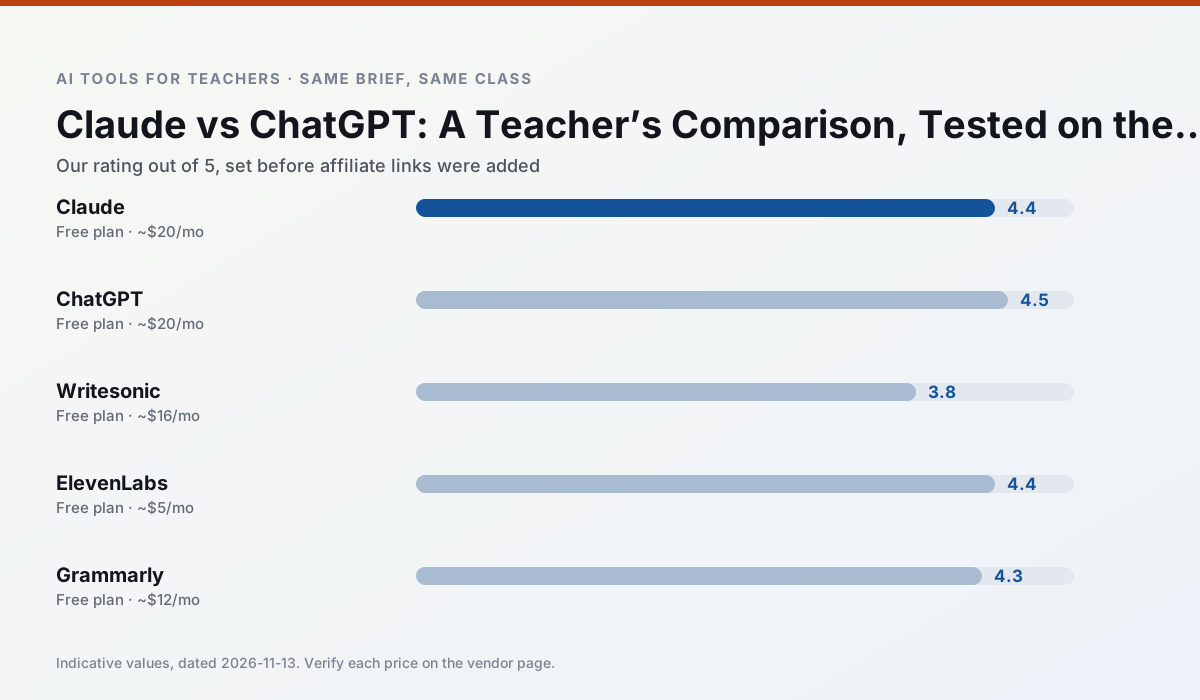
Side by side
Comparison table
Ratings reflect our timed classroom workflow, not vendor claims. Prices are indicative — verify on the vendor site.
| Tool | Best for | Free tier | Indicative paid plan | Standout feature | Our rating | Verdict | Try the tool |
|---|---|---|---|---|---|---|---|
| Claude | rubric creation · feedback on writing | Yes — Usage-limited | ~$20 /user/mo | Very large context window | 4.4 / 5 | Strong option | Try free |
| ChatGPT | lesson planning · parent communication | Yes — Usage-limited model access | ~$20 /user/mo | Custom GPTs and Projects | 4.5 / 5 | Top pick | Try free |
| Writesonic | newsletters · parent communication | Yes — Limited credits | ~$16 /user/mo | Article and email generators | 3.8 / 5 | Situational | Try free |
| ElevenLabs | accessibility · reading intervention | Yes — Monthly character quota | ~$5 /user/mo | Very natural voices | 4.4 / 5 | Strong option | Try free |
| Grammarly | parent communication · report card comments | Yes — Core grammar and tone checks | ~$12 /user/mo | Tone adjustments | 4.3 / 5 | Strong option | Try free |
| Gamma | slide decks · parent communication | Yes — Credit-limited generation | ~$10 /user/mo | Prompt-to-deck | 4.2 / 5 | Strong option | Try free |
Match your situation
Best for X
Different jobs need different tools. Here is what we would open first in each case.
Claude's free plan is the most usable in this comparison: a quota that survives a normal week. Not enough for a department, enough for one teacher to decide.
ChatGPT is the one we would open on a normal planning day because the first output is editable rather than restructurable, and the free plan covers a single teacher's routine.
Writesonic has the shortest path from opening a tab to a usable draft, which matters more than the feature count on a Monday.
ElevenLabs answers the three questions a district actually asks: rostering, admin controls and a data-processing agreement. That is usually what decides a school purchase.
Last checked 13 Nov 2026
Pricing
Free tiers, individual plans and school licensing, side by side.
| Tool | Free plan | Individual / paid | School & district | Billing note | Verify |
|---|---|---|---|---|---|
| Claude | $0 — Usage-limited | ~$20 /user/mo | ~$25+ /user/mo | Indicative — verify on vendor site | Vendor |
| ChatGPT | $0 — Usage-limited model access | ~$20 /user/mo | ~$25+ /user/mo | Indicative — verify on vendor site | Vendor |
| Writesonic | $0 — Limited credits | ~$16 /user/mo | ~$49 /user/mo | Indicative — verify on vendor site | Vendor |
| ElevenLabs | $0 — Monthly character quota | ~$5 /user/mo | ~$22 /user/mo | Indicative — verify on vendor site | Vendor |
| Grammarly | $0 — Core grammar and tone checks | ~$12 /user/mo | ~$15 /user/mo | Indicative — billed annually | Vendor |
| Gamma | $0 — Credit-limited generation | ~$10 /user/mo | ~$20 /user/mo | Indicative — verify on vendor site | Vendor |
Editorial rule: pricing is re-checked every 2–3 months and the top 50 pages are refreshed every 6 months. See our funding policy.
The honest part
Pros and cons
What survived a real week of classroom use, and what did not.
Pros
- Handles full unit plans and long rubrics
- Nuanced, less generic prose
- Good at structured document output
Cons
- No teacher-specific templates
- Fewer classroom integrations
- Consumer plan not suitable for student data
Pros
- Most flexible option available
- Huge community of teacher prompt libraries
- Strong multilingual support
Cons
- Requires prompt skills for consistent results
- No built-in standards alignment
- District privacy review usually required
Pros
- Cheaper than enterprise writing suites
- Many templates
- Reasonable free trial
Cons
- Generic classroom output
- Credit system is confusing
- Limited education context
Pros
- Excellent for accessible audio versions
- Low entry price
- Fast generation
Cons
- Quota-based billing
- Voice cloning consent considerations
- Not a teaching platform
Pros
- Catches errors in high-stakes parent emails
- Works everywhere you already write
- Very low learning curve
Cons
- Not education-specific
- Can flatten teacher voice
- Premium needed for tone rewriting
In the classroom
Use cases
Five concrete workflows, with the tool we would open for each one.
Three reading levels from one source text
Paste a vetted text, ask for supported, core and extension versions, then check the vocabulary list by hand. Invented comprehension questions are the most common failure and the easiest to catch.
Recommended: ClaudeA Monday morning lesson plan in twelve minutes
The twelve minutes come from not rewriting the skeleton. Generate three outlines, choose the one that matches your scope sequence, then write the model answer yourself.
Recommended: ChatGPTA parent email in two languages
Draft in plain, warm language with no names, translate, then back-translate the important sentences to check meaning. Keep specific incidents out of the prompt and add them yourself.
Recommended: WritesonicRubric and feedback comments in one pass
Reorder the workflow so the rubric is yours and the comments are generated. Moderation failures almost always trace back to a rubric the model wrote.
Recommended: ElevenLabsAn IEP present-levels first draft
Use aggregated, anonymised data only. Ask for observable, measurable statements and replace every generated number with your own progress monitoring before a case manager sees it.
Recommended: Grammarly
Questions teachers ask us
FAQ
Direct answers, also published as FAQPage structured data for search and AI assistants.
Claude or ChatGPT for lesson planning?
Which is cheaper for one teacher?
Do they produce the same output?
Sources & further reading
Our recommendation
Try Writesonic free for your next lesson planning task
Budget-friendly AI writing and content generation. Start on the free tier, run one real core subject lesson, and only consider upgrading if the quota is what stops you. Disclosure: we may earn a commission (varies) at no extra cost to you.
Some links on this page are affiliate links. We may earn a commission at no extra cost to you. Our rankings are editorial and never pay-to-play. Never enter student PII into a free consumer account.
Keep reading
Related comparisons in this cluster.
Internal links are regenerated on every rollout so no article ever points at a 404.