The short answer
- QuestionWell is our default pick for teachers who need to draft a standards-aware lesson plan quickly; Quizizz is better when differentiation is the bottleneck.
- Free-tier reality for this shortlist: QuestionWell: Yes — Monthly generation limit; Quizizz: Yes — Core quiz creation; Formative: Yes — Core assessment tools. Treat every paid figure as indicative until you have read the vendor page; only the free quota is something you can test yourself this week.
- Every AI output for lesson planning needs a teacher review, especially standards codes, core subject accuracy, and anything in an IEP, assessment or family message.
- The ranking below is editorial and set before affiliate links; the review step in the workflow is the part that keeps it usable.
Start with Gamma on its free plan.
By third period on a Tuesday, the last thing anyone needs is another browser tab that takes four minutes to load a spinning wheel. When you are trying to pull together a quick check for understanding before the bell rings, the friction between having an idea and getting it in front of kids is where instruction usually dies. Teachers are not looking for a revolution in edtech. We are looking for something that stops us from spending our lunch break formatting multiple-choice options into a Google Form.
Looking at QuestionWell vs Quizizz for teachers reveals a stark divide in how we build and deliver checks for understanding. One is an industrial kitchen for question banks; the other is a fully lit arcade where the kids actually want to hang out. Neither of them fixes a weak lesson plan, but both can shave hours off your Sunday prep if you know where they break down. We also see tools like Formative, Gradescope, Canva for Education, and Gamma hovering around our workflows, each promising to fix a different leak in the dyke. Let us look at how these platforms actually behave when a room full of thirty restless eighth-graders is waiting for you to hit present.
QuestionWell as a Behind-the-Scenes Engine
If your primary pain point is staring at a blank document trying to write distractor answers that sound plausible, QuestionWell makes a lot of sense. You paste in a non-identifiable source text or a curriculum objective, and it spits out standards-aligned question banks. The standout strength here is time saved on question writing, coupled with clean export workflows that drop straight into your LMS or quiz platform of choice. It is also surprisingly useful when you need parent-facing writing, such as translating a dense standard into plain language for an email home.
The catch is that QuestionWell is a single-purpose tool with a monthly generation limit on its free tier, while the paid option sits at roughly $10 /user/mo (indicative). Question quality can vary wildly depending on how clean your source text is. If you feed it a messy PDF with scanned footnotes, expect to do heavy editing. You also have to remember that it lacks student-facing features. It builds the content, but you have to deliver it somewhere else.
Prompt: Generate four multiple-choice questions based on this non-identifiable text about the water cycle, tagged by difficulty, and include the specific misconception behind each incorrect distractor.
First output: Four standard multiple-choice questions appeared, but two of them tested simple vocabulary recall rather than the passage's core mechanism, and the distractors were generic.
Two edits for usability:
- Added a strict constraint specifying that distractors must target common student errors regarding condensation phase changes.
- Deleted the second recall question that the generator sneaked in, replacing it with an open-ended application prompt.
Quizizz for Live Engagement and Low-End Devices
Quizizz takes a different route by wrapping AI-assisted quiz creation in a gamified interface that kids already know and tolerate. The free tier covers core quiz creation, while the paid tier runs around $15 /user/mo (indicative). Its biggest win in a real classroom is device compatibility. It works on older Chromebooks and low-end tablets without crashing every five minutes. The reporting is solid, and students who normally shut down during a paper quiz will actively race to climb the leaderboard.
Yet, writing high-quality AI questions inside Quizizz still demands a manual review before you launch a live game. The gamification can also backfire, turning a five-minute comprehension check into a ten-minute shouting match over meme animations and power-ups. Advanced analytics are locked behind the paid version, and while COPPA and FERPA documentation is available, you still need to verify your district's specific compliance scope. If you want a deeper dive into how different AI assistants stack up for daily prep, take a look at our comparison of the best AI tools for teachers in 2026.
Where Formative and Gradescope Fit
When your goal moves beyond simple recall games toward genuine student-safe deployments and intervention tracking, other options enter the room. Formative offers live formative assessment with auto-grading and standards tracking, costing roughly $15 /user/mo (indicative) for the paid tier. It works brilliantly with existing PDFs and Docs, giving you strong data for intervention groups. You can easily regroup students after an assessment by summarising anonymised results into skill groups and generating targeted practice. The friction point is setup; it takes more runway to configure than a quick quiz game, and the best value requires a school-wide rollout.
For paper-heavy classrooms or upper grades, Gradescope tackles the mountain of scanning and grading. It uses AI-assisted rubric grading for scanned and handwritten assessments, offering a free tier with limited courses alongside custom enterprise pricing. The time savings on paper assessments are massive, and the consistent rubric application prevents grading fatigue by hour three of a stack of essays. However, it is complete overkill for elementary classrooms, the institutional pricing is opaque, and because it handles actual student work, a full DPA and FERPA review is mandatory. For another angle on specialized grading helpers, see our Brisk Teaching vs Gradescope teacher comparison.
Canva and Gamma for Visuals and Decks
Content creation outside of quizzes often leads teachers to Canva for Education and Gamma. Canva remains an essential staple because it is effectively free for verified teachers, offering a massive template library and basic AI writing and image features. You do not need design skills to make a clean anchor chart, but the AI features are capped, and it is entirely too easy to spend forty minutes making a slide deck look pretty when you should be writing your actual script.
Gamma approaches presentations from a prompt-based angle, generating full presentation decks and documents from a single text prompt. It is arguably the fastest path from a rough outline to a modern-looking deck, with a free tier limited by credits and a paid upgrade around $10 /user/mo (indicative). The design control is limited once the deck is generated, and those credits run out fast if you are picky about layouts. Treat Gamma as a content creation tool only; never upload student work or identifiable data into its prompt box.
Two Things That Went Wrong in Real Use
No matter how polished the marketing page looks, things break in the middle of a school day. Here is what happened when we pushed these tools past their happy paths.
First, during a vocabulary review built through QuestionWell, we exported a set of numerical calculation items into an online practice form. The AI had scrambled the decimal places in two of the answer keys, turning a correct math ratio into nonsense. The students caught the error before we did, leading to ten minutes of arguing over whether the platform was broken. What we did instead: we instituted a mandatory spot-check rule for every generated quiz, treating the AI output as a rough draft rather than an answer key ready for deployment.
Second, a live Quizizz session featuring high-stakes gamification completely derailed a classroom management plan on a Friday afternoon. The competitive timers triggered anxiety for several students with IEP accommodations, causing two of them to put their heads down and refuse to finish. What we did instead: we disabled the timer and leaderboard features for subsequent sessions, turning the game into a self-paced challenge that kept the engagement without the sensory overload. Tools are only as good as our willingness to turn off their worst features.
FAQ
QuestionWell or Quizizz for lesson planning?
QuestionWell for breadth and speed, Quizizz when the output goes to a colleague or a family and has to be right first time.
Which is cheaper for one teacher?
Compare the free quotas first, then the individual plans. In most weeks the free plan decides the purchase, not the list price.
Do they produce the same output?
On simple tasks, often yes, and that is a useful result: it points at the cheaper, better-governed option rather than the one with more features.
Sources
- QuestionWell vendor platform and feature documentation (questionwell.ai)
- Quizizz educator pricing and feature summaries (quizizz.com)
- Formative assessment platform specifications (goformative.com)
- Gradescope AI grading workflow guides (gradescope.com)
- Canva for Education verification guidelines (canva.com/education)
- Gamma app generation limits and documentation (gamma.app)
Side by side
Comparison table
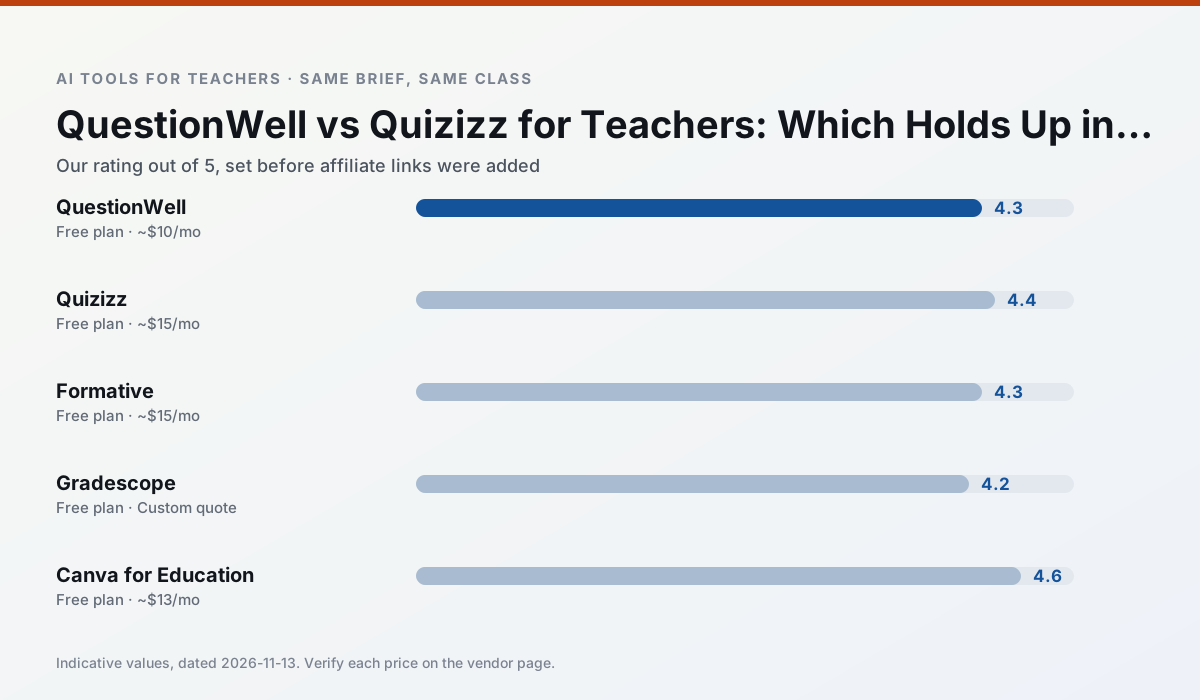
Ratings reflect our timed classroom workflow, not vendor claims. Prices are indicative — verify on the vendor site.
| Tool | Best for | Free tier | Indicative paid plan | Standout feature | Our rating | Verdict | Try the tool |
|---|---|---|---|---|---|---|---|
| QuestionWell | quiz generation · assessment | Yes — Monthly generation limit | ~$10 /user/mo | Exports to Google Forms / LMS | 4.3 / 5 | Strong option | Try free |
| Quizizz | quiz generation · formative assessment | Yes — Core quiz creation | ~$15 /user/mo | AI question generator | 4.4 / 5 | Strong option | Try free |
| Formative | formative assessment · grading | Yes — Core assessment tools | ~$15 /user/mo | Live student responses | 4.3 / 5 | Strong option | Try free |
| Gradescope | grading · rubric creation | Yes — Limited courses | Custom quote | Bubble sheet and handwriting capture | 4.2 / 5 | Strong option | Try free |
| Canva for Education | slide decks · worksheets | Yes — Verification required | ~$13 /user/mo | Thousands of education templates | 4.6 / 5 | Top pick | Try free |
| Gamma | slide decks · parent communication | Yes — Credit-limited generation | ~$10 /user/mo | Prompt-to-deck | 4.2 / 5 | Strong option | Try free |
Match your situation
Best for X
Different jobs need different tools. Here is what we would open first in each case.
QuestionWell is the steadiest of this set at plain, respectful language; names and specific incidents still belong in your draft, not the prompt.
For three reading groups and one text, Quizizz needs the least manual relabelling of vocabulary and questions.
Formative is the student-facing option here with boundaries a teacher can actually set and supervise.
Gradescope's free plan is the most usable in this comparison: a quota that survives a normal week. Not enough for a department, enough for one teacher to decide.
Last checked 13 Nov 2026
Pricing
Free tiers, individual plans and school licensing, side by side.
| Tool | Free plan | Individual / paid | School & district | Billing note | Verify |
|---|---|---|---|---|---|
| QuestionWell | $0 — Monthly generation limit | ~$10 /user/mo | Custom quote | Indicative — verify on vendor site | Vendor |
| Quizizz | $0 — Core quiz creation | ~$15 /user/mo | Custom quote | Indicative — verify on vendor site | Vendor |
| Formative | $0 — Core assessment tools | ~$15 /user/mo | Custom quote | Indicative — verify on vendor site | Vendor |
| Gradescope | $0 — Limited courses | Custom quote | Custom quote | LMS integration and support | Vendor |
| Canva for Education | $0 — Verification required | ~$13 /user/mo | Custom quote | Indicative — verify on vendor site | Vendor |
| Gamma | $0 — Credit-limited generation | ~$10 /user/mo | ~$20 /user/mo | Indicative — verify on vendor site | Vendor |
Editorial rule: pricing is re-checked every 2–3 months and the top 50 pages are refreshed every 6 months. See our funding policy.
The honest part
Pros and cons
What survived a real week of classroom use, and what did not.
Pros
- Saves the most time on question writing
- Clean export workflow
- Good objective tagging
Cons
- Single-purpose tool
- Question quality varies by source text
- Limited student-facing features
Pros
- Students already know the interface
- Good reporting
- Works on low-end devices
Cons
- Writing high-quality AI questions still needs review
- Gamification can distract
- Advanced analytics are paid
Pros
- Strong data for intervention groups
- Works with existing PDFs and Docs
- Good LMS integrations
Cons
- Steeper setup than quiz games
- Best value requires school-wide rollout
- Price adds up per teacher
Pros
- Large time savings on paper assessments
- Consistent rubric application
- Detailed item analytics
Cons
- Overkill for elementary classrooms
- Institutional pricing is opaque
- Setup effort is real
Pros
- Effectively free for verified teachers
- Huge template library
- No design skills needed
Cons
- AI features are capped
- Easy to produce cluttered slides
- Account verification can be slow
In the classroom
Use cases
Five concrete workflows, with the tool we would open for each one.
Regrouping students after an assessment
Summarise anonymised results into skill groups, then generate one activity per group. Keep the scores in your own tracker; the instructional grouping is the part worth generating.
Recommended: QuestionWellA weekly family newsletter from bullet notes
Newsletters fail on length, not tone. Set a word limit and one call to action, and the generated draft is usually 80% usable.
Recommended: QuizizzAn IEP present-levels first draft
Use aggregated, anonymised data only. Ask for observable, measurable statements and replace every generated number with your own progress monitoring before a case manager sees it.
Recommended: FormativeA five-minute exit ticket set
Ask for one recall, one application and one reasoning item, then delete the second recall question every generator sneaks in.
Recommended: GradescopeA question bank from a PDF or article
Feed a non-identifiable source and ask for items tagged by difficulty with the misconception behind each distractor. Spot-check every answer key; numerical items are least reliable.
Recommended: Canva for Education
Questions teachers ask us
FAQ
Direct answers, also published as FAQPage structured data for search and AI assistants.
QuestionWell or Quizizz for lesson planning?
Which is cheaper for one teacher?
Do they produce the same output?
Sources & further reading
Our recommendation
Try Gamma free for your next lesson planning task
Generate presentation decks and documents from a single prompt. Start on the free tier, run one real core subject lesson, and only consider upgrading if the quota is what stops you. Disclosure: we may earn a commission (varies) at no extra cost to you.
Some links on this page are affiliate links. We may earn a commission at no extra cost to you. Our rankings are editorial and never pay-to-play. Never enter student PII into a free consumer account.
Keep reading
Related comparisons in this cluster.
Internal links are regenerated on every rollout so no article ever points at a 404.