The short answer
- Brisk Teaching is our default pick for teachers who need to draft a standards-aware lesson plan quickly; Gradescope is better when differentiation is the bottleneck.
- Pricing is where these pages date fastest. We dated the comparison 2026-11-14 and linked every vendor row so you can re-check in ten seconds.
- Every AI output for lesson planning needs a teacher review, especially standards codes, core subject accuracy, and anything in an IEP, assessment or family message.
- Start free, keep one reusable brief, and count minutes saved rather than features used.
Start with Notion AI on its free plan.
At 9:45 PM on a Tuesday, grading a stack of thirty-five essay drafts or fifty algebra problem sets starts to feel less like teaching and more like data entry. Teachers do not need another platform that requires a separate tab, a fresh password, and a complicated export process. We need tools that meet us where our work actually lives, whether that is inside a student document or spread across a desk covered in handwritten geometry proofs. When looking at Brisk Teaching vs Gradescope for teachers, the core question is not which platform has more features. The question is whether the tool saves time on writing feedback or paper assessments without creating a secondary administrative headache.
The Case for In-Document Writing Support
Brisk Teaching operates as a browser extension that brings artificial intelligence directly into Google Docs, Slides, and web articles. Because it lives in the browser toolbar, you do not have to copy and paste student text into a separate chatbot window. You can highlight a student's paragraph in a Google Doc and generate inline feedback in seconds. This direct integration makes it our top pick for parent-facing writing, as it helps turn rough student drafts into constructive notes that families can actually understand at home.
The main catch is the workflow constraint. Brisk Teaching is strictly Chrome-first, meaning your school IT department has to approve the extension before it can be installed on district-managed Chromebooks. Furthermore, the free tier comes with a tight quota of monthly actions. Once you run through those limits, you are looking at an indicative cost of about $10 per user per month for the paid tier. Because the extension reads document content directly, you will also want to review your district data processing agreements before letting it loose on student work.
Prompt:
Act as a middle school writing teacher. Review this student paragraph on the American Revolution. Provide three constructive comments focusing on evidence integration, avoiding direct evaluation, and keeping the tone accessible for a family progress update.

Generated Output:
1. Great job adding a quote! Try to explain what the quote means in your own words right after you use it.
2. Check your citation format to make sure the author's name is clear.
3. Your final sentence connects nicely to the main idea of the paragraph.

Two Edits Made:
1. Replaced the generic praise in comment one with a specific prompt about why the tax act mattered.
2. Adjusted the phrasing in comment two to match the school's preferred MLA citation checklist rather than a generic format.
Streamlining Paper Assessments and Mixed Groups
Gradescope takes a completely different approach, focusing heavily on paper-based and hybrid assessments. It is designed for teachers who still rely on handwritten work, bubble sheets, and traditional exams. By grouping similar student answers together, Gradescope allows you to apply a rubric to fifty papers at once rather than grading question one through fifty for every single student in the room. This makes it our pick for mixed-ability classes where partial credit patterns repeat across different student misconceptions.
Despite its speed on paper, Gradescope has clear boundaries. It is absolute overkill for elementary classrooms where formative work lives in digital portfolios or colorful project folders. The institutional pricing model is opaque and relies on custom quotes, and the setup effort required to map rubrics before scanning is real. If your students submit everything digitally, Gradescope will sit empty. If you want a similar paper-workflow alternative with lightweight math support, Class Companion operates at an indicative price of about $12 per user per month, though scan quality heavily dictates its accuracy.
Institutional Alternatives and Workspace Management
When districts step in to standardize AI use, individual workflow tools often give way to platform-wide solutions. Turnitin Clarity and Feedback Studio handle institutional writing feedback and similarity checking with deep LMS integration. While individual teachers cannot simply buy a single license, many high schools already have it licensed. It provides a consistent revision history, though AI detection remains contested and administrative setup is heavy. If you are comparing broader curriculum planning options, Notion AI offers flexible databases at roughly $10 per user per month, serving as a solid free or low-cost choice for long-term course records as long as you keep student personally identifiable information out of personal workspaces.
For district-wide deployments that require strict safeguarding, SchoolAI provides teacher-controlled student spaces at an indicative cost of about $15 per user per month. It is built from the ground up for school safety, offering audit logs and tight teacher visibility. However, it requires whole-school buy-in and lacks the casual speed of a simple browser extension. To see how these writing assistants stack up against other popular classroom generators, take a look at our comparison of Brisk Teaching vs Diffit for differentiated reading resources.
What Went Wrong in the Classroom
Real testing always reveals the gaps that marketing pages gloss over. During a trial of Brisk Teaching, an extension permission update broke the toolbar integration right in the middle of a third-period writing workshop. The feedback button simply greyed out, leaving twenty students staring at blank Google Docs. The workaround was simple but annoying: switching back to manual commenting for one class period until district IT re-approved the scoped permissions.
With Gradescope, the failure mode was entirely physical. A batch of scanned lab reports came through with faint pencil handwriting that the optical recognition engine completely misread, scrambling the question groupings and forcing a manual resort of twelve papers. The fix required adjusting the scanner contrast settings and rescanning the physical stack, which ate up the exact prep-period time the tool was supposed to save. AI grading assistants do not eliminate human oversight; they just shift the labor from rote writing to quality control.
Selecting the right tool ultimately depends on where your students put pencil to paper or fingers to keys. If your classroom lives entirely inside Google Docs and you need to communicate quickly with parents, a browser-based assistant like Brisk Teaching fits the bill. If your desk is buried under stacks of handwritten math exams, an assessment platform like Gradescope is worth the initial rubric setup. Explore our broader analysis of the best AI tools for teachers in 2026 to see how these writing and grading utilities fit alongside lesson planning software.
FAQ
Brisk Teaching or Gradescope for lesson planning?
Brisk Teaching for breadth and speed, Gradescope when the output goes to a colleague or a family and has to be right first time.
Which is cheaper for one teacher?
Compare the free quotas first, then the individual plans. In most weeks the free plan decides the purchase, not the list price.
Do they produce the same output?
On simple tasks, often yes, and that is a useful result: it points at the cheaper, better-governed option rather than the one with more features.
Sources
- Brisk Teaching Vendor Pricing and Feature Documentation (2026)
- Gradescope Assessment Workflow and Rubric Guidelines (2026)
- Turnitin Feedback Studio Institutional Overview (2026)
- Notion AI Workspace Specifications and Pricing (2026)
- SchoolAI Safety and District Compliance Documentation (2026)
- Class Companion Platform Features and Scanning Requirements (2026)
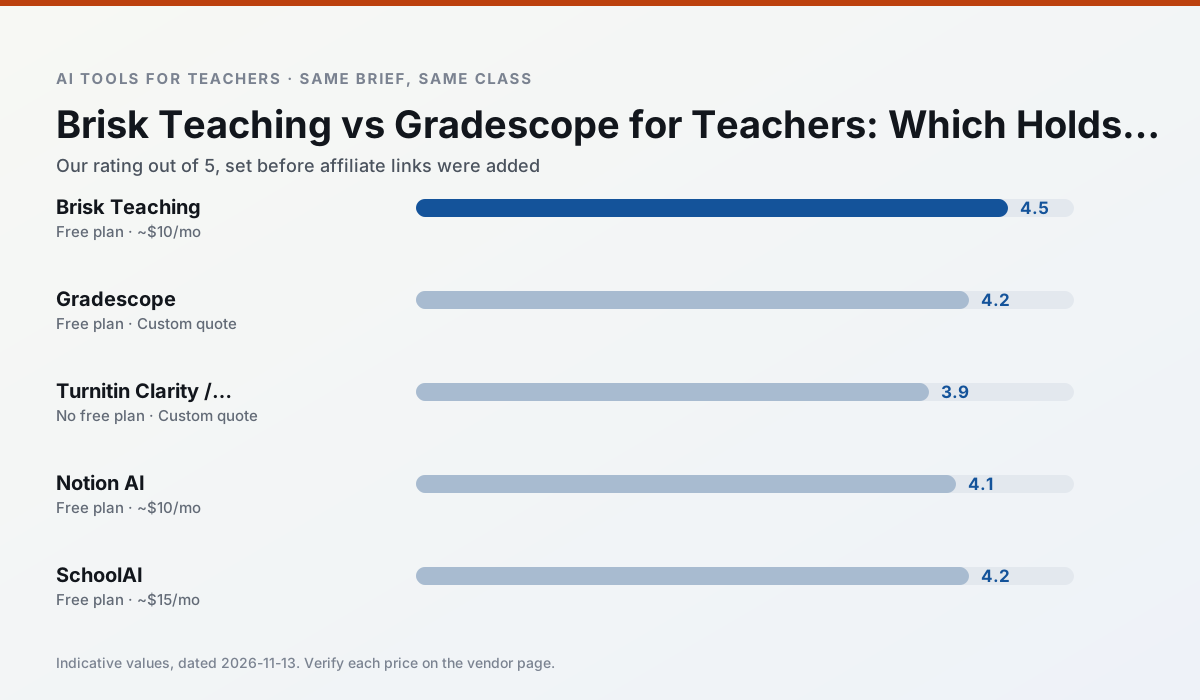
Side by side
Comparison table
Ratings reflect our timed classroom workflow, not vendor claims. Prices are indicative — verify on the vendor site.
| Tool | Best for | Free tier | Indicative paid plan | Standout feature | Our rating | Verdict | Try the tool |
|---|---|---|---|---|---|---|---|
| Brisk Teaching | feedback on writing · grading | Yes — Limited actions per month | ~$10 /user/mo | Works inside Google Docs | 4.5 / 5 | Top pick | Try free |
| Gradescope | grading · rubric creation | Yes — Limited courses | Custom quote | Bubble sheet and handwriting capture | 4.2 / 5 | Strong option | Try free |
| Turnitin Clarity / Feedback Studio | feedback on writing · academic integrity | No ongoing free plan | Custom quote | Similarity reports | 3.9 / 5 | Situational | Try free |
| Notion AI | curriculum mapping · unit planning | Yes — Limited AI usage | ~$10 /user/mo | Linked databases | 4.1 / 5 | Situational | Try free |
| SchoolAI | student-safe AI · differentiated instruction | Yes — Limited seats | ~$15 /user/mo | Teacher-monitored student chats | 4.2 / 5 | Strong option | Try free |
| Class Companion | grading · feedback on writing | Yes — Limited assignments | ~$12 /user/mo | Handwriting recognition | 4.1 / 5 | Situational | Try free |
Match your situation
Best for X
Different jobs need different tools. Here is what we would open first in each case.
Brisk Teaching has the strongest tone control for family emails and report comments, provided you still read the message aloud before sending.
Gradescope produces levelled versions from one source in a single pass, which is the highest-value differentiation shortcut we tested at this level.
For anything students touch directly, Turnitin Clarity / Feedback Studio offers the supervision controls and logging that IT will ask about first.
If there is no budget, start with Notion AI: free plan with clearest quota is the least punishing free tier here.
Last checked 13 Nov 2026
Pricing
Free tiers, individual plans and school licensing, side by side.
| Tool | Free plan | Individual / paid | School & district | Billing note | Verify |
|---|---|---|---|---|---|
| Brisk Teaching | $0 — Limited actions per month | ~$10 /user/mo | Custom quote | Indicative — verify on vendor site | Vendor |
| Gradescope | $0 — Limited courses | Custom quote | Custom quote | LMS integration and support | Vendor |
| Turnitin Clarity / Feedback Studio | No ongoing free tier | Custom quote | Custom quote | LMS-wide deployment | Vendor |
| Notion AI | $0 — Limited AI usage | ~$10 /user/mo | ~$8 /user/mo | Indicative — verify on vendor site | Vendor |
| SchoolAI | $0 — Limited seats | ~$15 /user/mo | Custom quote | Indicative — verify on vendor site | Vendor |
| Class Companion | $0 — Limited assignments | ~$12 /user/mo | Custom quote | Indicative — verify on vendor site | Vendor |
Editorial rule: pricing is re-checked every 2–3 months and the top 50 pages are refreshed every 6 months. See our funding policy.
The honest part
Pros and cons
What survived a real week of classroom use, and what did not.
Pros
- No copy-paste between tools
- Fast inline feedback on student drafts
- Gentle learning curve
Cons
- Chrome-first workflow
- Extension permissions need IT approval
- Free quota is tight
Pros
- Large time savings on paper assessments
- Consistent rubric application
- Detailed item analytics
Cons
- Overkill for elementary classrooms
- Institutional pricing is opaque
- Setup effort is real
Pros
- Already licensed at many schools
- Consistent institutional workflow
- Detailed revision history
Cons
- Individual teachers cannot buy it
- AI detection remains contested
- Heavy administrative setup
Pros
- Great for long-term curriculum records
- Strong team collaboration
- Flexible structure
Cons
- Setup time is significant
- AI add-on pricing changed more than once
- Not purpose-built for lesson generation
Pros
- Designed for district approval
- Teacher visibility into student use
- Good safeguarding defaults
Cons
- Requires school-wide buy-in
- Less flexible than general LLMs
- Pricing is mostly quote-based
In the classroom
Use cases
Five concrete workflows, with the tool we would open for each one.
Regrouping students after an assessment
Summarise anonymised results into skill groups, then generate one activity per group. Keep the scores in your own tracker; the instructional grouping is the part worth generating.
Recommended: Brisk TeachingA weekly family newsletter from bullet notes
Newsletters fail on length, not tone. Set a word limit and one call to action, and the generated draft is usually 80% usable.
Recommended: GradescopeAn IEP present-levels first draft
Use aggregated, anonymised data only. Ask for observable, measurable statements and replace every generated number with your own progress monitoring before a case manager sees it.
Recommended: Turnitin Clarity / Feedback StudioA five-minute exit ticket set
Ask for one recall, one application and one reasoning item, then delete the second recall question every generator sneaks in.
Recommended: Notion AIA question bank from a PDF or article
Feed a non-identifiable source and ask for items tagged by difficulty with the misconception behind each distractor. Spot-check every answer key; numerical items are least reliable.
Recommended: SchoolAI
Questions teachers ask us
FAQ
Direct answers, also published as FAQPage structured data for search and AI assistants.
Brisk Teaching or Gradescope for lesson planning?
Which is cheaper for one teacher?
Do they produce the same output?
Sources & further reading
Our recommendation
Try Notion AI free for your next lesson planning task
AI-assisted notes, databases and curriculum planning in one workspace. Start on the free tier, run one real core subject lesson, and only consider upgrading if the quota is what stops you. Disclosure: we may earn a commission (varies) at no extra cost to you.
Some links on this page are affiliate links. We may earn a commission at no extra cost to you. Our rankings are editorial and never pay-to-play. Never enter student PII into a free consumer account.
Keep reading
Related comparisons in this cluster.
Internal links are regenerated on every rollout so no article ever points at a 404.