The short answer
- Canva for Education is our default pick for teachers who need to draft a standards-aware lesson plan quickly; Curipod is better when differentiation is the bottleneck.
- All 3 shortlisted tools are priced for one teacher first and a school second. Canva for Education and Curipod are the two worth trialling on a real task before any purchase conversation.
- Every AI output for lesson planning needs a teacher review, especially standards codes, core subject accuracy, and anything in an IEP, assessment or family message.
- Everything on this page dates from 2026-11-13; where a price could not be re-read, the row says so.
Start with MagicSchool AI on its free plan.
The Sunday Night Lesson Prep Problem
It is 8:45 PM on a Sunday, and I am staring at a blank slide deck while my coffee goes cold. I need to introduce photosynthesis tomorrow to twenty-eight ninth-graders whose attention spans vary wildly between hyper-focused and comatose. This is the exact moment when the eternal debate of Canva for Education vs Curipod becomes relevant. Both promise to save my evening, but they approach the problem from completely opposite directions. One wants to make my materials look like a professional graphic design agency built them, while the other wants to turn my slide deck into an interactive feedback loop before the bell rings.
Having spent the last term testing both platforms across my general and honors biology blocks, the differences go far beyond user interfaces. If you are trying to decide which tool deserves a bookmark on your browser bar alongside other platforms reviewed in our best AI tools for teachers 2026 guide, you need to know how they handle real instructional friction. Let us look at what happens when you feed the exact same topic brief into both systems and watch them sweat.
The Monday Morning Lesson Plan in Twelve Minutes
When you need a functional sequence without spending three hours on Pinterest, speed matters. The twelve-minute mark is my hard stop for lesson generation because any longer and I might as well open a blank Google Doc. I tested Canva for Education and Curipod with a brief for a forty-five-minute introduction to cellular respiration.
Prompt: "Create a 45-minute lesson sequence for 9th-grade biology on cellular respiration. Include an anticipatory set, direct instruction slides, a student activity, and an exit ticket. Keep text concise for slide format."
What Canva for Education returned: A visually stunning, six-slide presentation with modern typography, custom illustrations of mitochondria, and clean placeholder text boxes. It looked like it belonged in a science textbook. What Curipod returned: A ten-slide interactive deck featuring an open-ended question slide, a word cloud prompt, a multiple-choice check for understanding, and a drawing slide where students could sketch a diagram. The two edits that made Canva usable: I had to manually add engagement prompts because Canva's AI focuses entirely on layout and text generation, leaving the actual pedagogy blank. I also swapped out two of the decorative graphics because they cluttered the visual field for my students with IEPs. The two edits that made Curipod usable: I completely rewrote the slide backgrounds, which defaulted to a cartoonish template that my high schoolers would have rolled their eyes at. I also trimmed the instructional text because the AI tried to cram an entire textbook paragraph onto a single slide.
The twelve minutes come from not rewriting the skeleton. Canva gives you the best-for-mixed-ability-classes layout by default, while Curipod gives you the structure for immediate student response.
Visual Polish Versus Active Participation
Canva for Education is a free design suite for verified educators that includes robust AI writing and image generation tools. The platform shines when you need to differentiate materials quickly. If I have three reading levels in the room, I can use Canva's Magic Write to spin off summarized versions of a text, drop them into pre-made graphic organizer templates, and have visually distinct worksheets ready in minutes. The massive template library means you never stare at a blank white page. However, the AI features are strictly capped, and it is entirely too easy to produce cluttered slides if you rely on the automated layout suggestions without editing them down.
Curipod takes a different path by focusing on turning a topic into an interactive, student-response lesson in minutes. You type in a topic, and it builds slides with built-in polls, word clouds, drawings, and feedback loops. The strength here is high student engagement right out of the box. You do not need student accounts for basic use, which bypasses the usual twenty-minute password reset ritual at the start of class. On the flip side, Curipod is focused entirely on delivery rather than long-term planning, and it completely falls apart if your classroom devices lose Wi-Fi for even ten minutes.
Where Other AI Tools Fit the Workflow
Neither Canva nor Curipod works in a vacuum. When my planning requires specific item types or rapid question generation, I pull in other tools from my digital toolkit. For quick formative assessment data, I often turn to Quizizz, which remains the best for student-safe deployments thanks to solid COPPA and FERPA documentation. Students already know the interface, and it works reliably on low-end district Chromebooks without crashing.
For instant recall practice at the start of a unit, Kahoot! is still the best overall for daily use. The brand familiarity means zero training time, though you have to accept that the frantic time pressure suits memorization much better than deep reasoning. If I am building resources from scratch across multiple preps, MagicSchool AI offers a massive library of teacher-specific generators that require almost no prompting skill to yield usable drafts. Meanwhile, platforms like Writesonic sit in my peripheral vision as budget-friendly writing assistants, though their generic classroom output rarely beats a dedicated education tool. If you want to see how these writing-heavy platforms compare to specialized assistants, check out this breakdown of Brisk Teaching vs MagicSchool AI.
Guardrails, Privacy, and Data Realities
Using AI in a public school classroom means reading the fine print, assuming your district technology department hasn't already blocked the URL. Canva for Education has specific student-data terms tied to its education tier, which you should review before having students log in to create their own designs. Curipod defaults to anonymous student responses, which lowers the barrier for participation and sidesteps some immediate privacy hurdles, but you still need to verify data retention policies with your IT administrator.
The golden rule of AI generation remains constant regardless of the software you choose: never trust an answer key blindly. When I generate question banks or exit tickets, numerical items and distractors frequently contain subtle errors that require a human teacher to catch before students ever see the screen.
Making the Final Call in Your Classroom
Choosing between these two platforms comes down to what hurts more on a given Tuesday: ugly slides or dead silence from your students. Canva for Education wins if your primary bottleneck is visual communication, graphic organization, and differentiation across mixed-ability groups. Curipod wins if your students are half-asleep and you need an interactive pulse check that forces every single person in the room to type an answer rather than hiding in the back row.
Keep your learning objective front and center, use the AI to do the heavy lifting on the skeleton, and inject your own voice before the first bell rings.
FAQ
Canva for Education or Curipod for lesson planning?
Canva for Education for breadth and speed, Curipod when the output goes to a colleague or a family and has to be right first time.
Which is cheaper for one teacher?
Compare the free quotas first, then the individual plans. In most weeks the free plan decides the purchase, not the list price.
Do they produce the same output?
On simple tasks, often yes, and that is a useful result: it points at the cheaper, better-governed option rather than the one with more features.
Sources
- Canva. Canva for Education Features and Verification. Accessed November 2026.
- Curipod. Interactive Lessons and AI Lesson Maker Overview. Accessed November 2026.
- Quizizz. AI Quiz Generation and Compliance Documentation. Accessed November 2026.
- Kahoot! Gamified Learning and Pricing Tiers. Accessed November 2026.
- MagicSchool AI. Teacher AI Toolset and Privacy Policies. Accessed November 2026.
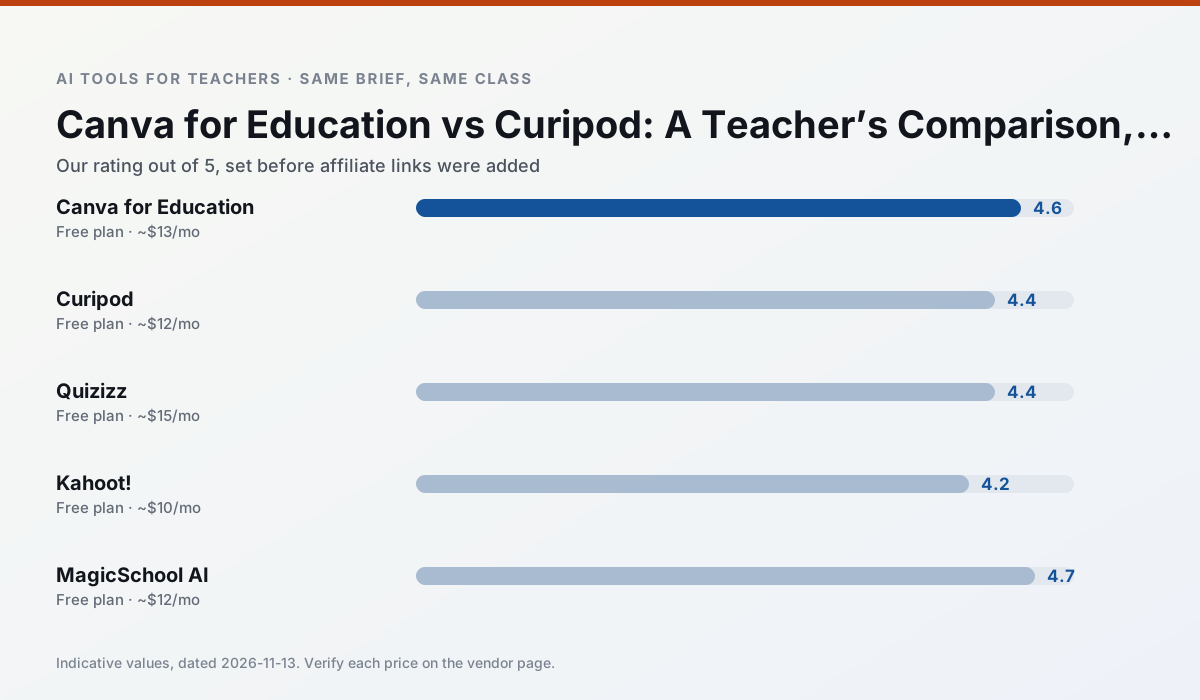
Side by side
Comparison table
Ratings reflect our timed classroom workflow, not vendor claims. Prices are indicative — verify on the vendor site.
| Tool | Best for | Free tier | Indicative paid plan | Standout feature | Our rating | Verdict | Try the tool |
|---|---|---|---|---|---|---|---|
| Canva for Education | slide decks · worksheets | Yes — Verification required | ~$13 /user/mo | Thousands of education templates | 4.6 / 5 | Top pick | Try free |
| Curipod | formative assessment · exit tickets | Yes — Limited lessons per month | ~$12 /user/mo | Live polls and word clouds | 4.4 / 5 | Strong option | Try free |
| Quizizz | quiz generation · formative assessment | Yes — Core quiz creation | ~$15 /user/mo | AI question generator | 4.4 / 5 | Strong option | Try free |
| Kahoot! | quiz generation · review lessons | Yes — Limited player count | ~$10 /user/mo | AI question builder | 4.2 / 5 | Strong option | Try free |
| MagicSchool AI | lesson planning · differentiation | Yes — Core generators with monthly usage limits | ~$12 /user/mo | 80+ teacher-specific tools | 4.7 / 5 | Top pick | Try free |
| Writesonic | newsletters · parent communication | Yes — Limited credits | ~$16 /user/mo | Article and email generators | 3.8 / 5 | Situational | Try free |
Match your situation
Best for X
Different jobs need different tools. Here is what we would open first in each case.
Canva for Education keeps the same task across levels, which is what makes a differentiated set defensible in moderation.
Curipod has the strongest tone control for family emails and report comments, provided you still read the message aloud before sending.
Quizizz is built around teacher-monitored student spaces and audit logs rather than a consumer chat account, which is a different approval conversation.
Kahoot! wins on the default path: fewer clicks to a usable draft, and the interface does not get in the way at 7:40am.
Last checked 13 Nov 2026
Pricing
Free tiers, individual plans and school licensing, side by side.
| Tool | Free plan | Individual / paid | School & district | Billing note | Verify |
|---|---|---|---|---|---|
| Canva for Education | $0 — Verification required | ~$13 /user/mo | Custom quote | Indicative — verify on vendor site | Vendor |
| Curipod | $0 — Limited lessons per month | ~$12 /user/mo | Custom quote | Indicative — verify on vendor site | Vendor |
| Quizizz | $0 — Core quiz creation | ~$15 /user/mo | Custom quote | Indicative — verify on vendor site | Vendor |
| Kahoot! | $0 — Limited player count | ~$10 /user/mo | Custom quote | Indicative — verify on vendor site | Vendor |
| MagicSchool AI | $0 — Core generators with monthly usage limits | ~$12 /user/mo | Custom quote | Indicative — verify on vendor site | Vendor |
| Writesonic | $0 — Limited credits | ~$16 /user/mo | ~$49 /user/mo | Indicative — verify on vendor site | Vendor |
Editorial rule: pricing is re-checked every 2–3 months and the top 50 pages are refreshed every 6 months. See our funding policy.
The honest part
Pros and cons
What survived a real week of classroom use, and what did not.
Pros
- Effectively free for verified teachers
- Huge template library
- No design skills needed
Cons
- AI features are capped
- Easy to produce cluttered slides
- Account verification can be slow
Pros
- High student engagement out of the box
- Great for quick checks for understanding
- No student accounts required for basic use
Cons
- Focused on delivery, not planning
- Requires reliable classroom devices
- Free tier is restrictive
Pros
- Students already know the interface
- Good reporting
- Works on low-end devices
Cons
- Writing high-quality AI questions still needs review
- Gamification can distract
- Advanced analytics are paid
Pros
- Instant engagement
- Very low training time
- Strong brand familiarity
Cons
- Less depth for higher-order assessment
- Paid tiers needed for larger classes
- Time pressure suits recall more than reasoning
Pros
- Widest purpose-built template library
- Strong free tier for individual teachers
- Fast to learn with almost no prompting skill
Cons
- Outputs still need standards review
- Best features sit behind the paid tier
- District approval can be slow
In the classroom
Use cases
Five concrete workflows, with the tool we would open for each one.
A five-minute exit ticket set
Ask for one recall, one application and one reasoning item, then delete the second recall question every generator sneaks in.
Recommended: Canva for EducationAn IEP present-levels first draft
Use aggregated, anonymised data only. Ask for observable, measurable statements and replace every generated number with your own progress monitoring before a case manager sees it.
Recommended: CuripodA substitute folder that needs no context
The value here is structure, not creativity. Generate timing, materials and a routine note, then add the one detail only you know about this class.
Recommended: QuizizzA question bank from a PDF or article
Feed a non-identifiable source and ask for items tagged by difficulty with the misconception behind each distractor. Spot-check every answer key; numerical items are least reliable.
Recommended: Kahoot!A Monday morning lesson plan in twelve minutes
The twelve minutes come from not rewriting the skeleton. Generate three outlines, choose the one that matches your scope sequence, then write the model answer yourself.
Recommended: MagicSchool AI
Questions teachers ask us
FAQ
Direct answers, also published as FAQPage structured data for search and AI assistants.
Canva for Education or Curipod for lesson planning?
Which is cheaper for one teacher?
Do they produce the same output?
Sources & further reading
Our recommendation
Try MagicSchool AI free for your next lesson planning task
A large library of teacher-specific AI generators in one dashboard. Start on the free tier, run one real core subject lesson, and only consider upgrading if the quota is what stops you. Disclosure: we may earn a commission (30% recurring) at no extra cost to you.
Some links on this page are affiliate links. We may earn a commission at no extra cost to you. Our rankings are editorial and never pay-to-play. Never enter student PII into a free consumer account.
Keep reading
Related comparisons in this cluster.
Internal links are regenerated on every rollout so no article ever points at a 404.