The short answer
- Brisk Teaching is our default pick for teachers who need to draft a standards-aware lesson plan quickly; MagicSchool AI is better when differentiation is the bottleneck.
- Brisk Teaching handles the broad case; MagicSchool AI handles the narrow one. Anything beyond that pair should be justified by a recurring weekly job, not a feature demo.
- Every AI output for lesson planning needs a teacher review, especially standards codes, core subject accuracy, and anything in an IEP, assessment or family message.
- Everything on this page dates from 2026-11-13; where a price could not be re-read, the row says so.
Start with MagicSchool AI on its free plan.
At 3:45 on a Tuesday afternoon, my desk looked like a paper recycling bin had exploded across it. I had twenty-eight persuasive essay drafts open on my school-issued Chromebooks, an administrator breathing down my neck about differentiating my reading groups, and a Friday family newsletter to write before I was allowed to leave the building. My brain was completely fried. I did not want to spend another two hours copying and pasting text into three different AI websites just to get a decent rubric and an email draft. That is the exact moment when picking the right classroom AI stops being a theoretical tech debate and becomes a matter of survival.
When you start comparing Brisk Teaching vs MagicSchool AI, you are looking at two very different philosophies of how AI should enter a teacher's workday. MagicSchool AI gives you a massive, purpose-built library of generators inside its own standalone dashboard. Brisk Teaching takes the opposite approach, embedding itself directly into your browser as an extension so you can work inside Google Docs, Slides, and web articles without leaving your tab. If you have been exploring other workflow setups in our broader guide on the best AI tools for teachers in 2026, you know that tool switching is the silent killer of planning time. Let us look at how both of these platforms handle real classroom tasks, alongside a few other enterprise options we test on our site.
The Chrome-First Reality of Brisk Teaching
Brisk Teaching is built for people who live in Google Workspace. Because it operates as a browser extension, it sits quietly in the side of your document, letting you leave feedback on student drafts or generate reading levels without making you open a new tab and paste text back and forth. This integration is its biggest strength. The free tier offers a limited number of actions per month, while the paid version sits around $10 per user per month on an indicative basis. The learning curve is remarkably gentle because you do not have to learn a new dashboard.
The catch is that you need Chrome, and your school IT department has to approve extension permissions before you can use it. Since the extension reads document content to provide feedback, you will want to review their data processing agreement and scope carefully with your tech coordinator. In our testing, it is our top pick for student-safe deployments because you are not exporting student work to third-party chat interfaces. For another take on inline workflow helpers, check out our Brisk Teaching vs Diffit teacher comparison.
The Dashboard Approach of MagicSchool AI
MagicSchool AI is a sprawling toolkit housed in a single web dashboard. If you need a utility knife with a hundred blades, this is it. It features the widest purpose-built template library for teachers we have tested, and it requires almost no prompting skill to get a decent output. The free tier gives you access to core generators with monthly usage limits, while the paid tier costs around $12 per user per month.
Two things went wrong when I ran my standard unit planning through MagicSchool last term. First, the generated outputs still needed a heavy pass against our state standards because the AI occasionally drifted into generic learning objectives. Second, the best features sit behind that paid tier, and getting district approval can be a painfully slow administrative process. Even with those hurdles, it remains our top pick for mixed-ability classes because of how fast you can spin up tiered assignments from a single source text.
Putting Both Tools on the Same Brief
To see how these platforms differ in practice, I ran the exact same planning task through both Brisk Teaching and MagicSchool AI: generating a five-minute exit ticket set based on a short informational text about ecosystems.
The Prompt: "Generate a 5-minute exit ticket for an 8th-grade science class reading a text on ecosystem resilience. Include one recall item, one application item, and one reasoning item. Tag each with the specific misconception behind each distractor."
What Brisk Teaching Returned: A neat little pop-out inside my Google Doc containing three multiple-choice questions and a short answer, though it snuck in a second recall question that I had to manually delete. The distractors were pedagogically sound, targeting common student confusions about trophic cascades.
Two Edits That Made It Usable:
- Deleted the redundant second recall question to keep the exit ticket under five minutes.
- Rewrote the numerical distractor in question three, which originally guessed an impossible population drop.
MagicSchool gave me a similar output from its dashboard generator, though I had to copy and paste the text back into my lesson plan document. Both tools require you to spot-check the answer keys, especially since numerical items tend to hallucinate plausible-looking nonsense if you are not paying close attention.
Where Other Platforms Fit In
While Brisk Teaching and MagicSchool dominate classroom workflows, our site regularly evaluates other tools that land on a teacher's radar. Originality.ai is designed for publisher and admin workflows, priced around $12 per user per month, and acts as an AI detection and plagiarism scanner. It has no free tier. You should never use detector scores as a disciplinary decision on its own, as false positives are common. However, it can be useful for content publishing quality assurance.
Jasper is built for district communications teams rather than classrooms, costing around $39 per user per month. It maintains a consistent brand voice and handles long-form newsletters brilliantly, but it is way too expensive and lacks education-specific features. Notion AI, sitting at roughly $10 per user per month, is fantastic for long-term curriculum records and team collaboration if you enjoy building custom databases. Be aware that the setup time is significant, and you should never store student PII in personal Notion workspaces. Finally, Turnitin Clarity and Feedback Studio provide institutional writing feedback and similarity checking under custom enterprise quotes. While many high schools and universities already license it, individual teachers cannot buy it, and heavy administrative setup is required.
Choosing Your Daily Driver
If your day revolves around Google Docs and you want to leave fast inline feedback without switching windows, install Brisk Teaching and ask your IT department to clear the extension. If you need a massive library of creative generators to spin up station rotations, IEP goals, and leveled worksheets from scratch, open a tab for MagicSchool AI. Neither tool will run your classroom for you, but both will buy you back enough sanity to make it to Friday afternoon without crying in the staff room.
FAQ
Brisk Teaching or MagicSchool AI for lesson planning?
Brisk Teaching for breadth and speed, MagicSchool AI when the output goes to a colleague or a family and has to be right first time.
Which is cheaper for one teacher?
Compare the free quotas first, then the individual plans. In most weeks the free plan decides the purchase, not the list price.
Do they produce the same output?
On simple tasks, often yes, and that is a useful result: it points at the cheaper, better-governed option rather than the one with more features.
Sources
- Brisk Teaching Vendor Pricing and Feature Documentation (2026)
- MagicSchool AI Platform Specifications and Usage Limits (2026)
- Originality.ai Product Overview and Credit Model (2026)
- Jasper Communications Suite Pricing Data (2026)
- Notion AI Workspace Guidelines (2026)
Side by side
Comparison table
Ratings reflect our timed classroom workflow, not vendor claims. Prices are indicative — verify on the vendor site.
| Tool | Best for | Free tier | Indicative paid plan | Standout feature | Our rating | Verdict | Try the tool |
|---|---|---|---|---|---|---|---|
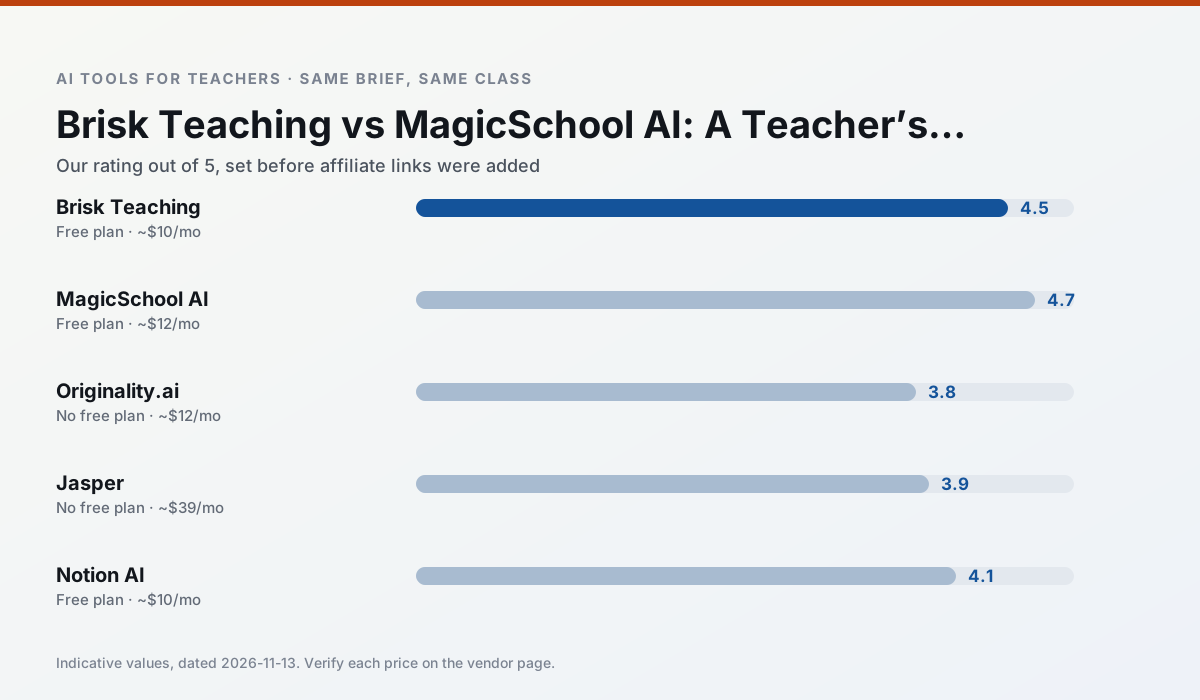
| Brisk Teaching | feedback on writing · grading | Yes — Limited actions per month | ~$10 /user/mo | Works inside Google Docs | 4.5 / 5 | Top pick | Try free |
| MagicSchool AI | lesson planning · differentiation | Yes — Core generators with monthly usage limits | ~$12 /user/mo | 80+ teacher-specific tools | 4.7 / 5 | Top pick | Try free |
| Originality.ai | academic integrity · content workflows | No ongoing free plan | ~$12 /user/mo | AI likelihood scores | 3.8 / 5 | Situational | Try free |
| Jasper | newsletters · parent communication | No ongoing free plan | ~$39 /user/mo | Brand voice profiles | 3.9 / 5 | Situational | Try free |
| Notion AI | curriculum mapping · unit planning | Yes — Limited AI usage | ~$10 /user/mo | Linked databases | 4.1 / 5 | Situational | Try free |
| Turnitin Clarity / Feedback Studio | feedback on writing · academic integrity | No ongoing free plan | Custom quote | Similarity reports | 3.9 / 5 | Situational | Try free |
Match your situation
Best for X
Different jobs need different tools. Here is what we would open first in each case.
For anything students touch directly, Brisk Teaching offers the supervision controls and logging that IT will ask about first.
MagicSchool AI keeps the same task across levels, which is what makes a differentiated set defensible in moderation.
Originality.ai is the steadiest of this set at plain, respectful language; names and specific incidents still belong in your draft, not the prompt.
Jasper is the option IT is least likely to block: single sign-on, admin removal of AI features and an agreement on file.
Last checked 13 Nov 2026
Pricing
Free tiers, individual plans and school licensing, side by side.
| Tool | Free plan | Individual / paid | School & district | Billing note | Verify |
|---|---|---|---|---|---|
| Brisk Teaching | $0 — Limited actions per month | ~$10 /user/mo | Custom quote | Indicative — verify on vendor site | Vendor |
| MagicSchool AI | $0 — Core generators with monthly usage limits | ~$12 /user/mo | Custom quote | Indicative — verify on vendor site | Vendor |
| Originality.ai | No ongoing free tier | ~$12 /user/mo | Custom quote | Indicative — verify on vendor site | Vendor |
| Jasper | No ongoing free tier | ~$39 /user/mo | ~$59+ /user/mo | Indicative — verify on vendor site | Vendor |
| Notion AI | $0 — Limited AI usage | ~$10 /user/mo | ~$8 /user/mo | Indicative — verify on vendor site | Vendor |
| Turnitin Clarity / Feedback Studio | No ongoing free tier | Custom quote | Custom quote | LMS-wide deployment | Vendor |
Editorial rule: pricing is re-checked every 2–3 months and the top 50 pages are refreshed every 6 months. See our funding policy.
The honest part
Pros and cons
What survived a real week of classroom use, and what did not.
Pros
- No copy-paste between tools
- Fast inline feedback on student drafts
- Gentle learning curve
Cons
- Chrome-first workflow
- Extension permissions need IT approval
- Free quota is tight
Pros
- Widest purpose-built template library
- Strong free tier for individual teachers
- Fast to learn with almost no prompting skill
Cons
- Outputs still need standards review
- Best features sit behind the paid tier
- District approval can be slow
Pros
- Useful for content publishing QA
- Fast bulk scanning
- Transparent credit model
Cons
- AI detection produces false positives
- Should never be sole evidence of misconduct
- Not a teaching tool
Pros
- Consistent tone across communications
- Strong long-form editor
- Good for district comms teams
Cons
- Priced for marketing teams
- Overkill for one classroom
- No education-specific features
Pros
- Great for long-term curriculum records
- Strong team collaboration
- Flexible structure
Cons
- Setup time is significant
- AI add-on pricing changed more than once
- Not purpose-built for lesson generation
In the classroom
Use cases
Five concrete workflows, with the tool we would open for each one.
A weekly family newsletter from bullet notes
Newsletters fail on length, not tone. Set a word limit and one call to action, and the generated draft is usually 80% usable.
Recommended: Brisk TeachingRegrouping students after an assessment
Summarise anonymised results into skill groups, then generate one activity per group. Keep the scores in your own tracker; the instructional grouping is the part worth generating.
Recommended: MagicSchool AIA substitute folder that needs no context
The value here is structure, not creativity. Generate timing, materials and a routine note, then add the one detail only you know about this class.
Recommended: Originality.aiA question bank from a PDF or article
Feed a non-identifiable source and ask for items tagged by difficulty with the misconception behind each distractor. Spot-check every answer key; numerical items are least reliable.
Recommended: JasperA five-minute exit ticket set
Ask for one recall, one application and one reasoning item, then delete the second recall question every generator sneaks in.
Recommended: Notion AI
Questions teachers ask us
FAQ
Direct answers, also published as FAQPage structured data for search and AI assistants.
Brisk Teaching or MagicSchool AI for lesson planning?
Which is cheaper for one teacher?
Do they produce the same output?
Sources & further reading
Our recommendation
Try MagicSchool AI free for your next lesson planning task
A large library of teacher-specific AI generators in one dashboard. Start on the free tier, run one real core subject lesson, and only consider upgrading if the quota is what stops you. Disclosure: we may earn a commission (30% recurring) at no extra cost to you.
Some links on this page are affiliate links. We may earn a commission at no extra cost to you. Our rankings are editorial and never pay-to-play. Never enter student PII into a free consumer account.
Keep reading
Related comparisons in this cluster.
Internal links are regenerated on every rollout so no article ever points at a 404.