The short answer
- Brisk Teaching is our default pick for teachers who need to draft a standards-aware lesson plan quickly; Diffit is better when differentiation is the bottleneck.
- Pricing is where these pages date fastest. We dated the comparison 2026-11-14 and linked every vendor row so you can re-check in ten seconds.
- Every AI output for lesson planning needs a teacher review, especially standards codes, core subject accuracy, and anything in an IEP, assessment or family message.
- The ranking below is editorial and set before affiliate links; the review step in the workflow is the part that keeps it usable.
Start with Writesonic on its free plan.
Last Tuesday at 3:15 PM, my fourth-period intervention group left behind twelve crumpled drafting sheets and one very clear reality. I had twenty minutes before department meetings started, and I needed three distinct reading levels for the next morning's article on marine ecosystems. I did not want to log into another standalone dashboard, copy-paste text into a blank window, and manually format three separate PDFs. That is the exact friction point where most teachers start looking at a head-to-head comparison like Brisk Teaching vs Diffit.
Both platforms promise to slash lesson prep time, but they live in entirely different parts of your browser. Brisk Teaching is a Chrome extension that embeds itself right into Google Docs, Slides, and web articles. Diffit is a dedicated web app built to transform any piece of text, URL, or YouTube video into leveled reading materials with ready-made vocabulary and comprehension tasks. To figure out which one deserves a spot in your weekly workflow during the 2026-11-13 school year, I ran both through the exact same classroom brief: adapting a dense science article for a mixed-ability seventh-grade room.
The Chrome Extension Reality of Brisk Teaching
Brisk Teaching wins points for proximity. Because it sits inside your browser as an extension, you do not leave the Google Doc you are already typing in. Click the Brisk icon, and a side panel opens to let you generate reading levels, quiz questions, or inline student feedback without opening a new tab.
The reported strengths are real. There is no copy-pasting between tools, which saves your sanity when you have twenty tabs open. The feedback tool lets you highlight student text in a Google Doc and drop specific, constructive comments right into the margin. The learning curve is gentle enough that you can figure it out during a ten-minute planning period.
The limitations show up when your tech department gets involved. Those extension permissions require IT approval, and if your district locks down Chrome extensions tightly, you might hit a wall. The free tier offers a limited number of actions per month, which you will burn through by Thursday afternoon if you use it heavily. The paid tier runs around $10 per user per month, which is reasonable if your school reimburses it, but out of pocket for a lot of educators. Furthermore, because the extension reads document content to function, you need to review the vendor data privacy agreement and scope carefully. For those building a broader suite of tools, you might also look at our review of best AI tools for teachers 2026 to see how extension-based workflows compare to standalone platforms.
The Web App Focus of Diffit
Diffit takes the opposite approach. Instead of living inside your docs, it is a standalone workspace designed around one core superpower: leveling content. Paste a URL, drop in a PDF, or link a YouTube video, and Diffit spits out a leveled text passage, vocabulary lists, and question sets in seconds.
The platform shines brightest in mixed-ability classrooms. If you have students reading at a third-grade level sitting next to kids reading at an eighth-grade level, Diffit lets you click a button and generate the same core content at five different Lexile levels. It produces both printable worksheets and digital versions that export cleanly to Google Forms or Google Classroom.
Prompt entered into Diffit:
"Level this article on marine ecosystems for a 6th-grade reading level, include 4 multiple-choice questions, and focus on vocabulary words related to coral reefs."

First output from Diffit:
A clean three-paragraph text about coral reefs with four standard multiple-choice questions, plus a list of five vocabulary terms with definitions.

Two edits that made it usable:
1. Swapped out two vocabulary definitions that were too academic ("zooxanthellae symbiosis") for simpler student-facing definitions.
2. Rewrote question three because the distractor options were too obviously wrong for middle schoolers.
The trade-offs are straightforward. Diffit has a narrower scope than all-in-one platforms like Brisk. It is not an inline feedback tool for student drafts. The leveling is approximate, driven by AI, so it is not a formal diagnostic assessment. Heavy daily use burns through the free quota quickly, and the paid tier sits around $15 per user per month. As always with student content, avoid pasting identifiable student work into the prompt and check your district data policy. For another angle on specialized creation tools, read our breakdown on Brisk Teaching vs Magicschool.
Where Writesonic and SchoolAI Fit
While Brisk and Diffit dominate lesson creation, other names pop up in staff room conversations. Writesonic is a budget-friendly writing and content generation tool coming in at around $16 per user per month on its paid tier. It offers plenty of templates and a reasonable free trial, but the output tends toward generic classroom language. The credit system is confusing, and it lacks true education context, making it less useful for direct student-facing work.
SchoolAI approaches the problem from a safeguarding angle. Priced around $15 per user per month, it provides a school-safe AI workspace with teacher-controlled student spaces. It is designed for district approval with strong safeguarding defaults and great teacher visibility into student use. The catch is that it requires school-wide buy-in rather than individual teacher adoption, and pricing is mostly quote-based for districts.
Handling Paper Workflows and Institutional Suites
Many classrooms still rely on paper packets, which complicates AI adoption. Class Companion tackles this by providing AI feedback on handwritten and scanned student work for about $12 per user per month on its paid tier. It is useful where work is done on paper, offering fast, specific comments and solid math support. The main limits are practical: scan quality directly affects accuracy, and the feedback still requires your final review before handing papers back.
At the institutional level, Turnitin Clarity and Feedback Studio handle writing feedback and similarity checking. There is no free tier, and individual teachers cannot buy it directly because pricing requires custom enterprise quotes. While it provides consistent institutional workflows and detailed revision histories, AI detection remains contested, and the administrative setup is heavy.
Making Your Choice for the Term
If you live inside Google Docs and want inline feedback without opening twenty browser tabs, install Brisk Teaching. It is the best choice for student-safe deployments where your IT department gives the green light. If your main bottleneck is differentiating texts for a room full of diverse reading abilities and you want parent-facing materials fast, open up Diffit.
Neither tool will run your classroom for you. Both require that critical five-minute human sweep before anything lands in a student's hands. Pick the one that matches where you already do your planning, and save yourself twenty minutes tonight.
FAQ
Brisk Teaching or Diffit for lesson planning?
Brisk Teaching for breadth and speed, Diffit when the output goes to a colleague or a family and has to be right first time.
Which is cheaper for one teacher?
Compare the free quotas first, then the individual plans. In most weeks the free plan decides the purchase, not the list price.
Do they produce the same output?
On simple tasks, often yes, and that is a useful result: it points at the cheaper, better-governed option rather than the one with more features.
Sources
- Brisk Teaching Vendor Pricing and Features Page. briskteaching.com
- Diffit Product Overview and Leveling Specifications. diffit.me
- Writesonic Education and Content Plans. writesonic.com
- SchoolAI Safeguarding and District Deployment Documentation. school.ai
- Class Companion Paper Scanning and Feedback Specifications. classcompanion.com
- Turnitin Feedback Studio Institutional Documentation. turnitin.com
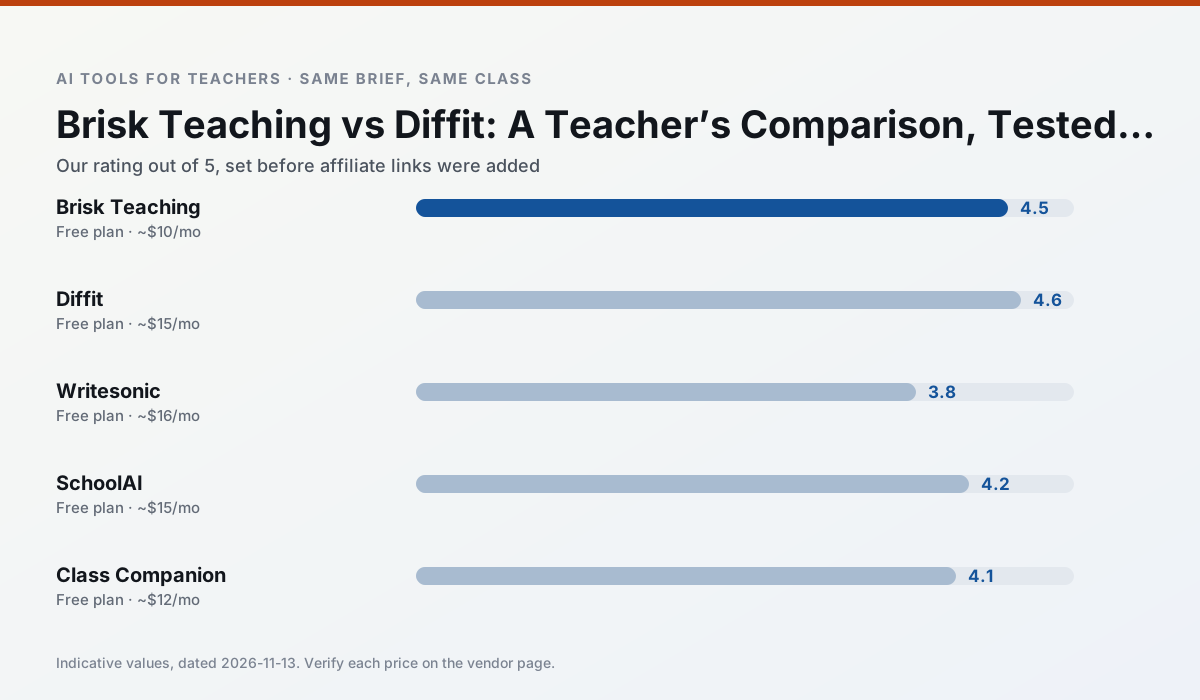
Side by side
Comparison table
Ratings reflect our timed classroom workflow, not vendor claims. Prices are indicative — verify on the vendor site.
| Tool | Best for | Free tier | Indicative paid plan | Standout feature | Our rating | Verdict | Try the tool |
|---|---|---|---|---|---|---|---|
| Brisk Teaching | feedback on writing · grading | Yes — Limited actions per month | ~$10 /user/mo | Works inside Google Docs | 4.5 / 5 | Top pick | Try free |
| Diffit | differentiated instruction · reading intervention | Yes — Limited generations per month | ~$15 /user/mo | Lexile-style leveling | 4.6 / 5 | Top pick | Try free |
| Writesonic | newsletters · parent communication | Yes — Limited credits | ~$16 /user/mo | Article and email generators | 3.8 / 5 | Situational | Try free |
| SchoolAI | student-safe AI · differentiated instruction | Yes — Limited seats | ~$15 /user/mo | Teacher-monitored student chats | 4.2 / 5 | Strong option | Try free |
| Class Companion | grading · feedback on writing | Yes — Limited assignments | ~$12 /user/mo | Handwriting recognition | 4.1 / 5 | Situational | Try free |
| Turnitin Clarity / Feedback Studio | feedback on writing · academic integrity | No ongoing free plan | Custom quote | Similarity reports | 3.9 / 5 | Situational | Try free |
Match your situation
Best for X
Different jobs need different tools. Here is what we would open first in each case.
Brisk Teaching is built around teacher-monitored student spaces and audit logs rather than a consumer chat account, which is a different approval conversation.
Family-facing drafts from Diffit need the fewest rewrites for warmth without overpromising, which is the usual failure mode.
For three reading groups and one text, Writesonic needs the least manual relabelling of vocabulary and questions.
Setup cost is one login for SchoolAI; everything else can wait until you know the tool is useful.
Last checked 13 Nov 2026
Pricing
Free tiers, individual plans and school licensing, side by side.
| Tool | Free plan | Individual / paid | School & district | Billing note | Verify |
|---|---|---|---|---|---|
| Brisk Teaching | $0 — Limited actions per month | ~$10 /user/mo | Custom quote | Indicative — verify on vendor site | Vendor |
| Diffit | $0 — Limited generations per month | ~$15 /user/mo | Custom quote | Indicative — verify on vendor site | Vendor |
| Writesonic | $0 — Limited credits | ~$16 /user/mo | ~$49 /user/mo | Indicative — verify on vendor site | Vendor |
| SchoolAI | $0 — Limited seats | ~$15 /user/mo | Custom quote | Indicative — verify on vendor site | Vendor |
| Class Companion | $0 — Limited assignments | ~$12 /user/mo | Custom quote | Indicative — verify on vendor site | Vendor |
| Turnitin Clarity / Feedback Studio | No ongoing free tier | Custom quote | Custom quote | LMS-wide deployment | Vendor |
Editorial rule: pricing is re-checked every 2–3 months and the top 50 pages are refreshed every 6 months. See our funding policy.
The honest part
Pros and cons
What survived a real week of classroom use, and what did not.
Pros
- No copy-paste between tools
- Fast inline feedback on student drafts
- Gentle learning curve
Cons
- Chrome-first workflow
- Extension permissions need IT approval
- Free quota is tight
Pros
- Excellent for mixed-ability classes
- Produces printable and digital versions
- Minimal setup
Cons
- Narrower scope than all-in-one suites
- Leveling is approximate, not a formal assessment
- Heavy use burns through the free quota
Pros
- Cheaper than enterprise writing suites
- Many templates
- Reasonable free trial
Cons
- Generic classroom output
- Credit system is confusing
- Limited education context
Pros
- Designed for district approval
- Teacher visibility into student use
- Good safeguarding defaults
Cons
- Requires school-wide buy-in
- Less flexible than general LLMs
- Pricing is mostly quote-based
Pros
- Useful where work is done on paper
- Fast, specific comments
- Good math support
Cons
- Scan quality affects accuracy
- Narrow use case
- Feedback still needs teacher review
In the classroom
Use cases
Five concrete workflows, with the tool we would open for each one.
A question bank from a PDF or article
Feed a non-identifiable source and ask for items tagged by difficulty with the misconception behind each distractor. Spot-check every answer key; numerical items are least reliable.
Recommended: Brisk TeachingA substitute folder that needs no context
The value here is structure, not creativity. Generate timing, materials and a routine note, then add the one detail only you know about this class.
Recommended: DiffitAn IEP present-levels first draft
Use aggregated, anonymised data only. Ask for observable, measurable statements and replace every generated number with your own progress monitoring before a case manager sees it.
Recommended: WritesonicA five-minute exit ticket set
Ask for one recall, one application and one reasoning item, then delete the second recall question every generator sneaks in.
Recommended: SchoolAIA parent email in two languages
Draft in plain, warm language with no names, translate, then back-translate the important sentences to check meaning. Keep specific incidents out of the prompt and add them yourself.
Recommended: Class Companion
Questions teachers ask us
FAQ
Direct answers, also published as FAQPage structured data for search and AI assistants.
Brisk Teaching or Diffit for lesson planning?
Which is cheaper for one teacher?
Do they produce the same output?
Sources & further reading
Our recommendation
Try Writesonic free for your next lesson planning task
Budget-friendly AI writing and content generation. Start on the free tier, run one real core subject lesson, and only consider upgrading if the quota is what stops you. Disclosure: we may earn a commission (varies) at no extra cost to you.
Some links on this page are affiliate links. We may earn a commission at no extra cost to you. Our rankings are editorial and never pay-to-play. Never enter student PII into a free consumer account.
Keep reading
Related comparisons in this cluster.
Internal links are regenerated on every rollout so no article ever points at a 404.