The short answer
- ChatGPT is our default pick for teachers who need to draft a standards-aware lesson plan quickly; Eduaide.Ai is better when differentiation is the bottleneck.
- Free-tier reality for this shortlist: ChatGPT: Yes — Usage-limited model access; Eduaide.Ai: Yes — Daily generation cap; Kahoot!: Yes — Limited player count. Treat every paid figure as indicative until you have read the vendor page; only the free quota is something you can test yourself this week.
- Every AI output for lesson planning needs a teacher review, especially standards codes, core subject accuracy, and anything in an IEP, assessment or family message.
- Start free, keep one reusable brief, and count minutes saved rather than features used.
Start with MagicSchool AI on its free plan.
At 3:15 on a Tuesday afternoon, nobody wants to rewrite a rubric for a comparative essay about the Dust Bowl. You have forty open tabs, a stack of lab reports sitting on the corner of your desk, and an administrator walking the halls. That is when most teachers turn to AI. When comparing ChatGPT vs Eduaide.Ai for teachers, the real question is not which platform has the flashiest marketing page, but which one survives actual contact with a tired educator who needs a worksheet generated before the bell rings tomorrow.
Evaluating generative AI tools requires looking at how they hold up during a heavy planning week in 2026-11-13. A tool that looks great in a ten-minute demo can fall apart when you need nuanced standards-aligned output without spending twenty minutes prompting it into shape. If you are trying to figure out which subscription is worth your own money or your department's dwindling budget, you need a clear breakdown of what these platforms actually do in the classroom.
The Case for General-Purpose Flexibility
ChatGPT remains the best free option if you want a tool that can adapt to almost any classroom task. Because it is a general-purpose assistant, it does not lock you into specific worksheet templates or rigid generation loops. If you want to brainstorm three different ways to introduce quadratic functions to tenth graders who are half-asleep, it delivers. The free tier offers usage-limited model access, while the paid tier costs around $20 per user per month.
The primary strength of ChatGPT is its sheer flexibility and a massive community of teacher prompt libraries. If you need strong multilingual support to translate a parent communication email into Spanish, Vietnamese, and Arabic in one go, it handles the syntax naturally. The downside is that it requires strong prompt skills to get consistent results. It has no built-in standards alignment unless you feed the benchmarks into the prompt yourself, and district privacy review is usually required. If you are looking at broader options or want to see how these fit into a larger software stack, take a look at our roundup of the best AI tools for teachers 2026.
Dedicated Lesson Design and Resource Generation
Eduaide.Ai takes a different route by focusing directly on lesson, rubric, and worksheet generation housed within a clean, uncluttered teaching-resource library. It stands out as our pick for the best overall for daily use, primarily because it cuts out the blank-page syndrome. The free tier comes with a daily generation cap, and the paid version runs around $10 per user per month, making it one of the more budget-friendly options for individual educators.
The interface is deliberately minimal, meaning you spend less time hunting through menus and more time clicking generate. Its worksheets and rubrics are generally well-formatted for immediate classroom deployment. However, it does have limitations. The template set is smaller than what you might find on other platforms like MagicSchool, export options can feel a bit unpolished, and integrations with standard learning management systems are limited. You still need to confirm data retention settings before you use it with any student data.
Prompt: Create a four-column rubric for a high school persuasive essay focusing on claim, evidence, reasoning, and counter-argument. Use a 4-point scale.
Output: A standard table with generic band descriptions like "the student shows good understanding" repeated across multiple criteria boxes.
Edits:
- Restrict the generation to comment banks rather than full rubrics first, keeping your department's specific wording intact.
- Add explicit cognitive verbs to each performance band to stop the model from inventing a fifth evaluation criterion.
Quiz Games and Live Review Sessions
When it comes to livening up a Friday review session, Kahoot! remains a staple for quick setup. It is our choice for the best for quick setup due to instant student engagement and minimal training time. The free tier limits player count, while paid tiers hover around $10 per user per month. Teachers love the brand familiarity and the immediate spike in classroom energy when the game music starts playing.
At the same time, Kahoot! has distinct limits. It lacks depth for higher-order assessment. The time pressure baked into the game mechanics suits quick recall far better than deep reasoning or complex problem-solving. Furthermore, younger students should use nicknames rather than real names to keep privacy protocols tight, and larger classes require paid tiers to avoid getting locked out.
Comprehensive Quiz Banks and School Integrations
Quizizz bridges the gap between gamified review and formal formative assessment, earning our ranking as the best for schools and districts. Students already know the interface well, and the platform offers robust reporting that works reliably even on low-end school-issued devices. The free tier covers core quiz creation, while paid tiers run around $15 per user per month.
The platform boasts a massive question bank and AI-assisted generation tools, but writing high-quality questions still requires a careful human eye. If you import a PDF or an article to build a question bank, examine the distractor rationales closely. The distractor rationale is the part worth keeping; if the generator cannot name the specific misconception a wrong option tests, delete that option immediately. Gamification can also occasionally distract students from the core content, and advanced analytics require a paid subscription. For a deeper dive into how specialized tools compare in specific workflows, read our breakdown of Brisk Teaching vs Diffit.
Long-Context Planning and Browser-Based Feedback
Claude and Brisk Teaching serve entirely different parts of the teacher's workflow. Claude operates as a long-context assistant suited to document-heavy planning and feedback, running around $20 per user per month on its paid tier, with a usage-limited free option. It handles full unit plans and long rubrics with ease, producing nuanced prose that feels far less generic than standard AI outputs. It has no teacher-specific templates, however, and consumer plans are never suitable for student data.
Brisk Teaching takes a different approach entirely by functioning as a browser extension that brings AI feedback directly into Google Docs, Slides, and web articles. Priced around $10 per user per month with a tight free quota, it removes the friction of copy-pasting text between different tabs. You can generate a five-minute exit ticket set consisting of three questions at different cognitive levels plus one confidence check right inside your working document. If the generator suggests questions that only test recall of your exact classroom wording, discard them immediately. That only measures memory of the lesson, not actual learning. Because the extension reads document content directly, your district IT department will need to review the data privacy agreement and scope carefully.
What Went Wrong in Real Use
Working with these tools in a live classroom inevitably leads to friction. In one instance, an educator used a general-purpose AI to draft an IEP present-levels section for a struggling reader, assuming the output would be ready to paste into the official paperwork. The resulting text was far too generic, lacking specific reading fluency data and behavioral observations. The teacher quickly realized that the draft was only a starting point for a conversation, not a finished document. Present levels require hard assessment evidence, and AI cannot supply the evidence you failed to collect in class.
In another instance, a teacher attempted to generate a comprehensive substitute folder using an AI assistant without providing clear constraints. The model returned overly complex project-based activities that required device access and prior teacher modeling, which would have been a disaster for a substitute working with a dead laptop cart. The fix was simple: the teacher rewrote the prompt to enforce strict constraints, specifying no prior context, no devices, a forty-minute time limit, and a printable format. Everything else about a functional substitute folder follows naturally once those four boundaries are locked down.
FAQ
ChatGPT or Eduaide.Ai for lesson planning?
ChatGPT for breadth and speed, Eduaide.Ai when the output goes to a colleague or a family and has to be right first time.
Which is cheaper for one teacher?
Compare the free quotas first, then the individual plans. In most weeks the free plan decides the purchase, not the list price.
Do they produce the same output?
On simple tasks, often yes, and that is a useful result: it points at the cheaper, better-governed option rather than the one with more features.
Sources
- OpenAI. ChatGPT Pricing and Model Specifications. openai.com
- Eduaide.Ai. Platform Features and Resource Library Documentation. eduaide.ai
- Kahoot! Educator Plans and Feature Matrix. kahoot.com
- Quizizz. District Solutions and Assessment Tools. quizizz.com
- Anthropic. Claude Model Context and Enterprise Privacy Standards. anthropic.com
- Brisk Teaching. Browser Extension Integration and Privacy Overview. briskteaching.com
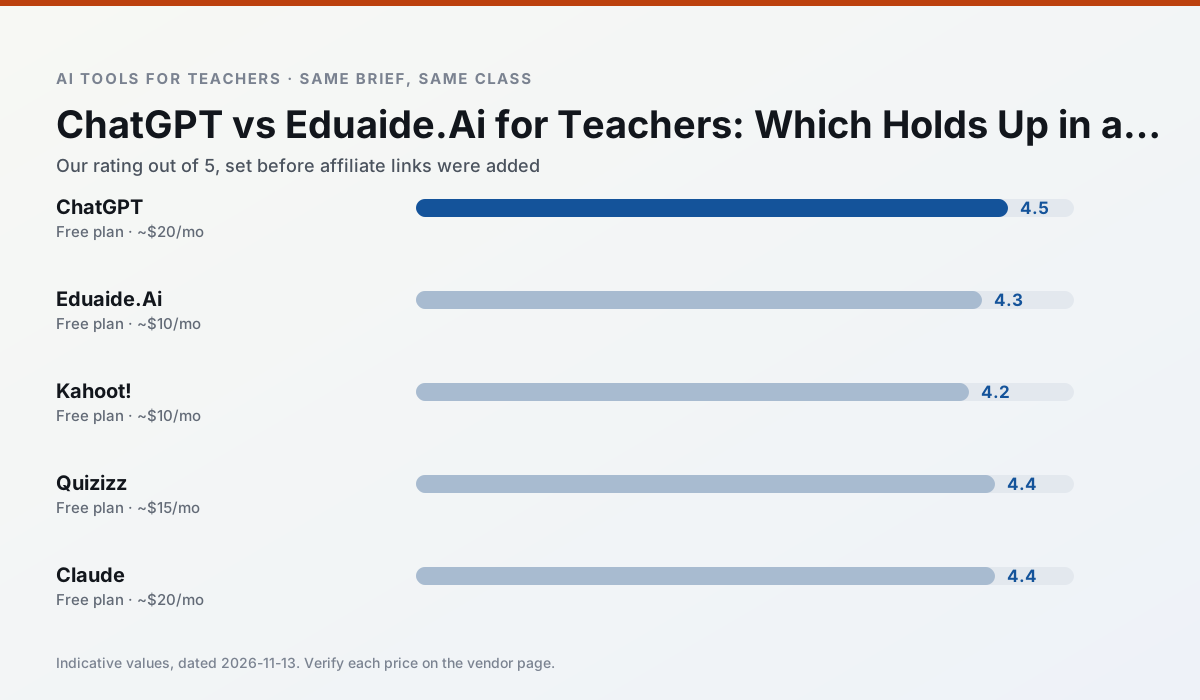
Side by side
Comparison table
Ratings reflect our timed classroom workflow, not vendor claims. Prices are indicative — verify on the vendor site.
| Tool | Best for | Free tier | Indicative paid plan | Standout feature | Our rating | Verdict | Try the tool |
|---|---|---|---|---|---|---|---|
| ChatGPT | lesson planning · parent communication | Yes — Usage-limited model access | ~$20 /user/mo | Custom GPTs and Projects | 4.5 / 5 | Top pick | Try free |
| Eduaide.Ai | lesson planning · rubric creation | Yes — Daily generation cap | ~$10 /user/mo | Resource library | 4.3 / 5 | Strong option | Try free |
| Kahoot! | quiz generation · review lessons | Yes — Limited player count | ~$10 /user/mo | AI question builder | 4.2 / 5 | Strong option | Try free |
| Quizizz | quiz generation · formative assessment | Yes — Core quiz creation | ~$15 /user/mo | AI question generator | 4.4 / 5 | Strong option | Try free |
| Claude | rubric creation · feedback on writing | Yes — Usage-limited | ~$20 /user/mo | Very large context window | 4.4 / 5 | Strong option | Try free |
| Brisk Teaching | feedback on writing · grading | Yes — Limited actions per month | ~$10 /user/mo | Works inside Google Docs | 4.5 / 5 | Top pick | Try free |
Match your situation
Best for X
Different jobs need different tools. Here is what we would open first in each case.
Nothing on ChatGPT's free tier is a teaser demo; the limits are documented and a normal week fits inside them.
On the daily cycle, Eduaide.Ai saves the most edit time per task; the paid tier mostly buys more runs rather than better ones.
Kahoot! runs in a browser tab with no extension, no student accounts and no onboarding call, so you can test it in a free period.
For a school rollout, Quizizz offers the paperwork and the admin console; the classroom features are standard by comparison.
Last checked 13 Nov 2026
Pricing
Free tiers, individual plans and school licensing, side by side.
| Tool | Free plan | Individual / paid | School & district | Billing note | Verify |
|---|---|---|---|---|---|
| ChatGPT | $0 — Usage-limited model access | ~$20 /user/mo | ~$25+ /user/mo | Indicative — verify on vendor site | Vendor |
| Eduaide.Ai | $0 — Daily generation cap | ~$10 /user/mo | Custom quote | Indicative — verify on vendor site | Vendor |
| Kahoot! | $0 — Limited player count | ~$10 /user/mo | Custom quote | Indicative — verify on vendor site | Vendor |
| Quizizz | $0 — Core quiz creation | ~$15 /user/mo | Custom quote | Indicative — verify on vendor site | Vendor |
| Claude | $0 — Usage-limited | ~$20 /user/mo | ~$25+ /user/mo | Indicative — verify on vendor site | Vendor |
| Brisk Teaching | $0 — Limited actions per month | ~$10 /user/mo | Custom quote | Indicative — verify on vendor site | Vendor |
Editorial rule: pricing is re-checked every 2–3 months and the top 50 pages are refreshed every 6 months. See our funding policy.
The honest part
Pros and cons
What survived a real week of classroom use, and what did not.
Pros
- Most flexible option available
- Huge community of teacher prompt libraries
- Strong multilingual support
Cons
- Requires prompt skills for consistent results
- No built-in standards alignment
- District privacy review usually required
Pros
- Very low entry price
- Good worksheet and rubric output
- Clean, uncluttered UI
Cons
- Smaller template set than MagicSchool
- Less polished export options
- Limited integrations
Pros
- Instant engagement
- Very low training time
- Strong brand familiarity
Cons
- Less depth for higher-order assessment
- Paid tiers needed for larger classes
- Time pressure suits recall more than reasoning
Pros
- Students already know the interface
- Good reporting
- Works on low-end devices
Cons
- Writing high-quality AI questions still needs review
- Gamification can distract
- Advanced analytics are paid
Pros
- Handles full unit plans and long rubrics
- Nuanced, less generic prose
- Good at structured document output
Cons
- No teacher-specific templates
- Fewer classroom integrations
- Consumer plan not suitable for student data
In the classroom
Use cases
Five concrete workflows, with the tool we would open for each one.
Rubric and feedback comments in one pass
Write the four criteria and the band wording first; generate only the comment bank. That keeps your department's rubric language intact and stops the model inventing a fifth criterion.
Recommended: ChatGPTAn IEP present-levels first draft
The draft is a starting point for a conversation, not a document. Present levels need assessment evidence, and AI cannot supply the evidence you did not collect.
Recommended: Eduaide.AiA five-minute exit ticket set
Three questions at different cognitive levels plus one confidence check. Discard anything that only tests recall of your exact wording; that measures memory of the lesson, not the learning.
Recommended: Kahoot!A question bank from a PDF or article
The distractor rationale is the part worth keeping. If the generator cannot name the misconception an option tests, delete that option.
Recommended: QuizizzA substitute folder that needs no context
Say "no prior context, no devices, 40 minutes, printable" in the prompt. Everything else about substitute plans follows from those four constraints.
Recommended: Claude
Questions teachers ask us
FAQ
Direct answers, also published as FAQPage structured data for search and AI assistants.
ChatGPT or Eduaide.Ai for lesson planning?
Which is cheaper for one teacher?
Do they produce the same output?
Sources & further reading
Our recommendation
Try MagicSchool AI free for your next lesson planning task
A large library of teacher-specific AI generators in one dashboard. Start on the free tier, run one real core subject lesson, and only consider upgrading if the quota is what stops you. Disclosure: we may earn a commission (30% recurring) at no extra cost to you.
Some links on this page are affiliate links. We may earn a commission at no extra cost to you. Our rankings are editorial and never pay-to-play. Never enter student PII into a free consumer account.
Keep reading
Related comparisons in this cluster.
Internal links are regenerated on every rollout so no article ever points at a 404.