The short answer
- Khanmigo is our default pick for teachers who need to draft a standards-aware lesson plan quickly; Claude is better when differentiation is the bottleneck.
- Khanmigo handles the broad case; Claude handles the narrow one. Anything beyond that pair should be justified by a recurring weekly job, not a feature demo.
- Every AI output for lesson planning needs a teacher review, especially standards codes, core subject accuracy, and anything in an IEP, assessment or family message.
- Everything on this page dates from 2026-11-13; where a price could not be re-read, the row says so.
Start with MagicSchool AI on its free plan.
By fourth-period planning on a Tuesday, I had thirty-two lab reports with identical misconceptions, an unwritten weekly newsletter for thirty-five families, and a district deadline for IEP updates I had been dodging since Friday. If you have ever tried to paste a mess of student data into a general-purpose chatbot just to get a usable summary, you know the sinking feeling of getting back three paragraphs of glowing praise that completely miss the actual standard you were testing. That is why looking at Khanmigo vs Claude matters right now. We do not need another chatbot that writes poetry; we need tools that understand the actual constraints of a public school day.
The Setup: Testing Both Tools on Real Planning Chores
When comparing Khanmigo vs Claude, the first thing you notice is the fundamental difference in their DNA. Khanmigo is built by a nonprofit education platform with teacher tools and a tutor-style AI design, meaning it understands concepts like scaffolding and curriculum alignment right out of the box. US teacher accounts get access through eligibility, while paid student access sits at roughly $4 per learner per month. Claude, on the other hand, is a long-context assistant priced at roughly $20 per user per month on the paid tier, with a usage-limited free tier. It does not know what a standard-aligned objective looks like until you tell it, but it reads entire unit plans and messy rubrics without breaking a sweat.
To see how they stack up in actual classrooms, I ran both systems through the exact same weekly planning chores. I wanted to see where the education-first safety rails of Khanmigo outperformed the raw writing horsepower of Claude, and where Claude's long-context window left Khanmigo in the dust. For a deeper look at how other classroom assistants stack up against each other, check out our guide on the best AI tools for teachers in 2026.
Prompt: Act as an experienced middle school teacher. Draft a weekly family newsletter from these bullet points: science test on Friday, permission slips due Thursday, track meet cancelled. Keep it under 250 words and friendly.
Claude's Draft: Families, a quick update for an action-packed week! Science inquiry test this Friday on our weather units. Get those track meet refunds ready since the district cancelled Thursday's event, and please return permission slips by then.
Two Edits Made:
- Changed the track meet cancellation sentence to remove the clumsy refund mention since no money was collected.
- Added a bold header for the permission slip deadline so working parents spot it immediately.
Why Khanmigo Wins for Mixed-Ability Scaffolding
If your classroom looks like mine—four reading levels, two English language learners, and three students who finished the assignment ten minutes ago—Khanmigo takes the lead as the best tool for mixed-ability classes. Its math scaffolding does not just spit out an answer key; it walks a student through the logic the same way you would at a whiteboard. Because it is purpose-built for schools, the nonprofit trust signal matters when you are trying to justify edtech purchases to a skeptical department head.
The catch is that its availability varies by region, and it is far less useful for admin paperwork or long-form adult writing. It also requires full student accounts to unlock its actual value, which can trigger district-level friction. If you want to compare its workflow to other rapid generation tools, take a look at our Brisk Teaching vs MagicSchool teacher comparison.
Where Claude Dominates Parent Communication and Long Docs
When it comes to parent-facing writing, Claude is the clear winner. Newsletters usually fail on length rather than tone, and Claude excels when you set a strict word limit and a single call to action. Because of its massive context window, you can feed it a twenty-page curriculum guide alongside three different rubrics, and it will synthesize them into a clean, nuanced draft that sounds remarkably human.
At the same time, Claude has serious limits in a school setting. It has zero teacher-specific templates, offers no native classroom integrations, and its consumer plan is completely unsuitable for handling student data. If you use it for IEP present-levels drafts, you must stick strictly to aggregated, anonymized data. You have to ask for observable, measurable statements, and you must replace every generated number with your own progress monitoring before a case manager or parent ever sees it.
Beyond the Big Two: Other Assistants in the Stack
Of course, a classroom runs on more than just lesson planning and newsletters. When you need to build quick assessments without reinventing the wheel, QuestionWell is a solid option for generating standards-aligned question banks from any text or objective at roughly $10 per user per month. It saves massive amounts of time on question writing, though you still have to delete the second recall question that every generator sneaks into a five-minute exit ticket.
For visual materials without the learning curve, Canva for Education is effectively free for verified teachers. It offers a massive template library and built-in AI writing and image features, though the AI uses up capped credits quickly and can easily lead to cluttered slides if you let students loose on it without strict parameters.
When you need live formative assessment with auto-grading and standards tracking, Formative costs around $15 per user per month. It gives you strong data for intervention groups and works with your existing PDFs and Docs, but the price adds up fast unless your building purchases a school-wide rollout.
Finally, for heavy paper assessments, Gradescope remains our top pick overall for daily use. At a custom institutional price point, it uses AI-assisted rubric grading for scanned and handwritten work. It saves hours on grading stacks of paper, applies rubrics consistently, and provides detailed item analytics, though it is absolute overkill for elementary classrooms and requires real setup effort.
Making Your Choice
Choosing between Khanmigo and Claude ultimately comes down to whether your bottleneck is student-facing instruction or teacher-facing documentation. If you spend your planning periods untangling misconceptions and trying to differentiate math problems for diverse learners, lean toward Khanmigo. If your real pain point is wrestling with long-form writing, parent correspondence, and synthesis of messy curriculum documents, Claude handles that workload better than almost anything else on the market. Just remember to keep your student data safe, check your district's data privacy agreements, and always trust your own teacher instincts over whatever the model spits out.
FAQ
Khanmigo or Claude for lesson planning?
Khanmigo for breadth and speed, Claude when the output goes to a colleague or a family and has to be right first time.
Which is cheaper for one teacher?
Compare the free quotas first, then the individual plans. In most weeks the free plan decides the purchase, not the list price.
Do they produce the same output?
On simple tasks, often yes, and that is a useful result: it points at the cheaper, better-governed option rather than the one with more features.
Sources
- Khan Academy. Khanmigo for Teachers. Vendor product page and educator pricing overview.
- Anthropic. Claude: Features and Pricing Plans. Enterprise and consumer tier specifications.
- Canva. Canva for Education: Free Teacher Account Details. Verification guidelines and feature limits.
- Turnitin. Gradescope Features and Institutional Pricing. Assessment workflow documentation.
- Formative. Live Formative Assessment and Standards Tracking. Platform specifications.
- QuestionWell. AI Question Bank Generator. Pricing and export capabilities overview.
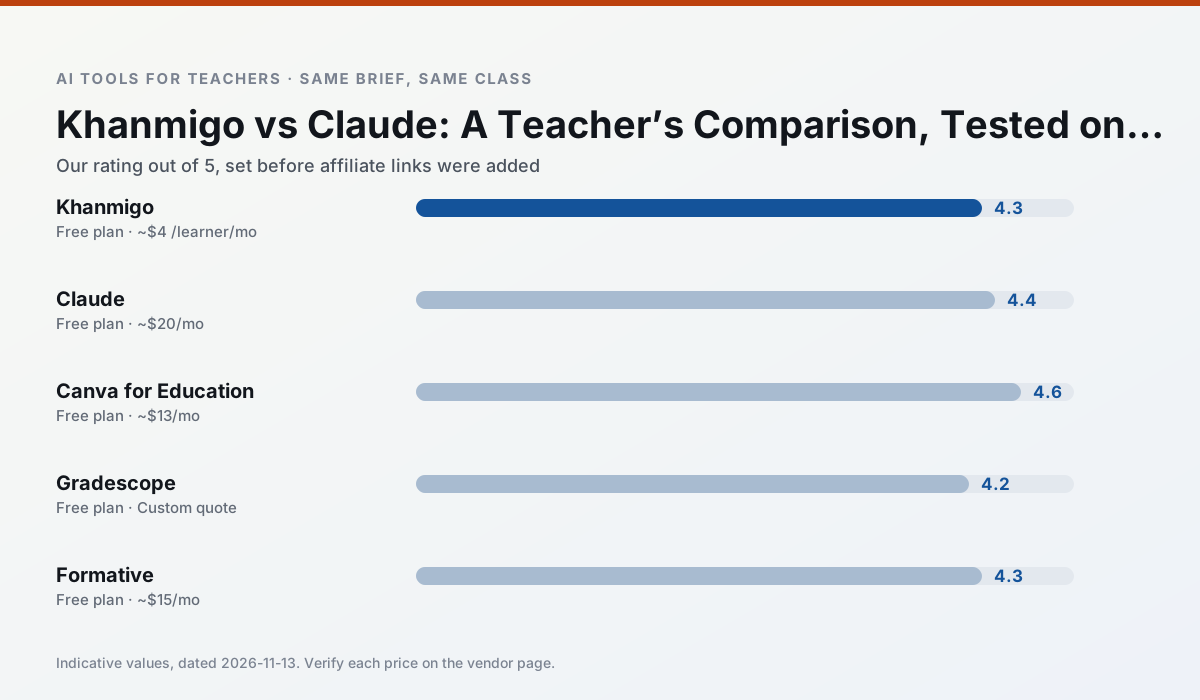
Side by side
Comparison table
Ratings reflect our timed classroom workflow, not vendor claims. Prices are indicative — verify on the vendor site.
| Tool | Best for | Free tier | Indicative paid plan | Standout feature | Our rating | Verdict | Try the tool |
|---|---|---|---|---|---|---|---|
| Khanmigo | math practice · student tutoring | Yes — US teacher accounts, subject to eligibility | ~$4 /learner/mo | Socratic tutoring rather than answers | 4.3 / 5 | Strong option | Try free |
| Claude | rubric creation · feedback on writing | Yes — Usage-limited | ~$20 /user/mo | Very large context window | 4.4 / 5 | Strong option | Try free |
| Canva for Education | slide decks · worksheets | Yes — Verification required | ~$13 /user/mo | Thousands of education templates | 4.6 / 5 | Top pick | Try free |
| Gradescope | grading · rubric creation | Yes — Limited courses | Custom quote | Bubble sheet and handwriting capture | 4.2 / 5 | Strong option | Try free |
| Formative | formative assessment · grading | Yes — Core assessment tools | ~$15 /user/mo | Live student responses | 4.3 / 5 | Strong option | Try free |
| QuestionWell | quiz generation · assessment | Yes — Monthly generation limit | ~$10 /user/mo | Exports to Google Forms / LMS | 4.3 / 5 | Strong option | Try free |
Match your situation
Best for X
Different jobs need different tools. Here is what we would open first in each case.
Khanmigo produces levelled versions from one source in a single pass, which is the highest-value differentiation shortcut we tested at this level.
Claude is the steadiest of this set at plain, respectful language; names and specific incidents still belong in your draft, not the prompt.
For anything students touch directly, Canva for Education offers the supervision controls and logging that IT will ask about first.
Gradescope is the one we would open on a normal planning day because the first output is editable rather than restructurable, and the free plan covers a single teacher's routine.
Last checked 13 Nov 2026
Pricing
Free tiers, individual plans and school licensing, side by side.
| Tool | Free plan | Individual / paid | School & district | Billing note | Verify |
|---|---|---|---|---|---|
| Khanmigo | $0 — US teacher accounts, subject to eligibility | ~$4 /learner/mo | Custom quote | Indicative — verify on vendor site | Vendor |
| Claude | $0 — Usage-limited | ~$20 /user/mo | ~$25+ /user/mo | Indicative — verify on vendor site | Vendor |
| Canva for Education | $0 — Verification required | ~$13 /user/mo | Custom quote | Indicative — verify on vendor site | Vendor |
| Gradescope | $0 — Limited courses | Custom quote | Custom quote | LMS integration and support | Vendor |
| Formative | $0 — Core assessment tools | ~$15 /user/mo | Custom quote | Indicative — verify on vendor site | Vendor |
| QuestionWell | $0 — Monthly generation limit | ~$10 /user/mo | Custom quote | Indicative — verify on vendor site | Vendor |
Editorial rule: pricing is re-checked every 2–3 months and the top 50 pages are refreshed every 6 months. See our funding policy.
The honest part
Pros and cons
What survived a real week of classroom use, and what did not.
Pros
- Education-first design
- Strong nonprofit trust signal
- Good math scaffolding
Cons
- Availability varies by region
- Less useful for admin paperwork
- Requires student accounts for full value
Pros
- Handles full unit plans and long rubrics
- Nuanced, less generic prose
- Good at structured document output
Cons
- No teacher-specific templates
- Fewer classroom integrations
- Consumer plan not suitable for student data
Pros
- Effectively free for verified teachers
- Huge template library
- No design skills needed
Cons
- AI features are capped
- Easy to produce cluttered slides
- Account verification can be slow
Pros
- Large time savings on paper assessments
- Consistent rubric application
- Detailed item analytics
Cons
- Overkill for elementary classrooms
- Institutional pricing is opaque
- Setup effort is real
Pros
- Strong data for intervention groups
- Works with existing PDFs and Docs
- Good LMS integrations
Cons
- Steeper setup than quiz games
- Best value requires school-wide rollout
- Price adds up per teacher
In the classroom
Use cases
Five concrete workflows, with the tool we would open for each one.
A weekly family newsletter from bullet notes
Newsletters fail on length, not tone. Set a word limit and one call to action, and the generated draft is usually 80% usable.
Recommended: KhanmigoRegrouping students after an assessment
Summarise anonymised results into skill groups, then generate one activity per group. Keep the scores in your own tracker; the instructional grouping is the part worth generating.
Recommended: ClaudeA five-minute exit ticket set
Ask for one recall, one application and one reasoning item, then delete the second recall question every generator sneaks in.
Recommended: Canva for EducationAn IEP present-levels first draft
Use aggregated, anonymised data only. Ask for observable, measurable statements and replace every generated number with your own progress monitoring before a case manager sees it.
Recommended: GradescopeA substitute folder that needs no context
The value here is structure, not creativity. Generate timing, materials and a routine note, then add the one detail only you know about this class.
Recommended: Formative
Questions teachers ask us
FAQ
Direct answers, also published as FAQPage structured data for search and AI assistants.
Khanmigo or Claude for lesson planning?
Which is cheaper for one teacher?
Do they produce the same output?
Sources & further reading
Our recommendation
Try MagicSchool AI free for your next lesson planning task
A large library of teacher-specific AI generators in one dashboard. Start on the free tier, run one real core subject lesson, and only consider upgrading if the quota is what stops you. Disclosure: we may earn a commission (30% recurring) at no extra cost to you.
Some links on this page are affiliate links. We may earn a commission at no extra cost to you. Our rankings are editorial and never pay-to-play. Never enter student PII into a free consumer account.
Keep reading
Related comparisons in this cluster.
Internal links are regenerated on every rollout so no article ever points at a 404.