The short answer
- QuestionWell is our default pick for teachers who need to draft a standards-aware lesson plan quickly; Notion AI is better when differentiation is the bottleneck.
- Start with QuestionWell on its free plan, keep Notion AI as the second opinion, and do not open a card until the quota, not the feature list, is what stops you.
- Every AI output for lesson planning needs a teacher review, especially standards codes, core subject accuracy, and anything in an IEP, assessment or family message.
- Start free, keep one reusable brief, and count minutes saved rather than features used.
Start with Notion AI on its free plan.
The printer jammed at 7:32 AM, leaving me with twenty minutes before first period and half a class set of formative quizzes missing their second page. That morning panic is usually when teachers start hunting for shortcuts, opening six different browser tabs and testing whatever AI tool promises to fix the gap. When you look at QuestionWell vs Notion AI for teachers, you are staring at two completely opposite approaches to that panic. One wants to build your assessment questions in ten seconds flat, while the other wants to house your entire curriculum map, lesson archive, and departmental planning notes in one sprawling digital filing cabinet.
Choosing between a single-purpose utility and a sprawling workspace depends entirely on whether your bottleneck is generating raw instructional content or keeping your sanity intact across a multi-month unit plan. We spend a lot of time testing these platforms in real classrooms to see which ones survive contact with actual students, department heads, and tight passing periods. If you are exploring the broader landscape before committing to a paid plan, take a look at our roundup of the best AI tools for teachers 2026. For a deeper dive into how specialized generation tools stack up against browser-native helpers, you can also read our detailed breakdown of Brisk Teaching vs Diffit.
The Case for QuestionWell: Speed Over Structure
QuestionWell does one thing and does it remarkably well. You drop in a block of source text or a specific learning objective, and it spits out standards-aligned question banks that you can export straight to your learning management system or quiz platform. The free tier gives you a monthly generation limit, while the paid tier sits at roughly $10 per user per month. It takes best for quick setup honours because it cuts out the tedious blank-page friction of writing multiple-choice distractors.
The catch is that QuestionWell is a single-purpose tool. If you need it to organize your scope and sequence or write a narrative report card comment, you are out of luck. The quality of the output also fluctuates depending on how clean your source text is. If you paste messy web scrapes, expect messy questions. You also have to remember the golden rule of classroom data hygiene: only paste non-identifiable source text into tools like this.
The Case for Notion AI: The Long-Term Archive
Notion AI operates on the opposite end of the spectrum. At roughly $10 per user per month with a limited free tier, it functions as an AI-assisted notes, database, and curriculum planning hub all in one workspace. It earns our spot for best for schools and districts because its real power lies in team collaboration and long-term curriculum records. When your entire eighth-grade history PLC needs to store shared unit plans, common assessment data, and pacing guides in a single searchable database, Notion is hard to beat.
Prompt:
"Draft a three-week middle school unit plan for fractions based on Common Core standard 6.NS.A.1, structured into a table with daily objectives, core activities, and exit ticket prompts."

Model Output:
A clean, well-formatted table with daily rows, standard alignments, and basic procedural practice problems for each lesson.

Teacher Edits:
1. Swapped out two of the abstract word problems for scenarios involving actual recipe measurements that our local students recognize.
2. Adjusted the pacing of week two, spreading the division of mixed numbers across two days instead of rushing it into one.
The friction with Notion AI is the upfront setup time. You have to build the databases, configure the pages, and train your colleagues to use them before the AI features become genuinely useful. It is not purpose-built for churning out tomorrow's worksheet during your planning period. Furthermore, its pricing structure for teams has shifted more than once, and you must never store student personally identifiable information in personal workspaces.
Where the Rest of the Field Fits
While QuestionWell and Notion AI handle generation and organization, other tools fill different gaps in a teacher's daily workflow. Brisk Teaching works as a browser extension that brings AI feedback straight into Google Docs and slides. It takes the crown for best free option, though its free quota is tight and the paid tier runs around $10 per user per month. Because it reads document content directly in your browser window, your IT department will want to review its permissions and DPA scope carefully before deployment.
Khanmigo takes a different route altogether as an education-first tutor-style platform from a trusted nonprofit. At roughly $4 per learner per month with free accounts for US teachers subject to eligibility, it offers strong math scaffolding and an undeniable nonprofit trust signal. It shines as best overall for daily use if your students have regular device access, though it is less useful for a teacher's own admin paperwork and requires student accounts to unlock its full value.
If you need raw horsepower for document-heavy planning, standalone consumer chat models like Claude and ChatGPT offer immense flexibility. Claude excels at handling full unit plans and long rubrics at roughly $20 per user per month, producing nuanced prose that sounds less robotic than standard AI output. ChatGPT matches that $20 price point and remains the most flexible option available thanks to a massive community of teacher prompt libraries and strong multilingual support. Both demand strict adherence to privacy rules: never drop student PII into consumer tiers, and reserve these heavy hitters for approved enterprise or workspace environments.
Making Your Choice Work on Monday Morning
If your filing cabinet is a disaster and your department shares lesson plans across three different Google Drive folders that nobody can ever find, invest your time in setting up Notion AI. The structural clarity pays off by November. If your weekly nightmare is writing twenty distinct reading comprehension questions that actually align with your state standards without making you want to fall asleep, keep a shortcut to QuestionWell on your bookmarks bar.
Never let any of these systems write your rubrics or grading comments in a vacuum. Build your assessment criteria by hand first, then use the AI to generate the supportive text or alternative reading levels around your framework. When you keep the instructional decisions in your own hands, these tools stop feeling like gimmicks and start acting like the assistant teachers we all wish we had on payroll.
FAQ
QuestionWell or Notion AI for lesson planning?
QuestionWell for breadth and speed, Notion AI when the output goes to a colleague or a family and has to be right first time.
Which is cheaper for one teacher?
Compare the free quotas first, then the individual plans. In most weeks the free plan decides the purchase, not the list price.
Do they produce the same output?
On simple tasks, often yes, and that is a useful result: it points at the cheaper, better-governed option rather than the one with more features.
Sources
- QuestionWell vendor product data and feature documentation
- Notion AI pricing and workspace specifications
- Brisk Teaching browser extension capabilities and privacy disclosures
- Khanmigo educator portal and pricing structure
- Anthropic Claude feature summaries and context window specifications
- OpenAI ChatGPT platform capabilities and subscription tiers
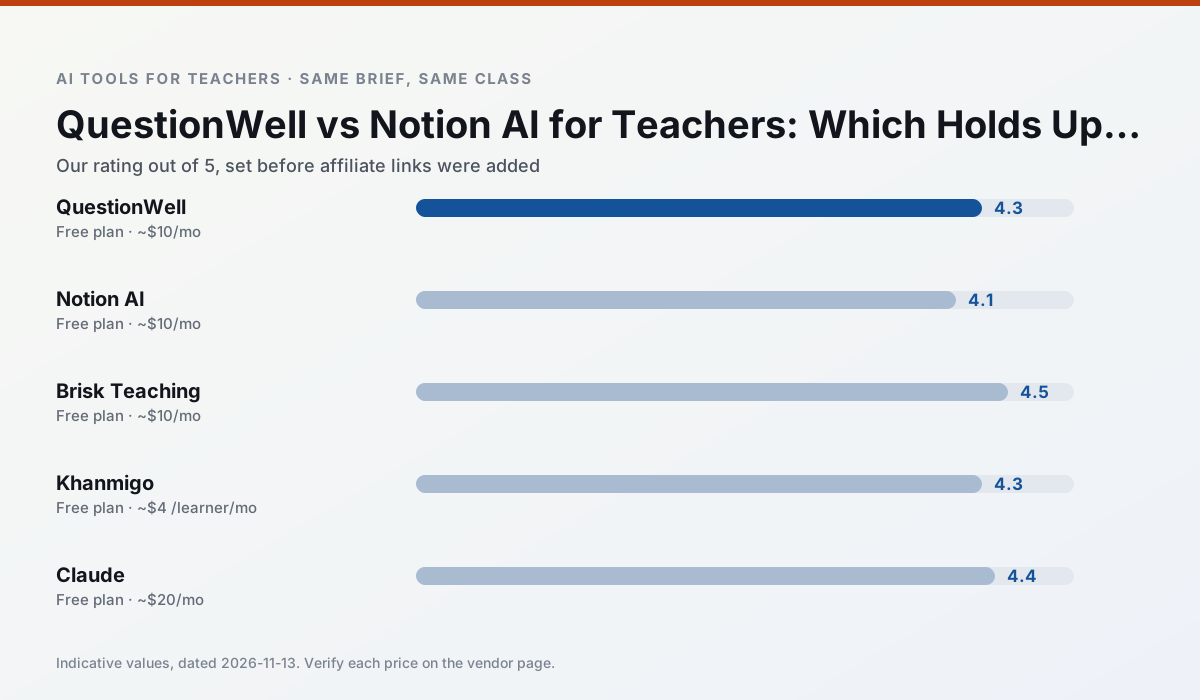
Side by side
Comparison table
Ratings reflect our timed classroom workflow, not vendor claims. Prices are indicative — verify on the vendor site.
| Tool | Best for | Free tier | Indicative paid plan | Standout feature | Our rating | Verdict | Try the tool |
|---|---|---|---|---|---|---|---|
| QuestionWell | quiz generation · assessment | Yes — Monthly generation limit | ~$10 /user/mo | Exports to Google Forms / LMS | 4.3 / 5 | Strong option | Try free |
| Notion AI | curriculum mapping · unit planning | Yes — Limited AI usage | ~$10 /user/mo | Linked databases | 4.1 / 5 | Situational | Try free |
| Brisk Teaching | feedback on writing · grading | Yes — Limited actions per month | ~$10 /user/mo | Works inside Google Docs | 4.5 / 5 | Top pick | Try free |
| Khanmigo | math practice · student tutoring | Yes — US teacher accounts, subject to eligibility | ~$4 /learner/mo | Socratic tutoring rather than answers | 4.3 / 5 | Strong option | Try free |
| Claude | rubric creation · feedback on writing | Yes — Usage-limited | ~$20 /user/mo | Very large context window | 4.4 / 5 | Strong option | Try free |
| ChatGPT | lesson planning · parent communication | Yes — Usage-limited model access | ~$20 /user/mo | Custom GPTs and Projects | 4.5 / 5 | Top pick | Try free |
Match your situation
Best for X
Different jobs need different tools. Here is what we would open first in each case.
Setup cost is one login for QuestionWell; everything else can wait until you know the tool is useful.
Notion AI answers the three questions a district actually asks: rostering, admin controls and a data-processing agreement. That is usually what decides a school purchase.
Brisk Teaching's free plan is the most usable in this comparison: a quota that survives a normal week. Not enough for a department, enough for one teacher to decide.
Khanmigo is the one we would open on a normal planning day because the first output is editable rather than restructurable, and the free plan covers a single teacher's routine.
Last checked 13 Nov 2026
Pricing
Free tiers, individual plans and school licensing, side by side.
| Tool | Free plan | Individual / paid | School & district | Billing note | Verify |
|---|---|---|---|---|---|
| QuestionWell | $0 — Monthly generation limit | ~$10 /user/mo | Custom quote | Indicative — verify on vendor site | Vendor |
| Notion AI | $0 — Limited AI usage | ~$10 /user/mo | ~$8 /user/mo | Indicative — verify on vendor site | Vendor |
| Brisk Teaching | $0 — Limited actions per month | ~$10 /user/mo | Custom quote | Indicative — verify on vendor site | Vendor |
| Khanmigo | $0 — US teacher accounts, subject to eligibility | ~$4 /learner/mo | Custom quote | Indicative — verify on vendor site | Vendor |
| Claude | $0 — Usage-limited | ~$20 /user/mo | ~$25+ /user/mo | Indicative — verify on vendor site | Vendor |
| ChatGPT | $0 — Usage-limited model access | ~$20 /user/mo | ~$25+ /user/mo | Indicative — verify on vendor site | Vendor |
Editorial rule: pricing is re-checked every 2–3 months and the top 50 pages are refreshed every 6 months. See our funding policy.
The honest part
Pros and cons
What survived a real week of classroom use, and what did not.
Pros
- Saves the most time on question writing
- Clean export workflow
- Good objective tagging
Cons
- Single-purpose tool
- Question quality varies by source text
- Limited student-facing features
Pros
- Great for long-term curriculum records
- Strong team collaboration
- Flexible structure
Cons
- Setup time is significant
- AI add-on pricing changed more than once
- Not purpose-built for lesson generation
Pros
- No copy-paste between tools
- Fast inline feedback on student drafts
- Gentle learning curve
Cons
- Chrome-first workflow
- Extension permissions need IT approval
- Free quota is tight
Pros
- Education-first design
- Strong nonprofit trust signal
- Good math scaffolding
Cons
- Availability varies by region
- Less useful for admin paperwork
- Requires student accounts for full value
Pros
- Handles full unit plans and long rubrics
- Nuanced, less generic prose
- Good at structured document output
Cons
- No teacher-specific templates
- Fewer classroom integrations
- Consumer plan not suitable for student data
In the classroom
Use cases
Five concrete workflows, with the tool we would open for each one.
Regrouping students after an assessment
Summarise anonymised results into skill groups, then generate one activity per group. Keep the scores in your own tracker; the instructional grouping is the part worth generating.
Recommended: QuestionWellA weekly family newsletter from bullet notes
Newsletters fail on length, not tone. Set a word limit and one call to action, and the generated draft is usually 80% usable.
Recommended: Notion AIA parent email in two languages
Draft in plain, warm language with no names, translate, then back-translate the important sentences to check meaning. Keep specific incidents out of the prompt and add them yourself.
Recommended: Brisk TeachingRubric and feedback comments in one pass
Reorder the workflow so the rubric is yours and the comments are generated. Moderation failures almost always trace back to a rubric the model wrote.
Recommended: KhanmigoThree reading levels from one source text
Paste a vetted text, ask for supported, core and extension versions, then check the vocabulary list by hand. Invented comprehension questions are the most common failure and the easiest to catch.
Recommended: Claude
Questions teachers ask us
FAQ
Direct answers, also published as FAQPage structured data for search and AI assistants.
QuestionWell or Notion AI for lesson planning?
Which is cheaper for one teacher?
Do they produce the same output?
Sources & further reading
Our recommendation
Try Notion AI free for your next lesson planning task
AI-assisted notes, databases and curriculum planning in one workspace. Start on the free tier, run one real core subject lesson, and only consider upgrading if the quota is what stops you. Disclosure: we may earn a commission (varies) at no extra cost to you.
Some links on this page are affiliate links. We may earn a commission at no extra cost to you. Our rankings are editorial and never pay-to-play. Never enter student PII into a free consumer account.
Keep reading
Related comparisons in this cluster.
Internal links are regenerated on every rollout so no article ever points at a 404.