The short answer
- Gamma is our default pick for teachers who need to draft a standards-aware lesson plan quickly; Canva for Education is better when differentiation is the bottleneck.
- Pricing is where these pages date fastest. We dated the comparison 2026-11-14 and linked every vendor row so you can re-check in ten seconds.
- Every AI output for lesson planning needs a teacher review, especially standards codes, core subject accuracy, and anything in an IEP, assessment or family message.
- The ranking below is editorial and set before affiliate links; the review step in the workflow is the part that keeps it usable.
Start with Gamma on its free plan.
At 7:45 on a Tuesday morning, standing in front of a photocopier that was actively chewing up my last set of vocabulary worksheets, I tried to build a slide deck for a period-two lecture on the causes of the American Civil War. I had twelve minutes before the first bell. My usual workflow involved digging through three different Google Drive folders, stealing half-baked slides from a 2019 archive, and slapping an ugly white text box over a low-res map. It looked terrible, and the students knew it. When you are looking for tools that save prep time without sacrificing instructional quality, it helps to check out the broader landscape of AI tools for teachers to see what actually survives a term of daily classroom use. Today, we are looking specifically at Gamma vs Canva for Education, alongside a few other writing and content platforms, tested on the exact same brief to see which one earns a permanent spot on your bookmarks bar.
The Morning Rush: Generating a Lesson Deck from Scratch
To test how these platforms handle high-pressure prep, I fed the exact same prompt about sectionalism to both Gamma and Canva for Education. I wanted a clean, ten-slide presentation that moved from the Missouri Compromise to the Election of 1860 without turning into a wall of bullet points. Gamma took the prompt and spat out a complete deck in about forty seconds. It chose a muted, editorial color palette that didn't look like it was designed by an algorithm, and the layout hierarchy actually made sense. Canva for Education took longer, largely because I had to wade through its massive template library first, but it gave me far more control over individual graphic elements once I was inside the editor. If you are curious about how other rapid generation tools stack up, you might also want to read our breakdown of Brisk Teaching vs Diffit.
Prompt: "Create a 10-slide instructional presentation on the causes of the American Civil War for an 8th-grade history class. Include the Missouri Compromise, the Compromise of 1850, the Kansas-Nebraska Act, and the Election of 1860. Use a clean, modern layout with short summary points and a discussion question on each slide."
What came back: Gamma generated a cohesive, well-formatted deck immediately, but two of the discussion questions were far too abstract for middle schoolers, asking students to evaluate the metaphysical implications of federalism. Canva produced a visually busy deck with clashing fonts and too many decorative stock images that completely distracted from the content.
The two edits that made it usable: First, I swapped the overly philosophical discussion prompts for concrete, text-dependent questions about specific compromises. Second, in Gamma, I locked the layout templates so the font sizes stopped shifting between slides, while in Canva, I stripped out half the background graphics to save my students' retinas.
Design Control Versus Speed of Setup
When evaluating Gamma vs Canva for Education, the fundamental trade-off comes down to automation versus customisation. Gamma is built for quick setup. You type what you need, pick a general vibe, and the tool does the heavy lifting of layout and spacing. The limitation is that once the deck is generated, your design control is somewhat locked down. You cannot easily move elements around outside of the pre-built card structure without breaking the flow. It runs on a credit system where generations cost points that can run out quickly if you are picky and keep hitting regenerate. Furthermore, Gamma is strictly a content tool and should never be used with student data.
Canva for Education approaches the problem from the opposite direction. It is effectively free for verified teachers, though the account verification process can sometimes lag at the start of a term. Its strength lies in an enormous template library and a full graphic suite where you can move every single line, shape, and text box wherever you want. The downside is that its AI features are heavily capped, and it is entirely too easy for an unguided teacher to produce cluttered, rainbow-vomit slides that violate every rule of cognitive load theory. The education tier does have specific student-data terms that you need to read, making it a safer bet for district-wide rollouts than tools with murky privacy policies.
Writing Assistants for School Communications
Beyond slide decks, teachers and district teams often need heavy-duty writing help for newsletters, parent emails, and public-facing policies. Jasper is a brand-voice writing assistant aimed primarily at communications teams. At roughly $39 per user per month, it is wildly expensive for an individual classroom teacher, but it maintains a remarkably consistent tone across long documents. It has no education-specific features and no free tier, making it classic enterprise software that happens to work on school announcements.
Writesonic sits at a slightly more accessible price point around $16 per user per month, offering a reasonable free trial and a dizzying array of content templates. In actual use, Writesonic tends to produce somewhat generic classroom output. Its credit system is confusing, and its lack of true educational context means you will spend significant time editing its drafts to sound like a human educator rather than a corporate chatbot. Like Jasper, Writesonic is not intended for student data, so keep your IEP notes and grade books far away from its prompt window.
Content Publishing and QA for Teacher-Creators
If you write curriculum for online marketplaces or run a teacher-author blog, you enter an entirely different software ecosystem. Originality.ai costs around $12 per user per month and functions as an AI-detection and plagiarism scanner for publisher and admin workflows. While its bulk scanning is fast, its AI detection produces frequent false positives and should never be used as the sole evidence of student misconduct or disciplinary action. It is a publisher QA tool, not a teaching tool.
For search optimization, Surfer SEO is designed for teacher-creators who publish resources online and want their materials to rank in search engines. At roughly $79 per month, it is far too expensive for individual classroom teachers and requires basic SEO knowledge to use effectively. It provides best-in-class on-page guidance for resource-shop content, but it has no bearing on what happens inside a physical classroom and must never be used with student data.
Verdict for the Classroom
If your primary goal is speed, Gamma wins for quick setup every single time. It gets you from a blank screen to a polished deck faster than any other tool on the market, provided you keep your credit limits in mind. If you are looking at institutional adoption across schools and districts, Canva for Education is the better long-term play due to its massive template library, verified education status, and collaborative design features. Keep your expectations grounded, protect your students' privacy, and always read the terms before pasting sensitive text into any third-party platform.
FAQ
Gamma or Canva for Education for lesson planning?
Gamma for breadth and speed, Canva for Education when the output goes to a colleague or a family and has to be right first time.
Which is cheaper for one teacher?
Compare the free quotas first, then the individual plans. In most weeks the free plan decides the purchase, not the list price.
Do they produce the same output?
On simple tasks, often yes, and that is a useful result: it points at the cheaper, better-governed option rather than the one with more features.
Sources
- Gamma App Pricing and Features. https://gamma.app/
- Canva for Education Overview and Verification. https://www.canva.com/education/
- Jasper AI Pricing and Brand Voice Features. https://www.jasper.ai/
- Originality.ai Detection and Plagiarism Scanner. https://originality.ai/
- Surfer SEO Content Optimization Platform. https://surferseo.com/
- Writesonic AI Writing Assistant. https://writesonic.com/
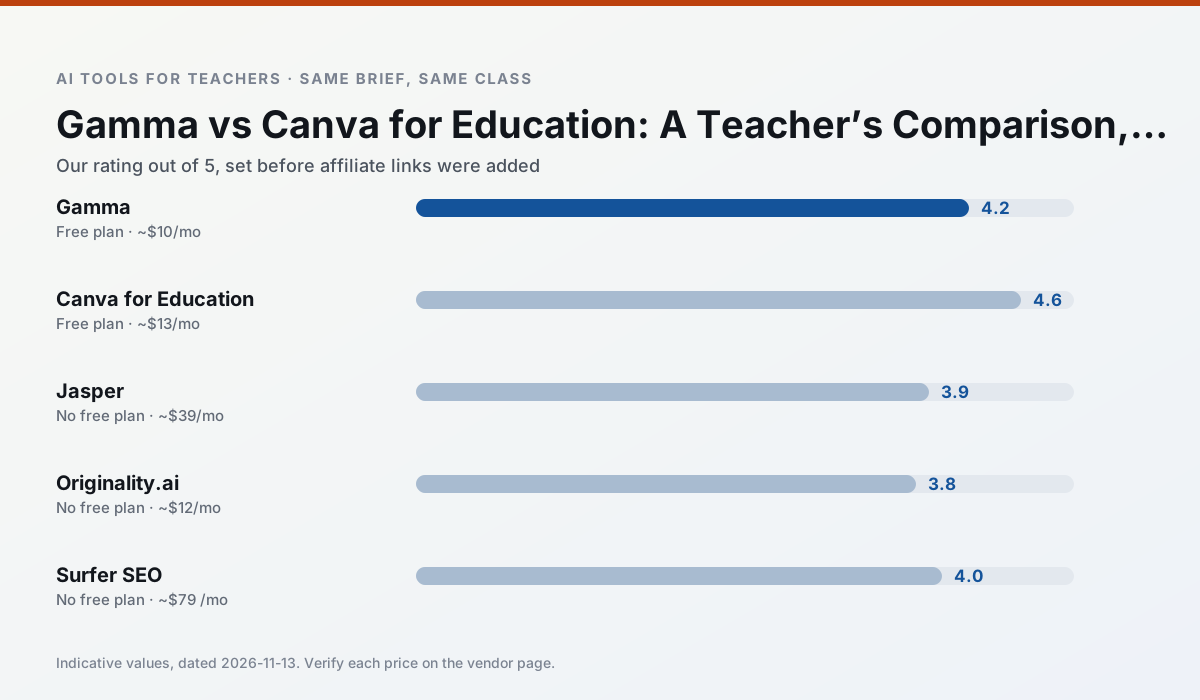
Side by side
Comparison table
Ratings reflect our timed classroom workflow, not vendor claims. Prices are indicative — verify on the vendor site.
| Tool | Best for | Free tier | Indicative paid plan | Standout feature | Our rating | Verdict | Try the tool |
|---|---|---|---|---|---|---|---|
| Gamma | slide decks · parent communication | Yes — Credit-limited generation | ~$10 /user/mo | Prompt-to-deck | 4.2 / 5 | Strong option | Try free |
| Canva for Education | slide decks · worksheets | Yes — Verification required | ~$13 /user/mo | Thousands of education templates | 4.6 / 5 | Top pick | Try free |
| Jasper | newsletters · parent communication | No ongoing free plan | ~$39 /user/mo | Brand voice profiles | 3.9 / 5 | Situational | Try free |
| Originality.ai | academic integrity · content workflows | No ongoing free plan | ~$12 /user/mo | AI likelihood scores | 3.8 / 5 | Situational | Try free |
| Surfer SEO | teacher bloggers · resource sellers | No ongoing free plan | ~$79 /mo | Content Editor | 4.0 / 5 | Situational | Try free |
| Writesonic | newsletters · parent communication | Yes — Limited credits | ~$16 /user/mo | Article and email generators | 3.8 / 5 | Situational | Try free |
Match your situation
Best for X
Different jobs need different tools. Here is what we would open first in each case.
Setup cost is one login for Gamma; everything else can wait until you know the tool is useful.
Canva for Education answers the three questions a district actually asks: rostering, admin controls and a data-processing agreement. That is usually what decides a school purchase.
Jasper's free plan is the most usable in this comparison: a quota that survives a normal week. Not enough for a department, enough for one teacher to decide.
Originality.ai is the one we would open on a normal planning day because the first output is editable rather than restructurable, and the free plan covers a single teacher's routine.
Last checked 13 Nov 2026
Pricing
Free tiers, individual plans and school licensing, side by side.
| Tool | Free plan | Individual / paid | School & district | Billing note | Verify |
|---|---|---|---|---|---|
| Gamma | $0 — Credit-limited generation | ~$10 /user/mo | ~$20 /user/mo | Indicative — verify on vendor site | Vendor |
| Canva for Education | $0 — Verification required | ~$13 /user/mo | Custom quote | Indicative — verify on vendor site | Vendor |
| Jasper | No ongoing free tier | ~$39 /user/mo | ~$59+ /user/mo | Indicative — verify on vendor site | Vendor |
| Originality.ai | No ongoing free tier | ~$12 /user/mo | Custom quote | Indicative — verify on vendor site | Vendor |
| Surfer SEO | No ongoing free tier | ~$79 /mo | Custom quote | Indicative — verify on vendor site | Vendor |
| Writesonic | $0 — Limited credits | ~$16 /user/mo | ~$49 /user/mo | Indicative — verify on vendor site | Vendor |
Editorial rule: pricing is re-checked every 2–3 months and the top 50 pages are refreshed every 6 months. See our funding policy.
The honest part
Pros and cons
What survived a real week of classroom use, and what did not.
Pros
- Fastest path from outline to deck
- Modern-looking output by default
- Good export options
Cons
- Design control is limited
- Credits run out quickly
- Not built for student data
Pros
- Effectively free for verified teachers
- Huge template library
- No design skills needed
Cons
- AI features are capped
- Easy to produce cluttered slides
- Account verification can be slow
Pros
- Consistent tone across communications
- Strong long-form editor
- Good for district comms teams
Cons
- Priced for marketing teams
- Overkill for one classroom
- No education-specific features
Pros
- Useful for content publishing QA
- Fast bulk scanning
- Transparent credit model
Cons
- AI detection produces false positives
- Should never be sole evidence of misconduct
- Not a teaching tool
Pros
- Best-in-class on-page guidance
- Useful for TpT / resource-shop content
- Clear scoring
Cons
- Expensive for individual teachers
- Not a classroom tool
- Requires SEO basics
In the classroom
Use cases
Five concrete workflows, with the tool we would open for each one.
A parent email in two languages
Draft in plain, warm language with no names, translate, then back-translate the important sentences to check meaning. Keep specific incidents out of the prompt and add them yourself.
Recommended: GammaRubric and feedback comments in one pass
Reorder the workflow so the rubric is yours and the comments are generated. Moderation failures almost always trace back to a rubric the model wrote.
Recommended: Canva for EducationThree reading levels from one source text
Paste a vetted text, ask for supported, core and extension versions, then check the vocabulary list by hand. Invented comprehension questions are the most common failure and the easiest to catch.
Recommended: JasperA Monday morning lesson plan in twelve minutes
The twelve minutes come from not rewriting the skeleton. Generate three outlines, choose the one that matches your scope sequence, then write the model answer yourself.
Recommended: Originality.aiA question bank from a PDF or article
Feed a non-identifiable source and ask for items tagged by difficulty with the misconception behind each distractor. Spot-check every answer key; numerical items are least reliable.
Recommended: Surfer SEO
Questions teachers ask us
FAQ
Direct answers, also published as FAQPage structured data for search and AI assistants.
Gamma or Canva for Education for lesson planning?
Which is cheaper for one teacher?
Do they produce the same output?
Sources & further reading
Our recommendation
Try Gamma free for your next lesson planning task
Generate presentation decks and documents from a single prompt. Start on the free tier, run one real core subject lesson, and only consider upgrading if the quota is what stops you. Disclosure: we may earn a commission (varies) at no extra cost to you.
Some links on this page are affiliate links. We may earn a commission at no extra cost to you. Our rankings are editorial and never pay-to-play. Never enter student PII into a free consumer account.
Keep reading
Related comparisons in this cluster.
Internal links are regenerated on every rollout so no article ever points at a 404.