The short answer
- Synthesia is our default pick for teachers who need to draft a standards-aware lesson plan quickly; Colossyan is better when differentiation is the bottleneck.
- Pricing is where these pages date fastest. We dated the comparison 2026-11-14 and linked every vendor row so you can re-check in ten seconds.
- Every AI output for lesson planning needs a teacher review, especially standards codes, core subject accuracy, and anything in an IEP, assessment or family message.
- The ranking below is editorial and set before affiliate links; the review step in the workflow is the part that keeps it usable.
Start with Synthesia on its free plan.
It is seven in the evening, grading is half done, and you are staring at a department curriculum update that somehow needs to become an engaging video walkthrough for families by tomorrow morning. You do not own a ring light, your classroom echoes like a gymnasium, and the thought of recording your voice four times because you stumbled over a transition makes you want to close the laptop. This is the exact moment teachers start looking at AI video generators. When comparing Synthesia vs Colossyan, you are not just choosing between two marketing budgets; you are trying to figure out which synthetic human will deliver your chemistry lab safety rules without sounding like a badly dubbed martial arts film.
Both platforms turn a standard text script into a presenter-led video using AI avatars. Neither offers a permanent free tier, and both sit at a professional price point of roughly $27 to $29 per user per month. For a deeper look at how these multimedia tools stack up against standard planning assistants, check out our guide on the best AI tools for teachers 2026. If you are trying to decide which platform deserves a slice of your departmental budget, the devil is entirely in the workflow details.
Setting Up the Test Script
To put both tools through their paces, I wrote a two-minute script explaining our school’s new late-work policy for an upcoming back-to-school night. I kept the language direct, removed education jargon, and flagged three spots where the presenter needed to pause for emphasis.
The Prompt: Create a 120-second explainer video from this script about our late-work policy. Use a professional, approachable female avatar, ensure clear enunciation, and add dynamic text highlights for key policy deadlines.
What came back: Both tools generated a clean, polished presenter who nailed the pronunciation of our district name on the first try. Synthesia delivered a slightly warmer eye-contact cadence, while Colossyan built out the slide transitions and text highlights much faster from the raw text upload.
The two edits that made it usable:
- Manually adjusting the avatar's hand gestures, which initially looked like a flight attendant demonstrating oxygen masks during a crisis.
- Trimming three seconds of dead air at the end of the Synthesia render where the avatar held a smile a fraction too long.
Synthesia in the Classroom
Synthesia focuses heavily on turning a script into a presenter-led video with no camera or editing skills required. The multilingual voice output is remarkably strong, making it a solid option for best for student-safe deployments when you need to translate announcements for families who speak languages other than English. You do not need an extensive background in video editing to get a clean result, and updating an existing video is as simple as typing a new sentence into the script box.
The downsides hit public school realities hard. At roughly $29 per user per month with no ongoing free tier, the cost is exceptionally difficult to justify for a single teacher working out of pocket. Furthermore, avatar video can easily feel impersonal to teenagers who spot synthetic media from a mile away. If you plan to use student likenesses, stop immediately, as you must never use student data or likenesses without explicit consent. When I tested Synthesia for a quick parent explainer, the render queue took nearly twenty minutes during the afternoon rush, which broke my workflow when I needed a same-day turnaround.
Colossyan for Training and Explanations
Colossyan approaches the same problem with a heavy focus on training and explainer videos built directly from documents and scripts. It excels at fast document-to-video conversions and includes strong compliance and LMS export features. For our purposes, it functions best as best for parent-facing writing when you need to turn a dense PDF handbook into a digestible visual walkthrough without filming yourself.
Pricing sits around $27 per user per month, and like Synthesia, there is no permanent free plan to test with a full class. Colossyan is less suited to K-12 student-facing content because the polished corporate aesthetic feels out of place in a middle school humanities class. When I tried to feed it a dense science safety manual, the document parser pulled in too much boilerplate legal text, forcing me to spend ten minutes scrubbing out phrases about liability before generating the avatar. As with any cloud tool handling school materials, confirm data residency for school use before uploading any sensitive policy drafts.
Where the Other Tools Fit
When you are looking beyond video generation, your classroom toolkit likely includes several other AI platforms with very different price tags and use cases. Writesonic offers a budget-friendly AI writing and content generation experience at around $16 per user per month with limited free credits. It works well as best for mixed-ability classes when you need to spin up leveled reading passages quickly, though the output can feel generic and the credit system is confusing.
For interactive student spaces, SchoolAI provides a school-safe AI workspace with teacher-controlled student seats around $15 per user per month. It stands out as best for quick setup because it is designed for district approval and features robust safeguarding defaults, though it requires school-wide buy-in to unlock its full potential. If your bottlenecks happen after the bell rings, Class Companion tackles AI feedback on handwritten and scanned student work for about $12 per user per month, making it a practical choice when students refuse to type their math proofs. Finally, Turnitin Clarity and Feedback Studio handle institutional writing feedback and similarity checking through custom quotes, though individual teachers cannot buy it independently. For a similar perspective on how focused text tools compare in daily use, take a look at this comparison of Brisk Teaching vs Diffit.
Two Real Failures and How I Fixed Them
AI video tools love to overpromise on speed, which leads directly to classroom friction. Here is what broke during my testing block and how I adjusted.
First, I tried to generate a multilingual video for a family night in a single session by pasting translated text directly into Synthesia without checking the phonetic spelling of local street names. The avatar mangled our town name so badly that it sounded like a sneeze. I fixed this by switching the pronunciation phonetic spelling tool in the editor, writing out the syllables manually, and previewing the audio snippet three times before rendering the full sequence.
Second, I uploaded a dense curriculum document directly into Colossyan to see if it could auto-generate a ten-slide explainer video without my script edits. The tool tried to cram three entire pages of state standards onto two slides, resulting in microscopic text scrolling past at auctioneer speed. I stopped the generation, stripped the source document down to three core bullet points myself, and let the AI build the visual pacing around my skeleton outline instead of trusting the raw PDF upload.
FAQ
Synthesia or Colossyan for lesson planning?
Synthesia for breadth and speed, Colossyan when the output goes to a colleague or a family and has to be right first time.
Which is cheaper for one teacher?
Compare the free quotas first, then the individual plans. In most weeks the free plan decides the purchase, not the list price.
Do they produce the same output?
On simple tasks, often yes, and that is a useful result: it points at the cheaper, better-governed option rather than the one with more features.
Sources
- Synthesia Pricing and Features. https://www.synthesia.io/
- Colossyan Documentation and Training Features. https://www.colossyan.com/
- Writesonic Plans and Limits. https://writesonic.com/
- SchoolAI Safeguarding and DPA Overview. https://school.ai/
- Class Companion Features and Pricing. https://classcompanion.com/
- Turnitin Feedback Studio and Institutional Resources. https://www.turnitin.com/
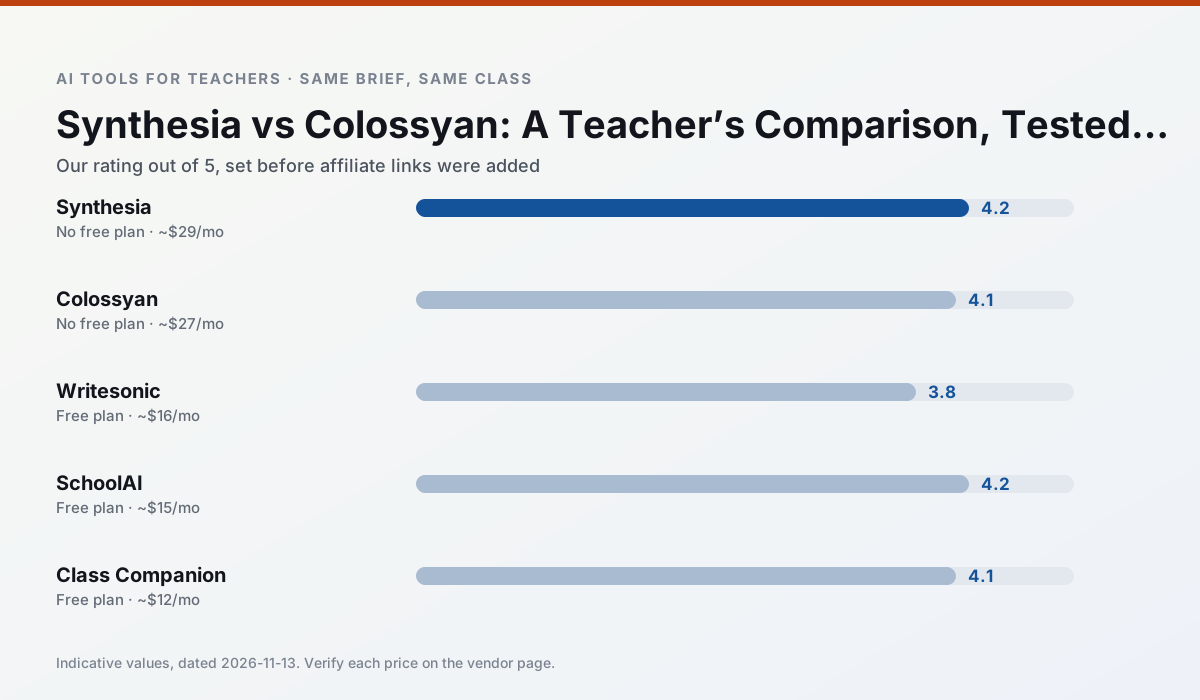
Side by side
Comparison table
Ratings reflect our timed classroom workflow, not vendor claims. Prices are indicative — verify on the vendor site.
| Tool | Best for | Free tier | Indicative paid plan | Standout feature | Our rating | Verdict | Try the tool |
|---|---|---|---|---|---|---|---|
| Synthesia | flipped lessons · video lessons | No ongoing free plan | ~$29 /user/mo | 140+ languages | 4.2 / 5 | Strong option | Try free |
| Colossyan | PD materials · video lessons | No ongoing free plan | ~$27 /user/mo | PDF/PPT-to-video | 4.1 / 5 | Situational | Try free |
| Writesonic | newsletters · parent communication | Yes — Limited credits | ~$16 /user/mo | Article and email generators | 3.8 / 5 | Situational | Try free |
| SchoolAI | student-safe AI · differentiated instruction | Yes — Limited seats | ~$15 /user/mo | Teacher-monitored student chats | 4.2 / 5 | Strong option | Try free |
| Class Companion | grading · feedback on writing | Yes — Limited assignments | ~$12 /user/mo | Handwriting recognition | 4.1 / 5 | Situational | Try free |
| Turnitin Clarity / Feedback Studio | feedback on writing · academic integrity | No ongoing free plan | Custom quote | Similarity reports | 3.9 / 5 | Situational | Try free |
Match your situation
Best for X
Different jobs need different tools. Here is what we would open first in each case.
Synthesia is built around teacher-monitored student spaces and audit logs rather than a consumer chat account, which is a different approval conversation.
Colossyan is the steadiest of this set at plain, respectful language; names and specific incidents still belong in your draft, not the prompt.
Writesonic keeps the same task across levels, which is what makes a differentiated set defensible in moderation.
SchoolAI runs in a browser tab with no extension, no student accounts and no onboarding call, so you can test it in a free period.
Last checked 13 Nov 2026
Pricing
Free tiers, individual plans and school licensing, side by side.
| Tool | Free plan | Individual / paid | School & district | Billing note | Verify |
|---|---|---|---|---|---|
| Synthesia | No ongoing free tier | ~$29 /user/mo | Custom quote | Indicative — verify on vendor site | Vendor |
| Colossyan | No ongoing free tier | ~$27 /user/mo | Custom quote | Indicative — verify on vendor site | Vendor |
| Writesonic | $0 — Limited credits | ~$16 /user/mo | ~$49 /user/mo | Indicative — verify on vendor site | Vendor |
| SchoolAI | $0 — Limited seats | ~$15 /user/mo | Custom quote | Indicative — verify on vendor site | Vendor |
| Class Companion | $0 — Limited assignments | ~$12 /user/mo | Custom quote | Indicative — verify on vendor site | Vendor |
| Turnitin Clarity / Feedback Studio | No ongoing free tier | Custom quote | Custom quote | LMS-wide deployment | Vendor |
Editorial rule: pricing is re-checked every 2–3 months and the top 50 pages are refreshed every 6 months. See our funding policy.
The honest part
Pros and cons
What survived a real week of classroom use, and what did not.
Pros
- No camera or editing skills required
- Excellent multilingual voice output
- Easy updates to existing videos
Cons
- Cost is hard to justify for a single teacher
- Avatar video can feel impersonal
- No free ongoing tier
Pros
- Strong for staff training, not just lessons
- Good compliance/LMS export
- Fast document-to-video
Cons
- No permanent free plan
- Higher price point
- Less suited to K-12 student-facing content
Pros
- Cheaper than enterprise writing suites
- Many templates
- Reasonable free trial
Cons
- Generic classroom output
- Credit system is confusing
- Limited education context
Pros
- Designed for district approval
- Teacher visibility into student use
- Good safeguarding defaults
Cons
- Requires school-wide buy-in
- Less flexible than general LLMs
- Pricing is mostly quote-based
Pros
- Useful where work is done on paper
- Fast, specific comments
- Good math support
Cons
- Scan quality affects accuracy
- Narrow use case
- Feedback still needs teacher review
In the classroom
Use cases
Five concrete workflows, with the tool we would open for each one.
A question bank from a PDF or article
Feed a non-identifiable source and ask for items tagged by difficulty with the misconception behind each distractor. Spot-check every answer key; numerical items are least reliable.
Recommended: SynthesiaA substitute folder that needs no context
The value here is structure, not creativity. Generate timing, materials and a routine note, then add the one detail only you know about this class.
Recommended: ColossyanAn IEP present-levels first draft
Use aggregated, anonymised data only. Ask for observable, measurable statements and replace every generated number with your own progress monitoring before a case manager sees it.
Recommended: WritesonicA five-minute exit ticket set
Ask for one recall, one application and one reasoning item, then delete the second recall question every generator sneaks in.
Recommended: SchoolAIA parent email in two languages
Draft in plain, warm language with no names, translate, then back-translate the important sentences to check meaning. Keep specific incidents out of the prompt and add them yourself.
Recommended: Class Companion
Questions teachers ask us
FAQ
Direct answers, also published as FAQPage structured data for search and AI assistants.
Synthesia or Colossyan for lesson planning?
Which is cheaper for one teacher?
Do they produce the same output?
Sources & further reading
Our recommendation
Try Synthesia free for your next lesson planning task
Turn a script into a presenter-led video with AI avatars. Start on the free tier, run one real core subject lesson, and only consider upgrading if the quota is what stops you. Disclosure: we may earn a commission (25% recurring) at no extra cost to you.
Some links on this page are affiliate links. We may earn a commission at no extra cost to you. Our rankings are editorial and never pay-to-play. Never enter student PII into a free consumer account.
Keep reading
Related comparisons in this cluster.
Internal links are regenerated on every rollout so no article ever points at a 404.