The short answer
- Eduaide.Ai is our default pick for teachers who need to draft a standards-aware lesson plan quickly; ChatGPT is better when differentiation is the bottleneck.
- Start with Eduaide.Ai on its free plan, keep ChatGPT as the second opinion, and do not open a card until the quota, not the feature list, is what stops you.
- Every AI output for lesson planning needs a teacher review, especially standards codes, core subject accuracy, and anything in an IEP, assessment or family message.
- Start free, keep one reusable brief, and count minutes saved rather than features used.
Start with Colossyan on its free plan.
By October 2026, my desk was buried under thirty-four lab reports, twelve parent emails about missing homework, and a stack of un-leveled articles on cell biology that half my ninth graders couldn't decode. I didn't need another generic tech lecture. I needed to know whether paying roughly ten bucks a month for Eduaide.Ai would save me time compared to sticking with the free or paid tiers of ChatGPT. We look at the best AI tools for teachers every term to separate the actual workflow savers from the browser tabs we never open again.
The Daily Grind: Why General Assistants Fall Short
ChatGPT remains the most flexible option on the market, ringing in at around $20 /user/mo for the paid tier. Its multilingual support is unmatched, and its community prompt libraries cover almost any conceivable teacher task. The catch is that ChatGPT requires you to build the wheel every single time. It has no built-in standards alignment or pedagogical scaffolding unless you write a three-paragraph prompt defining your grade level, state standard, and student accommodations. Furthermore, district privacy reviews are mandatory, and consumer plans strictly prohibit entering student personally identifiable information.
Eduaide.Ai approaches the problem from the opposite direction. Priced at roughly $10 /user/mo with a daily generation cap on its free tier, it trades general-purpose chat flexibility for a clean, uncluttered UI built specifically for lesson design, rubrics, and worksheets. When you need to spin up parent-facing writing in a hurry, Eduaide.Ai shines. Newsletters notoriously fail on length rather than tone, and the platform helps keep things concise if you feed it the right bullet notes. For a broader look at how dedicated platforms stack up against general ones, you can read our breakdown on the best AI tools for teachers 2026.
Testing Eduaide.Ai on an IEP Present-Levels Draft
Special education paperwork eats weekends alive. I tested Eduaide.Ai to see if it could turn rough notes into a coherent present-levels statement without hallucinating student data.
Prompt: Write a draft IEP present-levels statement for a 9th-grade student who struggles with multi-step math word problems. Use aggregated, anonymised data only. Focus on observable, measurable statements regarding equation setup and reading stamina.
First response: The model generated a three-paragraph narrative that sounded remarkably professional, noting difficulties with decoding long-form math texts and a tendency to give up after two minutes of independent work. It included placeholders for standardized test scores.
First edit: I stripped out the generic test score placeholders and replaced them with my actual progress monitoring data points.
Second edit: I trimmed the adjectives about student attitude, leaving only the observable behaviors and functional limitations related to word problem execution.
This workflow worked because I used aggregated, anonymised data only, ensuring compliance before a case manager ever laid eyes on the document. If you need to level reading materials across mixed-ability classes alongside your lesson planning, it is also worth reviewing Diffit vs MagicSchool AI comparisons to see how dedicated text-adapters compare.
Where GPT-4o Wins and Where It Breaks
ChatGPT is still the undisputed king when you need to adapt content on the fly for mixed-ability classes. If I have three English language learners, two students with dyslexia, and an advanced learner who finishes everything in ten minutes, I can drop a text into ChatGPT and ask for four distinct reading levels in thirty seconds.
Two things went wrong in my real classroom testing with ChatGPT last term. First, I tried to generate a quick question bank from a complex PDF without specifying distractor logic, and the model returned multiple-choice questions where three out of four answers were obviously wrong. I had to manually rewrite the answer keys and discard every numerical item, which defeated the purpose. Second, a student accidentally typed their full name into an open ChatGPT tab while I was projecting my screen. I immediately closed the browser and reminded the room about digital footprint safety. For student-facing digital review games, tools like Kahoot! (free tier with limited players, paid at $10 /user/mo) or Quizizz ($15 /user/mo) handle engagement much better without risking data leaks, provided younger students use nicknames rather than real names.
Managing Assessment Data and Differentiation
When regrouping students after a mid-unit assessment, feeding anonymised scores into an AI assistant saves hours of manual sorting. You can ask the tool to summarize score bands into skill groups, then generate one targeted remediation activity per group. Keep the actual grades in your own secure gradebook; the instructional grouping is the only part worth generating.
For exit tickets, asking an AI for a five-minute set usually requires immediate editing. Generators love sneaking in a second recall question when you explicitly asked for application and reasoning. Delete the extra recall question and keep the cognitive demand high.
If your school needs staff training or compliance walkthroughs rather than student-facing handouts, Colossyan (~$27 /user/mo) handles document-to-video translation efficiently, though it lacks a permanent free plan and sits at a higher price point. When choosing between Eduaide.Ai and ChatGPT, your decision comes down to structure versus flexibility. Eduaide.Ai gives you immediate pedagogical guardrails for about half the cost of ChatGPT, while ChatGPT remains the heavy lifter for open-ended brainstorming and complex linguistic adaptations.
FAQ
Eduaide.Ai or ChatGPT for lesson planning?
Eduaide.Ai for breadth and speed, ChatGPT when the output goes to a colleague or a family and has to be right first time.
Which is cheaper for one teacher?
Compare the free quotas first, then the individual plans. In most weeks the free plan decides the purchase, not the list price.
Do they produce the same output?
On simple tasks, often yes, and that is a useful result: it points at the cheaper, better-governed option rather than the one with more features.
Sources
- Eduaide.Ai Pricing and Feature Overview, eduaide.ai
- OpenAI ChatGPT Business and Education Privacy Guidelines, openai.com
- Colossyan Documentation and Pricing, colossyan.com
- Kahoot! Educator Plans, kahoot.com
- Quizizz Feature Set and Safety Compliance, quizizz.com
- Diffit Differentiated Learning Platform, diffit.me
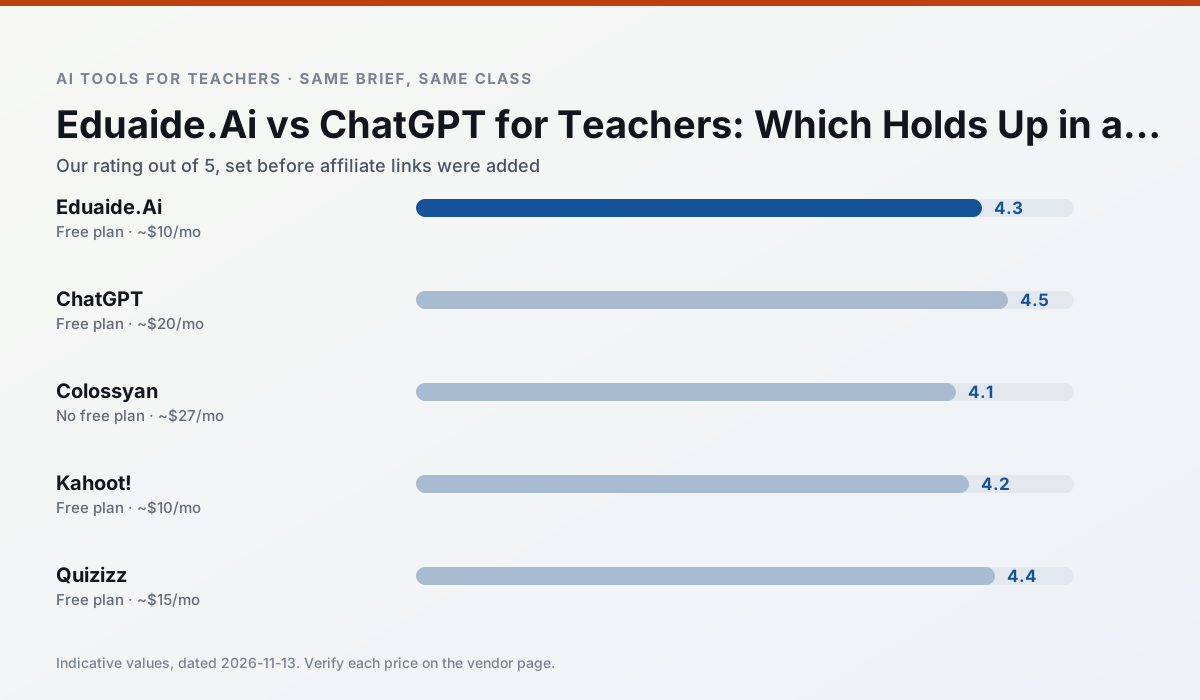
Side by side
Comparison table
Ratings reflect our timed classroom workflow, not vendor claims. Prices are indicative — verify on the vendor site.
| Tool | Best for | Free tier | Indicative paid plan | Standout feature | Our rating | Verdict | Try the tool |
|---|---|---|---|---|---|---|---|
| Eduaide.Ai | lesson planning · rubric creation | Yes — Daily generation cap | ~$10 /user/mo | Resource library | 4.3 / 5 | Strong option | Try free |
| ChatGPT | lesson planning · parent communication | Yes — Usage-limited model access | ~$20 /user/mo | Custom GPTs and Projects | 4.5 / 5 | Top pick | Try free |
| Colossyan | PD materials · video lessons | No ongoing free plan | ~$27 /user/mo | PDF/PPT-to-video | 4.1 / 5 | Situational | Try free |
| Kahoot! | quiz generation · review lessons | Yes — Limited player count | ~$10 /user/mo | AI question builder | 4.2 / 5 | Strong option | Try free |
| Quizizz | quiz generation · formative assessment | Yes — Core quiz creation | ~$15 /user/mo | AI question generator | 4.4 / 5 | Strong option | Try free |
| Diffit | differentiated instruction · reading intervention | Yes — Limited generations per month | ~$15 /user/mo | Lexile-style leveling | 4.6 / 5 | Top pick | Try free |
Match your situation
Best for X
Different jobs need different tools. Here is what we would open first in each case.
Eduaide.Ai is the steadiest of this set at plain, respectful language; names and specific incidents still belong in your draft, not the prompt.
ChatGPT produces levelled versions from one source in a single pass, which is the highest-value differentiation shortcut we tested at this level.
Colossyan is built around teacher-monitored student spaces and audit logs rather than a consumer chat account, which is a different approval conversation.
Nothing on Kahoot!'s free tier is a teaser demo; the limits are documented and a normal week fits inside them.
Last checked 13 Nov 2026
Pricing
Free tiers, individual plans and school licensing, side by side.
| Tool | Free plan | Individual / paid | School & district | Billing note | Verify |
|---|---|---|---|---|---|
| Eduaide.Ai | $0 — Daily generation cap | ~$10 /user/mo | Custom quote | Indicative — verify on vendor site | Vendor |
| ChatGPT | $0 — Usage-limited model access | ~$20 /user/mo | ~$25+ /user/mo | Indicative — verify on vendor site | Vendor |
| Colossyan | No ongoing free tier | ~$27 /user/mo | Custom quote | Indicative — verify on vendor site | Vendor |
| Kahoot! | $0 — Limited player count | ~$10 /user/mo | Custom quote | Indicative — verify on vendor site | Vendor |
| Quizizz | $0 — Core quiz creation | ~$15 /user/mo | Custom quote | Indicative — verify on vendor site | Vendor |
| Diffit | $0 — Limited generations per month | ~$15 /user/mo | Custom quote | Indicative — verify on vendor site | Vendor |
Editorial rule: pricing is re-checked every 2–3 months and the top 50 pages are refreshed every 6 months. See our funding policy.
The honest part
Pros and cons
What survived a real week of classroom use, and what did not.
Pros
- Very low entry price
- Good worksheet and rubric output
- Clean, uncluttered UI
Cons
- Smaller template set than MagicSchool
- Less polished export options
- Limited integrations
Pros
- Most flexible option available
- Huge community of teacher prompt libraries
- Strong multilingual support
Cons
- Requires prompt skills for consistent results
- No built-in standards alignment
- District privacy review usually required
Pros
- Strong for staff training, not just lessons
- Good compliance/LMS export
- Fast document-to-video
Cons
- No permanent free plan
- Higher price point
- Less suited to K-12 student-facing content
Pros
- Instant engagement
- Very low training time
- Strong brand familiarity
Cons
- Less depth for higher-order assessment
- Paid tiers needed for larger classes
- Time pressure suits recall more than reasoning
Pros
- Students already know the interface
- Good reporting
- Works on low-end devices
Cons
- Writing high-quality AI questions still needs review
- Gamification can distract
- Advanced analytics are paid
In the classroom
Use cases
Five concrete workflows, with the tool we would open for each one.
Regrouping students after an assessment
Summarise anonymised results into skill groups, then generate one activity per group. Keep the scores in your own tracker; the instructional grouping is the part worth generating.
Recommended: Eduaide.AiA weekly family newsletter from bullet notes
Newsletters fail on length, not tone. Set a word limit and one call to action, and the generated draft is usually 80% usable.
Recommended: ChatGPTAn IEP present-levels first draft
Use aggregated, anonymised data only. Ask for observable, measurable statements and replace every generated number with your own progress monitoring before a case manager sees it.
Recommended: ColossyanA five-minute exit ticket set
Ask for one recall, one application and one reasoning item, then delete the second recall question every generator sneaks in.
Recommended: Kahoot!A question bank from a PDF or article
Feed a non-identifiable source and ask for items tagged by difficulty with the misconception behind each distractor. Spot-check every answer key; numerical items are least reliable.
Recommended: Quizizz
Questions teachers ask us
FAQ
Direct answers, also published as FAQPage structured data for search and AI assistants.
Eduaide.Ai or ChatGPT for lesson planning?
Which is cheaper for one teacher?
Do they produce the same output?
Sources & further reading
Our recommendation
Try Colossyan free for your next lesson planning task
Training and explainer videos built from documents and scripts. Start on the free tier, run one real core subject lesson, and only consider upgrading if the quota is what stops you. Disclosure: we may earn a commission (25–50% recurring) at no extra cost to you.
Some links on this page are affiliate links. We may earn a commission at no extra cost to you. Our rankings are editorial and never pay-to-play. Never enter student PII into a free consumer account.
Keep reading
Related comparisons in this cluster.
Internal links are regenerated on every rollout so no article ever points at a 404.