The short answer
- MagicSchool AI is our default pick for teachers who need to draft a standards-aware lesson plan quickly; ChatGPT is better when differentiation is the bottleneck.
- Free-tier reality for this shortlist: MagicSchool AI: Yes — Core generators with monthly usage limits; ChatGPT: Yes — Usage-limited model access; Kahoot!: Yes — Limited player count. Treat every paid figure as indicative until you have read the vendor page; only the free quota is something you can test yourself this week.
- Every AI output for lesson planning needs a teacher review, especially standards codes, core subject accuracy, and anything in an IEP, assessment or family message.
- The ranking below is editorial and set before affiliate links; the review step in the workflow is the part that keeps it usable.
Start with MagicSchool AI on its free plan.
It was a Tuesday afternoon in October when I decided to test both MagicSchool AI and ChatGPT against a stack of un-graded exit tickets and a blank lesson plan template for the next unit. I had exactly twenty minutes before duty, and I wanted to see which tool actually saved time rather than creating a new editorial project for me to fix.
When you look at the landscape of AI tools for teachers in 2026, the debate usually boils down to a specialized education platform versus a general-purpose model. Both have earned a spot on our list of the best AI tools for teachers, but they approach classroom workflows from entirely different directions. Let's look at how they stack up when the bell is about to ring and you have thirty seventh-graders walking through your door.
The Interface and Setup Reality
MagicSchool AI lives in a single dashboard packed with purpose-built templates. You do not need to know how to prompt an AI to get a decent worksheet or a rubric; you just click on the generator you want, fill out a few dropdown menus, and click submit. The learning curve is practically flat, making it the best for quick setup when you are pressed for time between classes.
ChatGPT, on the other hand, is a blank text box. It is the most flexible option available, but it requires you to know how to talk to it. If you give ChatGPT a vague instruction, you get a vague, overly academic lesson plan that looks like it was written by a committee of ed-tech consultants. However, because of its immense flexibility and vast community of teacher prompt libraries, it remains a powerhouse once you build your own library of reusable prompts.
Prompt: Write a 7th-grade science lesson plan on cellular respiration that includes a warm-up, direct instruction, a lab activity, and a formative assessment.
Result: The model returned a generic, highly verbose five-page document with an unmanageable lab that required equipment my supply closet hasn't seen since 2012.
Edits:
- Restructured the prompt to specify a 45-minute period using only iodine, droppers, and beakers.
- Swapped the generic assessment for a three-question exit ticket targeting misconceptions about where plants get their mass.
Generating Differentiated Reading Materials
One of the most frequent tasks in a mixed-ability classroom is taking a single piece of text and modifying it for three different reading levels. Doing this manually takes an entire Sunday evening. Both platforms can handle this, but the workflow differs.
With MagicSchool AI, you drop your text into a specific leveled-reading generator, select your target grade levels, and let it run. With ChatGPT, you have to write a multi-step prompt specifying Lexile ranges, vocabulary retention rules, and formatting constraints. In both cases, however, the real danger is not the reading level; it is the comprehension questions the AI generates at the end of the passage.
Invented comprehension questions are the most common failure point for both tools, and they are the easiest to catch if you read them before printing. The model often generates distractor questions that test memory of minor details rather than actual conceptual understanding. You always need to write or heavily revise the answer keys yourself, especially for numerical or data-heavy items.
Handling Sensitive Parent Communication
Drafting a sensitive email to a parent requires a delicate touch, and neither AI tool should ever be fed student names, specific disciplinary infractions, or confidential data. On consumer plans, ChatGPT requires strict adherence to privacy rules, and district approval is usually mandatory. MagicSchool AI states that no student PII is required for its core generators, though you still need to confirm your district's DPA.
When drafting parent communication, the safest workflow is to keep all names out of the prompt entirely.
Prompt: Write a warm, professional, and plain-language email to a parent explaining that their child is missing three consecutive homework assignments and offering a time to connect after school. No names or specific incidents included.
Result: A polite, slightly stiff template with placeholders for dates and specific missing assignment titles.
Edits:
- Softened the opening sentence to sound more conversational and less like an automated warning system.
- Added a specific invitation for a phone call rather than just asking them to reply via email.
Where Other Tools Fit In
While MagicSchool AI and ChatGPT handle the heavy lifting of lesson planning and text generation, specialized platforms fill specific gaps in the daily routine. If you need gamified review, Kahoot! offers instant engagement with a very low training time, making it the best free option for quick formative checks, provided you use nicknames for younger students. Quizizz is our pick as the best overall for daily use due to its robust reporting and student familiarity with the interface.
For real-time feedback on student writing inside Google Docs or Slides, Brisk Teaching brings inline assessment straight to your browser without requiring you to copy and paste text back and forth. If you are looking at structured, nonprofit-backed math scaffolding and tutor-style guidance, Khanmigo provides strong education-first design, though it requires student accounts for full functionality. For a deeper dive into how these extension-based workflows compare, read our breakdown on Brisk Teaching vs Diffit.
Two Things That Went Wrong in Real Use
The first major failure happened when I tried to generate a rubric and grading comments in a single pass using ChatGPT. The model wrote both the rubric and the feedback based on a loose prompt about "persuasive writing." Because the rubric itself was vague and internally contradictory, the generated feedback comments for my students were completely unhelpful and didn't align with our actual state writing standards. I had to throw out the comments, rewrite the rubric from scratch, and manually grade the papers the old-fashioned way. The lesson learned: moderation failures almost always trace back to a rubric the model wrote itself.
The second issue occurred with MagicSchool AI when I used a quick-generate quiz tool based on an uploaded PDF article about ecosystems. The tool generated fifteen multiple-choice questions in about ten seconds. However, when I spot-checked the answer key, three of the questions had factually incorrect correct-answers because the AI misinterpreted a graph caption in the source text. I caught it because I read the key before handing it out, but it reinforced the rule that automated outputs always require standards and factual review before they ever touch a student's desk.
FAQ
MagicSchool AI or ChatGPT for lesson planning?
MagicSchool AI for breadth and speed, ChatGPT when the output goes to a colleague or a family and has to be right first time.
Which is cheaper for one teacher?
Compare the free quotas first, then the individual plans. In most weeks the free plan decides the purchase, not the list price.
Do they produce the same output?
On simple tasks, often yes, and that is a useful result: it points at the cheaper, better-governed option rather than the one with more features.
Sources
- MagicSchool AI Vendor Documentation and Feature Overview. Magicschool.ai
- OpenAI ChatGPT Educator Resources and Safety Guidelines. OpenAI.com
- Kahoot! Educator Plans and Pricing Overview. Kahoot.com
- Quizizz Teacher Features and Compliance Documentation. Quizizz.com
- Brisk Teaching Extension Specifications and Privacy Policies. Briskteaching.com
- Khanmigo AI Tutor Implementation and District Guidelines. Khanacademy.org
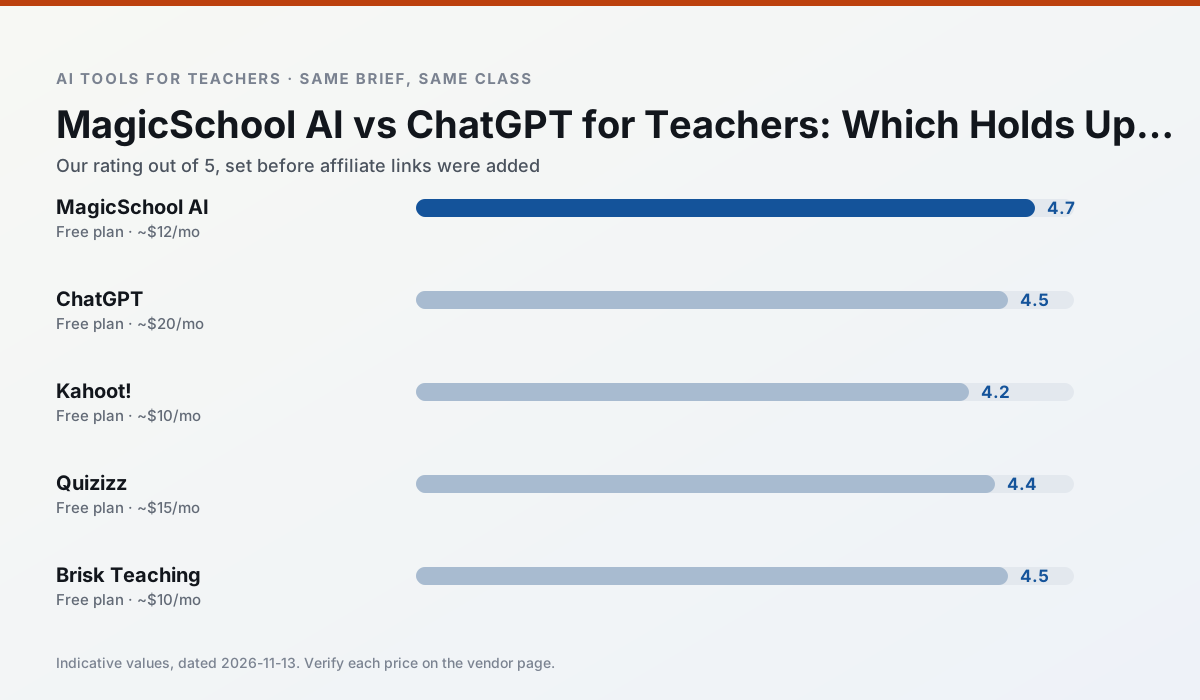
Side by side
Comparison table
Ratings reflect our timed classroom workflow, not vendor claims. Prices are indicative — verify on the vendor site.
| Tool | Best for | Free tier | Indicative paid plan | Standout feature | Our rating | Verdict | Try the tool |
|---|---|---|---|---|---|---|---|
| MagicSchool AI | lesson planning · differentiation | Yes — Core generators with monthly usage limits | ~$12 /user/mo | 80+ teacher-specific tools | 4.7 / 5 | Top pick | Try free |
| ChatGPT | lesson planning · parent communication | Yes — Usage-limited model access | ~$20 /user/mo | Custom GPTs and Projects | 4.5 / 5 | Top pick | Try free |
| Kahoot! | quiz generation · review lessons | Yes — Limited player count | ~$10 /user/mo | AI question builder | 4.2 / 5 | Strong option | Try free |
| Quizizz | quiz generation · formative assessment | Yes — Core quiz creation | ~$15 /user/mo | AI question generator | 4.4 / 5 | Strong option | Try free |
| Brisk Teaching | feedback on writing · grading | Yes — Limited actions per month | ~$10 /user/mo | Works inside Google Docs | 4.5 / 5 | Top pick | Try free |
| Khanmigo | math practice · student tutoring | Yes — US teacher accounts, subject to eligibility | ~$4 /learner/mo | Socratic tutoring rather than answers | 4.3 / 5 | Strong option | Try free |
Match your situation
Best for X
Different jobs need different tools. Here is what we would open first in each case.
MagicSchool AI runs in a browser tab with no extension, no student accounts and no onboarding call, so you can test it in a free period.
ChatGPT answers the three questions a district actually asks: rostering, admin controls and a data-processing agreement. That is usually what decides a school purchase.
Nothing on Kahoot!'s free tier is a teaser demo; the limits are documented and a normal week fits inside them.
Quizizz is the one we would open on a normal planning day because the first output is editable rather than restructurable, and the free plan covers a single teacher's routine.
Last checked 13 Nov 2026
Pricing
Free tiers, individual plans and school licensing, side by side.
| Tool | Free plan | Individual / paid | School & district | Billing note | Verify |
|---|---|---|---|---|---|
| MagicSchool AI | $0 — Core generators with monthly usage limits | ~$12 /user/mo | Custom quote | Indicative — verify on vendor site | Vendor |
| ChatGPT | $0 — Usage-limited model access | ~$20 /user/mo | ~$25+ /user/mo | Indicative — verify on vendor site | Vendor |
| Kahoot! | $0 — Limited player count | ~$10 /user/mo | Custom quote | Indicative — verify on vendor site | Vendor |
| Quizizz | $0 — Core quiz creation | ~$15 /user/mo | Custom quote | Indicative — verify on vendor site | Vendor |
| Brisk Teaching | $0 — Limited actions per month | ~$10 /user/mo | Custom quote | Indicative — verify on vendor site | Vendor |
| Khanmigo | $0 — US teacher accounts, subject to eligibility | ~$4 /learner/mo | Custom quote | Indicative — verify on vendor site | Vendor |
Editorial rule: pricing is re-checked every 2–3 months and the top 50 pages are refreshed every 6 months. See our funding policy.
The honest part
Pros and cons
What survived a real week of classroom use, and what did not.
Pros
- Widest purpose-built template library
- Strong free tier for individual teachers
- Fast to learn with almost no prompting skill
Cons
- Outputs still need standards review
- Best features sit behind the paid tier
- District approval can be slow
Pros
- Most flexible option available
- Huge community of teacher prompt libraries
- Strong multilingual support
Cons
- Requires prompt skills for consistent results
- No built-in standards alignment
- District privacy review usually required
Pros
- Instant engagement
- Very low training time
- Strong brand familiarity
Cons
- Less depth for higher-order assessment
- Paid tiers needed for larger classes
- Time pressure suits recall more than reasoning
Pros
- Students already know the interface
- Good reporting
- Works on low-end devices
Cons
- Writing high-quality AI questions still needs review
- Gamification can distract
- Advanced analytics are paid
Pros
- No copy-paste between tools
- Fast inline feedback on student drafts
- Gentle learning curve
Cons
- Chrome-first workflow
- Extension permissions need IT approval
- Free quota is tight
In the classroom
Use cases
Five concrete workflows, with the tool we would open for each one.
A parent email in two languages
Draft in plain, warm language with no names, translate, then back-translate the important sentences to check meaning. Keep specific incidents out of the prompt and add them yourself.
Recommended: MagicSchool AIRubric and feedback comments in one pass
Reorder the workflow so the rubric is yours and the comments are generated. Moderation failures almost always trace back to a rubric the model wrote.
Recommended: ChatGPTThree reading levels from one source text
Paste a vetted text, ask for supported, core and extension versions, then check the vocabulary list by hand. Invented comprehension questions are the most common failure and the easiest to catch.
Recommended: Kahoot!A Monday morning lesson plan in twelve minutes
The twelve minutes come from not rewriting the skeleton. Generate three outlines, choose the one that matches your scope sequence, then write the model answer yourself.
Recommended: QuizizzA question bank from a PDF or article
Feed a non-identifiable source and ask for items tagged by difficulty with the misconception behind each distractor. Spot-check every answer key; numerical items are least reliable.
Recommended: Brisk Teaching
Questions teachers ask us
FAQ
Direct answers, also published as FAQPage structured data for search and AI assistants.
MagicSchool AI or ChatGPT for lesson planning?
Which is cheaper for one teacher?
Do they produce the same output?
Sources & further reading
Our recommendation
Try MagicSchool AI free for your next lesson planning task
A large library of teacher-specific AI generators in one dashboard. Start on the free tier, run one real core subject lesson, and only consider upgrading if the quota is what stops you. Disclosure: we may earn a commission (30% recurring) at no extra cost to you.
Some links on this page are affiliate links. We may earn a commission at no extra cost to you. Our rankings are editorial and never pay-to-play. Never enter student PII into a free consumer account.
Keep reading
Related comparisons in this cluster.
Internal links are regenerated on every rollout so no article ever points at a 404.