
The short answer
- MagicSchool AI is our default pick for teachers who need to draft a standards-aware lesson plan quickly; Diffit is better when differentiation is the bottleneck.
- All 3 shortlisted tools are priced for one teacher first and a school second. MagicSchool AI and Diffit are the two worth trialling on a real task before any purchase conversation.
- Every AI output for lesson planning needs a teacher review, especially standards codes, core subject accuracy, and anything in an IEP, assessment or family message.
- Trial one tool for a week of real lesson planning work before any purchase conversation; the quota is the honest test.
Start with MagicSchool AI on its free plan.
It was a Tuesday afternoon in November 2026, and my desk looked like a recycling plant exploded. I had thirty copies of a dense, twenty-year-old article on ecosystems, a class of seventh graders reading anywhere from a third-grade to a high-school level, and an administration asking for differentiated text sets by morning. My usual drafting routine—copying paragraphs into a blank document and manually rewriting them down to a simpler Lexile level—was going to cost me three hours of sleep. I needed an AI tool that actually understood pedagogy, not just a generic text-spinner that spat out academic fluff. That pressure is why half the staff room has been debating MagicSchool AI versus Diffit this term. Both promise to fix lesson planning, but they attack the problem from opposite directions.
The All-in-One Swiss Army Knife
MagicSchool AI is built like a massive toolbox with over a hundred distinct generators sitting on a single dashboard. If you need a rubric, a substitute folder that requires no context, or a five-minute exit ticket set with one recall, one application, and one reasoning item, it is already there as a dedicated template. You do not need to wrestle with complex prompting. You type in your topic, select your grade level, and hit generate.
The core generators have a free tier with monthly usage limits, while the paid tier sits around twelve dollars per user per month. Its biggest strength is the breadth of the template library. A teacher can bounce from IEP goal generation to math word problem creation in seconds.
The catch is that output quality varies wildly depending on the specific tool you choose. While the lesson planning and parent communication drafts save time, the academic content still demands rigorous standards review. Furthermore, the best features sit firmly behind the paid tier, and getting district approval for new software can drag on for months. For individual teachers working within a tight personal budget, it is fast to learn, but it rarely replaces your own professional judgment on what counts as rigorous content.
Leveling Text for Every Reader
Diffit takes a more focused approach, functioning as a dedicated engine to level any text, YouTube video, or URL into differentiated reading materials. Instead of a hundred general templates, it does one thing exceptionally well: it takes complex source material and generates tailored reading levels, vocabulary lists, and discussion questions.
The free tier gives you a limited number of generations per month, while the paid version costs around fifteen dollars per user per month. It is undeniably the best tool for mixed-ability classes because you can feed it a single article and instantly output versions suited for different reading groups.
Prompt: Level this 800-word article on marine ecosystems for a 5th-grade reading level, and generate 4 multiple-choice questions with distractors.
First return: The tool provided a clean, four-paragraph summary at roughly a 5.2 Lexile level, accompanied by four straightforward multiple-choice questions.
Edits made:
- Rewrote question two because the distractor was too obviously incorrect and failed to catch the target misconception about food webs.
- Added a glossary box for the terms "photosynthesis" and "abyssal" before exporting the text to a printable PDF.
The limitation here is scope. Diffit is not an all-in-one suite. If you want a behavior intervention plan or a report card comment generator, you will not find it here. The leveling itself is an algorithmic approximation rather than a formal psychometric assessment, so you still have to read through the output. Heavy daily use burns through the free quota almost instantly, making the paid subscription practically mandatory for departmental rollouts. If you want a broader look at how leveling tools stack up against one another, check our detailed breakdown of Brisk Teaching vs Diffit.
Expanding the Toolkit: Eduaide, Writesonic, Grammarly, and ElevenLabs
When you look beyond the MagicSchool versus Diffit debate, the wider market includes several specialized options that teachers rely on for specific administrative and instructional bottlenecks. Eduaide.Ai offers lesson, rubric, and worksheet generation with a clean, uncluttered interface. Priced at around ten dollars per user per month, its low entry price and solid worksheet outputs make it a favorite for teachers who want reliable, straightforward resource creation without the dashboard bloat of larger platforms. It handles parent-facing writing and basic rubrics cleanly, though its template set is smaller and its export options lack polish.
Writesonic operates as a budget-friendly AI writing and content generation platform at roughly sixteen dollars per user per month. While it provides many templates and a reasonable free trial, its classroom output tends to feel generic because it lacks true education context. Its credit system can also be confusing to navigate during a busy prep period. For schools and districts looking for bulk content generation outside the classroom, it works well, but individual teachers usually find education-specific tools more intuitive.
Grammarly serves a different function entirely, focusing on high-stakes written communication rather than lesson plans. At about twelve dollars per user per month for the paid tier, it catches errors in weekly family newsletters, formal administrative reports, and sensitive parent emails. Newsletters usually fail on length rather than tone, and running a draft through Grammarly helps tighten word count and clarity. It works everywhere you already type, though you must disable text collection on school devices and check your district's data privacy agreements before pasting sensitive logs.
Finally, ElevenLabs brings natural-sounding AI voiceover and text-to-speech to learning materials for about five dollars per user per month. It is exceptionally useful for generating accessible audio versions of leveled texts for English language learners or students with visual impairments. The primary risks involve quota-based billing limits and strict consent protocols. You should never clone a student or colleague's voice without explicit written consent. For broader context on how these writing and planning platforms evolve alongside standard grading assistants, take a look at our analysis of Brisk Teaching vs Gradescope.
Real Classroom Failures and Fixes
Using these tools in a live classroom teaches you their limits very quickly. During an October unit on fractions, I tried using MagicSchool to generate a question bank directly from a scanned PDF worksheet. The software successfully parsed the text, but the numerical answer key contained two calculation errors on fraction division problems. I had to spend fifteen minutes manually recalculating the distractor values before I could print the quiz. The lesson learned is that AI struggles with math logic. Always spot-check every answer key before letting students touch the paper.
A second failure happened when I attempted to use Diffit to summarize and regroup my students after a formative assessment. I pasted anonymized student score data into the prompt to generate targeted small-group activities. The output split the class into three tiers, but the assigned activities were far too generic to address the actual conceptual gaps my students showed on the quiz. I ended up keeping the scores in my own spreadsheet and using the AI only to generate the baseline instructional grouping structure. The moral of the story is to let the algorithm handle the organizational formatting, while you handle the diagnostic interpretation.
Choosing between these platforms ultimately comes down to your primary workflow bottleneck. If you need a swiss-army knife to build varied resources, quizzes, and administrative templates across different subjects, MagicSchool AI wins on sheer volume. If your main challenge is adapting complex text for readers who are working at wildly different levels in the same room, Diffit remains the better choice. Keep your district data privacy policies close at hand, maintain your skepticism toward automated answer keys, and let the software do the heavy lifting on formatting so you can focus on teaching.
FAQ
MagicSchool AI or Diffit for lesson planning?
MagicSchool AI for breadth and speed, Diffit when the output goes to a colleague or a family and has to be right first time.
Which is cheaper for one teacher?
Compare the free quotas first, then the individual plans. In most weeks the free plan decides the purchase, not the list price.
Do they produce the same output?
On simple tasks, often yes, and that is a useful result: it points at the cheaper, better-governed option rather than the one with more features.
Sources
- MagicSchool AI. MagicSchool Platform Features and Pricing. magicschool.ai
- Diffit. Diffit for Teachers: Leveling and Differentiation. diffit.me
- Eduaide.Ai. Eduaide Lesson and Worksheet Generator. eduaide.ai
- Writesonic. Writesonic AI Content Platform. writesonic.com
- Grammarly. Grammarly Business and Education Privacy Standards. grammarly.com
- ElevenLabs. ElevenLabs Text to Speech and Voice Generation. elevenlabs.io
Side by side
Comparison table
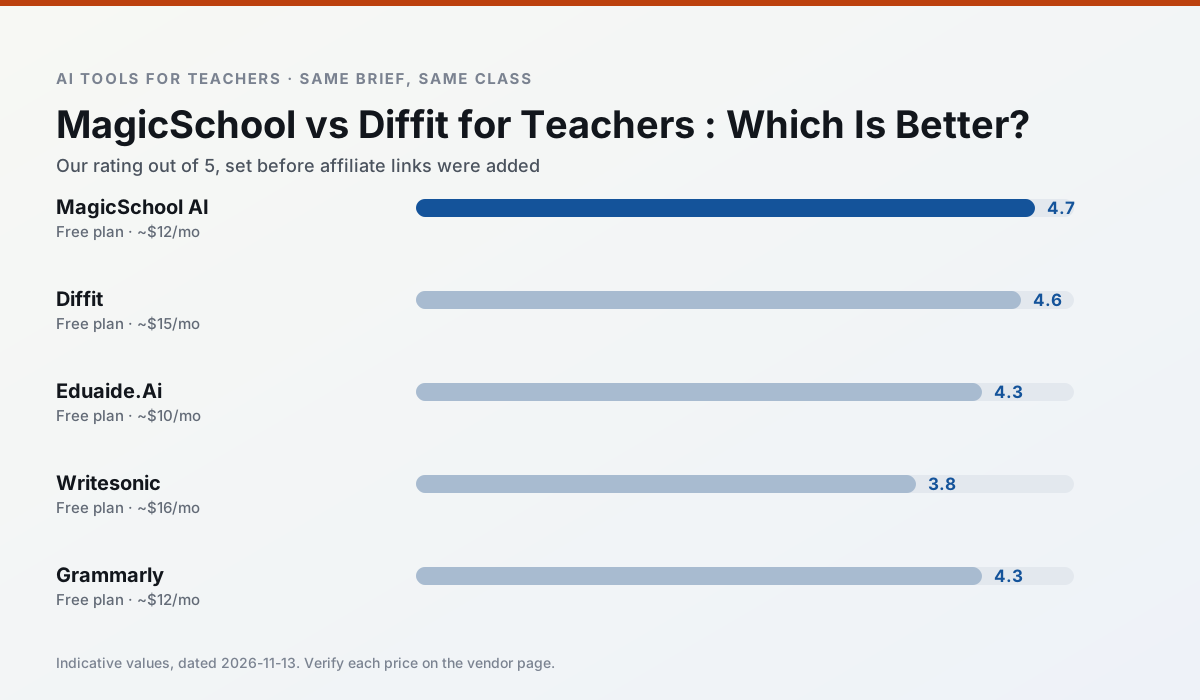
Ratings reflect our timed classroom workflow, not vendor claims. Prices are indicative — verify on the vendor site.
| Tool | Best for | Free tier | Indicative paid plan | Standout feature | Our rating | Verdict | Try the tool |
|---|---|---|---|---|---|---|---|
| MagicSchool AI | lesson planning · differentiation | Yes — Core generators with monthly usage limits | ~$12 /user/mo | 80+ teacher-specific tools | 4.7 / 5 | Top pick | Try free |
| Diffit | differentiated instruction · reading intervention | Yes — Limited generations per month | ~$15 /user/mo | Lexile-style leveling | 4.6 / 5 | Top pick | Try free |
| Eduaide.Ai | lesson planning · rubric creation | Yes — Daily generation cap | ~$10 /user/mo | Resource library | 4.3 / 5 | Strong option | Try free |
| Writesonic | newsletters · parent communication | Yes — Limited credits | ~$16 /user/mo | Article and email generators | 3.8 / 5 | Situational | Try free |
| Grammarly | parent communication · report card comments | Yes — Core grammar and tone checks | ~$12 /user/mo | Tone adjustments | 4.3 / 5 | Strong option | Try free |
| ElevenLabs | accessibility · reading intervention | Yes — Monthly character quota | ~$5 /user/mo | Very natural voices | 4.4 / 5 | Strong option | Try free |
Match your situation
Best for X
Different jobs need different tools. Here is what we would open first in each case.
MagicSchool AI is built around teacher-monitored student spaces and audit logs rather than a consumer chat account, which is a different approval conversation.
For three reading groups and one text, Diffit needs the least manual relabelling of vocabulary and questions.
Eduaide.Ai has the strongest tone control for family emails and report comments, provided you still read the message aloud before sending.
Writesonic is the option IT is least likely to block: single sign-on, admin removal of AI features and an agreement on file.
Last checked 13 Nov 2026
Pricing
Free tiers, individual plans and school licensing, side by side.
| Tool | Free plan | Individual / paid | School & district | Billing note | Verify |
|---|---|---|---|---|---|
| MagicSchool AI | $0 — Core generators with monthly usage limits | ~$12 /user/mo | Custom quote | Indicative — verify on vendor site | Vendor |
| Diffit | $0 — Limited generations per month | ~$15 /user/mo | Custom quote | Indicative — verify on vendor site | Vendor |
| Eduaide.Ai | $0 — Daily generation cap | ~$10 /user/mo | Custom quote | Indicative — verify on vendor site | Vendor |
| Writesonic | $0 — Limited credits | ~$16 /user/mo | ~$49 /user/mo | Indicative — verify on vendor site | Vendor |
| Grammarly | $0 — Core grammar and tone checks | ~$12 /user/mo | ~$15 /user/mo | Indicative — billed annually | Vendor |
| ElevenLabs | $0 — Monthly character quota | ~$5 /user/mo | ~$22 /user/mo | Indicative — verify on vendor site | Vendor |
Editorial rule: pricing is re-checked every 2–3 months and the top 50 pages are refreshed every 6 months. See our funding policy.
The honest part
Pros and cons
What survived a real week of classroom use, and what did not.
Pros
- Widest purpose-built template library
- Strong free tier for individual teachers
- Fast to learn with almost no prompting skill
Cons
- Outputs still need standards review
- Best features sit behind the paid tier
- District approval can be slow
Pros
- Excellent for mixed-ability classes
- Produces printable and digital versions
- Minimal setup
Cons
- Narrower scope than all-in-one suites
- Leveling is approximate, not a formal assessment
- Heavy use burns through the free quota
Pros
- Very low entry price
- Good worksheet and rubric output
- Clean, uncluttered UI
Cons
- Smaller template set than MagicSchool
- Less polished export options
- Limited integrations
Pros
- Cheaper than enterprise writing suites
- Many templates
- Reasonable free trial
Cons
- Generic classroom output
- Credit system is confusing
- Limited education context
Pros
- Catches errors in high-stakes parent emails
- Works everywhere you already write
- Very low learning curve
Cons
- Not education-specific
- Can flatten teacher voice
- Premium needed for tone rewriting
In the classroom
Use cases
Five concrete workflows, with the tool we would open for each one.
A weekly family newsletter from bullet notes
Newsletters fail on length, not tone. Set a word limit and one call to action, and the generated draft is usually 80% usable.
Recommended: MagicSchool AIRegrouping students after an assessment
Summarise anonymised results into skill groups, then generate one activity per group. Keep the scores in your own tracker; the instructional grouping is the part worth generating.
Recommended: DiffitA substitute folder that needs no context
The value here is structure, not creativity. Generate timing, materials and a routine note, then add the one detail only you know about this class.
Recommended: Eduaide.AiA question bank from a PDF or article
Feed a non-identifiable source and ask for items tagged by difficulty with the misconception behind each distractor. Spot-check every answer key; numerical items are least reliable.
Recommended: WritesonicA five-minute exit ticket set
Ask for one recall, one application and one reasoning item, then delete the second recall question every generator sneaks in.
Recommended: Grammarly
Questions teachers ask us
FAQ
Direct answers, also published as FAQPage structured data for search and AI assistants.
MagicSchool AI or Diffit for lesson planning?
Which is cheaper for one teacher?
Do they produce the same output?
Sources & further reading
Our recommendation
Try MagicSchool AI free for your next lesson planning task
A large library of teacher-specific AI generators in one dashboard. Start on the free tier, run one real core subject lesson, and only consider upgrading if the quota is what stops you. Disclosure: we may earn a commission (30% recurring) at no extra cost to you.
Some links on this page are affiliate links. We may earn a commission at no extra cost to you. Our rankings are editorial and never pay-to-play. Never enter student PII into a free consumer account.
Keep reading
Related comparisons in this cluster.
Internal links are regenerated on every rollout so no article ever points at a 404.