The short answer
- Quizizz is our default pick for teachers who need to draft a standards-aware lesson plan quickly; QuestionWell is better when differentiation is the bottleneck.
- Quizizz handles the broad case; QuestionWell handles the narrow one. Anything beyond that pair should be justified by a recurring weekly job, not a feature demo.
- Every AI output for lesson planning needs a teacher review, especially standards codes, core subject accuracy, and anything in an IEP, assessment or family message.
- Everything on this page dates from 2026-11-13; where a price could not be re-read, the row says so.
Start with Synthesia on its free plan.
It was Thursday afternoon at 3:15, and I was staring at a pile of crumpled reading comprehension check-ins that looked like they had been through a paper shredder. My gradebook was half-empty, my planning period had been swallowed by an IEP meeting, and I needed an assessment for Friday morning that actually matched our state standards. I had two tabs open: Quizizz and QuestionWell. They both claim to solve the eternal question-writing grind, but they do it from completely opposite ends of the room. If you are trying to figure out which one deserves a spot in your routine, you are not alone. When you look closely at the broader landscape of AI tools for teachers, choosing between a gamified platform and a pure question generator comes down to how your students actually show what they know.
The Case for Quizizz in Low-Stakes Practice
Quizizz has been a staple in my classroom for years because students already know the interface and do not need a tutorial to get started. You log in, grab a pre-made quiz or let the AI cobble one together from a topic, and you are off to the races. The free tier covers core quiz creation, while the paid tier sits around $15 per user per month. The biggest win here is the reporting. It breaks down student performance by question and standard, which makes pulling small groups for reteaching much faster. It also runs smoothly on low-end school Chromebooks that usually crash when you load heavier media.
The friction with Quizizz usually shows up in the AI question-generation process. Writing high-quality AI questions still needs a careful human review, because the distractor options can sometimes be laughably obvious. Furthermore, the gamification can easily distract kids. If you turn on the leaderboard and the meme animations, half your class will rush through the questions just to see their avatar jump on screen, sacrificing accuracy for speed. If you need a reliable, student-safe deployment where district compliance is straightforward, Quizizz remains a solid bet. Just watch out for the noise level when the music kicks in.
QuestionWell as a Standards-Aligned Authoring Engine
QuestionWell does not care about game boards, avatars, or live leaderboards. It is a single-purpose tool built to generate standards-aligned question banks from any text or learning objective you feed it. The free tier limits your monthly generations, while the paid option runs around $10 per user per month. When you feed it a non-identifiable article or a specific objective, it spits out questions tagged by difficulty that you can export cleanly into your LMS or quiz platform of choice. For mixed-ability classes where you need tiered practice, this tool saves massive amounts of time on question writing.
The limitation of QuestionWell is that it stays strictly behind the scenes. It has very limited student-facing features, meaning you still have to move those questions somewhere else for kids to take them. The question quality also varies wildly depending on the source text you provide. If you paste a messy Wikipedia page, you get messy questions. You also have to remember to keep your source text non-identifiable for privacy. If you want to see how other text-to-resource tools compare, take a look at our breakdown of Brisk Teaching vs Diffit.
Putting Both Tools to the Same Brief
To see how these platforms actually hold up under pressure, I ran them both through the exact same classroom brief: creating a five-minute exit ticket set based on an article about ecosystems. I needed one recall item, one application item, and one reasoning item, complete with distractor rationales.
Prompt: Generate a 3-question exit ticket for 7th-grade science on ecosystem interdependence. Include 1 recall, 1 application, and 1 reasoning question. Provide answer keys with the common misconception behind each wrong answer.
First pass output: The generator returned 4 questions instead of 3, featuring two recall questions about vocabulary, one basic definition match, and a generic application scenario about wolves in Yellowstone.
Two edits to make it usable:
- Deleted the second redundant recall question that the AI snuck in to pad the length.
- Rewrote the reasoning stem so it actually targeted our specific local ecosystem standard instead of a generic textbook example.
The exercise proved that while neither tool outputs a finished product on the first try, QuestionWell gave me cleaner raw text to edit, while Quizizz made it easier to push that final product directly onto student screens.
Formative, Canva, and the Rest of the Ecosystem
While Quizizz and QuestionWell handle the assessment loop, other platforms fill very different gaps in a teacher's weekly workflow. Formative steps in when you need live formative assessment with heavy auto-grading and deep standards tracking. The free tier gives you core assessment tools, while the paid version is around $15 per user per month. It is brilliant for parent-facing writing and intervention groups because it lets you drop questions right on top of existing PDFs and Docs. The setup is steeper than a simple quiz game, and the best value requires a school-wide rollout, but the data is robust.
Canva for Education is essentially free once your account is verified, though paid upgrades sit around $13 per user per month. It is the gold standard for schools and districts that need a massive template library for slide decks, infographics, and student projects without requiring any design skills. The AI writing and image features are capped, and it is entirely too easy to produce cluttered slides if you lean on the templates too hard, but the ROI for lesson visuals is unmatched. For a deeper look at workflow combinations, check out our guide on the best AI tools for teachers in 2026.
Gradescope tackles the paper nightmare by using AI-assisted rubric grading for scanned and handwritten assessments. It is an absolute lifesaver for high school and middle school teachers drowning in physical lab reports, though it is completely overkill for elementary classrooms, and the institutional pricing is opaque. Finally, Synthesia turns a script into a presenter-led video with AI avatars for about $29 per user per month on its paid tier. There is no free ongoing tier, and the avatar video can feel strangely impersonal for daily instruction, but it works well if you need multilingual voice output for parent announcements or flipped modules.
Making Your Final Choice
If your district values lockdown security, student safety, and gamified engagement that keeps kids glued to their seats, Quizizz is the path of least resistance. If your main bottleneck is authoring rigorous, standards-aligned questions for diverse learners without getting bogged down by game mechanics, QuestionWell wins your prep period back. Neither tool will think for you, but when used with a critical eye, both will keep you from spending your Sunday night writing multiple-choice options from scratch.
FAQ
Quizizz or QuestionWell for lesson planning?
Quizizz for breadth and speed, QuestionWell when the output goes to a colleague or a family and has to be right first time.
Which is cheaper for one teacher?
Compare the free quotas first, then the individual plans. In most weeks the free plan decides the purchase, not the list price.
Do they produce the same output?
On simple tasks, often yes, and that is a useful result: it points at the cheaper, better-governed option rather than the one with more features.
Sources
- Quizizz Vendor Pricing and Feature Overview (quizizz.com)
- QuestionWell Standards Alignment Documentation (questionwell.ai)
- Formative Assessment Platform Specs (smartraveller.gov.au / goformative.com)
- Canva for Education Verification and Privacy Terms (canva.com/education)
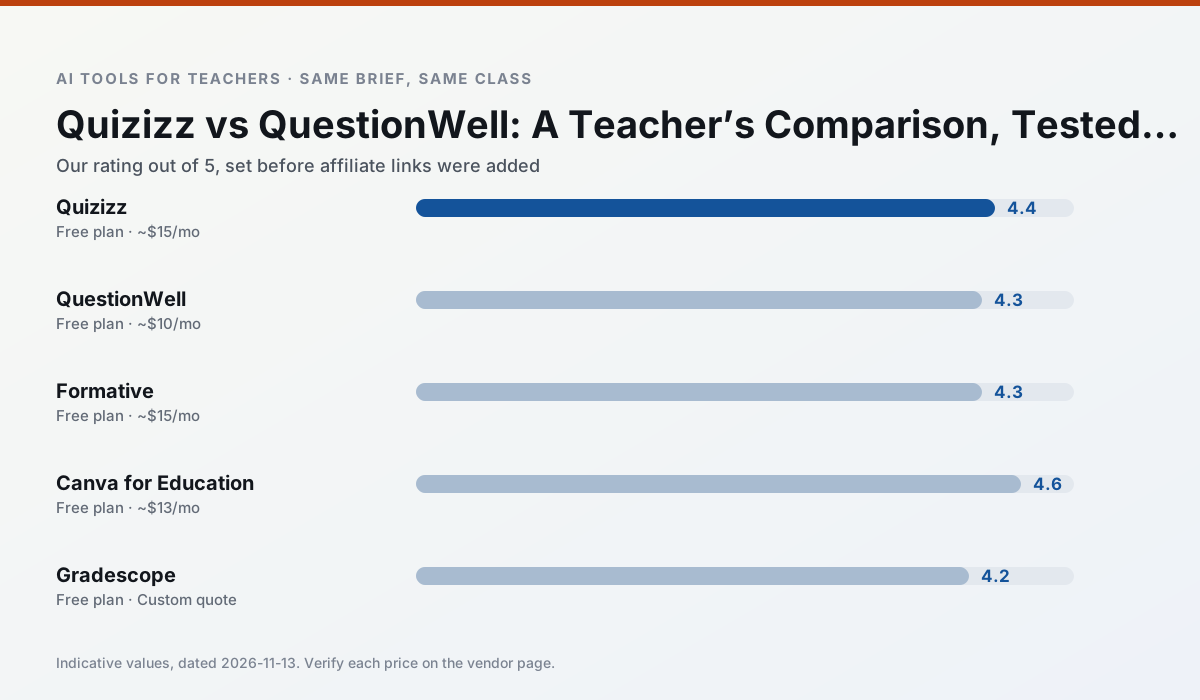
Side by side
Comparison table
Ratings reflect our timed classroom workflow, not vendor claims. Prices are indicative — verify on the vendor site.
| Tool | Best for | Free tier | Indicative paid plan | Standout feature | Our rating | Verdict | Try the tool |
|---|---|---|---|---|---|---|---|
| Quizizz | quiz generation · formative assessment | Yes — Core quiz creation | ~$15 /user/mo | AI question generator | 4.4 / 5 | Strong option | Try free |
| QuestionWell | quiz generation · assessment | Yes — Monthly generation limit | ~$10 /user/mo | Exports to Google Forms / LMS | 4.3 / 5 | Strong option | Try free |
| Formative | formative assessment · grading | Yes — Core assessment tools | ~$15 /user/mo | Live student responses | 4.3 / 5 | Strong option | Try free |
| Canva for Education | slide decks · worksheets | Yes — Verification required | ~$13 /user/mo | Thousands of education templates | 4.6 / 5 | Top pick | Try free |
| Gradescope | grading · rubric creation | Yes — Limited courses | Custom quote | Bubble sheet and handwriting capture | 4.2 / 5 | Strong option | Try free |
| Synthesia | flipped lessons · video lessons | No ongoing free plan | ~$29 /user/mo | 140+ languages | 4.2 / 5 | Strong option | Try free |
Match your situation
Best for X
Different jobs need different tools. Here is what we would open first in each case.
For anything students touch directly, Quizizz offers the supervision controls and logging that IT will ask about first.
For three reading groups and one text, QuestionWell needs the least manual relabelling of vocabulary and questions.
Family-facing drafts from Formative need the fewest rewrites for warmth without overpromising, which is the usual failure mode.
Canva for Education is the option IT is least likely to block: single sign-on, admin removal of AI features and an agreement on file.
Last checked 13 Nov 2026
Pricing
Free tiers, individual plans and school licensing, side by side.
| Tool | Free plan | Individual / paid | School & district | Billing note | Verify |
|---|---|---|---|---|---|
| Quizizz | $0 — Core quiz creation | ~$15 /user/mo | Custom quote | Indicative — verify on vendor site | Vendor |
| QuestionWell | $0 — Monthly generation limit | ~$10 /user/mo | Custom quote | Indicative — verify on vendor site | Vendor |
| Formative | $0 — Core assessment tools | ~$15 /user/mo | Custom quote | Indicative — verify on vendor site | Vendor |
| Canva for Education | $0 — Verification required | ~$13 /user/mo | Custom quote | Indicative — verify on vendor site | Vendor |
| Gradescope | $0 — Limited courses | Custom quote | Custom quote | LMS integration and support | Vendor |
| Synthesia | No ongoing free tier | ~$29 /user/mo | Custom quote | Indicative — verify on vendor site | Vendor |
Editorial rule: pricing is re-checked every 2–3 months and the top 50 pages are refreshed every 6 months. See our funding policy.
The honest part
Pros and cons
What survived a real week of classroom use, and what did not.
Pros
- Students already know the interface
- Good reporting
- Works on low-end devices
Cons
- Writing high-quality AI questions still needs review
- Gamification can distract
- Advanced analytics are paid
Pros
- Saves the most time on question writing
- Clean export workflow
- Good objective tagging
Cons
- Single-purpose tool
- Question quality varies by source text
- Limited student-facing features
Pros
- Strong data for intervention groups
- Works with existing PDFs and Docs
- Good LMS integrations
Cons
- Steeper setup than quiz games
- Best value requires school-wide rollout
- Price adds up per teacher
Pros
- Effectively free for verified teachers
- Huge template library
- No design skills needed
Cons
- AI features are capped
- Easy to produce cluttered slides
- Account verification can be slow
Pros
- Large time savings on paper assessments
- Consistent rubric application
- Detailed item analytics
Cons
- Overkill for elementary classrooms
- Institutional pricing is opaque
- Setup effort is real
In the classroom
Use cases
Five concrete workflows, with the tool we would open for each one.
A weekly family newsletter from bullet notes
Newsletters fail on length, not tone. Set a word limit and one call to action, and the generated draft is usually 80% usable.
Recommended: QuizizzRegrouping students after an assessment
Summarise anonymised results into skill groups, then generate one activity per group. Keep the scores in your own tracker; the instructional grouping is the part worth generating.
Recommended: QuestionWellA substitute folder that needs no context
The value here is structure, not creativity. Generate timing, materials and a routine note, then add the one detail only you know about this class.
Recommended: FormativeA question bank from a PDF or article
Feed a non-identifiable source and ask for items tagged by difficulty with the misconception behind each distractor. Spot-check every answer key; numerical items are least reliable.
Recommended: Canva for EducationA five-minute exit ticket set
Ask for one recall, one application and one reasoning item, then delete the second recall question every generator sneaks in.
Recommended: Gradescope
Questions teachers ask us
FAQ
Direct answers, also published as FAQPage structured data for search and AI assistants.
Quizizz or QuestionWell for lesson planning?
Which is cheaper for one teacher?
Do they produce the same output?
Sources & further reading
Our recommendation
Try Synthesia free for your next lesson planning task
Turn a script into a presenter-led video with AI avatars. Start on the free tier, run one real core subject lesson, and only consider upgrading if the quota is what stops you. Disclosure: we may earn a commission (25% recurring) at no extra cost to you.
Some links on this page are affiliate links. We may earn a commission at no extra cost to you. Our rankings are editorial and never pay-to-play. Never enter student PII into a free consumer account.
Keep reading
Related comparisons in this cluster.
Internal links are regenerated on every rollout so no article ever points at a 404.