The short answer
- Quizizz is our default pick for teachers who need to draft a standards-aware lesson plan quickly; Formative is better when differentiation is the bottleneck.
- Quizizz handles the broad case; Formative handles the narrow one. Anything beyond that pair should be justified by a recurring weekly job, not a feature demo.
- Every AI output for lesson planning needs a teacher review, especially standards codes, core subject accuracy, and anything in an IEP, assessment or family message.
- Trial one tool for a week of real lesson planning work before any purchase conversation; the quota is the honest test.
Start with Fliki on its free plan.
By third period on a Tuesday, my eighth graders can smell filler work through closed doors. I had twenty-five minutes left in a chemistry block and needed to know if they actually understood how to balance equations, or if they were just copying coefficients from the kid next to them. Handing out a paper quiz meant twenty minutes of grading after contract hours, which was not happening. That is usually when teachers start hunting for tech that saves time without adding friction, which brings us to the eternal debate of Quizizz vs Formative for teachers trying to survive the middle of the term.
If you are trying to figure out which platform deserves a permanent bookmark in your browser, you are likely weighing student engagement against deep data tracking. Both tools sit around $15 per user per month on their paid tiers, though both offer functional free versions for basic checks. We evaluated these platforms based on daily classroom survival, device limits in older labs, and how quickly you can turn data into something useful before the bell rings. For a broader look at how different platforms stack up, check out our guide on the best AI tools for teachers 2026.
Why Quizizz Wins for Low-Friction Engagement
Quizizz has been a staple in classrooms for years, and its AI-assisted quiz creation has only made it faster to spin up review sessions. You can paste text or upload a standard PDF, and the platform generates a batch of multiple-choice or fill-in-the-blank questions in seconds. The biggest strength of Quizizz is that students already know the interface. There is no onboarding tutorial required on a Friday afternoon; they log in, slap in a goofy nickname, and start racing the clock.
The gamification is a double-edged sword, however. While it keeps the energy high in a room full of tired teenagers, the memes and point streaks can occasionally distract from the actual learning objective. Writing high-quality AI questions still requires a careful human review pass, because the initial generation sometimes leaves out crucial distractor logic or writes stems that are far too easy to guess. On the technical side, it runs smoothly on low-end Chromebooks and battered school tablets that choke on heavier web applications. The free tier covers core quiz creation, but you will need the paid tier at roughly $15 per user per month to unlock advanced reporting and question types. According to their documentation, COPPA and FERPA compliance measures are in place, but you should always confirm the specifics with your district tech department before syncing a roster. If your priority is keeping kids motivated with game elements, Quizizz takes the title for best for schools and districts.
Formative for Deep Standards Tracking and Intervention
Formative approaches assessment from the other end of the telescope, focusing heavily on live data and standards mastery rather than game mechanics. If you already have a library of PDFs and Docs that you use year after year, Formative lets you upload them and layer interactive questions directly onto the existing pages. You can watch student responses populate in real time on your screen, which lets you spot misconceptions while there is still time to fix them.
Prompt: Create four targeted remediation questions based on student errors in balancing chemical equations, focusing on subscript versus coefficient confusion, formatted for a live tracking grid.
First Draft Result: The AI generated four standard textbook questions with a multiple-choice layout, but missed the specific misconception about subscripts entirely.
Edit One: Added explicit constraints requiring open-ended response boxes instead of multiple choice.
Edit Two: Injected three anonymous student error examples into the prompt to anchor the difficulty level.
The setup is steeper than simply dropping a game code on the board, and the platform shines brightest when deployed as a school-wide rollout where departments can share pre-made trackers. Pricing sits around $15 per user per month for the paid tier, which can add up quickly if you are paying out of pocket. For teachers who want to regroup students after an assessment without spending an entire evening sorting spreadsheets, Formative is the best for quick setup and actionable intervention groups.
Expanding Beyond Quizzes with Media and Audio Tools
Classroom assessment is only half the battle when you are trying to build engaging instructional materials for the week. Many educators find themselves branching out into content creation tools like Fliki for text-to-video explainers, which costs around $21 per user per month on its paid tier and offers a watermarked free option. It is great for putting together quick visual overviews without needing an on-camera avatar, though the output can occasionally feel a bit generic if you do not customize the stock media. Similarly, Murf AI provides studio-quality voiceover work for slide presentations at roughly $19 per user per month, featuring a trial-only free output that is not usable long-term. It is a single-purpose tool, but the pacing controls make it remarkably easy to generate clean audio instructions for station rotations.
When you have longer recordings of lectures or professional development sessions, OpusClip steps in to chop them into short, captioned clips for around $15 per user per month on its paid plan. It is brilliant for turning a recorded review session into bite-sized highlights, though the free plan is quite restrictive and the tool is heavily optimized for social formats rather than direct lesson design. If you publish your own teacher resources online through marketplaces, Surfer SEO provides on-page guidance for around $79 per month, though it is far too expensive for standard classroom use and is not designed for student interaction. When using any of these media tools, remember to keep student PII entirely out of third-party content generators. For a similar comparison of workflow assistants, take a look at our breakdown of Brisk Teaching vs Diffit teacher comparison.
Two Real Classroom Failures and How to Fix Them
Even the best software can derail a lesson if you rely too heavily on default settings. Here is what went wrong in my classroom and how I adapted.
First, during a live Quizizz review session, the competitive leaderboards completely hijacked the room's focus. Students stopped reading the chemistry questions and started mashing buttons just to climb three spots on the screen, rendering the data useless for diagnostic purposes. To fix it for the next round, I turned off the live timer and the meme pop-ups in the settings menu, shifting the exercise from a chaotic race into a steady, thoughtful check for understanding.
Second, when uploading a dense lab handout into Formative, the layout warped on smaller mobile screens, forcing students to pinch and zoom constantly instead of answering questions. The interface friction caused a wave of off-task behavior before anyone even reached question two. I learned to strip out the messy graphics from legacy worksheets before uploading, converting them into clean text blocks that render properly on any device.
Choosing between these platforms ultimately comes down to your daily workflow. If your students need high-energy engagement and fast review cycles, lean toward Quizizz. If you need granular data to drive small-group intervention and standards tracking, Formative is the stronger companion. Just remember that the tool is only as good as the review pass you give the content before it hits the projector.
FAQ
Quizizz or Formative for lesson planning?
Quizizz for breadth and speed, Formative when the output goes to a colleague or a family and has to be right first time.
Which is cheaper for one teacher?
Compare the free quotas first, then the individual plans. In most weeks the free plan decides the purchase, not the list price.
Do they produce the same output?
On simple tasks, often yes, and that is a useful result: it points at the cheaper, better-governed option rather than the one with more features.
Sources
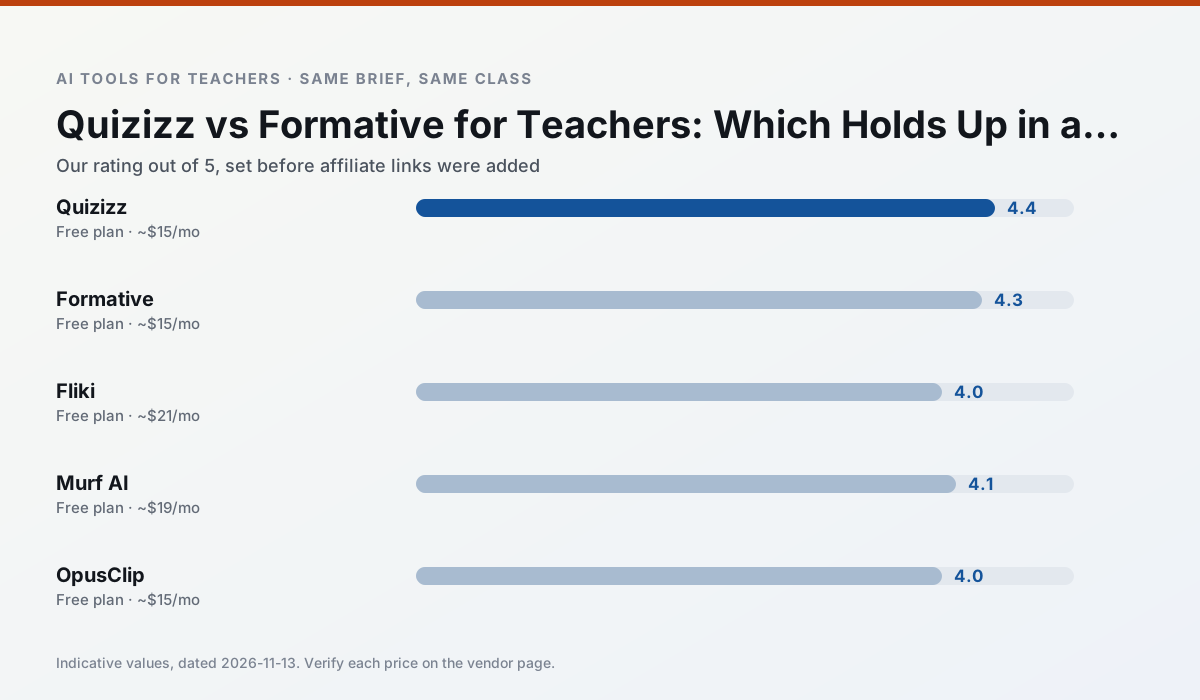
Side by side
Comparison table
Ratings reflect our timed classroom workflow, not vendor claims. Prices are indicative — verify on the vendor site.
| Tool | Best for | Free tier | Indicative paid plan | Standout feature | Our rating | Verdict | Try the tool |
|---|---|---|---|---|---|---|---|
| Quizizz | quiz generation · formative assessment | Yes — Core quiz creation | ~$15 /user/mo | AI question generator | 4.4 / 5 | Strong option | Try free |
| Formative | formative assessment · grading | Yes — Core assessment tools | ~$15 /user/mo | Live student responses | 4.3 / 5 | Strong option | Try free |
| Fliki | video lessons · audio lessons | Yes — Watermarked, limited minutes | ~$21 /user/mo | Blog/text to video | 4.0 / 5 | Situational | Try free |
| Murf AI | audio lessons · accessibility | Yes — Trial-only output | ~$19 /user/mo | Voice fine-tuning | 4.1 / 5 | Situational | Try free |
| OpusClip | PD materials · flipped lessons | Yes — Limited monthly clips | ~$15 /user/mo | Auto captions | 4.0 / 5 | Situational | Try free |
| Surfer SEO | teacher bloggers · resource sellers | No ongoing free plan | ~$79 /mo | Content Editor | 4.0 / 5 | Situational | Try free |
Match your situation
Best for X
Different jobs need different tools. Here is what we would open first in each case.
Quizizz answers the three questions a district actually asks: rostering, admin controls and a data-processing agreement. That is usually what decides a school purchase.
Formative runs in a browser tab with no extension, no student accounts and no onboarding call, so you can test it in a free period.
Fliki wins on the default path: fewer clicks to a usable draft, and the interface does not get in the way at 7:40am.
If there is no budget, start with Murf AI: free plan with clearest quota is the least punishing free tier here.
Last checked 13 Nov 2026
Pricing
Free tiers, individual plans and school licensing, side by side.
| Tool | Free plan | Individual / paid | School & district | Billing note | Verify |
|---|---|---|---|---|---|
| Quizizz | $0 — Core quiz creation | ~$15 /user/mo | Custom quote | Indicative — verify on vendor site | Vendor |
| Formative | $0 — Core assessment tools | ~$15 /user/mo | Custom quote | Indicative — verify on vendor site | Vendor |
| Fliki | $0 — Watermarked, limited minutes | ~$21 /user/mo | ~$66 /user/mo | Indicative — verify on vendor site | Vendor |
| Murf AI | $0 — Trial-only output | ~$19 /user/mo | ~$39 /user/mo | Indicative — verify on vendor site | Vendor |
| OpusClip | $0 — Limited monthly clips | ~$15 /user/mo | ~$29 /user/mo | Indicative — verify on vendor site | Vendor |
| Surfer SEO | No ongoing free tier | ~$79 /mo | Custom quote | Indicative — verify on vendor site | Vendor |
Editorial rule: pricing is re-checked every 2–3 months and the top 50 pages are refreshed every 6 months. See our funding policy.
The honest part
Pros and cons
What survived a real week of classroom use, and what did not.
Pros
- Students already know the interface
- Good reporting
- Works on low-end devices
Cons
- Writing high-quality AI questions still needs review
- Gamification can distract
- Advanced analytics are paid
Pros
- Strong data for intervention groups
- Works with existing PDFs and Docs
- Good LMS integrations
Cons
- Steeper setup than quiz games
- Best value requires school-wide rollout
- Price adds up per teacher
Pros
- No avatar needed
- Good for explainer visuals
- Simple editor
Cons
- Minute-based limits
- Output can look generic
- Price jumps between tiers
Pros
- Very clean audio
- Good pacing controls
- Easy slide integration
Cons
- Commercial licensing rules matter
- Free tier is not usable long-term
- Single-purpose
Pros
- Turns a recorded lesson into review clips
- Excellent captions
- Fast
Cons
- Optimised for social formats
- Not a lesson design tool
- Free plan is restrictive
In the classroom
Use cases
Five concrete workflows, with the tool we would open for each one.
A weekly family newsletter from bullet notes
Newsletters fail on length, not tone. Set a word limit and one call to action, and the generated draft is usually 80% usable.
Recommended: QuizizzRegrouping students after an assessment
Summarise anonymised results into skill groups, then generate one activity per group. Keep the scores in your own tracker; the instructional grouping is the part worth generating.
Recommended: FormativeRubric and feedback comments in one pass
Reorder the workflow so the rubric is yours and the comments are generated. Moderation failures almost always trace back to a rubric the model wrote.
Recommended: FlikiA parent email in two languages
Draft in plain, warm language with no names, translate, then back-translate the important sentences to check meaning. Keep specific incidents out of the prompt and add them yourself.
Recommended: Murf AIA Monday morning lesson plan in twelve minutes
The twelve minutes come from not rewriting the skeleton. Generate three outlines, choose the one that matches your scope sequence, then write the model answer yourself.
Recommended: OpusClip
Questions teachers ask us
FAQ
Direct answers, also published as FAQPage structured data for search and AI assistants.
Quizizz or Formative for lesson planning?
Which is cheaper for one teacher?
Do they produce the same output?
Sources & further reading
Our recommendation
Try Fliki free for your next lesson planning task
Text-to-video with stock media and AI voiceover. Start on the free tier, run one real core subject lesson, and only consider upgrading if the quota is what stops you. Disclosure: we may earn a commission (varies) at no extra cost to you.
Some links on this page are affiliate links. We may earn a commission at no extra cost to you. Our rankings are editorial and never pay-to-play. Never enter student PII into a free consumer account.
Keep reading
Related comparisons in this cluster.
Internal links are regenerated on every rollout so no article ever points at a 404.