The short answer
- Khanmigo is our default pick for teachers who need to draft a standards-aware lesson plan quickly; MagicSchool AI is better when differentiation is the bottleneck.
- The cheapest honest test is a week of real work on the free plans: Khanmigo: Yes — US teacher accounts, subject to eligibility; MagicSchool AI: Yes — Core generators with monthly usage limits; Notion AI: Yes — Limited AI usage. If a tool is still open on Friday, it has earned a paid conversation.
- Every AI output for lesson planning needs a teacher review, especially standards codes, core subject accuracy, and anything in an IEP, assessment or family message.
- Everything on this page dates from 2026-11-13; where a price could not be re-read, the row says so.
Start with MagicSchool AI on its free plan.
It was a Tuesday afternoon in October when I realized my desk had become a horizontal filing cabinet for generative AI tabs. I had one window open for drafting multiple-choice questions, another for rewriting IEP present-levels drafts, and a third for trying to get a lesson plan to actually match my state standards without sounding like a corporate wellness seminar. When you are standing in a stuffy classroom trying to prep forty minutes before first period, you do not need an assistant that wants to brainstorm. You need a tool that understands the difference between a high school junior and a middle schooler who forgot his headphones again. Looking at Khanmigo vs MagicSchool AI for teachers is less about counting features and more about figuring out which interface does not add to your cognitive load.
The Daily Planning Grind and Template Libraries
If your lesson planning workflow relies on having a massive menu of specific templates right in front of you, MagicSchool AI wins on sheer volume. It is built around a vast library of teacher-specific AI generators in one dashboard, making it fast to learn with almost no prompting skill required. You click on a generator for text-dependent questions or a warm-up routine, type in your topic, and get a usable draft. The free tier offers core generators with monthly usage limits, while the paid tier runs about twelve dollars per user per month. The catch is that outputs still need careful standards review because the model tends to default to generic grade-level assumptions.
Khanmigo approaches planning from a completely different direction. Born from a nonprofit education platform, its design centers on tutor-style interactions and strong math scaffolding rather than endless administrative templates. US teacher accounts get free access subject to eligibility, while student use runs around four dollars per learner per month. It is less useful if you are trying to crank out three different homework variations in ten minutes, but it shines when you need a structured mathematical progression that does not skip the intermediate steps. If you are exploring how other workflow helpers stack up against specialized platforms, you can check our breakdown of brisk teaching vs magicschool teacher comparison to see where general assistants fit into a daily routine.
Scaffolding and Mixed-Ability Classrooms
Mixed-ability classes demand resources that can split into three different directions without making the teacher look like a frantic short-order cook. MagicSchool AI is our pick for mixed-ability classes because its generators let you tweak reading levels or adjust output complexity with a single toggle. You can take a paragraph about cellular respiration and immediately generate three versions for varying Lexile bands.
Prompt: Rewrite this text about cellular respiration into three distinct reading levels for a sixth-grade science class, including Tier 2 vocabulary definitions for each version.
Initial AI Output: Three generic paragraphs with minor vocabulary swaps that still read at an eighth-grade instructional level.
Edit 1: Explicitly define the Lexile target for the lowest band and ban subordinate clauses in the simplified text.
Edit 2: Manually rewrite the definition of "mitochondria" because the AI used an analogy involving a power plant that our students haven't covered yet.
When you run five-minute exit ticket sets through these systems, the failure mode is almost always the same. You ask for one recall, one application, and one reasoning item, and the generator invariably sneaks in a second recall question. You have to develop the habit of deleting that extra fluff before copying the text into a document. When building a question bank from a PDF or article, always feed a non-identifiable source and ask for items tagged by difficulty with the misconception behind each distractor. Spot-check every answer key carefully, as numerical items generated by large language models remain notoriously unreliable.
Student Safety and District Deployments
When you move from teacher-facing prep to tools that students actually touch, the privacy and safeguarding requirements shift entirely. Khanmigo is our pick for student-safe deployments because of its nonprofit trust signal and purpose-built educational framework. It acts as an AI tutor that guides students through Socratic questioning rather than just giving them the answer to a homework problem. However, it requires student accounts for full value, and availability varies by region depending on district agreements.
For schools looking at broader infrastructure, other options enter the conversation. SchoolAI provides a school-safe AI workspace with teacher-controlled student spaces, priced around fifteen dollars per user per month, designed specifically for district approval with strong safeguarding defaults. Meanwhile, Notion AI offers a flexible workspace for AI-assisted notes, databases, and curriculum planning at about ten dollars per user per month. It is fantastic for long-term curriculum records and team collaboration, but because setup time is significant and it is not purpose-built for lesson generation, you must never store student personally identifiable information in personal Notion workspaces. For broader context on selecting tools that fit classroom realities, our guide on best AI tools for teachers 2026 outlines the criteria that actually matter for district compliance.
Grading, Feedback, and Administrative Realities
Grading student work is where AI either saves your weekend or creates a massive moderation headache. Class Companion targets paper-based workflows by providing AI feedback on handwritten and scanned student work for around twelve dollars per user per month. It is useful where work is done on paper, offering fast, specific comments and solid math support, though scan quality directly affects accuracy and every comment still needs teacher review.
When dealing with formal writing and institutional workflows, Turnitin Clarity and Feedback Studio handle institutional writing feedback and similarity checking. It is already licensed at many schools with consistent institutional workflows and detailed revision history, though individual teachers cannot buy it directly, AI detection remains contested, and administrative setup is heavy.
Prompt: Generate rubric-aligned feedback comments for twenty student essays about the causes of the American Revolution, focusing on thesis strength and evidence selection.
Initial AI Output: Vague, encouraging statements like "Good job including details!" that do not reference specific rubric criteria.
Edit 1: Paste the exact four-point rubric into the prompt and demand that every comment cite a specific row and score level.
Edit 2: Strip out the overly clinical tone that makes students think a robot wrote the margin notes.
If you are writing an IEP present-levels first draft, remember to use aggregated, anonymized data only. Ask for observable, measurable statements, and replace every generated number with your own progress monitoring data before a case manager sees the document. Moderation failures in AI-generated rubrics almost always trace back to a rubric the model wrote itself. Always reorder your workflow so the rubric is yours first, and the comments are generated second.
Choosing the Right Tool for Your Stack
If your primary bottleneck is generating differentiated materials across varied reading levels without spending your prep period clicking through ten different menus, MagicSchool AI fits individual teacher workflows well despite requiring careful standards review. If your school has already bought into a structured digital ecosystem where students interact directly with a Socratic tutor, Khanmigo provides a safer, more focused environment. Neither tool will run your classroom for you, and both will occasionally produce a lesson plan that requires a heavy red pen. The secret is knowing which tool saves you twenty minutes of formatting and which one is just a distraction with a subscription fee.
FAQ
Khanmigo or MagicSchool AI for lesson planning?
Khanmigo for breadth and speed, MagicSchool AI when the output goes to a colleague or a family and has to be right first time.
Which is cheaper for one teacher?
Compare the free quotas first, then the individual plans. In most weeks the free plan decides the purchase, not the list price.
Do they produce the same output?
On simple tasks, often yes, and that is a useful result: it points at the cheaper, better-governed option rather than the one with more features.
Sources
- Khan Academy. Khanmigo for Teachers Overview and Pricing. khanacademy.org
- MagicSchool AI. Feature Library and Educator Pricing Plans. magicschool.ai
- Notion. Notion AI Workspace Features and Security Guidelines. notion.so
- Turnitin. Feedback Studio and Clarity Institutional Documentation. turnitin.com
- Class Companion. AI Feedback for Scanned and Handwritten Student Work. classcompanion.com
- SchoolAI. District Safety, Guardrails, and Teacher Controls. schoolai.com
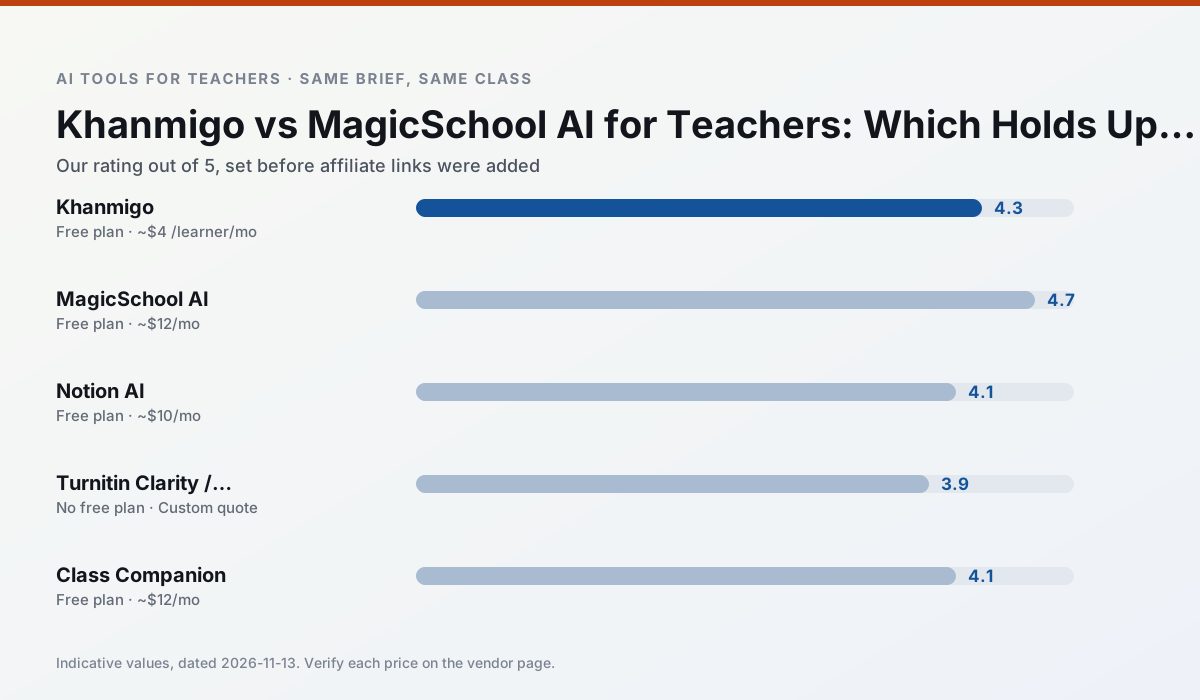
Side by side
Comparison table
Ratings reflect our timed classroom workflow, not vendor claims. Prices are indicative — verify on the vendor site.
| Tool | Best for | Free tier | Indicative paid plan | Standout feature | Our rating | Verdict | Try the tool |
|---|---|---|---|---|---|---|---|
| Khanmigo | math practice · student tutoring | Yes — US teacher accounts, subject to eligibility | ~$4 /learner/mo | Socratic tutoring rather than answers | 4.3 / 5 | Strong option | Try free |
| MagicSchool AI | lesson planning · differentiation | Yes — Core generators with monthly usage limits | ~$12 /user/mo | 80+ teacher-specific tools | 4.7 / 5 | Top pick | Try free |
| Notion AI | curriculum mapping · unit planning | Yes — Limited AI usage | ~$10 /user/mo | Linked databases | 4.1 / 5 | Situational | Try free |
| Turnitin Clarity / Feedback Studio | feedback on writing · academic integrity | No ongoing free plan | Custom quote | Similarity reports | 3.9 / 5 | Situational | Try free |
| Class Companion | grading · feedback on writing | Yes — Limited assignments | ~$12 /user/mo | Handwriting recognition | 4.1 / 5 | Situational | Try free |
| SchoolAI | student-safe AI · differentiated instruction | Yes — Limited seats | ~$15 /user/mo | Teacher-monitored student chats | 4.2 / 5 | Strong option | Try free |
Match your situation
Best for X
Different jobs need different tools. Here is what we would open first in each case.
For anything students touch directly, Khanmigo offers the supervision controls and logging that IT will ask about first.
For three reading groups and one text, MagicSchool AI needs the least manual relabelling of vocabulary and questions.
Notion AI has the strongest tone control for family emails and report comments, provided you still read the message aloud before sending.
Turnitin Clarity / Feedback Studio is the option IT is least likely to block: single sign-on, admin removal of AI features and an agreement on file.
Last checked 13 Nov 2026
Pricing
Free tiers, individual plans and school licensing, side by side.
| Tool | Free plan | Individual / paid | School & district | Billing note | Verify |
|---|---|---|---|---|---|
| Khanmigo | $0 — US teacher accounts, subject to eligibility | ~$4 /learner/mo | Custom quote | Indicative — verify on vendor site | Vendor |
| MagicSchool AI | $0 — Core generators with monthly usage limits | ~$12 /user/mo | Custom quote | Indicative — verify on vendor site | Vendor |
| Notion AI | $0 — Limited AI usage | ~$10 /user/mo | ~$8 /user/mo | Indicative — verify on vendor site | Vendor |
| Turnitin Clarity / Feedback Studio | No ongoing free tier | Custom quote | Custom quote | LMS-wide deployment | Vendor |
| Class Companion | $0 — Limited assignments | ~$12 /user/mo | Custom quote | Indicative — verify on vendor site | Vendor |
| SchoolAI | $0 — Limited seats | ~$15 /user/mo | Custom quote | Indicative — verify on vendor site | Vendor |
Editorial rule: pricing is re-checked every 2–3 months and the top 50 pages are refreshed every 6 months. See our funding policy.
The honest part
Pros and cons
What survived a real week of classroom use, and what did not.
Pros
- Education-first design
- Strong nonprofit trust signal
- Good math scaffolding
Cons
- Availability varies by region
- Less useful for admin paperwork
- Requires student accounts for full value
Pros
- Widest purpose-built template library
- Strong free tier for individual teachers
- Fast to learn with almost no prompting skill
Cons
- Outputs still need standards review
- Best features sit behind the paid tier
- District approval can be slow
Pros
- Great for long-term curriculum records
- Strong team collaboration
- Flexible structure
Cons
- Setup time is significant
- AI add-on pricing changed more than once
- Not purpose-built for lesson generation
Pros
- Already licensed at many schools
- Consistent institutional workflow
- Detailed revision history
Cons
- Individual teachers cannot buy it
- AI detection remains contested
- Heavy administrative setup
Pros
- Useful where work is done on paper
- Fast, specific comments
- Good math support
Cons
- Scan quality affects accuracy
- Narrow use case
- Feedback still needs teacher review
In the classroom
Use cases
Five concrete workflows, with the tool we would open for each one.
A substitute folder that needs no context
The value here is structure, not creativity. Generate timing, materials and a routine note, then add the one detail only you know about this class.
Recommended: KhanmigoA question bank from a PDF or article
Feed a non-identifiable source and ask for items tagged by difficulty with the misconception behind each distractor. Spot-check every answer key; numerical items are least reliable.
Recommended: MagicSchool AIA five-minute exit ticket set
Ask for one recall, one application and one reasoning item, then delete the second recall question every generator sneaks in.
Recommended: Notion AIAn IEP present-levels first draft
Use aggregated, anonymised data only. Ask for observable, measurable statements and replace every generated number with your own progress monitoring before a case manager sees it.
Recommended: Turnitin Clarity / Feedback StudioRubric and feedback comments in one pass
Reorder the workflow so the rubric is yours and the comments are generated. Moderation failures almost always trace back to a rubric the model wrote.
Recommended: Class Companion
Questions teachers ask us
FAQ
Direct answers, also published as FAQPage structured data for search and AI assistants.
Khanmigo or MagicSchool AI for lesson planning?
Which is cheaper for one teacher?
Do they produce the same output?
Sources & further reading
Our recommendation
Try MagicSchool AI free for your next lesson planning task
A large library of teacher-specific AI generators in one dashboard. Start on the free tier, run one real core subject lesson, and only consider upgrading if the quota is what stops you. Disclosure: we may earn a commission (30% recurring) at no extra cost to you.
Some links on this page are affiliate links. We may earn a commission at no extra cost to you. Our rankings are editorial and never pay-to-play. Never enter student PII into a free consumer account.
Keep reading
Related comparisons in this cluster.
Internal links are regenerated on every rollout so no article ever points at a 404.