The short answer
- Jasper is our default pick for teachers who need to draft a standards-aware lesson plan quickly; Grammarly is better when differentiation is the bottleneck.
- Pricing is where these pages date fastest. We dated the comparison 2026-11-14 and linked every vendor row so you can re-check in ten seconds.
- Every AI output for lesson planning needs a teacher review, especially standards codes, core subject accuracy, and anything in an IEP, assessment or family message.
- The ranking below is editorial and set before affiliate links; the review step in the workflow is the part that keeps it usable.
Start with Jasper on its free plan.
It was a Thursday night in October, and I had twenty-four parent emails to write about a failed math common assessment, a three-tier reading group adjustment, and a newsletter that needed to go out before the bell rang at eight. My laptop battery was at ten percent, and my coffee had gone cold hours ago. That was the week I decided to put a few writing assistants through their paces to see if any of them could actually handle the weight of a high school teacher's workload without making me sound like a corporate seminar leader. When looking at Jasper vs Grammarly, the differences become stark very quickly once you try to use them for real teacher tasks instead of marketing campaigns.
Why Daily Writing Assistants Matter
Teachers spend an astonishing amount of time translating raw professional data into human communication. We turn raw score spreadsheets into parent-friendly updates, bulleted department notes into engaging weekly family newsletters, and complex source texts into three distinct reading levels for mixed-ability classrooms. Doing this manually eats into planning periods that should be spent grading student work or actually talking to kids. We have previously looked at how other platforms stack up in our guide to the best AI tools for teachers 2026, but general writing tools sit in a different category altogether. They live inside your browser, follow you into your email client, and promise to save you from your own tired midnight phrasing.
Testing Grammarly for Daily Teacher Tasks
Grammarly is built to be everywhere you already write, which makes it an easy addition to a teacher's workflow. The free tier gives you core grammar and tone checks, while the paid version, coming in at an indicative cost of about $12 per user per month, unlocks deeper sentence rewrites and tone shifting. It catches errors in high-stakes parent emails before you hit send, preventing embarrassing typos when you are communicating with administration or guardians. The learning curve is practically non-existent because it simply underlines your own text as you type. If you want to see how other text-heavy tools compare, our Brisk Teaching vs Diffit comparison explores similar ground for classroom materials.
The downside is that Grammarly is not education-specific, and its automated suggestions can flatten your authentic teacher voice into something that sounds entirely robotic. If you rely too heavily on its full-sentence rewrites, your parent emails start reading like customer service chat logs. Furthermore, you need to be mindful of data privacy. On school devices, you should disable text collection and check your district's Data Processing Agreement before letting it parse sensitive correspondence.
Testing Jasper for School Communications
Jasper takes a very different approach, operating as a brand-voice writing assistant designed primarily for school communications teams and district PR offices rather than individual classrooms. With no free tier and an indicative price point of around $39 per user per month, it is priced firmly for marketing teams. Its reported strengths lie in maintaining a consistent tone across large batches of communications and providing a robust long-term editor.
For a single teacher, however, Jasper is severe overkill. It lacks education-specific features entirely and is not intended for handling student data in any capacity. If you are trying to generate quick reading passages or adapt a lesson plan on the fly, Jasper's marketing-centric templates feel clumsy and detached from the realities of a Tuesday morning classroom.
Prompt: Draft a warm, concise weekly family newsletter from these bullet notes: bake sale Friday, math unit test on fractions next Wednesday, early dismissal at noon. Keep it under 150 words and end with one clear call to action.
Result: The tool generated a hyper-enthusiastic corporate announcement about leveraging our baking synergy for fractional success, complete with a call to action asking parents to synergize their schedules.
Edit 1: Stripped out all marketing phrasing and replaced corporate buzzwords with plain English. Edit 2: Shortened the sentence length to match actual human speech patterns so it sounded like it came from a real person instead of an automated PR engine.
Where Gamma and Video Tools Fit
Beyond basic text editing, sometimes you need to turn a quick outline into a visual format without spending your entire Sunday night formatting slides. Gamma is the best option for quick setup, allowing you to generate presentation decks and documents from a single prompt for an indicative price of about $10 per user per month. It offers a credit-limited generation model on its free tier, giving you the fastest path from a rough outline to a modern-looking deck with solid export options. The catch is that design control is quite limited, and your credits run out faster than you expect if you are iterating frequently.
When text and slides are not enough, video generators enter the picture. Synthesia, priced at around $29 per user per month with no free tier, is our top pick for schools and districts that need to produce staff training or large-scale announcements without a camera crew. HeyGen offers a limited credit plan at a similar indicative price point of $29 per user per month, featuring best-in-class lip-sync translation that works wonderfully for communicating with multilingual families. Meanwhile, Colossyan comes in at roughly $27 per user per month, excelling at turning standard documents and scripts into compliance and LMS training videos.
All of these video tools share strict privacy boundaries. You must never upload student work, use student likenesses without explicit documented consent, or ignore data residency requirements when deploying avatar software in a K-12 environment.
Two Things That Went Wrong in Real Use
The first major failure happened when I tried to use Jasper to summarize anonymized math assessment scores into distinct skill groups for a Friday intervention block. Because the tool has no concept of pedagogical pacing or local curriculum standards, it clumped students based on raw score percentiles rather than conceptual misconceptions. The resulting groups put kids who missed word problems alongside kids who simply made arithmetic computation errors, rendering the instructional grouping useless. I had to abandon the AI output entirely and sort the physical exit tickets by hand while my planning period ticked away.
The second issue occurred with Grammarly when I drafted a sensitive parent email regarding a behavioral incident. The aggressive tone-checking feature flagged my firm, neutral sentences as overly negative and repeatedly tried to rewrite them into bubbly, enthusiastic cheerleading. Sending a note about a classroom safety violation wrapped in exclamation points and upbeat vocabulary is a fast track to a confused and angry phone call from a guardian. I learned quickly to toggle off the tone rewrite feature for anything more serious than a routine homework reminder, trusting my own professional judgment over an algorithm that treats every piece of writing like a sales pitch.
FAQ
Jasper or Grammarly for lesson planning?
Jasper for breadth and speed, Grammarly when the output goes to a colleague or a family and has to be right first time.
Which is cheaper for one teacher?
Compare the free quotas first, then the individual plans. In most weeks the free plan decides the purchase, not the list price.
Do they produce the same output?
On simple tasks, often yes, and that is a useful result: it points at the cheaper, better-governed option rather than the one with more features.
Sources
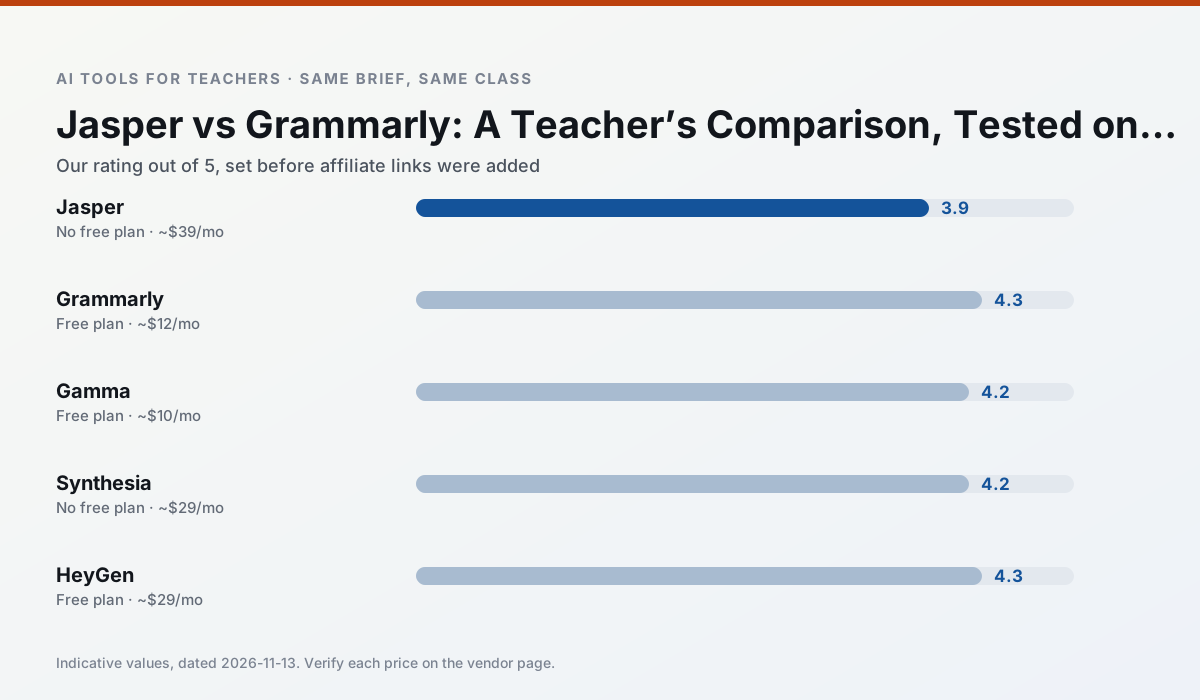
Side by side
Comparison table
Ratings reflect our timed classroom workflow, not vendor claims. Prices are indicative — verify on the vendor site.
| Tool | Best for | Free tier | Indicative paid plan | Standout feature | Our rating | Verdict | Try the tool |
|---|---|---|---|---|---|---|---|
| Jasper | newsletters · parent communication | No ongoing free plan | ~$39 /user/mo | Brand voice profiles | 3.9 / 5 | Situational | Try free |
| Grammarly | parent communication · report card comments | Yes — Core grammar and tone checks | ~$12 /user/mo | Tone adjustments | 4.3 / 5 | Strong option | Try free |
| Gamma | slide decks · parent communication | Yes — Credit-limited generation | ~$10 /user/mo | Prompt-to-deck | 4.2 / 5 | Strong option | Try free |
| Synthesia | flipped lessons · video lessons | No ongoing free plan | ~$29 /user/mo | 140+ languages | 4.2 / 5 | Strong option | Try free |
| HeyGen | video lessons · translation | Yes — Limited credit plan | ~$29 /user/mo | Video translation | 4.3 / 5 | Strong option | Try free |
| Colossyan | PD materials · video lessons | No ongoing free plan | ~$27 /user/mo | PDF/PPT-to-video | 4.1 / 5 | Situational | Try free |
Match your situation
Best for X
Different jobs need different tools. Here is what we would open first in each case.
Nothing on Jasper's free tier is a teaser demo; the limits are documented and a normal week fits inside them.
On the daily cycle, Grammarly saves the most edit time per task; the paid tier mostly buys more runs rather than better ones.
Gamma runs in a browser tab with no extension, no student accounts and no onboarding call, so you can test it in a free period.
Synthesia is the option IT is least likely to block: single sign-on, admin removal of AI features and an agreement on file.
Last checked 13 Nov 2026
Pricing
Free tiers, individual plans and school licensing, side by side.
| Tool | Free plan | Individual / paid | School & district | Billing note | Verify |
|---|---|---|---|---|---|
| Jasper | No ongoing free tier | ~$39 /user/mo | ~$59+ /user/mo | Indicative — verify on vendor site | Vendor |
| Grammarly | $0 — Core grammar and tone checks | ~$12 /user/mo | ~$15 /user/mo | Indicative — billed annually | Vendor |
| Gamma | $0 — Credit-limited generation | ~$10 /user/mo | ~$20 /user/mo | Indicative — verify on vendor site | Vendor |
| Synthesia | No ongoing free tier | ~$29 /user/mo | Custom quote | Indicative — verify on vendor site | Vendor |
| HeyGen | $0 — Limited credit plan | ~$29 /user/mo | Custom quote | Indicative — verify on vendor site | Vendor |
| Colossyan | No ongoing free tier | ~$27 /user/mo | Custom quote | Indicative — verify on vendor site | Vendor |
Editorial rule: pricing is re-checked every 2–3 months and the top 50 pages are refreshed every 6 months. See our funding policy.
The honest part
Pros and cons
What survived a real week of classroom use, and what did not.
Pros
- Consistent tone across communications
- Strong long-form editor
- Good for district comms teams
Cons
- Priced for marketing teams
- Overkill for one classroom
- No education-specific features
Pros
- Catches errors in high-stakes parent emails
- Works everywhere you already write
- Very low learning curve
Cons
- Not education-specific
- Can flatten teacher voice
- Premium needed for tone rewriting
Pros
- Fastest path from outline to deck
- Modern-looking output by default
- Good export options
Cons
- Design control is limited
- Credits run out quickly
- Not built for student data
Pros
- No camera or editing skills required
- Excellent multilingual voice output
- Easy updates to existing videos
Cons
- Cost is hard to justify for a single teacher
- Avatar video can feel impersonal
- No free ongoing tier
Pros
- Best-in-class lip-sync translation
- Useful for multilingual families
- Generous trial credits
Cons
- Credit-based pricing is confusing
- Voice cloning raises consent questions
- Overkill for everyday lessons
In the classroom
Use cases
Five concrete workflows, with the tool we would open for each one.
Regrouping students after an assessment
Summarise anonymised results into skill groups, then generate one activity per group. Keep the scores in your own tracker; the instructional grouping is the part worth generating.
Recommended: JasperA weekly family newsletter from bullet notes
Newsletters fail on length, not tone. Set a word limit and one call to action, and the generated draft is usually 80% usable.
Recommended: GrammarlyThree reading levels from one source text
Paste a vetted text, ask for supported, core and extension versions, then check the vocabulary list by hand. Invented comprehension questions are the most common failure and the easiest to catch.
Recommended: GammaA Monday morning lesson plan in twelve minutes
The twelve minutes come from not rewriting the skeleton. Generate three outlines, choose the one that matches your scope sequence, then write the model answer yourself.
Recommended: SynthesiaA parent email in two languages
Draft in plain, warm language with no names, translate, then back-translate the important sentences to check meaning. Keep specific incidents out of the prompt and add them yourself.
Recommended: HeyGen
Questions teachers ask us
FAQ
Direct answers, also published as FAQPage structured data for search and AI assistants.
Jasper or Grammarly for lesson planning?
Which is cheaper for one teacher?
Do they produce the same output?
Sources & further reading
Our recommendation
Try Jasper free for your next lesson planning task
Brand-voice writing assistant for school communications teams. Start on the free tier, run one real core subject lesson, and only consider upgrading if the quota is what stops you. Disclosure: we may earn a commission (varies) at no extra cost to you.
Some links on this page are affiliate links. We may earn a commission at no extra cost to you. Our rankings are editorial and never pay-to-play. Never enter student PII into a free consumer account.
Keep reading
Related comparisons in this cluster.
Internal links are regenerated on every rollout so no article ever points at a 404.