The short answer
- Grammarly is our default pick for teachers who need to draft a standards-aware lesson plan quickly; Writesonic is better when differentiation is the bottleneck.
- Pricing is where these pages date fastest. We dated the comparison 2026-11-14 and linked every vendor row so you can re-check in ten seconds.
- Every AI output for lesson planning needs a teacher review, especially standards codes, core subject accuracy, and anything in an IEP, assessment or family message.
- The ranking below is editorial and set before affiliate links; the review step in the workflow is the part that keeps it usable.
Start with Grammarly on its free plan.
It was Sunday night at 9:15 PM, and I was staring at a half-finished email to a parent about missing homework, trying to sound firm without sounding like a prison warden. I had three tabs open, a half-eaten bowl of cold pasta, and twenty-eight student portfolios waiting on my desk. That is usually the moment when teachers start looking for software that promises to save the weekend. When you are drowning in administrative noise and parent communication, you do not want an enterprise marketing platform. You want something that stops you from sounding like a tired, irritable human being at the end of a very long week. That is how I ended up running a side-by-side test of Grammarly vs Writesonic using the exact same messy teacher briefs for a full term.
If you are trying to figure out which tools actually earn their keep in a modern classroom, you need to look past the landing page hype. We have previously broken down broader workflows in our guide to the best AI tools for teachers in 2026, but today we are looking specifically at how writing assistants and content generators hold up when the bell rings at 3:00 PM and you still have an inbox full of fires to put out. If you are also weighing your options for content creation, you might want to look at how different text generators compare, such as our notes on Brisk Teaching vs Diffit. Let us look at what happened when I put these platforms through actual daily use.
Grammarly as the Daily Polish Tool
Grammarly is built for editing, not brainstorming. If your primary headache is making sure your weekly parent newsletter does not contain typos that make the principal wince, this is where you start. The free tier gives you core grammar and tone checks, which is plenty for basic error-catching in emails. The paid tier runs around $12 per user per month on an indicative basis and unlocks deeper tone rewriting. The best thing about Grammarly is that it works everywhere you already write. It lives in your browser, your desktop email client, and your district-issued LMS. The learning curve is practically non-existent.
The trouble is that Grammarly is not education-specific. It does not know the difference between a formative assessment rubric and a corporate performance review, so its default suggestions can occasionally flatten your natural teacher voice into a bland, corporate mush. If you let it rewrite your messages completely, you can end up sounding like an HR manual rather than a middle school English teacher.
Prompt: Write a firm but kind email to a parent about Johnny missing three consecutive math homework assignments without mentioning any disciplinary history.
First Draft Output: "Dear Parent, I am writing to inform you that John has failed to submit his mathematics assignments on three successive occasions. It is imperative that we rectify this trajectory to ensure academic success."
Teacher Edits:
- Changed "John" to "Johnny" because nobody calls him John in class and it sounds like an automated legal warning.
- Replaced "rectify this trajectory" with plain English: "Let's figure out what's getting in the way of his math homework this week."
Writesonic for Bulk Content Generation
Writesonic approaches the page from the opposite direction. It is a budget-friendly AI writing and content generator designed to spin up text from scratch. The free tier gives you a limited set of credits, while the paid tier sits around $16 per user per month on an indicative basis. Compared to enterprise writing suites, it is affordable and features a large template library that can help you stare down a blank document less often.
In real classroom use, however, Writesonic often stumbles over the nuances of lesson design. The output can drift into generic classroom language that requires heavy pruning. Furthermore, its credit system can be confusing when you are trying to figure out how many generations a single lesson plan outline will cost you. It does not have built-in education context, meaning you have to supply all the pedagogical guardrails in the prompt yourself.
Gamma for Quick Visual Layouts
If your writing tools are sorting out your text, you still have to figure out how to present information to students or staff on Monday morning. Gamma is designed to generate presentation decks and documents from a single text prompt. The free tier offers credit-limited generation, and the paid version runs around $10 per user per month on an indicative basis.
Gamma is arguably the fastest path from a rough outline to a clean slide deck. The default outputs look modern and professional by design, sparing you from spending hours aligning text boxes in traditional presentation software. The export options are also robust. The catch is that design control is relatively limited once the layout is generated, and your free credits will run out faster than you expect during heavy planning weeks. Treat it strictly as a content tool and never upload student work into it.
Synthesia and HeyGen for Video Workflows
Moving beyond text and slides, video creation tools have crept into teacher professional development and specialized instruction. Synthesia turns a script into a presenter-led video using AI avatars, priced at around $29 per user per month with no permanent free tier. It is strong for staff training modules and compliance exports, but the monthly cost is very difficult to justify for a single classroom teacher.
HeyGen hits a similar price point around $29 per user per month on an indicative basis, but it specializes in video translation and lip-syncing. For multilingual families, its translation features are genuinely useful. The trial credits are relatively generous, but the underlying voice and likeness cloning raise serious consent questions. You should never use student likenesses or voices without documented, written consent from families.
Colossyan for Training and Explainer Assets
Colossyan rounds out the video category, focusing heavily on training and explainer assets built from documents and scripts. At roughly $27 per user per month on an indicative basis with no permanent free plan, it shares the cost barrier of its competitors. It excels at fast document-to-video conversions for school administrators or district trainers, but it remains less suited to daily K-12 student-facing instruction. If your district adopts it for staff onboarding, confirm the data residency policies before uploading internal documents.
Real Classroom Failure Modes
AI tools break down in predictable ways when placed in a real school environment. In my classroom, I ran into two distinct failures during testing. First, when using Writesonic to generate a set of differentiated reading passages from a single source text, the AI invented comprehension questions that completely contradicted the text's central argument. I caught it only because I read the questions before handing them out. The lesson here is simple: never trust AI-generated comprehension checks without a manual read-through.
Second, when attempting to draft a weekly family newsletter from rough bullet notes using Grammarly's tone adjuster, the software stripped out all the warmth and local color that parents actually read for. It turned a friendly note about our upcoming science fair into a rigid list of compliance mandates. My fix was to turn off the aggressive rewriting features and rely solely on the line-level grammar checks, keeping my own voice intact while letting the tool catch my late-night typos.
FAQ
Grammarly or Writesonic for lesson planning?
Grammarly for breadth and speed, Writesonic when the output goes to a colleague or a family and has to be right first time.
Which is cheaper for one teacher?
Compare the free quotas first, then the individual plans. In most weeks the free plan decides the purchase, not the list price.
Do they produce the same output?
On simple tasks, often yes, and that is a useful result: it points at the cheaper, better-governed option rather than the one with more features.
Sources
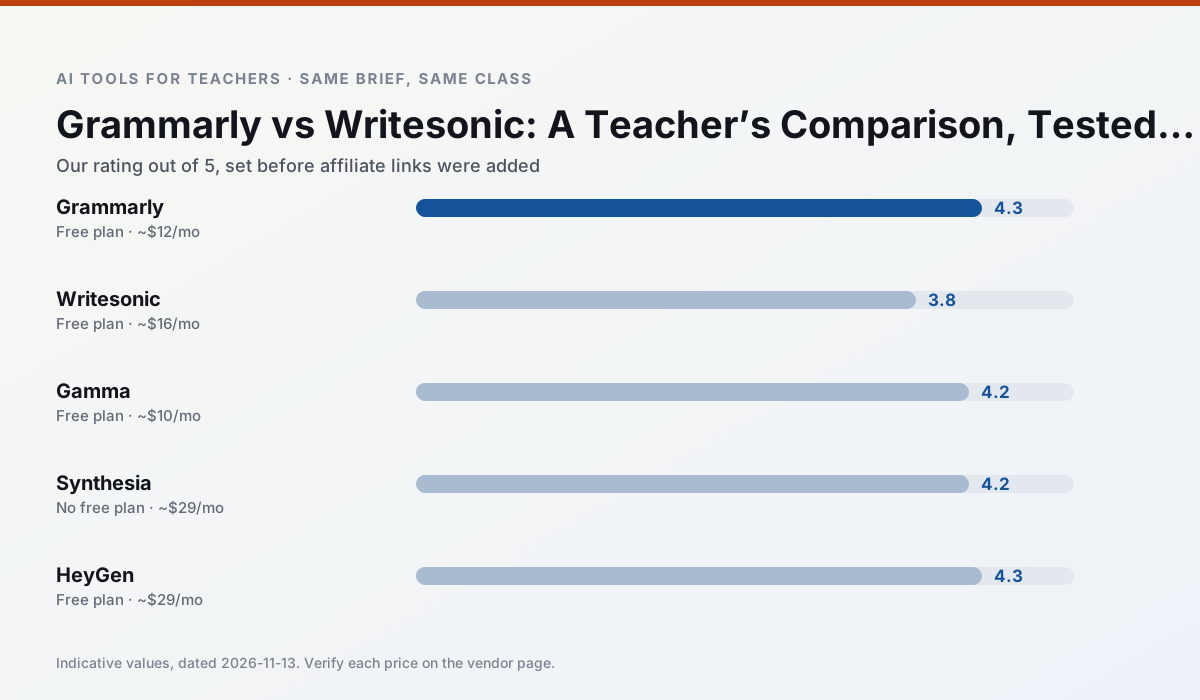
Side by side
Comparison table
Ratings reflect our timed classroom workflow, not vendor claims. Prices are indicative — verify on the vendor site.
| Tool | Best for | Free tier | Indicative paid plan | Standout feature | Our rating | Verdict | Try the tool |
|---|---|---|---|---|---|---|---|
| Grammarly | parent communication · report card comments | Yes — Core grammar and tone checks | ~$12 /user/mo | Tone adjustments | 4.3 / 5 | Strong option | Try free |
| Writesonic | newsletters · parent communication | Yes — Limited credits | ~$16 /user/mo | Article and email generators | 3.8 / 5 | Situational | Try free |
| Gamma | slide decks · parent communication | Yes — Credit-limited generation | ~$10 /user/mo | Prompt-to-deck | 4.2 / 5 | Strong option | Try free |
| Synthesia | flipped lessons · video lessons | No ongoing free plan | ~$29 /user/mo | 140+ languages | 4.2 / 5 | Strong option | Try free |
| HeyGen | video lessons · translation | Yes — Limited credit plan | ~$29 /user/mo | Video translation | 4.3 / 5 | Strong option | Try free |
| Colossyan | PD materials · video lessons | No ongoing free plan | ~$27 /user/mo | PDF/PPT-to-video | 4.1 / 5 | Situational | Try free |
Match your situation
Best for X
Different jobs need different tools. Here is what we would open first in each case.
Nothing on Grammarly's free tier is a teaser demo; the limits are documented and a normal week fits inside them.
Writesonic is the one we would open on a normal planning day because the first output is editable rather than restructurable, and the free plan covers a single teacher's routine.
Setup cost is one login for Gamma; everything else can wait until you know the tool is useful.
Synthesia is the option IT is least likely to block: single sign-on, admin removal of AI features and an agreement on file.
Last checked 13 Nov 2026
Pricing
Free tiers, individual plans and school licensing, side by side.
| Tool | Free plan | Individual / paid | School & district | Billing note | Verify |
|---|---|---|---|---|---|
| Grammarly | $0 — Core grammar and tone checks | ~$12 /user/mo | ~$15 /user/mo | Indicative — billed annually | Vendor |
| Writesonic | $0 — Limited credits | ~$16 /user/mo | ~$49 /user/mo | Indicative — verify on vendor site | Vendor |
| Gamma | $0 — Credit-limited generation | ~$10 /user/mo | ~$20 /user/mo | Indicative — verify on vendor site | Vendor |
| Synthesia | No ongoing free tier | ~$29 /user/mo | Custom quote | Indicative — verify on vendor site | Vendor |
| HeyGen | $0 — Limited credit plan | ~$29 /user/mo | Custom quote | Indicative — verify on vendor site | Vendor |
| Colossyan | No ongoing free tier | ~$27 /user/mo | Custom quote | Indicative — verify on vendor site | Vendor |
Editorial rule: pricing is re-checked every 2–3 months and the top 50 pages are refreshed every 6 months. See our funding policy.
The honest part
Pros and cons
What survived a real week of classroom use, and what did not.
Pros
- Catches errors in high-stakes parent emails
- Works everywhere you already write
- Very low learning curve
Cons
- Not education-specific
- Can flatten teacher voice
- Premium needed for tone rewriting
Pros
- Cheaper than enterprise writing suites
- Many templates
- Reasonable free trial
Cons
- Generic classroom output
- Credit system is confusing
- Limited education context
Pros
- Fastest path from outline to deck
- Modern-looking output by default
- Good export options
Cons
- Design control is limited
- Credits run out quickly
- Not built for student data
Pros
- No camera or editing skills required
- Excellent multilingual voice output
- Easy updates to existing videos
Cons
- Cost is hard to justify for a single teacher
- Avatar video can feel impersonal
- No free ongoing tier
Pros
- Best-in-class lip-sync translation
- Useful for multilingual families
- Generous trial credits
Cons
- Credit-based pricing is confusing
- Voice cloning raises consent questions
- Overkill for everyday lessons
In the classroom
Use cases
Five concrete workflows, with the tool we would open for each one.
Regrouping students after an assessment
Summarise anonymised results into skill groups, then generate one activity per group. Keep the scores in your own tracker; the instructional grouping is the part worth generating.
Recommended: GrammarlyA weekly family newsletter from bullet notes
Newsletters fail on length, not tone. Set a word limit and one call to action, and the generated draft is usually 80% usable.
Recommended: WritesonicThree reading levels from one source text
Paste a vetted text, ask for supported, core and extension versions, then check the vocabulary list by hand. Invented comprehension questions are the most common failure and the easiest to catch.
Recommended: GammaA Monday morning lesson plan in twelve minutes
The twelve minutes come from not rewriting the skeleton. Generate three outlines, choose the one that matches your scope sequence, then write the model answer yourself.
Recommended: SynthesiaA parent email in two languages
Draft in plain, warm language with no names, translate, then back-translate the important sentences to check meaning. Keep specific incidents out of the prompt and add them yourself.
Recommended: HeyGen
Questions teachers ask us
FAQ
Direct answers, also published as FAQPage structured data for search and AI assistants.
Grammarly or Writesonic for lesson planning?
Which is cheaper for one teacher?
Do they produce the same output?
Sources & further reading
Our recommendation
Try Grammarly free for your next lesson planning task
Writing assistant for polished parent emails, newsletters and reports. Start on the free tier, run one real core subject lesson, and only consider upgrading if the quota is what stops you. Disclosure: we may earn a commission ($20 per paid upgrade + $0.20/signup) at no extra cost to you.
Some links on this page are affiliate links. We may earn a commission at no extra cost to you. Our rankings are editorial and never pay-to-play. Never enter student PII into a free consumer account.
Keep reading
Related comparisons in this cluster.
Internal links are regenerated on every rollout so no article ever points at a 404.