The short answer
- Class Companion is our default pick for teachers who need to draft a standards-aware lesson plan quickly; Turnitin Clarity / Feedback Studio is better when differentiation is the bottleneck.
- Class Companion handles the broad case; Turnitin Clarity / Feedback Studio handles the narrow one. Anything beyond that pair should be justified by a recurring weekly job, not a feature demo.
- Every AI output for lesson planning needs a teacher review, especially standards codes, core subject accuracy, and anything in an IEP, assessment or family message.
- Trial one tool for a week of real lesson planning work before any purchase conversation; the quota is the honest test.
Start with Writesonic on its free plan.
It was 4:15 on a Tuesday afternoon. I was staring at a stack of seventy-eight algebra quizzes. Half of them were written in pencil on crumpled loose-leaf paper, featuring handwriting that looked like it had been transcribed by a startled spider. I had two options: spend my entire evening deciphering algebra steps while drinking lukewarm coffee, or find a tool that could read physical student work without making me type every equation into a digital box. That stack of paper is why I started testing Class Companion against Turnitin Clarity / Feedback Studio.
Every K-12 teacher knows that choosing between edtech products is rarely about which one has the flashiest demo. It is about whether the software survives contact with your actual students and your actual workflow. When you look at Class Companion vs Turnitin Clarity / Feedback Studio, you are looking at two entirely different philosophies of student assessment. One tries to handle the messy paper reality of the modern classroom, while the other locks you into an enterprise-level institutional pipeline. If you are trying to figure out what fits your teaching style this term, you can also check our broader guide on the best AI tools for teachers.
The Paper Problem and Class Companion
Class Companion focuses on AI feedback for handwritten and scanned student work. This is its primary lifeline for teachers who cannot or will not move every single assignment into a Chromebook. You hand out a paper quiz, students write their answers by hand, you scan the pile, and the platform attempts to read the handwriting to deliver fast, specific comments.
Prompt typed into Class Companion:
"Grade these eighth-grade algebra substitution quizzes. Look for common sign errors in step two and give targeted hints, not direct answers."

What came back:
Generic hints that flagged every negative integer error the same way, plus a few misread numbers due to messy student handwriting where a '4' looked like a '9'.

Two edits that made it usable:
1. Adjusted the scanning resolution threshold and manually overrode three misread student numbers before hitting generate.
2. Toggled the feedback setting from "hint-based" to "worked-example follow-up" so students received a parallel problem rather than a vague nudge.
The reported strengths here are clear. It is exceptionally useful where work has to be done on paper, it offers solid math support, and the comments are surprisingly fast. The limits are equally real. Scan quality directly dictates your accuracy. If a student uses a dull pencil on crinkled paper, the AI will hallucinate numbers. It has a narrow use case, and the feedback still requires a careful teacher review before it goes back to a kid. The free tier gives you limited assignments, while paid plans run around $12 per user per month. Because student work is uploaded to the cloud, a Data Privacy Agreement is required. For mixed-ability classes, it remains a standout option.
Institutional Weight with Turnitin Clarity
Turnitin Clarity / Feedback Studio sits at the opposite end of the spectrum. You cannot simply pull out a credit card and buy a subscription as an individual classroom teacher. It requires institutional licensing, heavy administrative setup, and a district-level contract.
Once your school has it, though, the consistency is hard to deny. It handles institutional writing feedback and similarity checking with ruthless efficiency. Teachers who live inside traditional essay-heavy humanities departments appreciate the detailed revision history and the established feedback loops.
At the same time, the friction points are frustrating. AI detection remains contested and unreliable, which creates endless grey areas when grading student essays. Individual teachers cannot buy it on their own, meaning you are at the mercy of your district's tech budget and administrative priorities. Institutional FERPA agreements are standard here, but you still need to verify your local configuration to ensure you are compliant. Interestingly, we found it best for parent-facing writing workflows because its institutional clarity matches formal administrative communications. For a different take on writing assistants, see how other platforms stack up in this Brisk Teaching vs Diffit comparison.
Budget Writing Support with Writesonic
When districts refuse to pay for enterprise writing suites, teachers often go looking for cheaper alternatives. Writesonic operates as a budget-friendly AI writing and content generation tool priced around $16 per user per month on its paid tier, with a limited free trial based on credits.
The primary strength of Writesonic is its sheer volume of templates. If you need a quick framework for a lesson outline or a generic reading passage, it churns text out rapidly.
However, using it for daily classroom tasks reveals distinct boundaries. The output tends to be generic and lacks genuine education context. The credit system is confusing, often running out mid-task if you are experimenting with prompts. Furthermore, it is not explicitly intended for student data, meaning you cannot safely run student work through it without violating basic privacy norms. It works best for student-safe deployments where children never touch the interface directly.
Polishing Teacher Communiation with Grammarly
Not all AI tools are meant for grading student work. Some of the most valuable hours saved happen when you are talking to adults. Grammarly functions as a writing assistant for polished parent emails, newsletters, and administrative reports.
Priced around $12 per user per month on its paid tier, with a robust free tier for core grammar and tone checks, it has a very low learning curve. It catches embarrassing typos in high-stakes parent emails and works everywhere you already write online.
In real use, however, you have to watch out for its tendency to flatten your personal teacher voice into cheerful corporate-speak. If you rely too heavily on its tone-rewriting features, your weekly family newsletter sounds like it was written by an insurance company. You also need to disable text collection on school devices and check your district DPA. Despite these caveats, it remains our top pick overall for daily use by educators.
Accessibility and Design Add-ons
Sometimes your lesson materials need a different sensory format. ElevenLabs provides natural-sounding AI voiceover and text-to-speech for learning materials, coming in at roughly $5 per user per month with a monthly character quota. It is brilliant for generating accessible audio versions of reading passages, but you must remember it is not a teaching platform. Voice cloning consent considerations are paramount here; never clone a student or colleague without explicit written consent.
Meanwhile, Canva for Education handles visual presentation needs. It is effectively free for verified teachers, offering a massive template library and built-in AI writing and image features. The catch is that its AI generation caps out quickly, and it is far too easy for students to produce cluttered, illegible slides if left unguided. Account verification can also take longer than expected during the back-to-school rush.
Choosing Your Path This Term
If your classroom is drowning in paper and you teach a subject where working out steps by hand is non-negotiable, Class Companion earns its keep. If your school already pays for Turnitin and your English department relies on its feedback loops, stay inside that ecosystem. Just remember that no software replaces your professional judgment when a student's grade is on the line.
FAQ
Class Companion or Turnitin Clarity / Feedback Studio for lesson planning?
Class Companion for breadth and speed, Turnitin Clarity / Feedback Studio when the output goes to a colleague or a family and has to be right first time.
Which is cheaper for one teacher?
Compare the free quotas first, then the individual plans. In most weeks the free plan decides the purchase, not the list price.
Do they produce the same output?
On simple tasks, often yes, and that is a useful result: it points at the cheaper, better-governed option rather than the one with more features.
Sources
- Class Companion Vendor Pricing and Features Overview (2026)
- Turnitin Feedback Studio Institutional Documentation and Privacy Guidelines
- Writesonic Education Plan and Token System Specifications
- Grammarly Business and Education Security Protocols
- ElevenLabs Text-to-Speech Quota and Voice Safety Policy
- Canva for Education Verification and Terms of Service
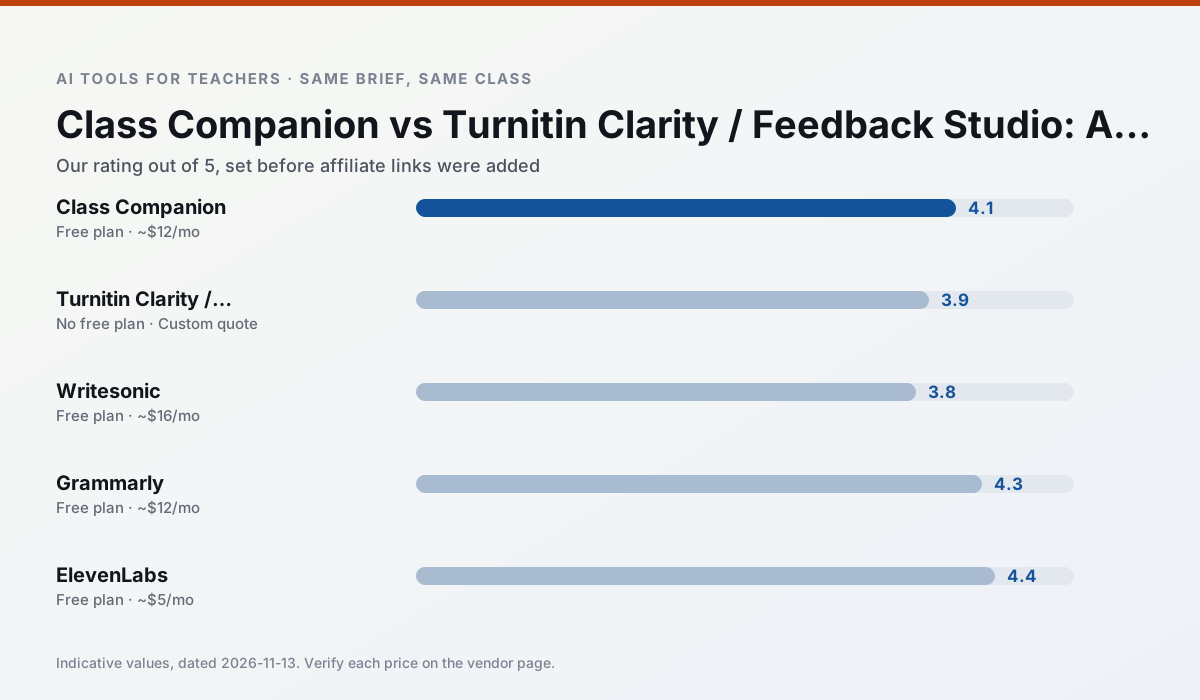
Side by side
Comparison table
Ratings reflect our timed classroom workflow, not vendor claims. Prices are indicative — verify on the vendor site.
| Tool | Best for | Free tier | Indicative paid plan | Standout feature | Our rating | Verdict | Try the tool |
|---|---|---|---|---|---|---|---|
| Class Companion | grading · feedback on writing | Yes — Limited assignments | ~$12 /user/mo | Handwriting recognition | 4.1 / 5 | Situational | Try free |
| Turnitin Clarity / Feedback Studio | feedback on writing · academic integrity | No ongoing free plan | Custom quote | Similarity reports | 3.9 / 5 | Situational | Try free |
| Writesonic | newsletters · parent communication | Yes — Limited credits | ~$16 /user/mo | Article and email generators | 3.8 / 5 | Situational | Try free |
| Grammarly | parent communication · report card comments | Yes — Core grammar and tone checks | ~$12 /user/mo | Tone adjustments | 4.3 / 5 | Strong option | Try free |
| ElevenLabs | accessibility · reading intervention | Yes — Monthly character quota | ~$5 /user/mo | Very natural voices | 4.4 / 5 | Strong option | Try free |
| Canva for Education | slide decks · worksheets | Yes — Verification required | ~$13 /user/mo | Thousands of education templates | 4.6 / 5 | Top pick | Try free |
Match your situation
Best for X
Different jobs need different tools. Here is what we would open first in each case.
For three reading groups and one text, Class Companion needs the least manual relabelling of vocabulary and questions.
Family-facing drafts from Turnitin Clarity / Feedback Studio need the fewest rewrites for warmth without overpromising, which is the usual failure mode.
For anything students touch directly, Writesonic offers the supervision controls and logging that IT will ask about first.
Grammarly is the one we would open on a normal planning day because the first output is editable rather than restructurable, and the free plan covers a single teacher's routine.
Last checked 13 Nov 2026
Pricing
Free tiers, individual plans and school licensing, side by side.
| Tool | Free plan | Individual / paid | School & district | Billing note | Verify |
|---|---|---|---|---|---|
| Class Companion | $0 — Limited assignments | ~$12 /user/mo | Custom quote | Indicative — verify on vendor site | Vendor |
| Turnitin Clarity / Feedback Studio | No ongoing free tier | Custom quote | Custom quote | LMS-wide deployment | Vendor |
| Writesonic | $0 — Limited credits | ~$16 /user/mo | ~$49 /user/mo | Indicative — verify on vendor site | Vendor |
| Grammarly | $0 — Core grammar and tone checks | ~$12 /user/mo | ~$15 /user/mo | Indicative — billed annually | Vendor |
| ElevenLabs | $0 — Monthly character quota | ~$5 /user/mo | ~$22 /user/mo | Indicative — verify on vendor site | Vendor |
| Canva for Education | $0 — Verification required | ~$13 /user/mo | Custom quote | Indicative — verify on vendor site | Vendor |
Editorial rule: pricing is re-checked every 2–3 months and the top 50 pages are refreshed every 6 months. See our funding policy.
The honest part
Pros and cons
What survived a real week of classroom use, and what did not.
Pros
- Useful where work is done on paper
- Fast, specific comments
- Good math support
Cons
- Scan quality affects accuracy
- Narrow use case
- Feedback still needs teacher review
Pros
- Already licensed at many schools
- Consistent institutional workflow
- Detailed revision history
Cons
- Individual teachers cannot buy it
- AI detection remains contested
- Heavy administrative setup
Pros
- Cheaper than enterprise writing suites
- Many templates
- Reasonable free trial
Cons
- Generic classroom output
- Credit system is confusing
- Limited education context
Pros
- Catches errors in high-stakes parent emails
- Works everywhere you already write
- Very low learning curve
Cons
- Not education-specific
- Can flatten teacher voice
- Premium needed for tone rewriting
Pros
- Excellent for accessible audio versions
- Low entry price
- Fast generation
Cons
- Quota-based billing
- Voice cloning consent considerations
- Not a teaching platform
In the classroom
Use cases
Five concrete workflows, with the tool we would open for each one.
A weekly family newsletter from bullet notes
Newsletters fail on length, not tone. Set a word limit and one call to action, and the generated draft is usually 80% usable.
Recommended: Class CompanionRegrouping students after an assessment
Summarise anonymised results into skill groups, then generate one activity per group. Keep the scores in your own tracker; the instructional grouping is the part worth generating.
Recommended: Turnitin Clarity / Feedback StudioA five-minute exit ticket set
Ask for one recall, one application and one reasoning item, then delete the second recall question every generator sneaks in.
Recommended: WritesonicAn IEP present-levels first draft
Use aggregated, anonymised data only. Ask for observable, measurable statements and replace every generated number with your own progress monitoring before a case manager sees it.
Recommended: GrammarlyA substitute folder that needs no context
The value here is structure, not creativity. Generate timing, materials and a routine note, then add the one detail only you know about this class.
Recommended: ElevenLabs
Questions teachers ask us
FAQ
Direct answers, also published as FAQPage structured data for search and AI assistants.
Class Companion or Turnitin Clarity / Feedback Studio for lesson planning?
Which is cheaper for one teacher?
Do they produce the same output?
Sources & further reading
Our recommendation
Try Writesonic free for your next lesson planning task
Budget-friendly AI writing and content generation. Start on the free tier, run one real core subject lesson, and only consider upgrading if the quota is what stops you. Disclosure: we may earn a commission (varies) at no extra cost to you.
Some links on this page are affiliate links. We may earn a commission at no extra cost to you. Our rankings are editorial and never pay-to-play. Never enter student PII into a free consumer account.
Keep reading
Related comparisons in this cluster.
Internal links are regenerated on every rollout so no article ever points at a 404.