The short answer
- Notion AI is our default pick for teachers who need to draft a standards-aware lesson plan quickly; QuestionWell is better when differentiation is the bottleneck.
- Pricing is where these pages date fastest. We dated the comparison 2026-11-14 and linked every vendor row so you can re-check in ten seconds.
- Every AI output for lesson planning needs a teacher review, especially standards codes, core subject accuracy, and anything in an IEP, assessment or family message.
- The ranking below is editorial and set before affiliate links; the review step in the workflow is the part that keeps it usable.
Start with Notion AI on its free plan.
The Monday Morning Lesson Planning Reality
My coffee was cold, first period started in twelve minutes, and my scope and sequence for the unit on Westward Expansion was sitting in my head rather than on the school portal. I did not need a philosophical debate about the nature of inquiry learning. I needed an outline that fit my forty-minute block and hit the state standards without making me want to tear my hair out. This is the exact moment when teachers start googling software at their desks, and it is why debates about Notion AI vs QuestionWell for teachers matter more than feature lists suggest.
Every edtech blog loves to talk about transforming the modern classroom, but most of us are just trying to survive Tuesday. Some tools want to be your digital filing cabinet for the next ten years. Others want to spit out thirty multiple-choice questions about the Missouri Compromise before you can close your inbox. We tested both approaches over a full term to see which one actually lightened the load. If you are trying to figure out where to spend your own money this year, our broader guide on the best AI tools for teachers 2026 covers the full landscape, but today we are looking specifically at the heavy hitters in lesson design and document management.
Notion AI as Your Digital Filing Cabinet
Notion AI is built around AI-assisted notes, databases, and curriculum planning in one workspace. It costs around $10 per user per month on its paid tier, with a free tier that offers limited AI usage. The strength here is obvious the moment you open it: it is brilliant for long-term curriculum records and team collaboration. If you teach on a grade-level team that shares a massive database of resources, Notion keeps everyone aligned.
The catch is that setup time is significant. You cannot just log in on a whim and expect a polished lesson plan without building the structure first. The AI add-on pricing has also changed more than once, which makes district purchasers nervous. Most importantly, it is not purpose-built for lesson generation. It is a workspace that happens to have artificial intelligence bolted onto the side. You also need to remember a hard operational rule: do not store student PII in personal workspaces. If you are comparing it against tools like Brisk or Diffit, as we did in our Brisk Teaching vs Diffit comparison, you will notice that Notion requires a lot more manual scaffolding upfront.
Prompt: "Act as a US history teacher. Generate a 3-week unit outline for Westward Expansion for 8th grade, structured around four essential questions about land acquisition."
Output received: A clean, four-column table listing weeks, topics, activities, and standard alignments, but the activities were generic textbook tropes like "make a poster about Oregon Trail."
First edit: Added explicit constraints demanding primary source analysis tasks instead of craft projects.
Second edit: Swapped the generic assessment ideas for a structured paragraph write-up using sentence stems.
QuestionWell for Daily Question Generation
QuestionWell takes the opposite approach. It is a single-purpose tool designed to generate standards-aligned question banks from any text or objective, costing around $10 per user per month with a monthly generation limit on the free tier. This is our pick for the best overall for daily use because it saves the most time on question writing. You paste your reading passage, select your grade level and standard, and watch it spit out a clean export workflow for your LMS or quiz platform.
The limitations are real, though. Because it is a single-purpose tool, it will not help you organize your syllabus or track your department meetings. Question quality also varies wildly depending on the source text you feed it. If your source text is poorly formatted or dense with jargon, the generated questions will be confusing or trivial. You must still review every single output, especially when dealing with invented comprehension questions, which remain the most common failure point and the easiest to catch by hand. And as always with cloud tools, only paste non-identifiable source text to protect student privacy.
Gamma and the Quest for Quick Slides
Sometimes you do not need a database or a quiz bank; you just need a slide deck that does not look like it was designed in 2004. Gamma generates presentation decks and documents from a single prompt, sitting around $10 per user per month on its paid tier with credit-limited generation for free users. It stands out as our best for quick setup because it takes you from a blank screen to a modern-looking presentation faster than any other tool on the market.
The design control is limited, however. If you want to move a text box three pixels to the left to fit a specific diagram, Gamma will often fight you. The credits run out quickly if you are experimenting with multiple drafts, and it is definitely not built for student data. Treat it strictly as a content creation tool and never upload student work into its generators.
Video Avatars with Synthesia, HeyGen, and Colossyan
Video tools represent a totally different investment tier for educators. Synthesia turns a script into a presenter-led video with AI avatars, running around $29 per user per month with no free ongoing tier. It earns our rank as best for schools and districts because it eliminates the need for camera or editing skills while offering multilingual voice output. But the cost is very hard to justify for a single classroom teacher working out of their own pocket.
HeyGen offers similar AI avatar video and video translation features around the same price point, with a limited credit plan. It provides best-in-class lip-sync translation, which makes it useful for communicating with multilingual families, but its voice cloning features raise serious consent questions. You must have documented consent before cloning anyone's voice or likeness. Colossyan operates in a similar corporate training space, priced around $27 per user per month with no permanent free plan, making it great for staff compliance training but overkill for everyday K-12 student-facing content.
Two Failures That Taught Us a Lesson
When we ran these tools through real classroom workflows last term, things broke in predictable ways. First, during a reading intervention block, we tried to generate three reading levels from a single source text by pasting an article about marine biology into QuestionWell and asking for supported, core, and extension versions. The tool generated the leveled text reasonably well, but the accompanying vocabulary lists were packed with obscure biological terms that our sixth graders had never seen and did not need for the standard. We had to pause, scrap the automated glossary, and build our own vocabulary list by hand before printing.
Second, we attempted to speed up our IEP present-levels first drafts by feeding aggregated, anonymised student data into a Notion AI workspace to generate progress monitoring statements. The first output read like a marketing brochure for a charter school, filled with vague cheerleading adjectives instead of observable, measurable data points. We had to delete every single generated number and rewrite the statements from scratch before the case manager ever laid eyes on the document. The lesson across all these platforms remains identical: AI is a drafting assistant, not a replacement for professional judgment.
FAQ
Notion AI or QuestionWell for lesson planning?
Notion AI for breadth and speed, QuestionWell when the output goes to a colleague or a family and has to be right first time.
Which is cheaper for one teacher?
Compare the free quotas first, then the individual plans. In most weeks the free plan decides the purchase, not the list price.
Do they produce the same output?
On simple tasks, often yes, and that is a useful result: it points at the cheaper, better-governed option rather than the one with more features.
Sources
- Notion Pricing and Features: notion.so/pricing (accessed November 13, 2026)
- QuestionWell Documentation: questionwell.ai (accessed November 13, 2026)
- Gamma App Guidelines: gamma.app (accessed November 13, 2026)
- Synthesia Plans: synthesia.io (accessed November 13, 2026)
- HeyGen Overview: heygen.com (accessed November 13, 2026)
- Colossyan Enterprise Details: colossyan.com (accessed November 13, 2026)
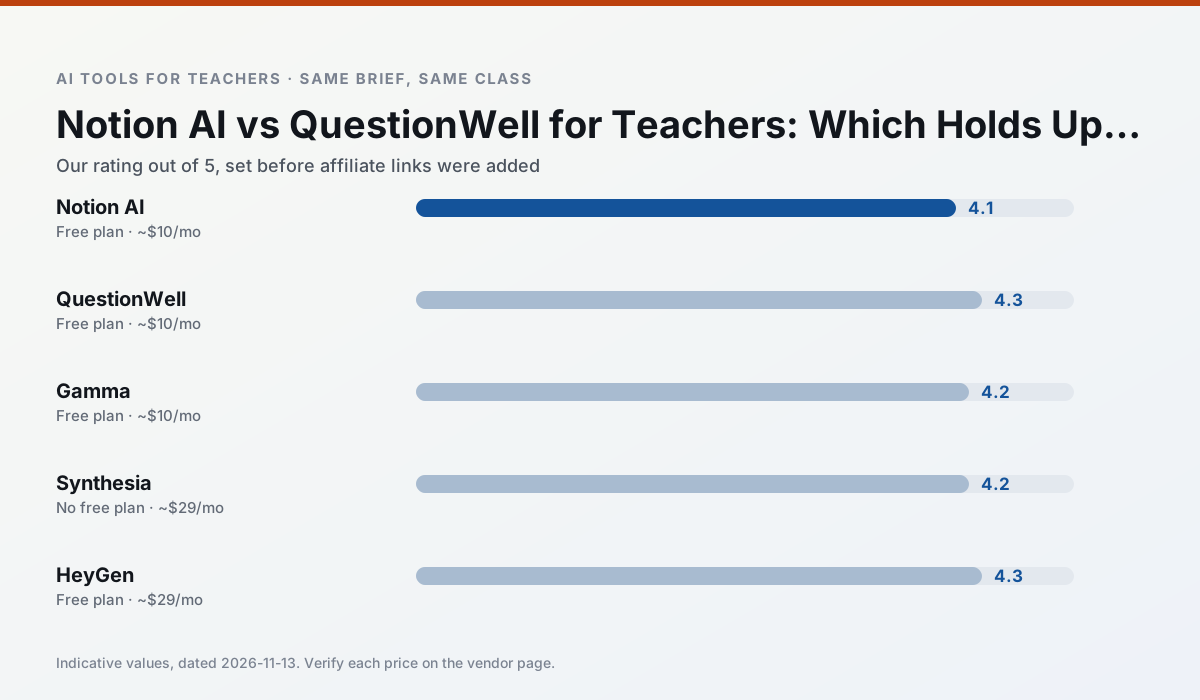
Side by side
Comparison table
Ratings reflect our timed classroom workflow, not vendor claims. Prices are indicative — verify on the vendor site.
| Tool | Best for | Free tier | Indicative paid plan | Standout feature | Our rating | Verdict | Try the tool |
|---|---|---|---|---|---|---|---|
| Notion AI | curriculum mapping · unit planning | Yes — Limited AI usage | ~$10 /user/mo | Linked databases | 4.1 / 5 | Situational | Try free |
| QuestionWell | quiz generation · assessment | Yes — Monthly generation limit | ~$10 /user/mo | Exports to Google Forms / LMS | 4.3 / 5 | Strong option | Try free |
| Gamma | slide decks · parent communication | Yes — Credit-limited generation | ~$10 /user/mo | Prompt-to-deck | 4.2 / 5 | Strong option | Try free |
| Synthesia | flipped lessons · video lessons | No ongoing free plan | ~$29 /user/mo | 140+ languages | 4.2 / 5 | Strong option | Try free |
| HeyGen | video lessons · translation | Yes — Limited credit plan | ~$29 /user/mo | Video translation | 4.3 / 5 | Strong option | Try free |
| Colossyan | PD materials · video lessons | No ongoing free plan | ~$27 /user/mo | PDF/PPT-to-video | 4.1 / 5 | Situational | Try free |
Match your situation
Best for X
Different jobs need different tools. Here is what we would open first in each case.
If there is no budget, start with Notion AI: free plan with clearest quota is the least punishing free tier here.
QuestionWell is the one we would open on a normal planning day because the first output is editable rather than restructurable, and the free plan covers a single teacher's routine.
Gamma runs in a browser tab with no extension, no student accounts and no onboarding call, so you can test it in a free period.
For a school rollout, Synthesia offers the paperwork and the admin console; the classroom features are standard by comparison.
Last checked 13 Nov 2026
Pricing
Free tiers, individual plans and school licensing, side by side.
| Tool | Free plan | Individual / paid | School & district | Billing note | Verify |
|---|---|---|---|---|---|
| Notion AI | $0 — Limited AI usage | ~$10 /user/mo | ~$8 /user/mo | Indicative — verify on vendor site | Vendor |
| QuestionWell | $0 — Monthly generation limit | ~$10 /user/mo | Custom quote | Indicative — verify on vendor site | Vendor |
| Gamma | $0 — Credit-limited generation | ~$10 /user/mo | ~$20 /user/mo | Indicative — verify on vendor site | Vendor |
| Synthesia | No ongoing free tier | ~$29 /user/mo | Custom quote | Indicative — verify on vendor site | Vendor |
| HeyGen | $0 — Limited credit plan | ~$29 /user/mo | Custom quote | Indicative — verify on vendor site | Vendor |
| Colossyan | No ongoing free tier | ~$27 /user/mo | Custom quote | Indicative — verify on vendor site | Vendor |
Editorial rule: pricing is re-checked every 2–3 months and the top 50 pages are refreshed every 6 months. See our funding policy.
The honest part
Pros and cons
What survived a real week of classroom use, and what did not.
Pros
- Great for long-term curriculum records
- Strong team collaboration
- Flexible structure
Cons
- Setup time is significant
- AI add-on pricing changed more than once
- Not purpose-built for lesson generation
Pros
- Saves the most time on question writing
- Clean export workflow
- Good objective tagging
Cons
- Single-purpose tool
- Question quality varies by source text
- Limited student-facing features
Pros
- Fastest path from outline to deck
- Modern-looking output by default
- Good export options
Cons
- Design control is limited
- Credits run out quickly
- Not built for student data
Pros
- No camera or editing skills required
- Excellent multilingual voice output
- Easy updates to existing videos
Cons
- Cost is hard to justify for a single teacher
- Avatar video can feel impersonal
- No free ongoing tier
Pros
- Best-in-class lip-sync translation
- Useful for multilingual families
- Generous trial credits
Cons
- Credit-based pricing is confusing
- Voice cloning raises consent questions
- Overkill for everyday lessons
In the classroom
Use cases
Five concrete workflows, with the tool we would open for each one.
Three reading levels from one source text
Paste a vetted text, ask for supported, core and extension versions, then check the vocabulary list by hand. Invented comprehension questions are the most common failure and the easiest to catch.
Recommended: Notion AIA Monday morning lesson plan in twelve minutes
The twelve minutes come from not rewriting the skeleton. Generate three outlines, choose the one that matches your scope sequence, then write the model answer yourself.
Recommended: QuestionWellA parent email in two languages
Draft in plain, warm language with no names, translate, then back-translate the important sentences to check meaning. Keep specific incidents out of the prompt and add them yourself.
Recommended: GammaRubric and feedback comments in one pass
Reorder the workflow so the rubric is yours and the comments are generated. Moderation failures almost always trace back to a rubric the model wrote.
Recommended: SynthesiaAn IEP present-levels first draft
Use aggregated, anonymised data only. Ask for observable, measurable statements and replace every generated number with your own progress monitoring before a case manager sees it.
Recommended: HeyGen
Questions teachers ask us
FAQ
Direct answers, also published as FAQPage structured data for search and AI assistants.
Notion AI or QuestionWell for lesson planning?
Which is cheaper for one teacher?
Do they produce the same output?
Sources & further reading
Our recommendation
Try Notion AI free for your next lesson planning task
AI-assisted notes, databases and curriculum planning in one workspace. Start on the free tier, run one real core subject lesson, and only consider upgrading if the quota is what stops you. Disclosure: we may earn a commission (varies) at no extra cost to you.
Some links on this page are affiliate links. We may earn a commission at no extra cost to you. Our rankings are editorial and never pay-to-play. Never enter student PII into a free consumer account.
Keep reading
Related comparisons in this cluster.
Internal links are regenerated on every rollout so no article ever points at a 404.