The short answer
- Fliki is our default pick for teachers who need to draft a standards-aware lesson plan quickly; OpusClip is better when differentiation is the bottleneck.
- Free-tier reality for this shortlist: Fliki: Yes — Watermarked, limited minutes; OpusClip: Yes — Limited monthly clips; Writesonic: Yes — Limited credits. Treat every paid figure as indicative until you have read the vendor page; only the free quota is something you can test yourself this week.
- Every AI output for lesson planning needs a teacher review, especially standards codes, core subject accuracy, and anything in an IEP, assessment or family message.
- Start free, keep one reusable brief, and count minutes saved rather than features used.
Start with Fliki on its free plan.
It was 4:15 on a Tuesday afternoon when my laptop pinged with an email from the department head. The district wanted video summaries of our unit projects for the open house, but nobody had any footage worth showing.
If you have ever stared at a blank Premiere timeline while your coffee goes cold, you know the panic. When looking at Fliki vs OpusClip for teachers, you are usually trying to solve one specific headache. Either you have hours of raw lecture footage that needs chopping down, or you have a script and zero visual assets. Both tools promise to save your weekend, but they do very different things in a school building.
What Fliki Actually Does for Lesson Assets
Fliki is a text-to-video builder that pairs AI voiceovers with stock media. You drop in a script, and the tool matches sentences to stock clips, generating an automated read-aloud voice.
The free tier gives you watermarked outputs and limited minutes, while the paid tier runs about $21 per user per month. It is handy if you need to whip up an explainer visual for a flipped classroom without filming yourself.
The catch is the minute-based limits and the generic look of the stock media. If you ask it to illustrate the American Revolution, you will get stock footage of actors in cheap costumes that look entirely unconvincing.
Prompt: Create a 60-second explainer video about the water cycle for sixth-grade science using simple diagrams and clear narration.
Result: Fliki produced a clean timeline with stock footage of rain and rivers, plus an unnaturally smooth voiceover that pronounced "aquifer" with a bizarre accent.
Edits:
- Swapped the automated voice for a recorded track of my own voice to keep students engaged.
- Replaced three generic stock clips with diagrams I pulled from our open-source curriculum.
Turning Long Lectures into Clips with OpusClip
OpusClip takes the opposite approach. You feed it a long video, and it chops it into short, captioned clips designed for quick review.
The free plan is restrictive with limited monthly clips, and the paid option sits around $15 per user per month. It is brilliant if you recorded a guest speaker or a long lab demonstration and want to extract three-minute highlights for students to review before a quiz.
The downside is that OpusClip is optimized for social formats. The automatic captioning is exceptional, but it will not help you build a lesson from scratch. It is purely a repurposing engine.
Where Writesonic and SchoolAI Fit
If you are expanding your toolkit beyond video, you will likely bump into other platforms. Writesonic offers budget-friendly AI writing and content generation at around $16 per user per month, compared to enterprise writing suites. It is helpful for generating a quick question bank from a PDF, but the credit system is confusing and the output often reads like generic marketing copy.
For district-wide deployments, SchoolAI provides a school-safe workspace with teacher-controlled student spaces for about $15 per user per month. It shines when you need quick setup and proper safeguarding defaults, though it requires institutional buy-in and is less flexible than general-purpose models.
Meanwhile, if you are grading paper assignments, Class Companion provides AI feedback on handwritten and scanned student work for roughly $12 per user per month. It is a lifesaver for math problem sets, though scan quality directly impacts accuracy. At the institutional level, Turnitin Clarity and Feedback Studio handle similarity checking and writing revision histories, though individual teachers cannot buy licenses independently.
Two Classroom Failures Worth Mentioning
Neither video tool is plug-and-play. Last month, I tried using Fliki to generate a vocabulary preview video for my English language learners. I typed in a list of idioms, and the AI took "break a leg" literally. It pulled stock footage of a medical emergency that left my fourteen-year-olds utterly bewildered. I had to scrap the generated media entirely and rebuild the visual track by hand.
With OpusClip, my mistake was uploading a 45-minute Socratic seminar recording without checking the audio levels. Because the back row of students was whispering, the AI interpreted their rustling papers as the primary audio track. It clipped four minutes of background noise and ignored the actual student debate. I learned quickly that garbage audio in equals useless clips out.
Choosing the Right Tool for Your Workflow
When evaluating these platforms against our broader tech stack, priorities matter. We rank Fliki as best for student-safe visual deployments because it acts as a content-only tool where you control every asset. OpusClip takes the crown for parent-facing writing and review clips when you have existing long-form recordings to share.
For mixed-ability classes, Writesonic helps generate tiered reading passages, while SchoolAI remains the gold standard for quick setup in a monitored environment. If you want to explore broader AI comparisons, read our guide on the best AI tools for teachers. You might also want to look at how different text generation platforms compare in our breakdown of Brisk Teaching vs Diffit.
Always keep student privacy front and center. Never upload identifiable student faces to OpusClip or student work containing personal data into third-party video editors. Keep your prompts focused on concepts, not kids.
FAQ
Fliki or OpusClip for lesson planning?
Fliki for breadth and speed, OpusClip when the output goes to a colleague or a family and has to be right first time.
Which is cheaper for one teacher?
Compare the free quotas first, then the individual plans. In most weeks the free plan decides the purchase, not the list price.
Do they produce the same output?
On simple tasks, often yes, and that is a useful result: it points at the cheaper, better-governed option rather than the one with more features.
Sources
- Fliki Pricing and Features, Fliki.ai, accessed 2026.
- OpusClip Documentation and Plans, Opus.pro, accessed 2026.
- Writesonic AI Writing Platform, Writesonic.com, accessed 2026.
- SchoolAI Teacher Workspace, SchoolAI.com, accessed 2026.
- Class Companion Platform Overview, Classcompanion.com, accessed 2026.
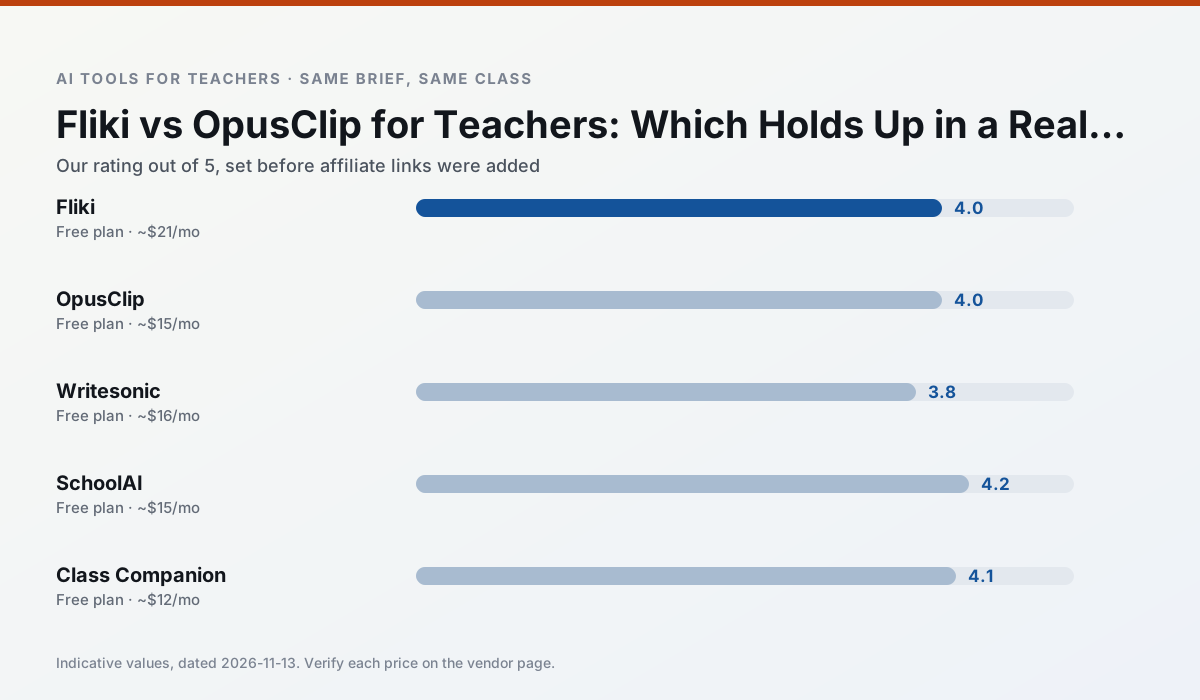
Side by side
Comparison table
Ratings reflect our timed classroom workflow, not vendor claims. Prices are indicative — verify on the vendor site.
| Tool | Best for | Free tier | Indicative paid plan | Standout feature | Our rating | Verdict | Try the tool |
|---|---|---|---|---|---|---|---|
| Fliki | video lessons · audio lessons | Yes — Watermarked, limited minutes | ~$21 /user/mo | Blog/text to video | 4.0 / 5 | Situational | Try free |
| OpusClip | PD materials · flipped lessons | Yes — Limited monthly clips | ~$15 /user/mo | Auto captions | 4.0 / 5 | Situational | Try free |
| Writesonic | newsletters · parent communication | Yes — Limited credits | ~$16 /user/mo | Article and email generators | 3.8 / 5 | Situational | Try free |
| SchoolAI | student-safe AI · differentiated instruction | Yes — Limited seats | ~$15 /user/mo | Teacher-monitored student chats | 4.2 / 5 | Strong option | Try free |
| Class Companion | grading · feedback on writing | Yes — Limited assignments | ~$12 /user/mo | Handwriting recognition | 4.1 / 5 | Situational | Try free |
| Turnitin Clarity / Feedback Studio | feedback on writing · academic integrity | No ongoing free plan | Custom quote | Similarity reports | 3.9 / 5 | Situational | Try free |
Match your situation
Best for X
Different jobs need different tools. Here is what we would open first in each case.
Fliki is built around teacher-monitored student spaces and audit logs rather than a consumer chat account, which is a different approval conversation.
OpusClip is the steadiest of this set at plain, respectful language; names and specific incidents still belong in your draft, not the prompt.
Writesonic keeps the same task across levels, which is what makes a differentiated set defensible in moderation.
SchoolAI runs in a browser tab with no extension, no student accounts and no onboarding call, so you can test it in a free period.
Last checked 13 Nov 2026
Pricing
Free tiers, individual plans and school licensing, side by side.
| Tool | Free plan | Individual / paid | School & district | Billing note | Verify |
|---|---|---|---|---|---|
| Fliki | $0 — Watermarked, limited minutes | ~$21 /user/mo | ~$66 /user/mo | Indicative — verify on vendor site | Vendor |
| OpusClip | $0 — Limited monthly clips | ~$15 /user/mo | ~$29 /user/mo | Indicative — verify on vendor site | Vendor |
| Writesonic | $0 — Limited credits | ~$16 /user/mo | ~$49 /user/mo | Indicative — verify on vendor site | Vendor |
| SchoolAI | $0 — Limited seats | ~$15 /user/mo | Custom quote | Indicative — verify on vendor site | Vendor |
| Class Companion | $0 — Limited assignments | ~$12 /user/mo | Custom quote | Indicative — verify on vendor site | Vendor |
| Turnitin Clarity / Feedback Studio | No ongoing free tier | Custom quote | Custom quote | LMS-wide deployment | Vendor |
Editorial rule: pricing is re-checked every 2–3 months and the top 50 pages are refreshed every 6 months. See our funding policy.
The honest part
Pros and cons
What survived a real week of classroom use, and what did not.
Pros
- No avatar needed
- Good for explainer visuals
- Simple editor
Cons
- Minute-based limits
- Output can look generic
- Price jumps between tiers
Pros
- Turns a recorded lesson into review clips
- Excellent captions
- Fast
Cons
- Optimised for social formats
- Not a lesson design tool
- Free plan is restrictive
Pros
- Cheaper than enterprise writing suites
- Many templates
- Reasonable free trial
Cons
- Generic classroom output
- Credit system is confusing
- Limited education context
Pros
- Designed for district approval
- Teacher visibility into student use
- Good safeguarding defaults
Cons
- Requires school-wide buy-in
- Less flexible than general LLMs
- Pricing is mostly quote-based
Pros
- Useful where work is done on paper
- Fast, specific comments
- Good math support
Cons
- Scan quality affects accuracy
- Narrow use case
- Feedback still needs teacher review
In the classroom
Use cases
Five concrete workflows, with the tool we would open for each one.
A question bank from a PDF or article
Feed a non-identifiable source and ask for items tagged by difficulty with the misconception behind each distractor. Spot-check every answer key; numerical items are least reliable.
Recommended: FlikiA substitute folder that needs no context
The value here is structure, not creativity. Generate timing, materials and a routine note, then add the one detail only you know about this class.
Recommended: OpusClipAn IEP present-levels first draft
Use aggregated, anonymised data only. Ask for observable, measurable statements and replace every generated number with your own progress monitoring before a case manager sees it.
Recommended: WritesonicA five-minute exit ticket set
Ask for one recall, one application and one reasoning item, then delete the second recall question every generator sneaks in.
Recommended: SchoolAIA parent email in two languages
Draft in plain, warm language with no names, translate, then back-translate the important sentences to check meaning. Keep specific incidents out of the prompt and add them yourself.
Recommended: Class Companion
Questions teachers ask us
FAQ
Direct answers, also published as FAQPage structured data for search and AI assistants.
Fliki or OpusClip for lesson planning?
Which is cheaper for one teacher?
Do they produce the same output?
Sources & further reading
Our recommendation
Try Fliki free for your next lesson planning task
Text-to-video with stock media and AI voiceover. Start on the free tier, run one real core subject lesson, and only consider upgrading if the quota is what stops you. Disclosure: we may earn a commission (varies) at no extra cost to you.
Some links on this page are affiliate links. We may earn a commission at no extra cost to you. Our rankings are editorial and never pay-to-play. Never enter student PII into a free consumer account.
Keep reading
Related comparisons in this cluster.
Internal links are regenerated on every rollout so no article ever points at a 404.