The short answer
- ChatGPT is our default pick for teachers who need to draft a standards-aware lesson plan quickly; Claude is better when differentiation is the bottleneck.
- ChatGPT handles the broad case; Claude handles the narrow one. Anything beyond that pair should be justified by a recurring weekly job, not a feature demo.
- Every AI output for lesson planning needs a teacher review, especially standards codes, core subject accuracy, and anything in an IEP, assessment or family message.
- Everything on this page dates from 2026-11-13; where a price could not be re-read, the row says so.
Start with Grammarly on its free plan.
It was 9:43 PM on a Tuesday, and I was staring at a pile of thirty-four sixth-grade persuasive essays while trying to decide if I cared about paragraph transitions anymore. I had already spent an hour wrestling a general-purpose AI into generating feedback that sounded like a robot had swallowed a thesaurus. That is the moment most of us realize that picking an AI assistant isn't about finding the flashiest tool on the market. It is about figuring out which platform will actually save you ten minutes instead of stealing twenty. When looking at ChatGPT vs Claude for teachers, the differences go far beyond simple feature lists. They change how your planning evening actually feels.
The Daily Planning Grind
ChatGPT is the tool you reach for when you need a Swiss Army knife. It is a general-purpose assistant that adapts to almost any classroom task, which is why it sits at the top of our list as best for schools and districts. On its free tier, you get usage-limited model access, while the paid tier runs around $20 per user per month. Its superpower is flexibility and a massive community of teacher prompt libraries, alongside strong multilingual support. The catch is that it requires solid prompt skills to get consistent results, it has no built-in standards alignment, and district privacy review is usually required. If you want to explore broader options, our guide on the best AI tools for teachers 2026 covers how these general assistants fit into a wider stack.
Claude takes a different path, making it our pick for quick setup. It is a long-context assistant suited to document-heavy planning and feedback. Like ChatGPT, its free tier is usage-limited and the paid tier runs around $20 per user per month. The big draw here is that it handles full unit plans and long rubrics effortlessly, producing nuanced prose that feels much less generic than its competitors. It excels at structured document output. However, it has no teacher-specific templates and fewer classroom integrations. For any school-related documents, you must use an approved workspace tier, as consumer plans are never suitable for student data.
The Prompt: "Act as a middle school science teacher. Write a three-tier reading passage about photosynthesis for below-grade, on-grade, and extension students based on this text [paste text], and include five multiple-choice questions for each level."
What Came Back: Claude generated three clean reading levels with appropriate vocabulary scaling, but invented two multiple-choice questions that tested facts not actually present in the source text.
The Two Edits That Made It Usable:
- Added a strict constraint: "Every question must have an explicit, word-for-word answer in the corresponding text tier."
- Hand-checked the distractor options on the extension tier to ensure the wrong answers were conceptually sound rather than random guesses.
Handling the Communication Load
Parent communication can drain your energy faster than a double-period of lab clean-up. Grammarly steps in here as our best overall for daily use. Operating primarily as a writing assistant for polished parent emails, newsletters, and reports, it offers core grammar and tone checks on its free tier, with the paid version running around $12 per user per month. It catches errors in high-stakes parent emails and works everywhere you already write with a very low learning curve. The downsides are that it is not education-specific and can flatten your natural teacher voice unless you pay for the premium tone-rewriting features. On school devices, remember to disable text collection and check your local data privacy agreement.
When drafting a sensitive email home, the workflow matters. Draft the message in plain, warm language without using real student names. Translate it if necessary, then back-translate the important sentences to verify the meaning didn't warp. Always keep specific disciplinary incidents completely out of the prompt, adding those sensitive details in yourself after the AI has done the heavy lifting on tone and structure.
Building Presentations and Visuals
Sometimes text on a page is not enough to keep thirty teenagers engaged on a Friday afternoon. Gamma offers a fast track for this, letting you generate presentation decks and documents from a single prompt. It features a credit-limited free tier, with paid plans around $10 per user per month. It represents the fastest path from an outline to a slide deck, producing modern-looking output by default with good export options. The friction points are that design control is limited, credits run out quickly if you are iterating constantly, and it is not built for student data. Treat it strictly as a content creation tool and never upload student work into its workspace.
If you want to move beyond slides into video, Synthesia turns a script into a presenter-led video using AI avatars. There is no free ongoing tier here, and the paid plan sits at around $29 per user per month. It requires zero camera or editing skills, offers excellent multilingual voice output, and makes updating existing videos painless. For an individual classroom teacher, however, the cost is extremely hard to justify, and avatar videos can sometimes feel cold and impersonal. Never use student likenesses without explicit written consent.
Bringing Audio into the Classroom
Accessibility often means getting text out of our static worksheets and into the ears of our learners. ElevenLabs provides natural-sounding AI voiceover and text-to-speech for learning materials, earning our spot as the best free option. It operates on a monthly character quota for its free tier, with paid plans starting around $5 per user per month. It is fantastic for creating accessible audio versions of reading materials, boasts a very low entry price, and generates audio files rapidly. You have to keep quota limits in mind, and you must never clone a student's or colleague's voice without written consent. If you are comparing workflows for differentiating instruction, take a look at how this pairs with other platforms in our Brisk Teaching vs Diffit teacher comparison.
Privacy and Practical Realities
Using these tools in a real school environment means accepting that things will occasionally break down. Two distinct failures happened during my term testing this stack. First, an automated rubric generator produced criteria that completely contradicted our district pacing guide because I failed to anchor the prompt with our specific standard first. The fix was simple: reorder the workflow so the rubric belongs to you, and the AI only generates the comments underneath it.
Second, a substitute folder generated by a model included timing that assumed students could complete a complex mapping activity in seven minutes. The fix was recognizing that AI provides structure, not local context. I started generating the basic timing, materials list, and routine notes, but I always add the one specific detail only I know about how my third period class handles transitions.
ChatGPT and Claude both have a place in a teacher's toolkit, but neither will replace professional judgment. Pick the tool that matches your immediate bottleneck, keep student names off the servers, and protect your planning time fiercely.
FAQ
ChatGPT or Claude for lesson planning?
ChatGPT for breadth and speed, Claude when the output goes to a colleague or a family and has to be right first time.
Which is cheaper for one teacher?
Compare the free quotas first, then the individual plans. In most weeks the free plan decides the purchase, not the list price.
Do they produce the same output?
On simple tasks, often yes, and that is a useful result: it points at the cheaper, better-governed option rather than the one with more features.
Sources
- OpenAI. ChatGPT Pricing and Model Specifications. https://openai.com/chatgpt/
- Anthropic. Claude Feature Overview and Context Windows. https://anthropic.com/claude/
- Grammarly. Writing Assistant Plans and Privacy Policies. https://grammarly.com/
- ElevenLabs. Text-to-Speech Quotas and Voice Generation. https://elevenlabs.io/
- Synthesia. AI Video Generation and Avatar Pricing. https://synthesia.io/
- Gamma. AI Presentation Deck Generation. https://gamma.app/
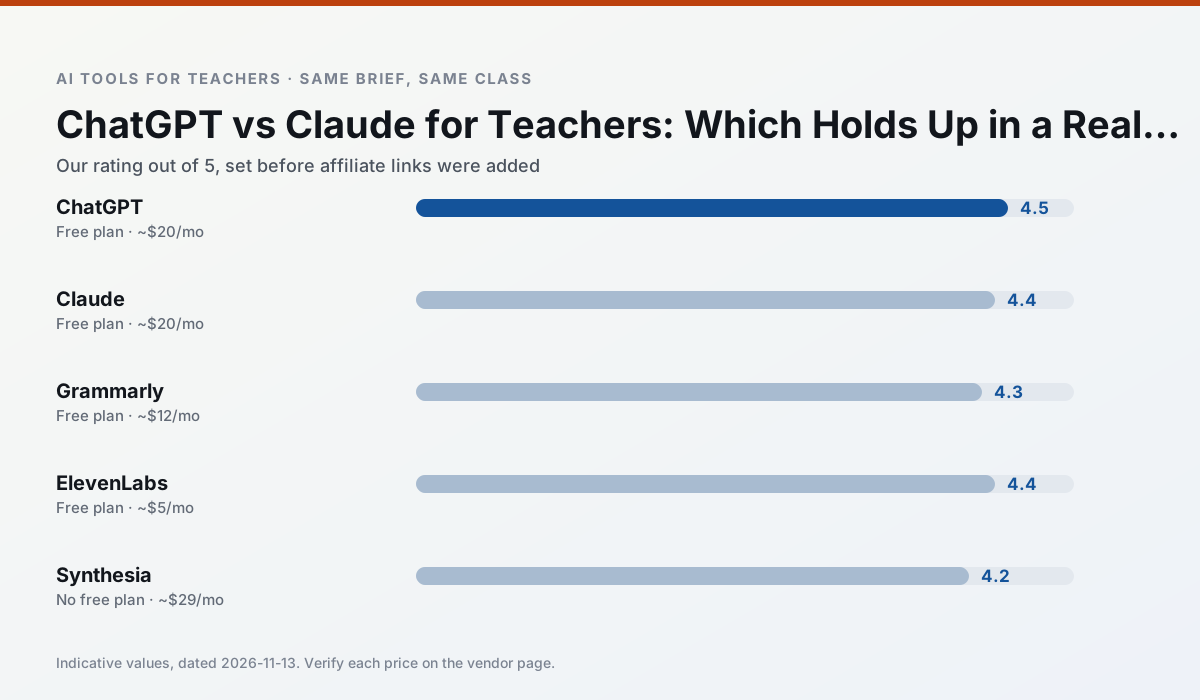
Side by side
Comparison table
Ratings reflect our timed classroom workflow, not vendor claims. Prices are indicative — verify on the vendor site.
| Tool | Best for | Free tier | Indicative paid plan | Standout feature | Our rating | Verdict | Try the tool |
|---|---|---|---|---|---|---|---|
| ChatGPT | lesson planning · parent communication | Yes — Usage-limited model access | ~$20 /user/mo | Custom GPTs and Projects | 4.5 / 5 | Top pick | Try free |
| Claude | rubric creation · feedback on writing | Yes — Usage-limited | ~$20 /user/mo | Very large context window | 4.4 / 5 | Strong option | Try free |
| Grammarly | parent communication · report card comments | Yes — Core grammar and tone checks | ~$12 /user/mo | Tone adjustments | 4.3 / 5 | Strong option | Try free |
| ElevenLabs | accessibility · reading intervention | Yes — Monthly character quota | ~$5 /user/mo | Very natural voices | 4.4 / 5 | Strong option | Try free |
| Synthesia | flipped lessons · video lessons | No ongoing free plan | ~$29 /user/mo | 140+ languages | 4.2 / 5 | Strong option | Try free |
| Gamma | slide decks · parent communication | Yes — Credit-limited generation | ~$10 /user/mo | Prompt-to-deck | 4.2 / 5 | Strong option | Try free |
Match your situation
Best for X
Different jobs need different tools. Here is what we would open first in each case.
For a school rollout, ChatGPT offers the paperwork and the admin console; the classroom features are standard by comparison.
Claude has the shortest path from opening a tab to a usable draft, which matters more than the feature count on a Monday.
Grammarly is the one we would open on a normal planning day because the first output is editable rather than restructurable, and the free plan covers a single teacher's routine.
ElevenLabs's free plan is the most usable in this comparison: a quota that survives a normal week. Not enough for a department, enough for one teacher to decide.
Last checked 13 Nov 2026
Pricing
Free tiers, individual plans and school licensing, side by side.
| Tool | Free plan | Individual / paid | School & district | Billing note | Verify |
|---|---|---|---|---|---|
| ChatGPT | $0 — Usage-limited model access | ~$20 /user/mo | ~$25+ /user/mo | Indicative — verify on vendor site | Vendor |
| Claude | $0 — Usage-limited | ~$20 /user/mo | ~$25+ /user/mo | Indicative — verify on vendor site | Vendor |
| Grammarly | $0 — Core grammar and tone checks | ~$12 /user/mo | ~$15 /user/mo | Indicative — billed annually | Vendor |
| ElevenLabs | $0 — Monthly character quota | ~$5 /user/mo | ~$22 /user/mo | Indicative — verify on vendor site | Vendor |
| Synthesia | No ongoing free tier | ~$29 /user/mo | Custom quote | Indicative — verify on vendor site | Vendor |
| Gamma | $0 — Credit-limited generation | ~$10 /user/mo | ~$20 /user/mo | Indicative — verify on vendor site | Vendor |
Editorial rule: pricing is re-checked every 2–3 months and the top 50 pages are refreshed every 6 months. See our funding policy.
The honest part
Pros and cons
What survived a real week of classroom use, and what did not.
Pros
- Most flexible option available
- Huge community of teacher prompt libraries
- Strong multilingual support
Cons
- Requires prompt skills for consistent results
- No built-in standards alignment
- District privacy review usually required
Pros
- Handles full unit plans and long rubrics
- Nuanced, less generic prose
- Good at structured document output
Cons
- No teacher-specific templates
- Fewer classroom integrations
- Consumer plan not suitable for student data
Pros
- Catches errors in high-stakes parent emails
- Works everywhere you already write
- Very low learning curve
Cons
- Not education-specific
- Can flatten teacher voice
- Premium needed for tone rewriting
Pros
- Excellent for accessible audio versions
- Low entry price
- Fast generation
Cons
- Quota-based billing
- Voice cloning consent considerations
- Not a teaching platform
Pros
- No camera or editing skills required
- Excellent multilingual voice output
- Easy updates to existing videos
Cons
- Cost is hard to justify for a single teacher
- Avatar video can feel impersonal
- No free ongoing tier
In the classroom
Use cases
Five concrete workflows, with the tool we would open for each one.
Rubric and feedback comments in one pass
Reorder the workflow so the rubric is yours and the comments are generated. Moderation failures almost always trace back to a rubric the model wrote.
Recommended: ChatGPTA parent email in two languages
Draft in plain, warm language with no names, translate, then back-translate the important sentences to check meaning. Keep specific incidents out of the prompt and add them yourself.
Recommended: ClaudeA Monday morning lesson plan in twelve minutes
The twelve minutes come from not rewriting the skeleton. Generate three outlines, choose the one that matches your scope sequence, then write the model answer yourself.
Recommended: GrammarlyThree reading levels from one source text
Paste a vetted text, ask for supported, core and extension versions, then check the vocabulary list by hand. Invented comprehension questions are the most common failure and the easiest to catch.
Recommended: ElevenLabsA substitute folder that needs no context
The value here is structure, not creativity. Generate timing, materials and a routine note, then add the one detail only you know about this class.
Recommended: Synthesia
Questions teachers ask us
FAQ
Direct answers, also published as FAQPage structured data for search and AI assistants.
ChatGPT or Claude for lesson planning?
Which is cheaper for one teacher?
Do they produce the same output?
Sources & further reading
Our recommendation
Try Grammarly free for your next lesson planning task
Writing assistant for polished parent emails, newsletters and reports. Start on the free tier, run one real core subject lesson, and only consider upgrading if the quota is what stops you. Disclosure: we may earn a commission ($20 per paid upgrade + $0.20/signup) at no extra cost to you.
Some links on this page are affiliate links. We may earn a commission at no extra cost to you. Our rankings are editorial and never pay-to-play. Never enter student PII into a free consumer account.
Keep reading
Related comparisons in this cluster.
Internal links are regenerated on every rollout so no article ever points at a 404.