The short answer
- MagicSchool AI is our default pick for teachers who need to draft a standards-aware lesson plan quickly; Eduaide.Ai is better when differentiation is the bottleneck.
- Free-tier reality for this shortlist: MagicSchool AI: Yes — Core generators with monthly usage limits; Eduaide.Ai: Yes — Daily generation cap; Gamma: Yes — Credit-limited generation. Treat every paid figure as indicative until you have read the vendor page; only the free quota is something you can test yourself this week.
- Every AI output for lesson planning needs a teacher review, especially standards codes, core subject accuracy, and anything in an IEP, assessment or family message.
- Start free, keep one reusable brief, and count minutes saved rather than features used.
Start with MagicSchool AI on its free plan.
It was 7:45 on a Tuesday morning in October, and my seventh-grade life science class was forty-five minutes away from walking through the door. I had a half-eaten granola bar in one hand and a textbook paragraph about cellular respiration in the other, needing three distinct reading levels before the first bell rang. That kind of morning pressure is usually when teachers make desperate choices. Instead of winging it, I opened two browser tabs: MagicSchool AI on the left and Eduaide.Ai on the right. Both promise to save your planning period, but they go about it in very different ways. If you are trying to figure out which platform deserves a permanent spot on your bookmark bar alongside other options covered in our guide to the best AI tools for teachers for 2026, you need to know how they hold up when the classroom gets loud and the prep time is zero.
The Interface and Daily Workflow
MagicSchool AI greets you with a sprawling dashboard that feels like a Swiss Army knife designed by people who know schools. It offers a massive library of teacher-specific generators divided into categories like lesson planning, student support, and communication. You do not need to know how to prompt an LLM. You just click on a tile, fill in a few form fields such as grade level and standard, and hit generate. Eduaide.Ai takes a slightly more streamlined approach. Its interface is clean and uncluttered, centering heavily on a resource builder that handles worksheets, rubrics, and lesson outlines without burying you in a maze of sub-menus. For daily use, Eduaide feels a bit faster if you want to stay inside a single workspace, while MagicSchool acts more like a toolbox where you hunt for the exact gadget you need.
When it comes to the free tier, MagicSchool AI stands out as the best free option because its core generators offer generous monthly usage limits that let an individual teacher test things thoroughly without hitting a wall on a Sunday night. Eduaide.Ai relies on a daily generation cap on its free plan, which is fine until you sit down to plan a whole unit in one marathon session and suddenly get locked out. Both platforms sit around $10 to $12 per user per month for their paid tiers, making them comparable for out-of-pocket expenses, though you will want to check if your district has enterprise licensing before pulling out your personal credit card. For a deeper look at how other platforms stack up for specific workflows, you can also read our breakdown of Brisk Teaching vs MagicSchool.
Generating Differentiated Reading Levels
Let us look at that Tuesday morning scramble with the cellular respiration text. Pasting a vetted source text into MagicSchool's leveled text tool gave me three versions—supported, core, and extension—in about twenty seconds. The vocabulary list looked reasonable at first glance, but I had to check it by hand because AI-generated comprehension questions are notorious for asking trivial recall questions rather than testing actual understanding. This is where most teachers run into trouble. You cannot blindly trust the output without a quick standards review. Eduaide handled the same source text with slightly cleaner formatting on the export, but the underlying challenge remained the same. The generated questions needed a thorough human edit to match the rigor of our actual state assessments.
Prompt: Act as a middle school science teacher. Take the following passage about cellular respiration [paste text] and generate three reading levels:
- Approaching grade level with simplified syntax and a glossary.
- On grade level with standard vocabulary.
- Advanced extension with inquiry prompts. Include three multiple-choice comprehension questions for each level.
First pass: The tool returned clear text levels, but the glossary missed the term "mitochondria," and two of the extension questions were mathematically impossible based on the text.
Edits made: I manually added mitochondria to the glossary and replaced the faulty extension questions with a short-response prompt about energy transfer in plant cells.
Lesson Planning and Scope Alignment
Building a Monday morning lesson plan in twelve minutes is entirely possible if you stop trying to rewrite the AI skeleton from scratch. The trick is to generate three separate outlines, choose the one that actually matches your scope and sequence, and then write the model answer yourself. MagicSchool offers a dedicated lesson plan generator that pulls in standard alignments quite smoothly, though the resulting procedures can sometimes read like generic education jargon. Eduaide shines here with a very low entry price and a resource library that helps you stitch together worksheets and rubrics to match the lesson outline without opening five different tabs.
Two things went wrong during my real classroom test of these planning features. First, MagicSchool generated an activity that required lab equipment our school simply does not own, assuming every classroom has hot plates and digital scales. Second, Eduaide produced a timeline for a history lesson that completely skipped the Industrial Revolution. In both cases, I had to catch the gaps during my morning review and pivot the student task before printing. If you want a different aesthetic entirely for your presentations, tools like Gamma offer the fastest path from a text outline to a modern-looking slide deck, though design control is limited and credits run out quickly if you tweak things too many times.
Communication and Administrative Support
Teachers spend an ungodly amount of time translating complex thoughts into parent-friendly emails and IEP notes. Drafting a parent email in two languages is a good test of this capability. You want to draft the message in plain, warm language with no student names, translate it using the platform, and then back-translate the important sentences in your head to check for awkward phrasing or tone shifts. Keep specific disciplinary incidents out of the prompt entirely and add them yourself afterward. Both platforms handle translation adequately, but MagicSchool's communication tools feel slightly more tailored to standard school-to-home touchpoints.
When dealing with more sensitive administrative tasks, like an IEP present-levels first draft, you must use aggregated, anonymized data only. Ask the generator for observable, measurable statements, but be prepared to replace every single generated number with your own hard data from progress monitoring before a case manager lays eyes on it. For video-based communication with families or staff training, standard lesson planners will not cut it. While Synthesia and Colossyan serve as powerful options for automated video creation and compliance training without requiring a camera, their costs are difficult to justify for a single classroom teacher. Similarly, HeyGen offers great lip-sync translation for multilingual families, but its credit-based pricing and consent requirements for voice cloning make it more of an occasional district-level asset than an everyday teaching tool.
The Verdict on Daily Classroom Utility
MagicSchool AI takes the crown as the best free option because its wide template library and forgiving limits make it exceptionally easy for a stressed teacher to learn with almost no prompting skill required. However, for sheer daily use in planning lessons, building worksheets, and keeping your resources organized in one clean interface, Eduaide.Ai edges out as the best overall for daily classroom workflows. Just remember that no matter which platform you choose, the output is a first draft, not a finished product. Your professional judgment remains the most important tool in the room.
FAQ
MagicSchool AI or Eduaide.Ai for lesson planning?
MagicSchool AI for breadth and speed, Eduaide.Ai when the output goes to a colleague or a family and has to be right first time.
Which is cheaper for one teacher?
Compare the free quotas first, then the individual plans. In most weeks the free plan decides the purchase, not the list price.
Do they produce the same output?
On simple tasks, often yes, and that is a useful result: it points at the cheaper, better-governed option rather than the one with more features.
Sources
- MagicSchool AI platform features, pricing tiers, and privacy documentation (Magicschool.ai, 2026).
- Eduaide.Ai resource library, generation limits, and educator tools (Eduaide.ai, 2026).
- Gamma presentation and document generation credits and features (Gamma.app, 2026).
- Synthesia AI video generation and enterprise pricing data (Synthesia.io, 2026).
- HeyGen localization and video translation platform data (HeyGen.com, 2026).
- Colossyan training video creation and compliance features (Colossyan.com, 2026).
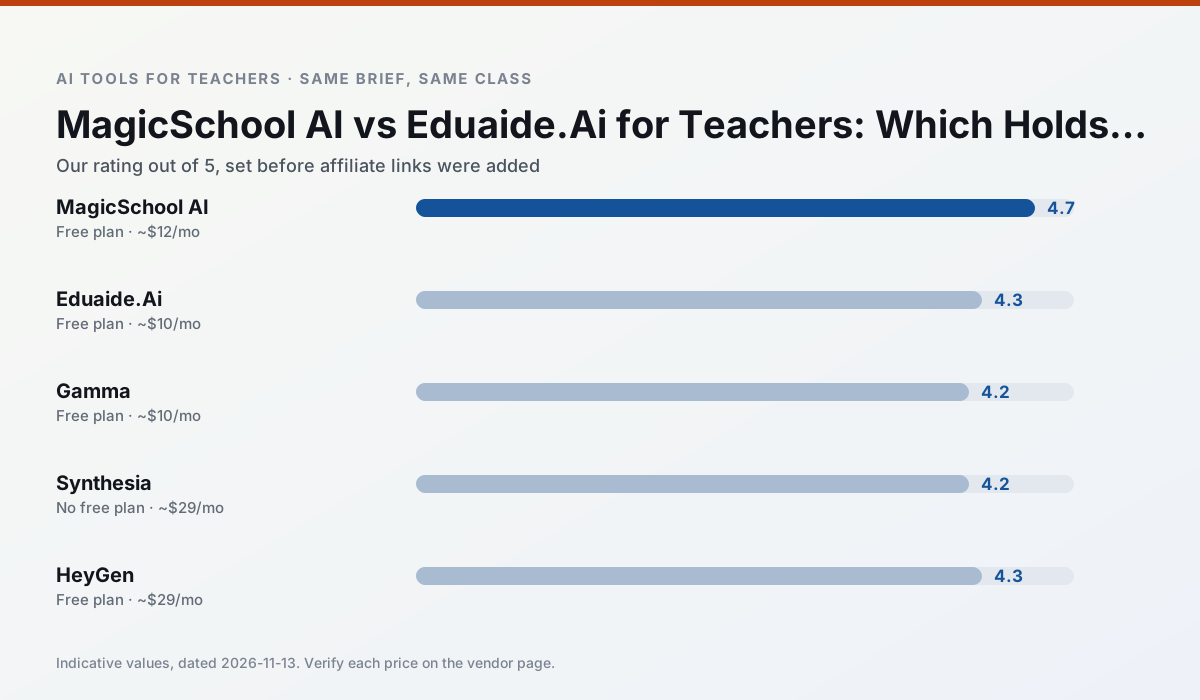
Side by side
Comparison table
Ratings reflect our timed classroom workflow, not vendor claims. Prices are indicative — verify on the vendor site.
| Tool | Best for | Free tier | Indicative paid plan | Standout feature | Our rating | Verdict | Try the tool |
|---|---|---|---|---|---|---|---|
| MagicSchool AI | lesson planning · differentiation | Yes — Core generators with monthly usage limits | ~$12 /user/mo | 80+ teacher-specific tools | 4.7 / 5 | Top pick | Try free |
| Eduaide.Ai | lesson planning · rubric creation | Yes — Daily generation cap | ~$10 /user/mo | Resource library | 4.3 / 5 | Strong option | Try free |
| Gamma | slide decks · parent communication | Yes — Credit-limited generation | ~$10 /user/mo | Prompt-to-deck | 4.2 / 5 | Strong option | Try free |
| Synthesia | flipped lessons · video lessons | No ongoing free plan | ~$29 /user/mo | 140+ languages | 4.2 / 5 | Strong option | Try free |
| HeyGen | video lessons · translation | Yes — Limited credit plan | ~$29 /user/mo | Video translation | 4.3 / 5 | Strong option | Try free |
| Colossyan | PD materials · video lessons | No ongoing free plan | ~$27 /user/mo | PDF/PPT-to-video | 4.1 / 5 | Situational | Try free |
Match your situation
Best for X
Different jobs need different tools. Here is what we would open first in each case.
If there is no budget, start with MagicSchool AI: free plan with clearest quota is the least punishing free tier here.
Eduaide.Ai wins on the default path: fewer clicks to a usable draft, and the interface does not get in the way at 7:40am.
Gamma runs in a browser tab with no extension, no student accounts and no onboarding call, so you can test it in a free period.
For a school rollout, Synthesia offers the paperwork and the admin console; the classroom features are standard by comparison.
Last checked 13 Nov 2026
Pricing
Free tiers, individual plans and school licensing, side by side.
| Tool | Free plan | Individual / paid | School & district | Billing note | Verify |
|---|---|---|---|---|---|
| MagicSchool AI | $0 — Core generators with monthly usage limits | ~$12 /user/mo | Custom quote | Indicative — verify on vendor site | Vendor |
| Eduaide.Ai | $0 — Daily generation cap | ~$10 /user/mo | Custom quote | Indicative — verify on vendor site | Vendor |
| Gamma | $0 — Credit-limited generation | ~$10 /user/mo | ~$20 /user/mo | Indicative — verify on vendor site | Vendor |
| Synthesia | No ongoing free tier | ~$29 /user/mo | Custom quote | Indicative — verify on vendor site | Vendor |
| HeyGen | $0 — Limited credit plan | ~$29 /user/mo | Custom quote | Indicative — verify on vendor site | Vendor |
| Colossyan | No ongoing free tier | ~$27 /user/mo | Custom quote | Indicative — verify on vendor site | Vendor |
Editorial rule: pricing is re-checked every 2–3 months and the top 50 pages are refreshed every 6 months. See our funding policy.
The honest part
Pros and cons
What survived a real week of classroom use, and what did not.
Pros
- Widest purpose-built template library
- Strong free tier for individual teachers
- Fast to learn with almost no prompting skill
Cons
- Outputs still need standards review
- Best features sit behind the paid tier
- District approval can be slow
Pros
- Very low entry price
- Good worksheet and rubric output
- Clean, uncluttered UI
Cons
- Smaller template set than MagicSchool
- Less polished export options
- Limited integrations
Pros
- Fastest path from outline to deck
- Modern-looking output by default
- Good export options
Cons
- Design control is limited
- Credits run out quickly
- Not built for student data
Pros
- No camera or editing skills required
- Excellent multilingual voice output
- Easy updates to existing videos
Cons
- Cost is hard to justify for a single teacher
- Avatar video can feel impersonal
- No free ongoing tier
Pros
- Best-in-class lip-sync translation
- Useful for multilingual families
- Generous trial credits
Cons
- Credit-based pricing is confusing
- Voice cloning raises consent questions
- Overkill for everyday lessons
In the classroom
Use cases
Five concrete workflows, with the tool we would open for each one.
Three reading levels from one source text
Paste a vetted text, ask for supported, core and extension versions, then check the vocabulary list by hand. Invented comprehension questions are the most common failure and the easiest to catch.
Recommended: MagicSchool AIA Monday morning lesson plan in twelve minutes
The twelve minutes come from not rewriting the skeleton. Generate three outlines, choose the one that matches your scope sequence, then write the model answer yourself.
Recommended: Eduaide.AiA parent email in two languages
Draft in plain, warm language with no names, translate, then back-translate the important sentences to check meaning. Keep specific incidents out of the prompt and add them yourself.
Recommended: GammaRubric and feedback comments in one pass
Reorder the workflow so the rubric is yours and the comments are generated. Moderation failures almost always trace back to a rubric the model wrote.
Recommended: SynthesiaAn IEP present-levels first draft
Use aggregated, anonymised data only. Ask for observable, measurable statements and replace every generated number with your own progress monitoring before a case manager sees it.
Recommended: HeyGen
Questions teachers ask us
FAQ
Direct answers, also published as FAQPage structured data for search and AI assistants.
MagicSchool AI or Eduaide.Ai for lesson planning?
Which is cheaper for one teacher?
Do they produce the same output?
Sources & further reading
Our recommendation
Try MagicSchool AI free for your next lesson planning task
A large library of teacher-specific AI generators in one dashboard. Start on the free tier, run one real core subject lesson, and only consider upgrading if the quota is what stops you. Disclosure: we may earn a commission (30% recurring) at no extra cost to you.
Some links on this page are affiliate links. We may earn a commission at no extra cost to you. Our rankings are editorial and never pay-to-play. Never enter student PII into a free consumer account.
Keep reading
Related comparisons in this cluster.
Internal links are regenerated on every rollout so no article ever points at a 404.