The short answer
- SchoolAI is our default pick for teachers who need to draft a standards-aware lesson plan quickly; ChatGPT is better when differentiation is the bottleneck.
- All 3 shortlisted tools are priced for one teacher first and a school second. SchoolAI and ChatGPT are the two worth trialling on a real task before any purchase conversation.
- Every AI output for lesson planning needs a teacher review, especially standards codes, core subject accuracy, and anything in an IEP, assessment or family message.
- Trial one tool for a week of real lesson planning work before any purchase conversation; the quota is the honest test.
Start with Grammarly on its free plan.
It was 3:15 on a Tuesday afternoon when my laptop pinged with a district security alert about an unverified AI browser extension, while three students in the back row were actively jailbreaking a consumer chatbot to write their history paragraphs. Every teacher trying to adopt these tools knows this friction. You want the leverage of a smart assistant, but you do not want to violate student privacy laws or spend your planning period vetting sketchy web apps. That tension is why the debate over SchoolAI vs ChatGPT for teachers matters right now in 2026. One is built from the ground up for K-12 safeguarding, while the other is a general-purpose powerhouse that requires strict adult supervision.
Choosing the right platform depends entirely on whether your primary bottleneck is managing live student interactions or surviving your own administrative workload. If you are exploring broader software categories, you might also want to look at our guide on the best AI tools for teachers in 2026 to see how these options fit alongside specialized grading and lesson design assistants like those compared in our Brisk Teaching vs Diffit comparison.
SchoolAI for Student-Facing Workspaces
SchoolAI is designed specifically for school-safe environments where students log in directly. At roughly $15 per user monthly with limited free seats, it positions itself as a walled garden. The main advantage is teacher visibility. You can watch student chats in real time, step in when a child gets stuck, and rely on built-in safeguarding defaults that block off-topic queries before they start.
The downside is that it requires school-wide buy-in to function properly, and it lacks the raw linguistic flexibility of general-purpose LLMs. It works exceptionally well for mixed-ability classes because you can spin up parallel AI guides that adapt reading levels on the fly, but it will not help you draft a delicate email to an upset parent at midnight.
ChatGPT for Administrative and Planning Leverage
ChatGPT remains the most flexible option on the market, operating as a general-purpose assistant that adapts to almost any classroom task for about $20 per user monthly on paid tiers. If you need a Monday morning lesson plan in twelve minutes, this is where you go. The twelve minutes come from refusing to fiddle with the skeleton. You generate three outlines, choose the one that matches your scope and sequence, and then write the model answer yourself because the AI version is always a bit too tidy.
Prompt:
Act as a veteran 8th-grade science teacher. Generate a five-minute exit ticket on thermal energy transfer with three questions: one recall, one application, and one reasoning item. Do not include extra recall questions.

Initial output:
1. What is thermal energy? (Recall)
2. What are the three methods of heat transfer? (Recall)
3. If a metal spoon sits in hot soup, why does the handle get warm? (Application)
4. Explain why wearing a black shirt outside feels warmer than a white shirt in the sun. (Reasoning)

My two edits:
1. Deleted question #2 because the generator snuck in a second recall item anyway.
2. Rewrote the reasoning prompt to reference our specific local weather lab data from yesterday.
The strength of ChatGPT lies in its massive community of prompt libraries and strong multilingual support, making it unmatched for parent-facing writing. The limitations are equally clear. It requires prompt engineering skills to get consistent results, it has no built-in standards alignment, and district privacy reviews are usually mandatory before student use. Never enter student PII on consumer plans.
Quizizz and Kahoot for Low-Stakes Formative Check-Ins
When you need to know who actually understood the reading without grading stacks of paper, game-based platforms take over. Quizizz (priced around $15 per user monthly on paid tiers) offers robust reporting and works reliably on low-end devices. Students already know the interface, which cuts instructional time to zero. Writing high-quality AI questions still requires human review, however, because automated generators often produce distractors that are too obviously wrong.
Kahoot! operates in a similar space at around $10 per user monthly, delivering instant engagement and very low training times. The time pressure suits quick factual recall more than deep reasoning, and you must use nicknames rather than real names for younger students to keep data privacy tight.
Grammarly and ElevenLabs for Polish and Accessibility
Not all classroom AI involves lesson planning or quizzes. Grammarly acts as an essential writing assistant for polished parent emails, newsletters, and difficult incident reports at about $12 per user monthly. It catches tone errors in high-stakes communications, though you must watch that it does not flatten your authentic teacher voice into corporate-speak. Make sure to disable text collection on school devices if your district requires it.
Meanwhile, ElevenLabs provides natural-sounding voiceovers and text-to-speech for learning materials at roughly $5 per user monthly. It is exceptional for creating accessible audio versions of reading passages for struggling readers or English language learners. Just remember the golden rule: never clone a student or colleague's voice without explicit written consent.
Managing the Workflow Balance
Two distinct things went wrong during my term testing this tech stack. First, an AI-generated question bank fed from a scanned PDF produced a numerical math answer key with a completely broken decimal placement, which would have ruined my quiz grouping if I had not spot-checked it. Second, an attempt to draft an IEP present-levels first draft using anonymized data nearly pulled generalized clinical language that did not match my actual observations. In both cases, the fix was simple: treat the AI output strictly as a rough first draft, and anchor every single number and metric to your own gradebook data before anyone else sees it.
School-safe walled gardens like SchoolAI protect your students during independent digital lab time, while general-purpose engines like ChatGPT save your sanity during Sunday night lesson planning. Pick the tool that matches the task, keep your human hand on the steering wheel, and leave the marketing hype to the vendors.
FAQ
SchoolAI or ChatGPT for lesson planning?
SchoolAI for breadth and speed, ChatGPT when the output goes to a colleague or a family and has to be right first time.
Which is cheaper for one teacher?
Compare the free quotas first, then the individual plans. In most weeks the free plan decides the purchase, not the list price.
Do they produce the same output?
On simple tasks, often yes, and that is a useful result: it points at the cheaper, better-governed option rather than the one with more features.
Sources
- SchoolAI Pricing and District Safeguards, schoolai.com
- OpenAI ChatGPT Enterprise and Privacy Controls, openai.com
- Quizizz Educator Plans and Features, quizizz.com
- Grammarly Business and Education Security, grammarly.com
- Kahoot! EDU Pricing and Safety Guidelines, kahoot.com
- ElevenLabs Creator Tier and Voice Guidelines, elevenlabs.io
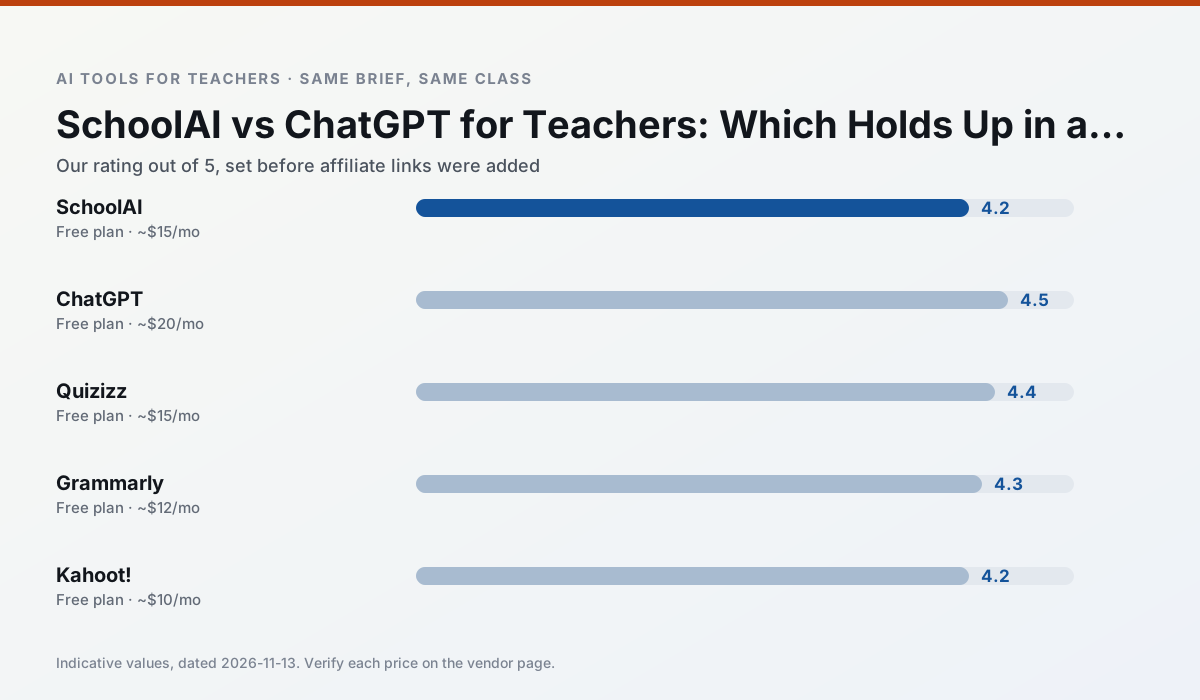
Side by side
Comparison table
Ratings reflect our timed classroom workflow, not vendor claims. Prices are indicative — verify on the vendor site.
| Tool | Best for | Free tier | Indicative paid plan | Standout feature | Our rating | Verdict | Try the tool |
|---|---|---|---|---|---|---|---|
| SchoolAI | student-safe AI · differentiated instruction | Yes — Limited seats | ~$15 /user/mo | Teacher-monitored student chats | 4.2 / 5 | Strong option | Try free |
| ChatGPT | lesson planning · parent communication | Yes — Usage-limited model access | ~$20 /user/mo | Custom GPTs and Projects | 4.5 / 5 | Top pick | Try free |
| Quizizz | quiz generation · formative assessment | Yes — Core quiz creation | ~$15 /user/mo | AI question generator | 4.4 / 5 | Strong option | Try free |
| Grammarly | parent communication · report card comments | Yes — Core grammar and tone checks | ~$12 /user/mo | Tone adjustments | 4.3 / 5 | Strong option | Try free |
| Kahoot! | quiz generation · review lessons | Yes — Limited player count | ~$10 /user/mo | AI question builder | 4.2 / 5 | Strong option | Try free |
| ElevenLabs | accessibility · reading intervention | Yes — Monthly character quota | ~$5 /user/mo | Very natural voices | 4.4 / 5 | Strong option | Try free |
Match your situation
Best for X
Different jobs need different tools. Here is what we would open first in each case.
SchoolAI keeps the same task across levels, which is what makes a differentiated set defensible in moderation.
Family-facing drafts from ChatGPT need the fewest rewrites for warmth without overpromising, which is the usual failure mode.
For anything students touch directly, Quizizz offers the supervision controls and logging that IT will ask about first.
Grammarly is the one we would open on a normal planning day because the first output is editable rather than restructurable, and the free plan covers a single teacher's routine.
Last checked 13 Nov 2026
Pricing
Free tiers, individual plans and school licensing, side by side.
| Tool | Free plan | Individual / paid | School & district | Billing note | Verify |
|---|---|---|---|---|---|
| SchoolAI | $0 — Limited seats | ~$15 /user/mo | Custom quote | Indicative — verify on vendor site | Vendor |
| ChatGPT | $0 — Usage-limited model access | ~$20 /user/mo | ~$25+ /user/mo | Indicative — verify on vendor site | Vendor |
| Quizizz | $0 — Core quiz creation | ~$15 /user/mo | Custom quote | Indicative — verify on vendor site | Vendor |
| Grammarly | $0 — Core grammar and tone checks | ~$12 /user/mo | ~$15 /user/mo | Indicative — billed annually | Vendor |
| Kahoot! | $0 — Limited player count | ~$10 /user/mo | Custom quote | Indicative — verify on vendor site | Vendor |
| ElevenLabs | $0 — Monthly character quota | ~$5 /user/mo | ~$22 /user/mo | Indicative — verify on vendor site | Vendor |
Editorial rule: pricing is re-checked every 2–3 months and the top 50 pages are refreshed every 6 months. See our funding policy.
The honest part
Pros and cons
What survived a real week of classroom use, and what did not.
Pros
- Designed for district approval
- Teacher visibility into student use
- Good safeguarding defaults
Cons
- Requires school-wide buy-in
- Less flexible than general LLMs
- Pricing is mostly quote-based
Pros
- Most flexible option available
- Huge community of teacher prompt libraries
- Strong multilingual support
Cons
- Requires prompt skills for consistent results
- No built-in standards alignment
- District privacy review usually required
Pros
- Students already know the interface
- Good reporting
- Works on low-end devices
Cons
- Writing high-quality AI questions still needs review
- Gamification can distract
- Advanced analytics are paid
Pros
- Catches errors in high-stakes parent emails
- Works everywhere you already write
- Very low learning curve
Cons
- Not education-specific
- Can flatten teacher voice
- Premium needed for tone rewriting
Pros
- Instant engagement
- Very low training time
- Strong brand familiarity
Cons
- Less depth for higher-order assessment
- Paid tiers needed for larger classes
- Time pressure suits recall more than reasoning
In the classroom
Use cases
Five concrete workflows, with the tool we would open for each one.
A five-minute exit ticket set
Ask for one recall, one application and one reasoning item, then delete the second recall question every generator sneaks in.
Recommended: SchoolAIAn IEP present-levels first draft
Use aggregated, anonymised data only. Ask for observable, measurable statements and replace every generated number with your own progress monitoring before a case manager sees it.
Recommended: ChatGPTA substitute folder that needs no context
The value here is structure, not creativity. Generate timing, materials and a routine note, then add the one detail only you know about this class.
Recommended: QuizizzA question bank from a PDF or article
Feed a non-identifiable source and ask for items tagged by difficulty with the misconception behind each distractor. Spot-check every answer key; numerical items are least reliable.
Recommended: GrammarlyA Monday morning lesson plan in twelve minutes
The twelve minutes come from not rewriting the skeleton. Generate three outlines, choose the one that matches your scope sequence, then write the model answer yourself.
Recommended: Kahoot!
Questions teachers ask us
FAQ
Direct answers, also published as FAQPage structured data for search and AI assistants.
SchoolAI or ChatGPT for lesson planning?
Which is cheaper for one teacher?
Do they produce the same output?
Sources & further reading
Our recommendation
Try Grammarly free for your next lesson planning task
Writing assistant for polished parent emails, newsletters and reports. Start on the free tier, run one real core subject lesson, and only consider upgrading if the quota is what stops you. Disclosure: we may earn a commission ($20 per paid upgrade + $0.20/signup) at no extra cost to you.
Some links on this page are affiliate links. We may earn a commission at no extra cost to you. Our rankings are editorial and never pay-to-play. Never enter student PII into a free consumer account.
Keep reading
Related comparisons in this cluster.
Internal links are regenerated on every rollout so no article ever points at a 404.