The short answer
- Canva for Education is our default pick for teachers who need to draft a standards-aware lesson plan quickly; Gamma is better when differentiation is the bottleneck.
- Canva for Education handles the broad case; Gamma handles the narrow one. Anything beyond that pair should be justified by a recurring weekly job, not a feature demo.
- Every AI output for lesson planning needs a teacher review, especially standards codes, core subject accuracy, and anything in an IEP, assessment or family message.
- Everything on this page dates from 2026-11-13; where a price could not be re-read, the row says so.
Start with Gamma on its free plan.
At 7:40 on a Tuesday morning, I stared at a blank slide deck and realized I had ten minutes before homeroom to prepare an introductory slideshow on tectonic plates. I did not need a philosophical debate about artificial intelligence in schools. I needed pictures, bullet points, and something that did not look like it was thrown together in 2004. That morning panic is why teachers spend hours testing platforms like Canva for Education vs Gamma for teachers, trying to figure out which one survives actual classroom demands without eating an entire planning period.
Both tools promise to take the friction out of creating visual resources, but they approach the desk from completely different directions. If you are trying to decide how to spend your limited prep time this term, it helps to look at where each platform shines and where it falls flat during a hectic school week. We have tested both alongside other mainstays in our broader breakdown of the best AI tools for teachers, but let us look specifically at how these two visual generators hold up under pressure.
The Morning Prep Test: Speed Versus Control
Gamma is built for one specific kind of speed. You type in a prompt, choose a theme, and watch the platform spin up an entire presentation deck complete with cards, columns, and placeholder text in under a minute. When you need a Monday morning lesson plan in twelve minutes flat, Gamma gets you past the blank page faster than almost anything else. The secret to making it work without a heavy rewrite is to generate three distinct outlines first, pick the one that matches your actual scope and sequence, and then write the model answers yourself. The downside is that once Gamma lays down its modern default styling, fine-tuning individual elements can feel rigid compared to a traditional canvas.
Canva for Education takes the opposite route. It is effectively free for verified teachers, and it hands you keys to a massive template library that covers everything from anchor charts to spirit week flyers. You do not need formal graphic design skills to make a worksheet look polished, but the sheer volume of choices can lead to cluttered slides if you lean too heavily on AI generation features. Those AI writing and image generation tools are genuinely helpful, but they are capped on free tiers, meaning you have to use your generation allowances wisely. Account verification for the education tier can also be sluggish, so do not expect instant access if you apply the night before a big unit launch.
Handling Student Data and Privacy Realities
We cannot talk about classroom tech without talking about privacy, especially when student work enters the equation. Gamma is a content creation tool pure and simple, and you should never upload student data or identifiable information into its prompt boxes. Canva for Education, on the other hand, includes specific student-data terms within its education tier that district compliance officers will want to inspect closely before rolling it out district-wide.
If you need general-purpose brainstorming, you might pivot to ChatGPT, which offers massive flexibility and strong multilingual support, though it requires careful prompt crafting to avoid generic output and strictly demands avoiding student PII on consumer plans. For document-heavy planning, long rubrics, and nuanced prose that avoids sounding like a robot, Claude handles full unit plans admirably well, though it lacks built-in classroom templates. Meanwhile, Khanmigo brings a distinct nonprofit trust signal and strong math scaffolding, though its availability varies by region and it requires student accounts for full value. If you prefer working directly inside your existing documents without copy-pasting, Brisk Teaching provides fast inline feedback through a Chrome extension, though its free quota is notoriously tight and IT department approval is mandatory.
Prompt: Generate three reading levels for an 8th-grade text on photosynthesis, including core, supported, and extension versions with vocabulary lists.
Result: The tool returned three distinct text passages with adjusted Lexile levels and five multiple-choice questions per level, but the extension text relied on slightly unnatural vocabulary phrasing.
Two Edits:
- Swapped out two invented vocabulary words in the supported version for terms we actually used in our glossary last week.
- Rewrote the extension comprehension questions to demand textual evidence rather than simple recall.
When Visual Generators Fail in Practice
Every teacher has a story about an AI tool humiliating them in front of a classroom. The first major pitfall with these slide platforms is the temptation to let the machine write your rubrics and assessment feedback in one pass. Moderation failures almost always trace back to an assessment rubric that an LLM generated without understanding your classroom context. Always keep your rubrics human-made, and only use AI to generate the supportive feedback comments afterward.
The second recurring headache is the credit wall. Gamma makes it remarkably easy to build gorgeous decks until you run out of credits mid-week, leaving you staring at an upgrade prompt when you just want to finish your Friday review slides. Canva avoids the sudden paywall shock for basic design, but its AI image generator caps will similarly leave you high and dry if you try to build an entire visual vocabulary deck in a single sitting. For a broader look at how these platforms compare to specialized grading and feedback utilities, check out our guide on Brisk Teaching vs Diffit teacher comparison.
Making Your Final Choice
If you want the best overall platform for daily use that balances design freedom with reliable templates, Canva for Education remains the reigning champion for classroom walls and slide decks alike. If your primary goal is the absolute fastest path from a bulleted outline to a modern presentation without getting bogged down in formatting, Gamma takes the crown as the best free option for quick setup. Just remember to keep your student data off consumer-tier prompts, verify your school credentials early, and always review the generated output before your first period bell rings.
FAQ
Canva for Education or Gamma for lesson planning?
Canva for Education for breadth and speed, Gamma when the output goes to a colleague or a family and has to be right first time.
Which is cheaper for one teacher?
Compare the free quotas first, then the individual plans. In most weeks the free plan decides the purchase, not the list price.
Do they produce the same output?
On simple tasks, often yes, and that is a useful result: it points at the cheaper, better-governed option rather than the one with more features.
Sources
- Canva Education Hub. Canva for Education Verified Educator Features and Safety Guidelines. Canva, 2026.
- Gamma App. Gamma AI Presentation Generator Pricing and Feature Limits. Gamma, 2026.
- OpenAI. ChatGPT Consumer and Education Plan Privacy Policies. OpenAI, 2026.
- Anthropic. Claude Model Capabilities and Document Processing Limits. Anthropic, 2026.
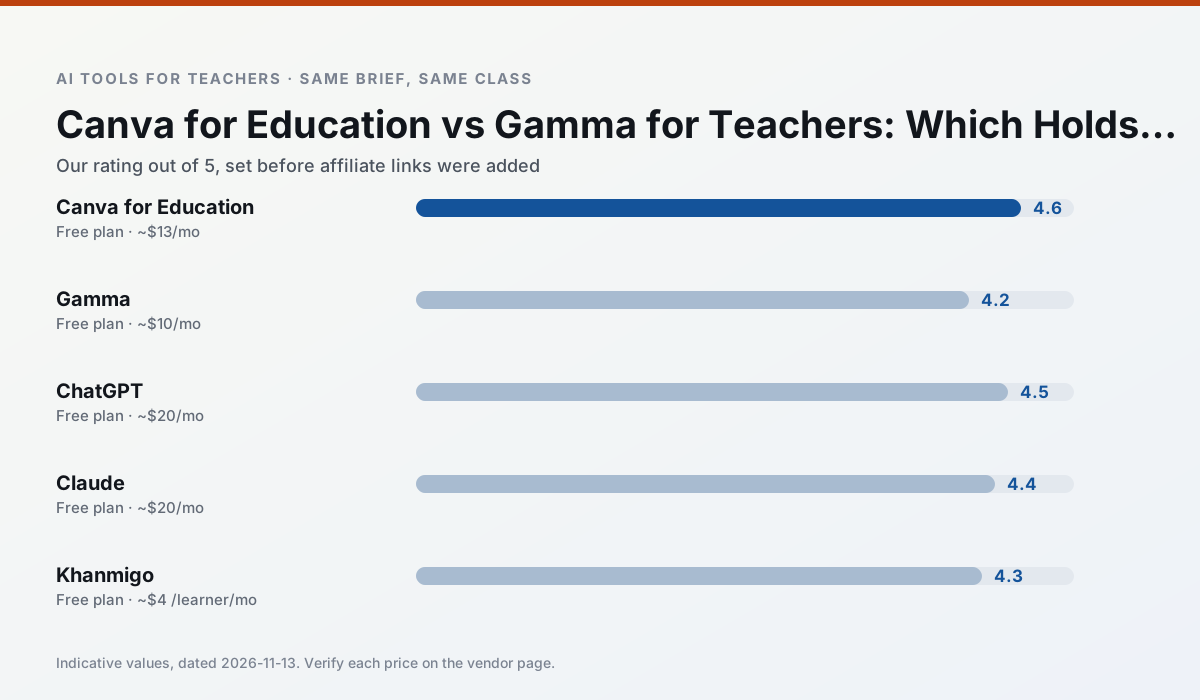
Side by side
Comparison table
Ratings reflect our timed classroom workflow, not vendor claims. Prices are indicative — verify on the vendor site.
| Tool | Best for | Free tier | Indicative paid plan | Standout feature | Our rating | Verdict | Try the tool |
|---|---|---|---|---|---|---|---|
| Canva for Education | slide decks · worksheets | Yes — Verification required | ~$13 /user/mo | Thousands of education templates | 4.6 / 5 | Top pick | Try free |
| Gamma | slide decks · parent communication | Yes — Credit-limited generation | ~$10 /user/mo | Prompt-to-deck | 4.2 / 5 | Strong option | Try free |
| ChatGPT | lesson planning · parent communication | Yes — Usage-limited model access | ~$20 /user/mo | Custom GPTs and Projects | 4.5 / 5 | Top pick | Try free |
| Claude | rubric creation · feedback on writing | Yes — Usage-limited | ~$20 /user/mo | Very large context window | 4.4 / 5 | Strong option | Try free |
| Khanmigo | math practice · student tutoring | Yes — US teacher accounts, subject to eligibility | ~$4 /learner/mo | Socratic tutoring rather than answers | 4.3 / 5 | Strong option | Try free |
| Brisk Teaching | feedback on writing · grading | Yes — Limited actions per month | ~$10 /user/mo | Works inside Google Docs | 4.5 / 5 | Top pick | Try free |
Match your situation
Best for X
Different jobs need different tools. Here is what we would open first in each case.
Canva for Education is the one we would open on a normal planning day because the first output is editable rather than restructurable, and the free plan covers a single teacher's routine.
Nothing on Gamma's free tier is a teaser demo; the limits are documented and a normal week fits inside them.
For a school rollout, ChatGPT offers the paperwork and the admin console; the classroom features are standard by comparison.
Claude runs in a browser tab with no extension, no student accounts and no onboarding call, so you can test it in a free period.
Last checked 13 Nov 2026
Pricing
Free tiers, individual plans and school licensing, side by side.
| Tool | Free plan | Individual / paid | School & district | Billing note | Verify |
|---|---|---|---|---|---|
| Canva for Education | $0 — Verification required | ~$13 /user/mo | Custom quote | Indicative — verify on vendor site | Vendor |
| Gamma | $0 — Credit-limited generation | ~$10 /user/mo | ~$20 /user/mo | Indicative — verify on vendor site | Vendor |
| ChatGPT | $0 — Usage-limited model access | ~$20 /user/mo | ~$25+ /user/mo | Indicative — verify on vendor site | Vendor |
| Claude | $0 — Usage-limited | ~$20 /user/mo | ~$25+ /user/mo | Indicative — verify on vendor site | Vendor |
| Khanmigo | $0 — US teacher accounts, subject to eligibility | ~$4 /learner/mo | Custom quote | Indicative — verify on vendor site | Vendor |
| Brisk Teaching | $0 — Limited actions per month | ~$10 /user/mo | Custom quote | Indicative — verify on vendor site | Vendor |
Editorial rule: pricing is re-checked every 2–3 months and the top 50 pages are refreshed every 6 months. See our funding policy.
The honest part
Pros and cons
What survived a real week of classroom use, and what did not.
Pros
- Effectively free for verified teachers
- Huge template library
- No design skills needed
Cons
- AI features are capped
- Easy to produce cluttered slides
- Account verification can be slow
Pros
- Fastest path from outline to deck
- Modern-looking output by default
- Good export options
Cons
- Design control is limited
- Credits run out quickly
- Not built for student data
Pros
- Most flexible option available
- Huge community of teacher prompt libraries
- Strong multilingual support
Cons
- Requires prompt skills for consistent results
- No built-in standards alignment
- District privacy review usually required
Pros
- Handles full unit plans and long rubrics
- Nuanced, less generic prose
- Good at structured document output
Cons
- No teacher-specific templates
- Fewer classroom integrations
- Consumer plan not suitable for student data
Pros
- Education-first design
- Strong nonprofit trust signal
- Good math scaffolding
Cons
- Availability varies by region
- Less useful for admin paperwork
- Requires student accounts for full value
In the classroom
Use cases
Five concrete workflows, with the tool we would open for each one.
A weekly family newsletter from bullet notes
Newsletters fail on length, not tone. Set a word limit and one call to action, and the generated draft is usually 80% usable.
Recommended: Canva for EducationRegrouping students after an assessment
Summarise anonymised results into skill groups, then generate one activity per group. Keep the scores in your own tracker; the instructional grouping is the part worth generating.
Recommended: GammaA Monday morning lesson plan in twelve minutes
The twelve minutes come from not rewriting the skeleton. Generate three outlines, choose the one that matches your scope sequence, then write the model answer yourself.
Recommended: ChatGPTThree reading levels from one source text
Paste a vetted text, ask for supported, core and extension versions, then check the vocabulary list by hand. Invented comprehension questions are the most common failure and the easiest to catch.
Recommended: ClaudeRubric and feedback comments in one pass
Reorder the workflow so the rubric is yours and the comments are generated. Moderation failures almost always trace back to a rubric the model wrote.
Recommended: Khanmigo
Questions teachers ask us
FAQ
Direct answers, also published as FAQPage structured data for search and AI assistants.
Canva for Education or Gamma for lesson planning?
Which is cheaper for one teacher?
Do they produce the same output?
Sources & further reading
Our recommendation
Try Gamma free for your next lesson planning task
Generate presentation decks and documents from a single prompt. Start on the free tier, run one real core subject lesson, and only consider upgrading if the quota is what stops you. Disclosure: we may earn a commission (varies) at no extra cost to you.
Some links on this page are affiliate links. We may earn a commission at no extra cost to you. Our rankings are editorial and never pay-to-play. Never enter student PII into a free consumer account.
Keep reading
Related comparisons in this cluster.
Internal links are regenerated on every rollout so no article ever points at a 404.