The short answer
- Notion AI is our default pick for teachers who need to draft a standards-aware lesson plan quickly; Claude is better when differentiation is the bottleneck.
- All 3 shortlisted tools are priced for one teacher first and a school second. Notion AI and Claude are the two worth trialling on a real task before any purchase conversation.
- Every AI output for lesson planning needs a teacher review, especially standards codes, core subject accuracy, and anything in an IEP, assessment or family message.
- Everything on this page dates from 2026-11-13; where a price could not be re-read, the row says so.
Start with Notion AI on its free plan.
Seventeen tabs were open on my projector screen by third period. My draft unit plan sat half-finished in one window, while a separate chat window blinked with a generic lesson outline that looked like it had been scraped from a 2012 blog post. This is usually the point in the term where teachers start looking for shortcuts that actually save time instead of creating more administrative work. When comparing Notion AI vs Claude, you are really deciding whether you want an organized digital filing cabinet that builds habits or a high-powered text engine that digests hundreds of pages of source material in one go. Both tools claim to streamline teacher planning, but they operate in entirely different ways when the bell rings and students need your attention.
The Case for Notion AI in Long-Term Planning
Notion AI lives inside the database structures you already use to run your classroom. If your curriculum docs are scattered across local folders and old flash drives, Notion AI pulls them into a centralized hub. The strength here is structural organization rather than quick creative tricks.
It shines when building long-term curriculum records that need to link standards to units, weeks, and individual assignments. The paid tier costs roughly $10 /user/mo (indicative), while the free tier offers limited AI usage. Setup time is significant because you have to build or adopt a database template before the AI has anything meaningful to reference.
Pricing and feature sets for Notion AI have changed more than once, and it is not purpose-built for instant lesson generation. For schools and districts looking for a standardized platform, this structure works well. Just remember never to store student PII in personal workspaces.
Claude and Document-Heavy Planning
Claude takes the opposite approach. It is a long-context assistant suited to document-heavy planning and feedback without requiring you to build databases first. You drop in a state standard PDF, your department’s pacing guide, and a three-page rubric, and Claude reads the lot before generating coherent prose.
The paid tier sits at around $20 /user/mo (indicative), with a usage-limited free tier available. Claude excels at producing nuanced, less generic prose and handles full unit plans and long rubrics better than almost anything else on the market.
Prompt: Act as an 8th-grade history teacher. Using the attached district pacing guide and state standards, write a four-day inquiry sequence on the American Revolution, followed by a four-level rubric assessing primary source analysis.
What came back: A structurally sound, four-day sequence with accurate historical framing and a detailed rubric, though the vocabulary targets were slightly too advanced for my inclusion students.
Two edits that made it usable: I swapped the target vocabulary list for our actual Tier Two academic word wall terms and manually adjusted the third level of the rubric to focus on citation mechanics instead of broad historical synthesis.
The trade-off is that Claude has no teacher-specific templates and fewer built-in classroom integrations. For quick setup when starting a new unit from scratch, Claude remains unmatched. Keep in mind that consumer plans are not suitable for handling student data.
Supporting Tools in the Teacher Workflow
Planning is only half the battle. Communicating with families and generating accessible materials requires a wider toolkit. When drafting high-stakes parent emails or weekly newsletters, Grammarly acts as a reliable safety net. Its core grammar and tone checks catch errors before messages go out to families.
At roughly $12 /user/mo (indicative) for the paid tier, Grammarly works right inside your browser where you already write. It has a very low learning curve, though it is not education-specific and can flatten your personal teacher voice if you lean too heavily on its tone-rewriting features. Be sure to disable text collection on school devices and check your district DPA.
For creating accessible audio versions of reading materials, ElevenLabs provides natural-sounding text-to-speech. With a monthly character quota on the free tier and a paid tier starting around $5 /user/mo (indicative), it generates quick voiceovers with low entry barriers.
When you need presenter-led video for asynchronous days, Synthesia turns a script into an AI avatar video. It costs roughly $29 /user/mo (indicative) with no free ongoing tier, making it hard to justify for a single teacher budget unless your department shares a license. Do not use student likenesses or clone a colleague's voice without explicit written consent in either tool.
Finally, Gamma generates presentation decks and documents from a single prompt. At around $10 /user/mo (indicative) with a credit-limited free tier, it provides the fastest path from an outline to a modern-looking slide deck with good export options. It is strictly a content tool, meaning you should never upload student work into it.
Where AI Planning Fails in the Classroom
AI tools break down when given too much creative freedom over core assessment data. Moderation failures almost always trace back to a rubric the model wrote entirely from scratch. To fix this, reorder your workflow so the rubric is yours and the comments are generated around your parameters.
Another common trap is the Monday morning lesson plan that eats up an entire prep period. You can build a complete plan in twelve minutes by refusing to rewrite the model's skeleton. Generate three outlines, choose the one that matches your actual scope and sequence, and then write the model answer yourself.
When differentiating text, feeding a source passage into an AI to generate three reading levels often produces invented comprehension questions that do not align with the text. Always paste a vetted source, ask for supported, core, and extension versions, and check the vocabulary list by hand.
Substitute folders require structural reliability rather than creativity. Generate timing, materials, and routine notes using an assistant like Claude, then add the one detail only you know about how your third-period class behaves during transitions.
Choosing the Right System
If your primary goal is standardizing curriculum across a department, Notion AI fits best as the backbone for long-term records. If you need to break down a massive pile of source documents into a workable unit plan this afternoon, Claude gets the job done faster. For broader comparisons on how these workflows stack up against specialized edtech platforms, read our guide on best AI tools for teachers 2026, or look at how specific differentiation suites handle text adaptation in our Brisk Teaching vs Diffit comparison.
Pick the tool that solves your current bottleneck. If your inbox is the problem, fix your writing assistant first. If your scope and sequence is a mess, fix your database. Just keep your data off consumer servers and your own judgment at the center of every lesson.
FAQ
Notion AI or Claude for lesson planning?
Notion AI for breadth and speed, Claude when the output goes to a colleague or a family and has to be right first time.
Which is cheaper for one teacher?
Compare the free quotas first, then the individual plans. In most weeks the free plan decides the purchase, not the list price.
Do they produce the same output?
On simple tasks, often yes, and that is a useful result: it points at the cheaper, better-governed option rather than the one with more features.
Sources
- Notion AI Product Documentation and Pricing (2026)
- Anthropic Claude Feature Overview and Context Limits (2026)
- Grammarly Business and Education Privacy Standards (2026)
- ElevenLabs Text-to-Speech Quota Guidelines (2026)
- Synthesia Enterprise Licensing and Avatar Policies (2026)
- Gamma App Generation Credits and Export Options (2026)
Side by side
Comparison table
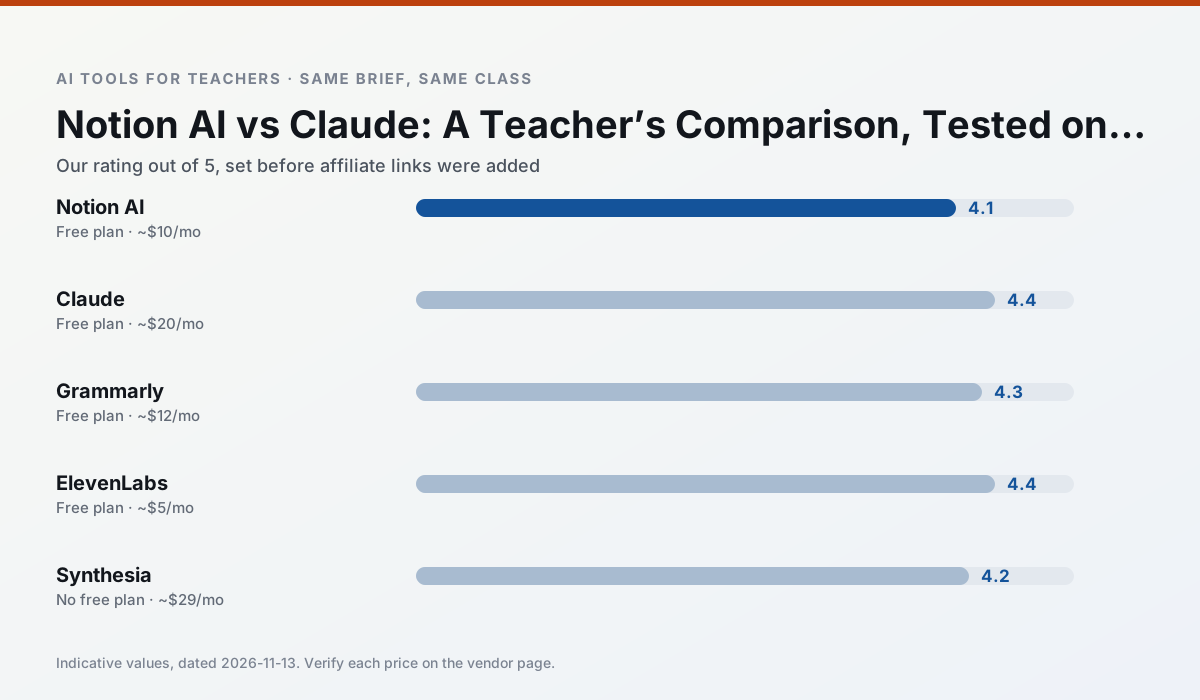
Ratings reflect our timed classroom workflow, not vendor claims. Prices are indicative — verify on the vendor site.
| Tool | Best for | Free tier | Indicative paid plan | Standout feature | Our rating | Verdict | Try the tool |
|---|---|---|---|---|---|---|---|
| Notion AI | curriculum mapping · unit planning | Yes — Limited AI usage | ~$10 /user/mo | Linked databases | 4.1 / 5 | Situational | Try free |
| Claude | rubric creation · feedback on writing | Yes — Usage-limited | ~$20 /user/mo | Very large context window | 4.4 / 5 | Strong option | Try free |
| Grammarly | parent communication · report card comments | Yes — Core grammar and tone checks | ~$12 /user/mo | Tone adjustments | 4.3 / 5 | Strong option | Try free |
| ElevenLabs | accessibility · reading intervention | Yes — Monthly character quota | ~$5 /user/mo | Very natural voices | 4.4 / 5 | Strong option | Try free |
| Synthesia | flipped lessons · video lessons | No ongoing free plan | ~$29 /user/mo | 140+ languages | 4.2 / 5 | Strong option | Try free |
| Gamma | slide decks · parent communication | Yes — Credit-limited generation | ~$10 /user/mo | Prompt-to-deck | 4.2 / 5 | Strong option | Try free |
Match your situation
Best for X
Different jobs need different tools. Here is what we would open first in each case.
Notion AI answers the three questions a district actually asks: rostering, admin controls and a data-processing agreement. That is usually what decides a school purchase.
Claude has the shortest path from opening a tab to a usable draft, which matters more than the feature count on a Monday.
On the daily cycle, Grammarly saves the most edit time per task; the paid tier mostly buys more runs rather than better ones.
ElevenLabs's free plan is the most usable in this comparison: a quota that survives a normal week. Not enough for a department, enough for one teacher to decide.
Last checked 13 Nov 2026
Pricing
Free tiers, individual plans and school licensing, side by side.
| Tool | Free plan | Individual / paid | School & district | Billing note | Verify |
|---|---|---|---|---|---|
| Notion AI | $0 — Limited AI usage | ~$10 /user/mo | ~$8 /user/mo | Indicative — verify on vendor site | Vendor |
| Claude | $0 — Usage-limited | ~$20 /user/mo | ~$25+ /user/mo | Indicative — verify on vendor site | Vendor |
| Grammarly | $0 — Core grammar and tone checks | ~$12 /user/mo | ~$15 /user/mo | Indicative — billed annually | Vendor |
| ElevenLabs | $0 — Monthly character quota | ~$5 /user/mo | ~$22 /user/mo | Indicative — verify on vendor site | Vendor |
| Synthesia | No ongoing free tier | ~$29 /user/mo | Custom quote | Indicative — verify on vendor site | Vendor |
| Gamma | $0 — Credit-limited generation | ~$10 /user/mo | ~$20 /user/mo | Indicative — verify on vendor site | Vendor |
Editorial rule: pricing is re-checked every 2–3 months and the top 50 pages are refreshed every 6 months. See our funding policy.
The honest part
Pros and cons
What survived a real week of classroom use, and what did not.
Pros
- Great for long-term curriculum records
- Strong team collaboration
- Flexible structure
Cons
- Setup time is significant
- AI add-on pricing changed more than once
- Not purpose-built for lesson generation
Pros
- Handles full unit plans and long rubrics
- Nuanced, less generic prose
- Good at structured document output
Cons
- No teacher-specific templates
- Fewer classroom integrations
- Consumer plan not suitable for student data
Pros
- Catches errors in high-stakes parent emails
- Works everywhere you already write
- Very low learning curve
Cons
- Not education-specific
- Can flatten teacher voice
- Premium needed for tone rewriting
Pros
- Excellent for accessible audio versions
- Low entry price
- Fast generation
Cons
- Quota-based billing
- Voice cloning consent considerations
- Not a teaching platform
Pros
- No camera or editing skills required
- Excellent multilingual voice output
- Easy updates to existing videos
Cons
- Cost is hard to justify for a single teacher
- Avatar video can feel impersonal
- No free ongoing tier
In the classroom
Use cases
Five concrete workflows, with the tool we would open for each one.
Rubric and feedback comments in one pass
Reorder the workflow so the rubric is yours and the comments are generated. Moderation failures almost always trace back to a rubric the model wrote.
Recommended: Notion AIA parent email in two languages
Draft in plain, warm language with no names, translate, then back-translate the important sentences to check meaning. Keep specific incidents out of the prompt and add them yourself.
Recommended: ClaudeA Monday morning lesson plan in twelve minutes
The twelve minutes come from not rewriting the skeleton. Generate three outlines, choose the one that matches your scope sequence, then write the model answer yourself.
Recommended: GrammarlyThree reading levels from one source text
Paste a vetted text, ask for supported, core and extension versions, then check the vocabulary list by hand. Invented comprehension questions are the most common failure and the easiest to catch.
Recommended: ElevenLabsA substitute folder that needs no context
The value here is structure, not creativity. Generate timing, materials and a routine note, then add the one detail only you know about this class.
Recommended: Synthesia
Questions teachers ask us
FAQ
Direct answers, also published as FAQPage structured data for search and AI assistants.
Notion AI or Claude for lesson planning?
Which is cheaper for one teacher?
Do they produce the same output?
Sources & further reading
Our recommendation
Try Notion AI free for your next lesson planning task
AI-assisted notes, databases and curriculum planning in one workspace. Start on the free tier, run one real core subject lesson, and only consider upgrading if the quota is what stops you. Disclosure: we may earn a commission (varies) at no extra cost to you.
Some links on this page are affiliate links. We may earn a commission at no extra cost to you. Our rankings are editorial and never pay-to-play. Never enter student PII into a free consumer account.
Keep reading
Related comparisons in this cluster.
Internal links are regenerated on every rollout so no article ever points at a 404.