The short answer
- SchoolAI is our default pick for teachers who need to draft a standards-aware lesson plan quickly; Khanmigo is better when differentiation is the bottleneck.
- All 3 shortlisted tools are priced for one teacher first and a school second. SchoolAI and Khanmigo are the two worth trialling on a real task before any purchase conversation.
- Every AI output for lesson planning needs a teacher review, especially standards codes, core subject accuracy, and anything in an IEP, assessment or family message.
- Everything on this page dates from 2026-11-13; where a price could not be re-read, the row says so.
Start with MagicSchool AI on its free plan.
Thirty-four tabs were open on my laptop at four in the afternoon last Tuesday, and half of them were AI generators trying to write the same vocabulary quiz. Every teacher hits this wall eventually. You want something that actually works with students without giving away their data to a server in a basement, but the software landscape feels like a carnival barker convention. When looking at SchoolAI vs Khanmigo, you are really choosing between two entirely different philosophies of classroom artificial intelligence. One builds a locked-down digital sandbox for your whole roster, while the other leans on a nonprofit pedigree to tutor kids one-on-one.
We have spent months testing these platforms against the realities of public school infrastructure, strict IT departments, and forty-five-minute periods where the Wi-Fi drops twice. If you are trying to figure out which ecosystem deserves your department's budget next term, you need to know how they handle real kids, messy lesson plans, and actual state standards. For a broader look at how these platforms stack up against other classroom staples, take a look at our main roundup of the best AI tools for teachers in 2026, or check out our detailed breakdown of Brisk Teaching vs Diffit.
The Sandbox vs The Tutor
SchoolAI was built from the ground up for teachers who want to keep students on a tight, monitored leash. It operates as a school-safe AI workspace where you create custom spaces for your classes. The free tier gives you limited seats, while paid plans run around $15 per user per month on an indicative basis, though most districts end up negotiating custom quotes. Its superpower is visibility. You can watch what twenty-five eighth graders are typing to their AI sidekicks in real time, catching off-topic shenanigans before they derail the period. The safeguarding defaults are robust, and it features a school-focused data privacy agreement with proper audit logs. The catch is that it requires serious school-wide buy-in to unlock its full power, and it can feel less flexible than open-ended general language models when you just want to draft a quick email home.
Khanmigo takes a different route, stemming from a trusted nonprofit education platform. It acts primarily as a tutor-style AI with separate teacher tools bolted on. For US teachers, accounts are free subject to specific eligibility, while learner accounts sit at an indicative price of around $4 per student per month. Khanmigo shines brightest in math scaffolding, guiding students through equations by asking Socratic questions rather than just handing over the answer key. The nonprofit trust signal is strong, and the code is purpose-built for schools. However, its availability varies wildly by region, and it offers less utility when you are drowning in afternoon admin paperwork. If you want students to use it effectively, they need individual accounts, which can be an administrative hurdle for a single classroom teacher to clear alone.
Pitting Them Against a Real Prompt
To see how these tools handle everyday teacher pain points, we ran both platforms through the exact same brief. We needed a structured exit ticket set containing one recall item, one application item, and one reasoning item. As is tradition with AI generators, both tools snuck in a second recall question that we immediately deleted.
Prompt: "Create a 3-question exit ticket for 9th-grade biology on cellular respiration. Include one recall item, one application item, and one reasoning item. Do not include extra recall questions."
SchoolAI output: Generated four questions, including two recall items about mitochondria, one application about yeast rising, and a reasoning item on oxygen deprivation.
Edits made:
- Deleted the extra recall question about ATP generation to meet the three-item limit.
- Rewrote the application stem so it tied directly to our specific lab from yesterday rather than a generic textbook scenario.
SchoolAI handled the structural constraints well once we pruned the excess question, keeping the tone appropriate for high schoolers. Khanmigo generated solid, pedagogically sound questions with strong scaffolding hints, but it required more clicking through menus to get the output into a usable format. Neither tool is a magic wand on the first try. You still have to bring the pedagogical judgment to edit out the fluff.
Where the Other Contenders Fit
While SchoolAI and Khanmigo fight for mindshare in student-facing spaces, other tools in the ecosystem handle the heavy lifting for teacher workflows. Canva for Education remains a staple for visual materials. It is effectively free for verified teachers, though paid tiers hover around $13 per user per month if you want advanced features. It has a massive template library and zero design skills required, but its AI writing and image generation tools are capped, and it is entirely too easy for students to produce cluttered, unreadable slides.
When it comes to grading paper assessments, Gradescope is unmatched. It uses AI-assisted rubric grading for scanned and handwritten work, saving massive amounts of time on summative assessments. While its pricing is custom-quoted and institutional, and the setup effort is real, it is the best overall tool for daily use if your department still relies on paper exams. Formative bridges the gap for live digital work, offering strong data for intervention groups at around $15 per user per month, though its steep setup means it works best when rolled out school-wide. Finally, QuestionWell saves hours on question writing by generating standards-aligned question banks for about $10 per user per month, though you still need to spot-check every answer key, especially on numerical items where AI models love to hallucinate.
Two Failures in the Wild
Every piece of classroom software breaks down eventually under real conditions. Last November, during a Friday afternoon review session, SchoolAI's live dashboard lagged severely because three different grade levels were hitting the servers simultaneously. The student chat interfaces froze, turning a smooth review game into twenty minutes of staring at loading spinners. The workaround was simple: we abandoned the live monitor, told the kids to close their laptops, and transitioned to a low-tech white-board sprint.
With Khanmigo, the failure was administrative rather than technical. A colleague tried to use it to generate parent-facing progress update letters, but the regional availability rules locked her out of the specific teacher dashboard features she needed on her school domain. She had to pivot to Canva for Education to quickly format a newsletter template while she waited for IT to sort out her account permissions. These glitches remind us why you never rely on a single piece of software to run your entire lesson plan.
Choosing Your Ecosystem
If your primary goal is managing mixed-ability classes where students need a secure, monitored AI partner while you pull small groups, SchoolAI is the stronger bet. It gives you the oversight you need to keep twenty-five teenagers on task without losing your sanity. If your district is already embedded in the Khan ecosystem and you need gentle, Socratic math scaffolding paired with a trusted nonprofit data framework, Khanmigo makes sense, provided your students have the required accounts set up. Neither tool will replace your lesson planning brain, but both can clear away enough administrative brush to let you focus on actual teaching.
FAQ
SchoolAI or Khanmigo for lesson planning?
SchoolAI for breadth and speed, Khanmigo when the output goes to a colleague or a family and has to be right first time.
Which is cheaper for one teacher?
Compare the free quotas first, then the individual plans. In most weeks the free plan decides the purchase, not the list price.
Do they produce the same output?
On simple tasks, often yes, and that is a useful result: it points at the cheaper, better-governed option rather than the one with more features.
Sources
- SchoolAI Pricing and Product Features. SchoolAI Vendor Page. Accessed 2026-11-13.
- Khanmigo for Teachers and Districts. Khan Academy Educator Portal. Accessed 2026-11-13.
- Canva for Education Features and Verification. Canva Education Hub. Accessed 2026-11-13.
- Gradescope Workflow and Pricing. Gradescope Overview. Accessed 2026-11-13.
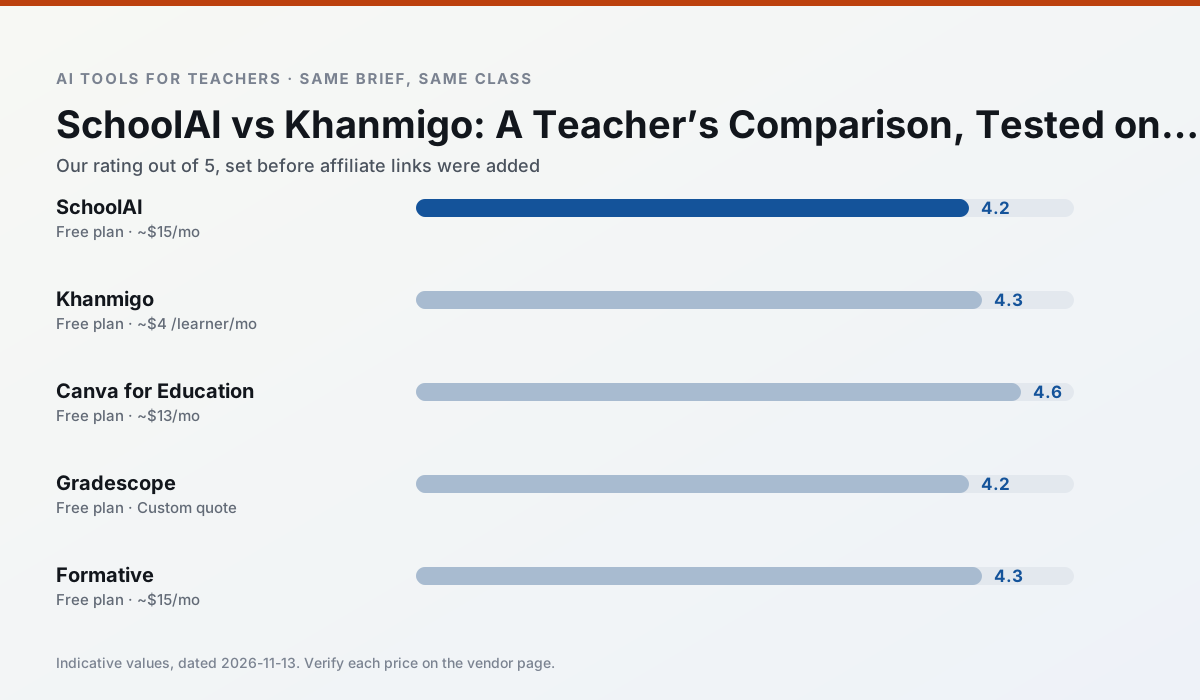
Side by side
Comparison table
Ratings reflect our timed classroom workflow, not vendor claims. Prices are indicative — verify on the vendor site.
| Tool | Best for | Free tier | Indicative paid plan | Standout feature | Our rating | Verdict | Try the tool |
|---|---|---|---|---|---|---|---|
| SchoolAI | student-safe AI · differentiated instruction | Yes — Limited seats | ~$15 /user/mo | Teacher-monitored student chats | 4.2 / 5 | Strong option | Try free |
| Khanmigo | math practice · student tutoring | Yes — US teacher accounts, subject to eligibility | ~$4 /learner/mo | Socratic tutoring rather than answers | 4.3 / 5 | Strong option | Try free |
| Canva for Education | slide decks · worksheets | Yes — Verification required | ~$13 /user/mo | Thousands of education templates | 4.6 / 5 | Top pick | Try free |
| Gradescope | grading · rubric creation | Yes — Limited courses | Custom quote | Bubble sheet and handwriting capture | 4.2 / 5 | Strong option | Try free |
| Formative | formative assessment · grading | Yes — Core assessment tools | ~$15 /user/mo | Live student responses | 4.3 / 5 | Strong option | Try free |
| QuestionWell | quiz generation · assessment | Yes — Monthly generation limit | ~$10 /user/mo | Exports to Google Forms / LMS | 4.3 / 5 | Strong option | Try free |
Match your situation
Best for X
Different jobs need different tools. Here is what we would open first in each case.
SchoolAI keeps the same task across levels, which is what makes a differentiated set defensible in moderation.
Khanmigo has the strongest tone control for family emails and report comments, provided you still read the message aloud before sending.
Canva for Education is built around teacher-monitored student spaces and audit logs rather than a consumer chat account, which is a different approval conversation.
Gradescope is the one we would open on a normal planning day because the first output is editable rather than restructurable, and the free plan covers a single teacher's routine.
Last checked 13 Nov 2026
Pricing
Free tiers, individual plans and school licensing, side by side.
| Tool | Free plan | Individual / paid | School & district | Billing note | Verify |
|---|---|---|---|---|---|
| SchoolAI | $0 — Limited seats | ~$15 /user/mo | Custom quote | Indicative — verify on vendor site | Vendor |
| Khanmigo | $0 — US teacher accounts, subject to eligibility | ~$4 /learner/mo | Custom quote | Indicative — verify on vendor site | Vendor |
| Canva for Education | $0 — Verification required | ~$13 /user/mo | Custom quote | Indicative — verify on vendor site | Vendor |
| Gradescope | $0 — Limited courses | Custom quote | Custom quote | LMS integration and support | Vendor |
| Formative | $0 — Core assessment tools | ~$15 /user/mo | Custom quote | Indicative — verify on vendor site | Vendor |
| QuestionWell | $0 — Monthly generation limit | ~$10 /user/mo | Custom quote | Indicative — verify on vendor site | Vendor |
Editorial rule: pricing is re-checked every 2–3 months and the top 50 pages are refreshed every 6 months. See our funding policy.
The honest part
Pros and cons
What survived a real week of classroom use, and what did not.
Pros
- Designed for district approval
- Teacher visibility into student use
- Good safeguarding defaults
Cons
- Requires school-wide buy-in
- Less flexible than general LLMs
- Pricing is mostly quote-based
Pros
- Education-first design
- Strong nonprofit trust signal
- Good math scaffolding
Cons
- Availability varies by region
- Less useful for admin paperwork
- Requires student accounts for full value
Pros
- Effectively free for verified teachers
- Huge template library
- No design skills needed
Cons
- AI features are capped
- Easy to produce cluttered slides
- Account verification can be slow
Pros
- Large time savings on paper assessments
- Consistent rubric application
- Detailed item analytics
Cons
- Overkill for elementary classrooms
- Institutional pricing is opaque
- Setup effort is real
Pros
- Strong data for intervention groups
- Works with existing PDFs and Docs
- Good LMS integrations
Cons
- Steeper setup than quiz games
- Best value requires school-wide rollout
- Price adds up per teacher
In the classroom
Use cases
Five concrete workflows, with the tool we would open for each one.
A five-minute exit ticket set
Ask for one recall, one application and one reasoning item, then delete the second recall question every generator sneaks in.
Recommended: SchoolAIAn IEP present-levels first draft
Use aggregated, anonymised data only. Ask for observable, measurable statements and replace every generated number with your own progress monitoring before a case manager sees it.
Recommended: KhanmigoA substitute folder that needs no context
The value here is structure, not creativity. Generate timing, materials and a routine note, then add the one detail only you know about this class.
Recommended: Canva for EducationA question bank from a PDF or article
Feed a non-identifiable source and ask for items tagged by difficulty with the misconception behind each distractor. Spot-check every answer key; numerical items are least reliable.
Recommended: GradescopeA Monday morning lesson plan in twelve minutes
The twelve minutes come from not rewriting the skeleton. Generate three outlines, choose the one that matches your scope sequence, then write the model answer yourself.
Recommended: Formative
Questions teachers ask us
FAQ
Direct answers, also published as FAQPage structured data for search and AI assistants.
SchoolAI or Khanmigo for lesson planning?
Which is cheaper for one teacher?
Do they produce the same output?
Sources & further reading
Our recommendation
Try MagicSchool AI free for your next lesson planning task
A large library of teacher-specific AI generators in one dashboard. Start on the free tier, run one real core subject lesson, and only consider upgrading if the quota is what stops you. Disclosure: we may earn a commission (30% recurring) at no extra cost to you.
Some links on this page are affiliate links. We may earn a commission at no extra cost to you. Our rankings are editorial and never pay-to-play. Never enter student PII into a free consumer account.
Keep reading
Related comparisons in this cluster.
Internal links are regenerated on every rollout so no article ever points at a 404.