The short answer
- Gamma is our default pick for teachers who need to draft a standards-aware lesson plan quickly; Canva for Education is better when differentiation is the bottleneck.
- Start with Gamma on its free plan, keep Canva for Education as the second opinion, and do not open a card until the quota, not the feature list, is what stops you.
- Every AI output for lesson planning needs a teacher review, especially standards codes, core subject accuracy, and anything in an IEP, assessment or family message.
- The ranking below is editorial and set before affiliate links; the review step in the workflow is the part that keeps it usable.
Start with Gamma on its free plan.
It was 8:15 PM on a Sunday, and I was staring at a blank slide deck about the causes of the American Revolution. My coffee was cold, my grade book was still sitting in my classroom, and I had forty-eight high schoolers walking through my door in less than twelve hours. I did what a lot of exhausted educators do in 2026. I typed a raw prompt into Gamma and watched it spin up a twelve-slide presentation in about forty seconds. The layouts looked sharp, the font hierarchy was clean, and my immediate reaction was pure relief. Then I read the actual text on slide four.
That is the reality of using Gamma in a working classroom. It builds slides in minutes and slideshows in seconds, but it does not build lessons. If you treat it like a co-teacher, you will end up correcting historical timelines and deleting weird floating illustrations of colonial soldiers holding three-pronged muskets. If you treat it like an automated layout engine that takes your outline and makes it look presentable, it is genuinely useful. Let us look at how Gamma compares to other media generators like Canva for Education, HeyGen, Synthesia, ElevenLabs, and Diffit when you are actually trying to survive a teaching term.
Using Gamma for Parent-Facing Writing and Newsletters
Gamma shines brightest when you step away from the whiteboard and need to communicate with adults. Newsletters usually fail because teachers try to write too much, losing parents in a wall of text. When you feed your rough bullet notes into Gamma with strict length constraints, the resulting format makes the update scannable.
[Prompt typed into Gamma]
Create a short, plain-language parent update about our upcoming science unit on ecosystems. Bullet points only. Include one clear call to action: sign up for the outdoor classroom volunteer day by Friday. Keep tone warm and direct.

[What came back]
A clean three-card layout with a modern header image, bullet points summarizing energy pyramids, and a prominent button link for the volunteer sign-up sheet. The tone was slightly too corporate for an elementary school, but the visual hierarchy was spot on.

[Two edits that made it usable]
1. Swapped the generic stock graphic for a photo of our actual school garden.
2. Rewrote the third bullet to explicitly name the Friday afternoon time slot so parents did not have to click through a second link to find out when we needed help.
The free tier gives you a credit-limited generation model, and those credits vanish faster than dry-erase markers in a middle school wing. Paid plans run around $10 per user per month. Because it processes text prompts into complete visual layouts, it has become my go-to tool for open houses and Back-to-School night decks. Just remember the privacy note: Gamma is a content creation tool, not a student management system. Never upload identifiable student work or assessment scores into it. For broader curriculum planning or adapting texts for diverse readers, you are better off pairing it with tools designed for differentiation, as detailed in our guide on AI essay feedback for history teachers.
Canva for Education and Mixed-Ability Classes
When you need actual pedagogical differentiation rather than just pretty slides, Canva for Education remains the heavyweight champion. For verified educators, the core platform is effectively free, though premium features sit around $13 per user per month if your district is buying site licenses. Its primary strength lies in its massive template library and built-in AI writing and image tools.
The catch is that Canva's AI features are strictly capped, and it is painfully easy to produce cluttered slides if you lean too hard on its graphic suggestions. Account verification can also take longer than you expect at the start of the term. Still, when paired with a text-leveling tool like Diffit—which costs about $15 a month for heavy users—Canva lets you take a single source article and output three different visual reading levels for a mixed-ability classroom without losing your sanity.
Video and Audio Tools: HeyGen, Synthesia, and ElevenLabs
Sometimes text and slides are not enough, especially when you are trying to reach multilingual families or students who benefit from auditory reinforcement. This is where AI video and voice platforms enter the staff room.
HeyGen sits around $29 per user per month on its paid tier, offering generous trial credits and best-in-class lip-sync translation. It is arguably the best option for student-safe deployments when communicating with parents who speak languages other than English at home. However, its credit-based pricing can be confusing, and voice cloning always raises valid consent questions. You should never clone a colleague's or a student's voice or likeness without explicit, documented written consent.
Synthesia runs at a similar price point of roughly $29 per user per month and turns scripts into presenter-led videos with AI avatars. It requires zero camera or editing skills and handles multilingual voice output smoothly. While it lacks a robust ongoing free tier, it makes updating existing instructional videos trivial when your curriculum changes mid-year.
For pure audio, ElevenLabs costs around $5 per user per month and gives you natural-sounding text-to-speech for creating accessible audio versions of reading materials. It is fast, but it shares the same strict governance requirements: do not clone student voices, and keep in mind it is an audio generator, not a complete teaching platform. If you want to see how these media tools fit into broader instructional routines, check out our collection of AI exit tickets for ELA teachers.
Managing the Limits of Automated Content Generation
Every single one of these tools has failure modes that will catch you off guard if you rely on them blindly. Gamma is notorious for hallucinating facts when asked to generate deep subject-matter content from scratch. If you ask it to build a deck on cellular respiration without providing a source text, it will happily invent biochemical pathways that do not exist in any biology textbook.
To keep AI tools working for you instead of creating more grading cleanup, follow these operational rules:
- Treat AI as an intern: Never let an AI tool generate student-facing materials without a thorough human review. You are the licensed professional in the room.
- Protect student privacy: Keep identifiable data out of generative design tools. Anonymize everything before pasting it anywhere.
- Watch the credit counters: Gamma and Diffit both burn through free generation quotas quickly during heavy planning weeks. Plan your batch generation accordingly.
Gamma is not a lesson planner, and it will not save you from knowing your content. But if you walk into your classroom knowing what you want to teach, it will save you an hour of wrestling with alignment boxes and color palettes. Use it for what it does well, keep your guard up, and save your real energy for the kids sitting in front of you.
FAQ
Is Gamma worth paying for at mixed-grade level?
Only if lesson planning is a weekly job for you. At one use a month the free plan is enough; at weekly use the paid tier buys back more time than it costs, provided you keep the review step.
What does Gamma get wrong most often?
Invented standards codes and assumed resources, in that order. Both survive a quick read, which is why the review checklist in this article starts with those two.
Can Gamma replace a planning period?
It replaces the blank page, not the planning. Our edit time ranged from eleven minutes for an outline to most of an evening for a full differentiated set.
Is Gamma safe to use with student data?
Not on a personal account. Use topic-level prompts, keep work samples out, and check what your district has approved before a student's work reaches any tool.
Sources
- Gamma Vendor Pricing and Feature Documentation (gamma.app)
- Canva for Education Verified Educator Guidelines (canva.com/education)
- HeyGen Translation and Avatar Specifications (heygen.com)
- Synthesia Video Generation and Pricing Overview (synthesia.io)
- ElevenLabs Audio Quota and Text-to-Speech Specifications (elevenlabs.io)
- Diffit Differentiation and Pricing Details (diffit.me)
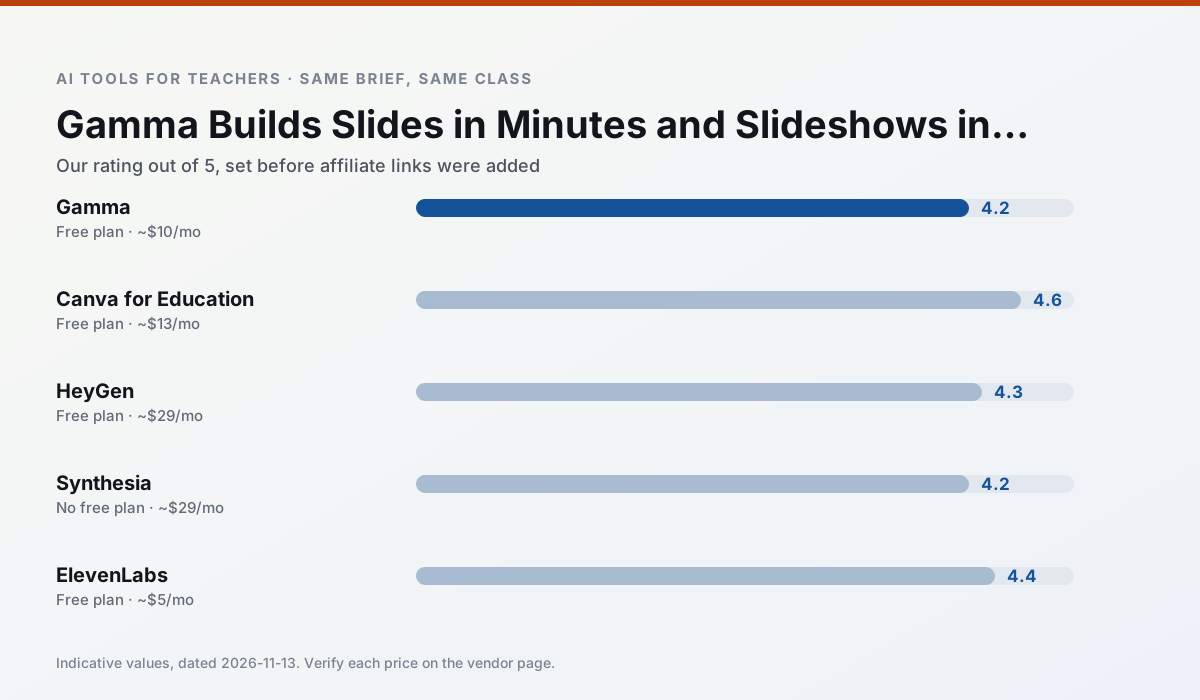
Side by side
Comparison table
Ratings reflect our timed classroom workflow, not vendor claims. Prices are indicative — verify on the vendor site.
| Tool | Best for | Free tier | Indicative paid plan | Standout feature | Our rating | Verdict | Try the tool |
|---|---|---|---|---|---|---|---|
| Gamma | slide decks · parent communication | Yes — Credit-limited generation | ~$10 /user/mo | Prompt-to-deck | 4.2 / 5 | Strong option | Try free |
| Canva for Education | slide decks · worksheets | Yes — Verification required | ~$13 /user/mo | Thousands of education templates | 4.6 / 5 | Top pick | Try free |
| HeyGen | video lessons · translation | Yes — Limited credit plan | ~$29 /user/mo | Video translation | 4.3 / 5 | Strong option | Try free |
| Synthesia | flipped lessons · video lessons | No ongoing free plan | ~$29 /user/mo | 140+ languages | 4.2 / 5 | Strong option | Try free |
| ElevenLabs | accessibility · reading intervention | Yes — Monthly character quota | ~$5 /user/mo | Very natural voices | 4.4 / 5 | Strong option | Try free |
| Diffit | differentiated instruction · reading intervention | Yes — Limited generations per month | ~$15 /user/mo | Lexile-style leveling | 4.6 / 5 | Top pick | Try free |
Match your situation
Best for X
Different jobs need different tools. Here is what we would open first in each case.
Family-facing drafts from Gamma need the fewest rewrites for warmth without overpromising, which is the usual failure mode.
Canva for Education keeps the same task across levels, which is what makes a differentiated set defensible in moderation.
HeyGen is the student-facing option here with boundaries a teacher can actually set and supervise.
Nothing on Synthesia's free tier is a teaser demo; the limits are documented and a normal week fits inside them.
Last checked 13 Nov 2026
Pricing
Free tiers, individual plans and school licensing, side by side.
| Tool | Free plan | Individual / paid | School & district | Billing note | Verify |
|---|---|---|---|---|---|
| Gamma | $0 — Credit-limited generation | ~$10 /user/mo | ~$20 /user/mo | Indicative — verify on vendor site | Vendor |
| Canva for Education | $0 — Verification required | ~$13 /user/mo | Custom quote | Indicative — verify on vendor site | Vendor |
| HeyGen | $0 — Limited credit plan | ~$29 /user/mo | Custom quote | Indicative — verify on vendor site | Vendor |
| Synthesia | No ongoing free tier | ~$29 /user/mo | Custom quote | Indicative — verify on vendor site | Vendor |
| ElevenLabs | $0 — Monthly character quota | ~$5 /user/mo | ~$22 /user/mo | Indicative — verify on vendor site | Vendor |
| Diffit | $0 — Limited generations per month | ~$15 /user/mo | Custom quote | Indicative — verify on vendor site | Vendor |
Editorial rule: pricing is re-checked every 2–3 months and the top 50 pages are refreshed every 6 months. See our funding policy.
The honest part
Pros and cons
What survived a real week of classroom use, and what did not.
Pros
- Fastest path from outline to deck
- Modern-looking output by default
- Good export options
Cons
- Design control is limited
- Credits run out quickly
- Not built for student data
Pros
- Effectively free for verified teachers
- Huge template library
- No design skills needed
Cons
- AI features are capped
- Easy to produce cluttered slides
- Account verification can be slow
Pros
- Best-in-class lip-sync translation
- Useful for multilingual families
- Generous trial credits
Cons
- Credit-based pricing is confusing
- Voice cloning raises consent questions
- Overkill for everyday lessons
Pros
- No camera or editing skills required
- Excellent multilingual voice output
- Easy updates to existing videos
Cons
- Cost is hard to justify for a single teacher
- Avatar video can feel impersonal
- No free ongoing tier
Pros
- Excellent for accessible audio versions
- Low entry price
- Fast generation
Cons
- Quota-based billing
- Voice cloning consent considerations
- Not a teaching platform
In the classroom
Use cases
Five concrete workflows, with the tool we would open for each one.
Regrouping students after an assessment
Summarise anonymised results into skill groups, then generate one activity per group. Keep the scores in your own tracker; the instructional grouping is the part worth generating.
Recommended: GammaA weekly family newsletter from bullet notes
Newsletters fail on length, not tone. Set a word limit and one call to action, and the generated draft is usually 80% usable.
Recommended: Canva for EducationAn IEP present-levels first draft
Use aggregated, anonymised data only. Ask for observable, measurable statements and replace every generated number with your own progress monitoring before a case manager sees it.
Recommended: HeyGenA five-minute exit ticket set
Ask for one recall, one application and one reasoning item, then delete the second recall question every generator sneaks in.
Recommended: SynthesiaA question bank from a PDF or article
Feed a non-identifiable source and ask for items tagged by difficulty with the misconception behind each distractor. Spot-check every answer key; numerical items are least reliable.
Recommended: ElevenLabs
Questions teachers ask us
FAQ
Direct answers, also published as FAQPage structured data for search and AI assistants.
Is Gamma worth paying for at mixed-grade level?
What does Gamma get wrong most often?
Can Gamma replace a planning period?
Is Gamma safe to use with student data?
Sources & further reading
Our recommendation
Try Gamma free for your next lesson planning task
Generate presentation decks and documents from a single prompt. Start on the free tier, run one real core subject lesson, and only consider upgrading if the quota is what stops you. Disclosure: we may earn a commission (varies) at no extra cost to you.
Some links on this page are affiliate links. We may earn a commission at no extra cost to you. Our rankings are editorial and never pay-to-play. Never enter student PII into a free consumer account.
Keep reading
Related comparisons in this cluster.
Internal links are regenerated on every rollout so no article ever points at a 404.