The short answer
- Writesonic is our default pick for teachers who need to generate practice sets with answer keys quickly; Originality.ai is better when differentiation is the bottleneck.
- All 3 shortlisted tools are priced for one teacher first and a school second. Writesonic and Originality.ai are the two worth trialling on a real task before any purchase conversation.
- Every AI output for worksheet creation needs a teacher review, especially standards codes, science accuracy, and anything in an IEP, assessment or family message.
- Trial one tool for a week of real worksheet creation work before any purchase conversation; the quota is the honest test.
Start with Writesonic on its free plan.
Staring at a blank document at 4:30 PM with twenty-eight 8th-grade physical science lab reports waiting on your desk is a special kind of fatigue. You need a practice sheet on balancing chemical equations that actually scales from the kid who still confuses coefficients with subscripts to the kid who finished the stoichiometry unit two weeks ago. You open a tab to try AI worksheet creation for science teachers, hoping to shave forty minutes off your Sunday planning block. Most of the time, the machine hands you a generic worksheet stuffed with textbook definitions you could have pulled from page two hundred of the district binder. The promise of generative tools is instant differentiation, but the reality involves a fair bit of editing before anything touches a copy machine. If you want to see how these systems fit into a broader workflow, check out our roundup of the best AI tools for teachers 2026 for more tested strategies.
The Reality of Generating Science Practice Sheets
Let us be honest about what general text generators give you when you ask for a science worksheet. Writesonic, priced at roughly $16 per user per month on its paid tier with a limited free option, is a budget-friendly way to churn out multiple-choice questions and vocabulary matching. It gives you plenty of templates and runs circles around standard word processors for pure speed, but it hits a wall with mixed-ability classes. If you ask it to differentiate a worksheet on cell organelles for three reading levels, it tends to change the vocabulary words while keeping the cognitive demand nearly identical. You end up with the same low-level recall questions dressed up in shorter sentences for your struggling readers. It is not a complete failure, but it requires you to supply the pedagogical scaffolding yourself.
Prompt: "Write a three-tier differentiated worksheet on Newton's Second Law for 8th-grade science, covering recall, calculation, and conceptual application."

Result: Writesonic generated three sections. Section one asked for the formula. Section two asked for three identical mass-acceleration math problems with different numbers. Section three asked for a paragraph explaining force.

Edits made:
1. Deleted two of the redundant math problems and replaced them with a qualitative question about air resistance.
2. Rewrote the third-tier prompt to require students to analyze a cart-ramp graph rather than just write a general paragraph.
Managing Question Banks and Numerical Reliability
When you feed a dense PDF article or a complex excerpt into a writing tool to generate a question bank, the output looks convincing at first glance. The formatting is clean, the district standards alignment looks solid, and the distractors for the multiple-choice items sound plausible. Then you try to work through the math problems yourself. That is when you notice the generator forgot to account for significant figures or created a density calculation with impossible units. AI tools are notoriously weak at internal math logic unless you explicitly constrain them. If you are building a question bank, treat the generated items as rough drafts that always need a manual spot-check before print.
Two distinct failures happen with predictable regularity during this process. First, the generator loves to sneak in extra recall questions even when you specifically ask for application and reasoning items. You will explicitly request a five-minute exit ticket set with one recall, one application, and one reasoning item, only to find the tool has generated three low-level definition questions and one weak application prompt. Second, the distractors in science multiple-choice questions often rely on silly, made-up misconceptions rather than the actual persistent student errors you see in the classroom. You fix both issues the same way: you prune the junk ruthlessly and inject your own knowledge of what your specific students get wrong on Tuesdays.
District Comms and Publishing Workflows
If your role extends beyond the classroom and you find yourself writing science curriculum guides or parent newsletters, the tool requirements change entirely. Jasper, sitting at roughly $39 per user per month with no free tier, is built for brand-voice consistency and long-form editing. It is genuinely useful for district communications teams or school websites, but it is massive overkill for a single science teacher trying to make a worksheet on plate tectonics. It lacks education-specific features and carries a marketing price tag that will make your principal wince if you ask for a site license out of your departmental budget.
For teachers who publish their original science labs and worksheets on marketplaces, a different set of tools enters the picture. Surfer SEO costs roughly $79 per month with no free tier and offers clear on-page optimization scores for online resource creation. It helps you structure digital resources so other educators can actually find them. Meanwhile, tools like Originality.ai, priced at roughly $12 per user per month with no free tier, and Turnitin Clarity or Feedback Studio, which use custom institutional quotes, handle plagiarism scanning and writing feedback at an administrative level. Originality.ai is fast for bulk scanning, but its AI detection scores produce false positives and should never serve as the sole piece of evidence for academic dishonesty.
Safe Deployments for Student-Facing Work
When you want students to interact with AI directly rather than just printing worksheets off your desk, public writing tools present a massive data privacy hurdle. Writesonic and Jasper are simply not intended for student data under standard consumer accounts. For a classroom environment where students are actively prompting an assistant or working through an interactive science module, SchoolAI steps in as the primary option. Priced at roughly $15 per user per month with limited free seats and quote-based district plans, it is designed for school-safe deployments with teacher visibility into student use and strict safeguarding defaults.
SchoolAI allows you to set guardrails so students exploring ecosystems or chemical reactions cannot wander off into inappropriate topics. For a closer look at how structured writing prompts function in other disciplines, read our guide on AI essay feedback for history teachers. The platform gives you audit logs and a workspace built with district approval in mind, though it requires broader school-wide buy-in to unlock its full utility. When you compare this level of control to the wild west of cheap consumer text generators, the extra setup time for a walled-garden environment pays for itself in peace of mind. You keep your student data secure, you maintain visibility over what the model tells them about cellular respiration, and you avoid the administrative nightmare of unvetted third-party apps.
FAQ
Can AI do worksheet creation at mixed-grade level?
It can produce a first draft and a structure. The level judgement, the standards check and the tone are teacher decisions.
Which tool is best for worksheet creation?
Writesonic on the evidence in this article, with Originality.ai as the second opinion. Neither replaces the review step.
What is the biggest risk?
A confident, plausible output that nobody checked. The five checks below exist for that reason.
Sources
- Writesonic Pricing and Feature Overview. Writesonic Pricing
- Originality.ai Detection and QA Documentation. Originality.ai
- Jasper Brand Voice and Workflow Specs. Jasper AI Features
- SchoolAI Safe Classroom Workspaces. SchoolAI Educator Hub
- Surfer SEO Content Guidelines. Surfer SEO Product Specs
- Turnitin Feedback Studio Institutional Integration. Turnitin Solutions
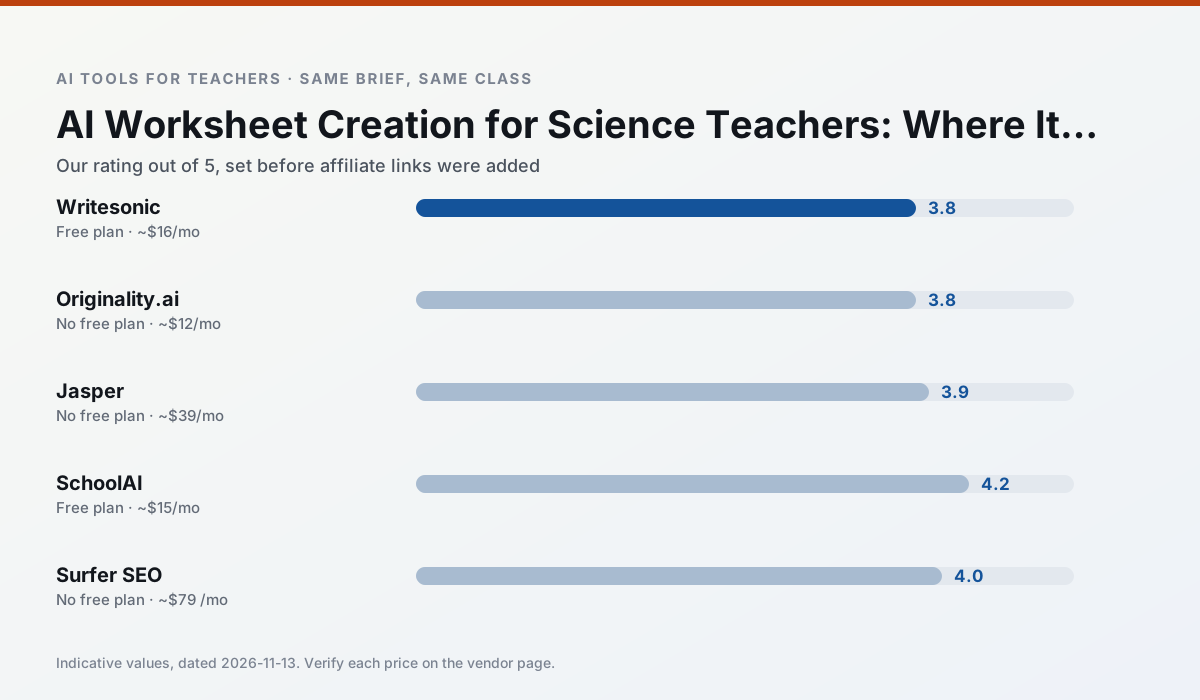
Side by side
Comparison table
Ratings reflect our timed classroom workflow, not vendor claims. Prices are indicative — verify on the vendor site.
| Tool | Best for | Free tier | Indicative paid plan | Standout feature | Our rating | Verdict | Try the tool |
|---|---|---|---|---|---|---|---|
| Writesonic | newsletters · parent communication | Yes — Limited credits | ~$16 /user/mo | Article and email generators | 3.8 / 5 | Situational | Try free |
| Originality.ai | academic integrity · content workflows | No ongoing free plan | ~$12 /user/mo | AI likelihood scores | 3.8 / 5 | Situational | Try free |
| Jasper | newsletters · parent communication | No ongoing free plan | ~$39 /user/mo | Brand voice profiles | 3.9 / 5 | Situational | Try free |
| SchoolAI | student-safe AI · differentiated instruction | Yes — Limited seats | ~$15 /user/mo | Teacher-monitored student chats | 4.2 / 5 | Strong option | Try free |
| Surfer SEO | teacher bloggers · resource sellers | No ongoing free plan | ~$79 /mo | Content Editor | 4.0 / 5 | Situational | Try free |
| Turnitin Clarity / Feedback Studio | feedback on writing · academic integrity | No ongoing free plan | Custom quote | Similarity reports | 3.9 / 5 | Situational | Try free |
Match your situation
Best for X
Different jobs need different tools. Here is what we would open first in each case.
Writesonic produces levelled versions from one source in a single pass, which is the highest-value differentiation shortcut we tested at this level.
Family-facing drafts from Originality.ai need the fewest rewrites for warmth without overpromising, which is the usual failure mode.
Jasper is the student-facing option here with boundaries a teacher can actually set and supervise.
SchoolAI wins on the default path: fewer clicks to a usable draft, and the interface does not get in the way at 7:40am.
Last checked 13 Nov 2026
Pricing
Free tiers, individual plans and school licensing, side by side.
| Tool | Free plan | Individual / paid | School & district | Billing note | Verify |
|---|---|---|---|---|---|
| Writesonic | $0 — Limited credits | ~$16 /user/mo | ~$49 /user/mo | Indicative — verify on vendor site | Vendor |
| Originality.ai | No ongoing free tier | ~$12 /user/mo | Custom quote | Indicative — verify on vendor site | Vendor |
| Jasper | No ongoing free tier | ~$39 /user/mo | ~$59+ /user/mo | Indicative — verify on vendor site | Vendor |
| SchoolAI | $0 — Limited seats | ~$15 /user/mo | Custom quote | Indicative — verify on vendor site | Vendor |
| Surfer SEO | No ongoing free tier | ~$79 /mo | Custom quote | Indicative — verify on vendor site | Vendor |
| Turnitin Clarity / Feedback Studio | No ongoing free tier | Custom quote | Custom quote | LMS-wide deployment | Vendor |
Editorial rule: pricing is re-checked every 2–3 months and the top 50 pages are refreshed every 6 months. See our funding policy.
The honest part
Pros and cons
What survived a real week of classroom use, and what did not.
Pros
- Cheaper than enterprise writing suites
- Many templates
- Reasonable free trial
Cons
- Generic classroom output
- Credit system is confusing
- Limited education context
Pros
- Useful for content publishing QA
- Fast bulk scanning
- Transparent credit model
Cons
- AI detection produces false positives
- Should never be sole evidence of misconduct
- Not a teaching tool
Pros
- Consistent tone across communications
- Strong long-form editor
- Good for district comms teams
Cons
- Priced for marketing teams
- Overkill for one classroom
- No education-specific features
Pros
- Designed for district approval
- Teacher visibility into student use
- Good safeguarding defaults
Cons
- Requires school-wide buy-in
- Less flexible than general LLMs
- Pricing is mostly quote-based
Pros
- Best-in-class on-page guidance
- Useful for TpT / resource-shop content
- Clear scoring
Cons
- Expensive for individual teachers
- Not a classroom tool
- Requires SEO basics
In the classroom
Use cases
Five concrete workflows, with the tool we would open for each one.
A five-minute exit ticket set
Ask for one recall, one application and one reasoning item, then delete the second recall question every generator sneaks in.
Recommended: WritesonicAn IEP present-levels first draft
Use aggregated, anonymised data only. Ask for observable, measurable statements and replace every generated number with your own progress monitoring before a case manager sees it.
Recommended: Originality.aiA substitute folder that needs no context
The value here is structure, not creativity. Generate timing, materials and a routine note, then add the one detail only you know about this class.
Recommended: JasperA question bank from a PDF or article
Feed a non-identifiable source and ask for items tagged by difficulty with the misconception behind each distractor. Spot-check every answer key; numerical items are least reliable.
Recommended: SchoolAIA Monday morning lesson plan in twelve minutes
The twelve minutes come from not rewriting the skeleton. Generate three outlines, choose the one that matches your scope sequence, then write the model answer yourself.
Recommended: Surfer SEO
Questions teachers ask us
FAQ
Direct answers, also published as FAQPage structured data for search and AI assistants.
Can AI do worksheet creation at mixed-grade level?
Which tool is best for worksheet creation?
What is the biggest risk?
Sources & further reading
Our recommendation
Try Writesonic free for your next worksheet creation task
Budget-friendly AI writing and content generation. Start on the free tier, run one real science lesson, and only consider upgrading if the quota is what stops you. Disclosure: we may earn a commission (varies) at no extra cost to you.
Some links on this page are affiliate links. We may earn a commission at no extra cost to you. Our rankings are editorial and never pay-to-play. Never enter student PII into a free consumer account.
Keep reading
Related comparisons in this cluster.
Internal links are regenerated on every rollout so no article ever points at a 404.