The short answer
- Formative is our default pick for teachers who need to generate practice sets with answer keys quickly; Notion AI is better when differentiation is the bottleneck.
- Pricing is where these pages date fastest. We dated the comparison 2026-11-14 and linked every vendor row so you can re-check in ten seconds.
- Every AI output for worksheet creation needs a teacher review, especially standards codes, social studies accuracy, and anything in an IEP, assessment or family message.
- Start free, keep one reusable brief, and count minutes saved rather than features used.
Start with Notion AI on its free plan.
It is a Tuesday afternoon in November 2026, and I am staring at thirty copies of a reading passage on the New Deal, realizing it is completely inaccessible to half my 10th-grade global history class. I need three tiered versions of the text, a vocabulary matching set, and four scaffolded questions that do not just ask kids to copy sentences off the page. Doing this manually takes forty minutes per tier. This is the exact bottleneck where AI worksheet creation for social studies teachers stops being a futuristic headline and becomes a matter of basic survival.
We have all tried dropping a primary source into a generic chatbot, only to receive a multiple-choice quiz where the correct answer is longer than the text and every distractor is glaringly obvious. Social studies is uniquely painful for AI generators because dates, causation, and historiography require factual precision that general-purpose tools treat as optional. If you are exploring broader strategies, our guide on the best ai tools for teachers 2026 covers how to balance these workflows across your prep periods. Let us look at what actually works in the classroom using the tools we have on our desks this term.
Turning Primary Sources Into Differentiated Question Banks
The most reliable shortcut is feeding a non-identifiable historical text directly into a structured environment and demanding specific question types. General prompts yield generic output. You need to constrain the model so it understands that history is about interpretation, not just trivia. When I build a question bank from a complex PDF, I ask for items tagged by difficulty, complete with the specific misconception behind each distractor.
Prompt: Act as a high school social studies curriculum writer. Based on the attached excerpt of the 14th Amendment, generate five multiple-choice questions for 10th-grade students. Tag each question by difficulty (Recall, Analysis, Evaluation). For every wrong answer choice, include a brief note explaining the specific student misconception that makes that distractor plausible.
First return: The model gave me two recall questions about dates, one analysis item, and two distractor notes that just said "student might guess wrong."
My edits: I deleted the second recall question, replaced the date queries with a prompt about incorporation doctrine, and manually wrote out the misconceptions for the distractors.
Final usable result: A sharp, three-question analytical check that immediately exposed whether my sophomores understood federalism versus state power.
You still have to spot-check every single answer key. Numerical data and specific chronological sequences are where these models trip up most often.
Organizing Long-Term Curriculum With Notion AI
Social studies planning suffers from scope creep. We build units on the French Revolution, expand them to include the Haitian Revolution, and suddenly our pacing guide is a digital landfill of orphaned Google Docs. Notion AI handles mixed-ability classes and long-term curriculum records better than a standard word processor because it treats your scope and sequence like a relational database. At roughly $10 per user per month with a limited free tier, it shines when you are trying to map out a ten-week unit on imperialism and need to attach differentiated reading tiers to specific state standards. The setup time is significant, and you must never store student personally identifiable information in personal workspaces, but for keeping a department aligned, it beats flipping through three ring binders.
Live Assessment and Intervention Groups Using Formative
Once the worksheet is made and handed out, you need to know who actually understood the material before the bell rings. Formative runs around $15 per user per month on its paid tier, offering core assessment tools for free, and it is built precisely for this moment. When I need to regroup students after an assessment, I use Formative to summarise anonymised results into skill groups, then generate one targeted activity per group. You should always keep the raw scores in your own gradebook, as the instructional grouping is the real value here. It works seamlessly with existing PDFs and Docs, though the setup is steeper than a basic quiz game and you really need a school-wide rollout to justify the cost. Be sure to confirm your rostering scope and check that your district has a proper Data Privacy Agreement in place.
Providing Fast Feedback on Paper Assignments
Not all of our students work inside an LMS. Many of us still rely on physical notebooks, map annotations, and handwritten document analysis sheets. Class Companion is our best free option here, offering limited assignments on its free tier and scaling up to a paid model at roughly $12 per user per month. It provides AI feedback on handwritten and scanned student work, which is a massive time-saver when you are staring down a stack of DBQ essays. Scan quality directly dictates accuracy, and you still need to review the comments before handing papers back, but it gives kids actionable feedback while the historical context is still fresh in their minds. Because student work is uploaded, a district-level DPA is mandatory.
Polishing Parent Communication With Grammarly
When the lesson is planned and the worksheets are graded, you still have to deal with the inevitable email from a parent asking why their child’s grade dropped after the unit on the Cold War. Grammarly costs about $12 per user per month for the paid tier, with a free tier covering basic grammar. It is not an education-specific tool, but it catches high-stakes errors in parent emails, newsletters, and weekly updates across every browser tab where you type. Newsletters always fail on length, not tone. If you set a strict word limit and a single call to action, the generated draft is usually eighty percent usable. You must disable text collection on school devices if your district privacy settings require it, but for avoiding a misinterpreted sentence at 9:00 PM on a Sunday, it is indispensable.
Institutional Writing Support and Content Publishing
For teachers working inside large districts with heavy administrative setups, Turnitin Clarity and Feedback Studio offer institutional writing feedback and similarity checking. Individual teachers cannot purchase this tool, and AI detection remains heavily contested, but its revision history is robust where it is already licensed. If you also publish your own social studies resources online, Surfer SEO costs roughly $79 a month on its paid tier with no free option, offering on-page guidance for teacher-creators who sell materials on marketplaces. It is expensive and requires basic SEO knowledge, but it is unmatched if you want your classroom-tested DBQ units to actually show up in search results. For a deeper look at managing student writing workflows, read our breakdown on ai essay feedback for history teachers guide.
FAQ
Can AI do worksheet creation at mixed-grade level?
It can produce a first draft and a structure. The level judgement, the standards check and the tone are teacher decisions.
Which tool is best for worksheet creation?
Formative on the evidence in this article, with Notion AI as the second opinion. Neither replaces the review step.
What is the biggest risk?
A confident, plausible output that nobody checked. The five checks below exist for that reason.
Sources
- Formative Pricing and Feature Overview, Formative Vendor Site, accessed 2026.
- Notion AI Plans and Workspace Security, Notion Documentation, accessed 2026.
- Grammarly Business and Education Privacy Standards, Grammarly, accessed 2026.
- Class Companion Product Features and Free Tier Limits, Class Companion, accessed 2026.
- Turnitin Feedback Studio Institutional Licensing, Turnitin, accessed 2026.
- Surfer SEO Content Guidelines and Pricing, Surfer, accessed 2026.
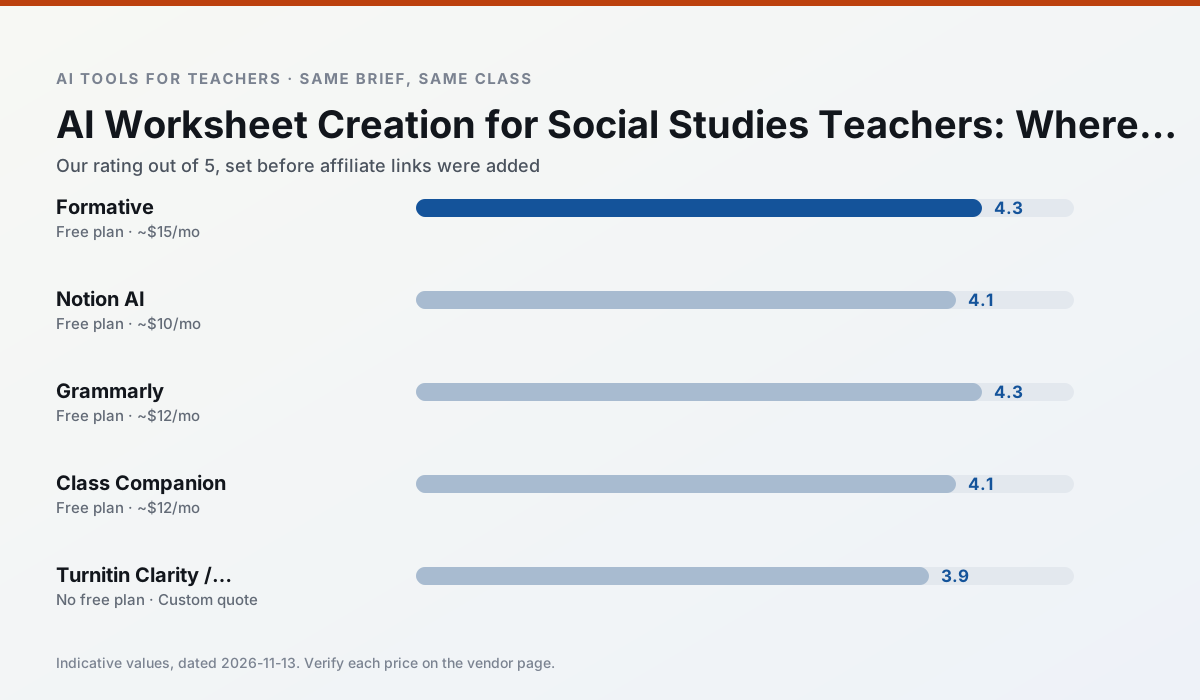
Side by side
Comparison table
Ratings reflect our timed classroom workflow, not vendor claims. Prices are indicative — verify on the vendor site.
| Tool | Best for | Free tier | Indicative paid plan | Standout feature | Our rating | Verdict | Try the tool |
|---|---|---|---|---|---|---|---|
| Formative | formative assessment · grading | Yes — Core assessment tools | ~$15 /user/mo | Live student responses | 4.3 / 5 | Strong option | Try free |
| Notion AI | curriculum mapping · unit planning | Yes — Limited AI usage | ~$10 /user/mo | Linked databases | 4.1 / 5 | Situational | Try free |
| Grammarly | parent communication · report card comments | Yes — Core grammar and tone checks | ~$12 /user/mo | Tone adjustments | 4.3 / 5 | Strong option | Try free |
| Class Companion | grading · feedback on writing | Yes — Limited assignments | ~$12 /user/mo | Handwriting recognition | 4.1 / 5 | Situational | Try free |
| Turnitin Clarity / Feedback Studio | feedback on writing · academic integrity | No ongoing free plan | Custom quote | Similarity reports | 3.9 / 5 | Situational | Try free |
| Surfer SEO | teacher bloggers · resource sellers | No ongoing free plan | ~$79 /mo | Content Editor | 4.0 / 5 | Situational | Try free |
Match your situation
Best for X
Different jobs need different tools. Here is what we would open first in each case.
Family-facing drafts from Formative need the fewest rewrites for warmth without overpromising, which is the usual failure mode.
Notion AI keeps the same task across levels, which is what makes a differentiated set defensible in moderation.
Grammarly is built around teacher-monitored student spaces and audit logs rather than a consumer chat account, which is a different approval conversation.
Nothing on Class Companion's free tier is a teaser demo; the limits are documented and a normal week fits inside them.
Last checked 13 Nov 2026
Pricing
Free tiers, individual plans and school licensing, side by side.
| Tool | Free plan | Individual / paid | School & district | Billing note | Verify |
|---|---|---|---|---|---|
| Formative | $0 — Core assessment tools | ~$15 /user/mo | Custom quote | Indicative — verify on vendor site | Vendor |
| Notion AI | $0 — Limited AI usage | ~$10 /user/mo | ~$8 /user/mo | Indicative — verify on vendor site | Vendor |
| Grammarly | $0 — Core grammar and tone checks | ~$12 /user/mo | ~$15 /user/mo | Indicative — billed annually | Vendor |
| Class Companion | $0 — Limited assignments | ~$12 /user/mo | Custom quote | Indicative — verify on vendor site | Vendor |
| Turnitin Clarity / Feedback Studio | No ongoing free tier | Custom quote | Custom quote | LMS-wide deployment | Vendor |
| Surfer SEO | No ongoing free tier | ~$79 /mo | Custom quote | Indicative — verify on vendor site | Vendor |
Editorial rule: pricing is re-checked every 2–3 months and the top 50 pages are refreshed every 6 months. See our funding policy.
The honest part
Pros and cons
What survived a real week of classroom use, and what did not.
Pros
- Strong data for intervention groups
- Works with existing PDFs and Docs
- Good LMS integrations
Cons
- Steeper setup than quiz games
- Best value requires school-wide rollout
- Price adds up per teacher
Pros
- Great for long-term curriculum records
- Strong team collaboration
- Flexible structure
Cons
- Setup time is significant
- AI add-on pricing changed more than once
- Not purpose-built for lesson generation
Pros
- Catches errors in high-stakes parent emails
- Works everywhere you already write
- Very low learning curve
Cons
- Not education-specific
- Can flatten teacher voice
- Premium needed for tone rewriting
Pros
- Useful where work is done on paper
- Fast, specific comments
- Good math support
Cons
- Scan quality affects accuracy
- Narrow use case
- Feedback still needs teacher review
Pros
- Already licensed at many schools
- Consistent institutional workflow
- Detailed revision history
Cons
- Individual teachers cannot buy it
- AI detection remains contested
- Heavy administrative setup
In the classroom
Use cases
Five concrete workflows, with the tool we would open for each one.
Regrouping students after an assessment
Summarise anonymised results into skill groups, then generate one activity per group. Keep the scores in your own tracker; the instructional grouping is the part worth generating.
Recommended: FormativeA weekly family newsletter from bullet notes
Newsletters fail on length, not tone. Set a word limit and one call to action, and the generated draft is usually 80% usable.
Recommended: Notion AIAn IEP present-levels first draft
Use aggregated, anonymised data only. Ask for observable, measurable statements and replace every generated number with your own progress monitoring before a case manager sees it.
Recommended: GrammarlyA five-minute exit ticket set
Ask for one recall, one application and one reasoning item, then delete the second recall question every generator sneaks in.
Recommended: Class CompanionA question bank from a PDF or article
Feed a non-identifiable source and ask for items tagged by difficulty with the misconception behind each distractor. Spot-check every answer key; numerical items are least reliable.
Recommended: Turnitin Clarity / Feedback Studio
Questions teachers ask us
FAQ
Direct answers, also published as FAQPage structured data for search and AI assistants.
Can AI do worksheet creation at mixed-grade level?
Which tool is best for worksheet creation?
What is the biggest risk?
Sources & further reading
Our recommendation
Try Notion AI free for your next worksheet creation task
AI-assisted notes, databases and curriculum planning in one workspace. Start on the free tier, run one real social studies lesson, and only consider upgrading if the quota is what stops you. Disclosure: we may earn a commission (varies) at no extra cost to you.
Some links on this page are affiliate links. We may earn a commission at no extra cost to you. Our rankings are editorial and never pay-to-play. Never enter student PII into a free consumer account.
Keep reading
Related comparisons in this cluster.
Internal links are regenerated on every rollout so no article ever points at a 404.