The short answer
- MagicSchool AI is our default pick for teachers who need to draft a standards-aware lesson plan quickly; OpusClip is better when differentiation is the bottleneck.
- Start with MagicSchool AI on its free plan, keep OpusClip as the second opinion, and do not open a card until the quota, not the feature list, is what stops you.
- Every AI output for Source analysis needs a teacher review, especially standards codes, history accuracy, and anything in an IEP, assessment or family message.
- Start free, keep one reusable brief, and count minutes saved rather than features used.
Start with MagicSchool AI on its free plan.
It was a Tuesday afternoon in October, and I had twenty-four copies of a translated 19th-century factory inspector’s report sitting in a recycling bin because the reading level was completely out of reach for half my tenth-grade history class. I needed three distinct versions of the same primary source text before the first bell rang the next morning, complete with scaffolded vocabulary and document analysis questions that did not treat my students like middle-schoolers. That is when AI source analysis for history teachers stops being an abstract ed-tech debate and becomes a survival metric. We have all spent our prep periods cobbling together document-based questions, only to find that the questions test simple reading comprehension rather than historical sourcing, corroboration, or contextualization.
Generating Three Reading Levels from One Source Text
The fastest way to handle a mixed-ability history classroom is to feed a vetted primary source into a tool like MagicSchool AI and ask it to break the text down. You paste your source text, specify your target lexile levels or grade bands, and ask for supported, core, and extension versions. The catch is that you must check the vocabulary list and comprehension questions by hand before you print a single page. Invented comprehension questions and surface-level reading prompts are the most common failure modes of these generators, and they will slip past you if you are moving too fast. If you need a wider template library for building these lessons from scratch, MagicSchool AI remains the best for parent-facing writing and general teacher tasks, with a robust free tier and paid options running around $12 per user per month.
Prompt: Act as a high school history teacher. Take the following factory inspector's report from 1842 and generate three versions: supported (lower Lexile with glossed terms), core (original text with targeted footnotes), and extension (original text with a comparative prompt). Include three sourcing questions for each.
First response: Provided three neat paragraphs with standard multiple-choice questions about the factory conditions.
Two edits that made it usable:
- Instructed the generator to keep the original vocabulary in the core and extension versions while adding marginal definitions rather than rewriting the historical voice.
- Deleted the multiple-choice questions entirely and replaced them with sourcing queries asking students to evaluate the inspector's point of view and potential bias.
Building Question Banks from Complex PDFs
When you are staring down a dense historical article or a digitized chapter from an archive, building an assessment takes hours you do not have. This is where QuestionWell shines as a single-purpose utility. You paste non-identifiable source text into the platform, and it spits out standards-aligned question banks tagged by difficulty, complete with the specific misconception behind each distractor. At roughly $10 per user per month on its paid tier, it saves the most time on question writing. However, you have to spot-check every single answer key because numerical items and specific dates are its least reliable outputs. If the text mentions a statistic about iron production in 1850, the AI might attribute it to the wrong decade or miscalculate a percentage in the distractor options.
Constructing Five-Minute Exit Tickets for Ancient History
Checking for historical reasoning at the end of a class period often results in rushed recall questions that do not tell you if students actually grasped the concept. You can generate a five-minute exit ticket set by explicitly asking for one recall item, one application item, and one reasoning item. The trick is that you almost always have to delete the second recall question that every generator sneaks into the draft. For quick classroom engagement and review games that require zero training time, Kahoot! is the best free option, though its paid tiers sit around $10 per user per month if you need larger player counts. Just remember that time pressure in a game setting suits rapid recall much more than deep historical reasoning, so keep your competitive checks light.
Canva for Education is another reliable workhorse for turning these exit tickets or source analysis rubrics into clean, visually engaging handouts. It is effectively free for verified teachers, though your account verification can sometimes take a few days, and its AI features are capped on the free tier with paid upgrades around $13 per user per month. It helps to check out how other educators structure their workflows by reviewing strategies on AI essay feedback for history teachers.
Designing Substitute Folders with Structural Integrity
A sub folder should never rely on AI creativity; it relies entirely on structural integrity. When you are out sick, you need timing, materials, and a routine note that a guest teacher can actually follow without a ten-minute orientation. You can use Gamma to generate presentation decks and document outlines from a single prompt, offering the fastest path from an outline to a clean deck with modern-looking output. It functions best as a student-safe deployment tool when used strictly for content generation, with a paid tier around $10 per user per month after credits run out.
Prompt: Create a substitute teacher lesson plan outline for a 90-minute block on the causes of the American Civil War, using a provided reading on the Compromise of 1850. Include strict timing, required handouts, and a step-by-step student routine.
First response: Included a creative group-roleplay activity where students pretended to be senators arguing over the territories.
Two edits that made it usable:
- Stripped out the roleplay entirely because a substitute cannot manage simulated congressional debates across six class periods.
- Replaced it with an independent document analysis task using the primary source text and added the one crucial note only I know: seat Jim next to the front window so he stays focused.
Repurposing Lecture Footage for Absent Students
If you record your direct instruction or document analysis modeling sessions, you often end up with forty minutes of video that absent students will never watch. OpusClip helps solve this by taking long recordings and turning them into short, captioned clips optimized for review. At roughly $15 per user per month on its paid tier, it is built to repurpose content quickly, though its free plan is quite restrictive and it is optimized for social-style formats rather than full lesson design. You must ensure you never upload recordings containing identifiable students, keeping the focus entirely on your document camera or your own lecture notes. This fits neatly into broader curriculum planning, and you can explore more ideas on managing these workflows in our guide on the best AI tools for teachers.
Drawing the Line on Student Privacy and Historical Nuance
AI tools are remarkably good at scaffolding reading levels, formatting worksheets, and suggesting distractor questions for multiple-choice quizzes. They fail miserably when asked to understand the emotional weight, local nuance, and complex causation of human history. When we use these platforms, we act as the final historical authority. We check the citations, we verify the primary source origins, and we ensure that our students are engaging with the messy realities of the past rather than the smooth, sometimes hallucinated summaries of a language model. Keep your data anonymous, keep your hand on the editorial wheel, and let the software handle the layout while you handle the history.
FAQ
Can AI do Source analysis at mixed-grade level?
It can produce a first draft and a structure. The level judgement, the standards check and the tone are teacher decisions.
Which tool is best for Source analysis?
MagicSchool AI on the evidence in this article, with OpusClip as the second opinion. Neither replaces the review step.
What is the biggest risk?
A confident, plausible output that nobody checked. The five checks below exist for that reason.
Sources
- MagicSchool AI. (2026). MagicSchool AI Platform Overview and Pricing. Retrieved from magicschool.ai
- OpusClip. (2026). OpusClip Features and Video Repurposing Tools. Retrieved from opus.clip
- Gamma. (2026). Gamma App: AI-Powered Presentations and Documents. Retrieved from gamma.app
- Kahoot!. (2026). Kahoot! Education Solutions and Pricing. Retrieved from kahoot.com
- Canva for Education. (2026). Canva for Teachers and Classroom Design Suites. Retrieved from canva.com/education
- QuestionWell. (2026). QuestionWell AI Question Generation for Teachers. Retrieved from questionwell.org
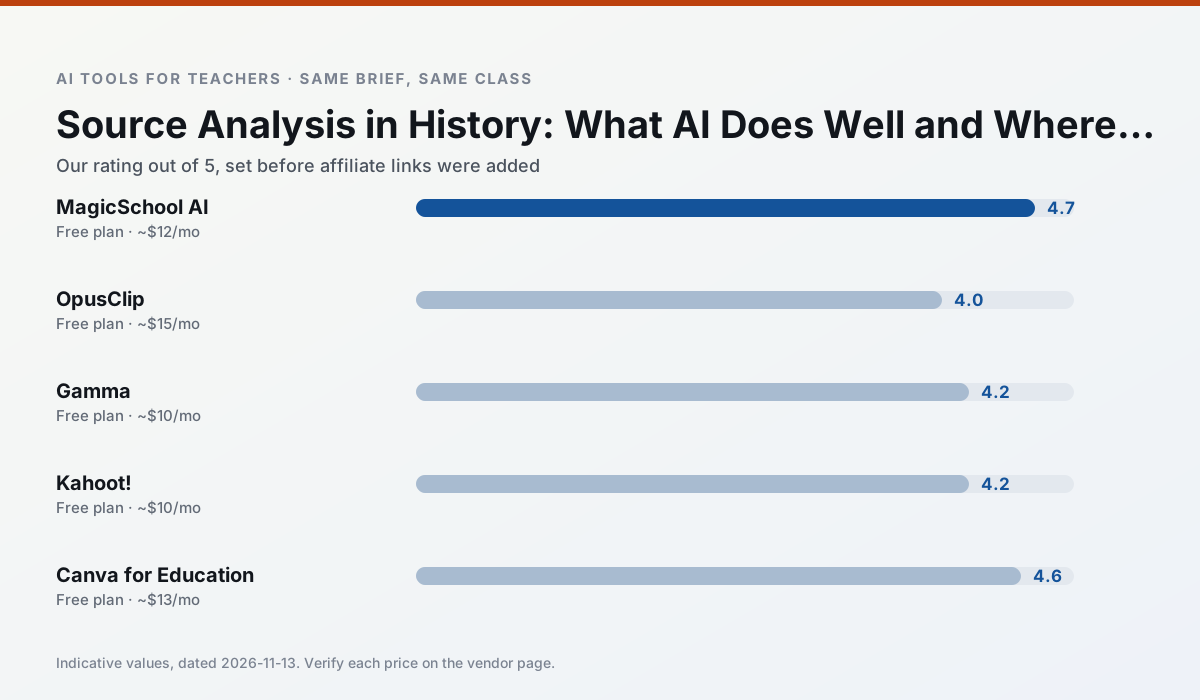
Side by side
Comparison table
Ratings reflect our timed classroom workflow, not vendor claims. Prices are indicative — verify on the vendor site.
| Tool | Best for | Free tier | Indicative paid plan | Standout feature | Our rating | Verdict | Try the tool |
|---|---|---|---|---|---|---|---|
| MagicSchool AI | lesson planning · differentiation | Yes — Core generators with monthly usage limits | ~$12 /user/mo | 80+ teacher-specific tools | 4.7 / 5 | Top pick | Try free |
| OpusClip | PD materials · flipped lessons | Yes — Limited monthly clips | ~$15 /user/mo | Auto captions | 4.0 / 5 | Situational | Try free |
| Gamma | slide decks · parent communication | Yes — Credit-limited generation | ~$10 /user/mo | Prompt-to-deck | 4.2 / 5 | Strong option | Try free |
| Kahoot! | quiz generation · review lessons | Yes — Limited player count | ~$10 /user/mo | AI question builder | 4.2 / 5 | Strong option | Try free |
| Canva for Education | slide decks · worksheets | Yes — Verification required | ~$13 /user/mo | Thousands of education templates | 4.6 / 5 | Top pick | Try free |
| QuestionWell | quiz generation · assessment | Yes — Monthly generation limit | ~$10 /user/mo | Exports to Google Forms / LMS | 4.3 / 5 | Strong option | Try free |
Match your situation
Best for X
Different jobs need different tools. Here is what we would open first in each case.
MagicSchool AI has the strongest tone control for family emails and report comments, provided you still read the message aloud before sending.
OpusClip keeps the same task across levels, which is what makes a differentiated set defensible in moderation.
Gamma is built around teacher-monitored student spaces and audit logs rather than a consumer chat account, which is a different approval conversation.
Kahoot!'s free plan is the most usable in this comparison: a quota that survives a normal week. Not enough for a department, enough for one teacher to decide.
Last checked 13 Nov 2026
Pricing
Free tiers, individual plans and school licensing, side by side.
| Tool | Free plan | Individual / paid | School & district | Billing note | Verify |
|---|---|---|---|---|---|
| MagicSchool AI | $0 — Core generators with monthly usage limits | ~$12 /user/mo | Custom quote | Indicative — verify on vendor site | Vendor |
| OpusClip | $0 — Limited monthly clips | ~$15 /user/mo | ~$29 /user/mo | Indicative — verify on vendor site | Vendor |
| Gamma | $0 — Credit-limited generation | ~$10 /user/mo | ~$20 /user/mo | Indicative — verify on vendor site | Vendor |
| Kahoot! | $0 — Limited player count | ~$10 /user/mo | Custom quote | Indicative — verify on vendor site | Vendor |
| Canva for Education | $0 — Verification required | ~$13 /user/mo | Custom quote | Indicative — verify on vendor site | Vendor |
| QuestionWell | $0 — Monthly generation limit | ~$10 /user/mo | Custom quote | Indicative — verify on vendor site | Vendor |
Editorial rule: pricing is re-checked every 2–3 months and the top 50 pages are refreshed every 6 months. See our funding policy.
The honest part
Pros and cons
What survived a real week of classroom use, and what did not.
Pros
- Widest purpose-built template library
- Strong free tier for individual teachers
- Fast to learn with almost no prompting skill
Cons
- Outputs still need standards review
- Best features sit behind the paid tier
- District approval can be slow
Pros
- Turns a recorded lesson into review clips
- Excellent captions
- Fast
Cons
- Optimised for social formats
- Not a lesson design tool
- Free plan is restrictive
Pros
- Fastest path from outline to deck
- Modern-looking output by default
- Good export options
Cons
- Design control is limited
- Credits run out quickly
- Not built for student data
Pros
- Instant engagement
- Very low training time
- Strong brand familiarity
Cons
- Less depth for higher-order assessment
- Paid tiers needed for larger classes
- Time pressure suits recall more than reasoning
Pros
- Effectively free for verified teachers
- Huge template library
- No design skills needed
Cons
- AI features are capped
- Easy to produce cluttered slides
- Account verification can be slow
In the classroom
Use cases
Five concrete workflows, with the tool we would open for each one.
An IEP present-levels first draft
Use aggregated, anonymised data only. Ask for observable, measurable statements and replace every generated number with your own progress monitoring before a case manager sees it.
Recommended: MagicSchool AIA five-minute exit ticket set
Ask for one recall, one application and one reasoning item, then delete the second recall question every generator sneaks in.
Recommended: OpusClipA question bank from a PDF or article
Feed a non-identifiable source and ask for items tagged by difficulty with the misconception behind each distractor. Spot-check every answer key; numerical items are least reliable.
Recommended: GammaA substitute folder that needs no context
The value here is structure, not creativity. Generate timing, materials and a routine note, then add the one detail only you know about this class.
Recommended: Kahoot!Three reading levels from one source text
Paste a vetted text, ask for supported, core and extension versions, then check the vocabulary list by hand. Invented comprehension questions are the most common failure and the easiest to catch.
Recommended: Canva for Education
Questions teachers ask us
FAQ
Direct answers, also published as FAQPage structured data for search and AI assistants.
Can AI do Source analysis at mixed-grade level?
Which tool is best for Source analysis?
What is the biggest risk?
Sources & further reading
Our recommendation
Try MagicSchool AI free for your next Source analysis task
A large library of teacher-specific AI generators in one dashboard. Start on the free tier, run one real history lesson, and only consider upgrading if the quota is what stops you. Disclosure: we may earn a commission (30% recurring) at no extra cost to you.
Some links on this page are affiliate links. We may earn a commission at no extra cost to you. Our rankings are editorial and never pay-to-play. Never enter student PII into a free consumer account.
Keep reading
Related comparisons in this cluster.
Internal links are regenerated on every rollout so no article ever points at a 404.