The short answer
- Claude is our default pick for teachers who need to give actionable draft feedback quickly; Brisk Teaching is better when differentiation is the bottleneck.
- Claude handles the broad case; Brisk Teaching handles the narrow one. Anything beyond that pair should be justified by a recurring weekly job, not a feature demo.
- Every AI output for feedback on student writing needs a teacher review, especially standards codes, math accuracy, and anything in an IEP, assessment or family message.
- Everything on this page dates from 2026-11-13; where a price could not be re-read, the row says so.
Start with Originality.ai on its free plan.
By November 2026, I had forty-two open tabs on my browser, a stack of seventy algebra justification paragraphs smelling faintly of stale coffee, and a deep regret for assigning a writing prompt in a math class. Math teachers do not assign writing to hear ourselves read. We assign it because if a kid cannot explain why they distributed a negative sign, they do not understand it. But reading seventy paragraphs where students attempt to describe the quadratic formula in plain English is a special kind of fatigue.
That is when I started testing AI feedback on student writing for math teachers. I wanted to know if these platforms could parse poorly typed algebraic reasoning, handle student work done on actual paper, and save me from spending my Sunday evening decoding run-on sentences about slope intercepts. The results were mixed, occasionally brilliant, and frequently frustrating.
Why Math Writing Feedback Breaks Generic Tools
Standard writing tools assume students are writing narrative essays or persuasive arguments about history. They look for thesis statements, transitions, and conclusion paragraphs. When you feed them a student explanation of why an extraneous solution appeared in a radical equation, generic parsers panic. They either tell the student their essay lacks a hook or they give up entirely.
Math teachers need tools that understand logic flow, mathematical vocabulary, and common calculation misconceptions. We also deal with a massive format problem. Half our students type their work into Google Docs, while the other half write it on lined paper with a dull pencil. If an AI feedback tool cannot handle both workflows, it lives in the graveyard of edtech subscriptions we abandon by October.
Best for Quick Setup: Claude
If you want to paste a rubric, a set of anonymous student paragraphs, and get back structured feedback without installing browser extensions or setting up institutional portals, Claude is the best for quick setup. It handles long contexts exceptionally well, which means you can drop in an entire unit plan along with your scoring rubric. The prose it generates sounds less robotic than older models.
The catch is obvious for anyone who reads a privacy policy. The consumer plan, which costs around $20 per user per month with a usage-limited free tier, is not suitable for student data. You have to scrub names and identifiers before pasting anything in. It also lacks teacher-specific templates, meaning you are writing your own prompts every single time.
Prompt: Act as a high school algebra teacher. Review this anonymized student explanation of completing the square. Check if they correctly identified the step where the constant must be halved and squared, and write two sentences of constructive feedback directly to the student in a supportive tone.
First response: The student correctly identifies the process of dividing the linear coefficient by two, but fails to mention squaring that result before adding it to both sides of the equation. Feedback to student: "Good job starting the process, but you missed a step with the constant."
Edits made:
- Instructed the model to specify the exact algebraic error rather than speaking in generalities.
- Added a constraint to frame the feedback as a guiding question instead of a direct correction.
Best Overall for Daily Use: Brisk Teaching
If your students draft their math justifications in Google Docs, Brisk Teaching changes your workflow entirely. It is a browser extension that brings AI feedback right into Docs and Slides. Because it lives where the students are typing, you do not have to copy and paste text back and forth. The learning curve is gentle, and the inline feedback is fast.
The limitations are tied to its browser-first architecture. It is a Chrome-first workflow, which means your school IT department has to approve the extension permissions before it touches student accounts. Furthermore, the free tier is extremely tight with a limited number of actions per month, pushing you toward the paid tier at roughly $10 per user per month. Because the extension reads document content directly, you must review the data processing agreement carefully to ensure compliance.
Best Free Option: Turnitin Clarity and Feedback Studio
Many high schools already license Turnitin for English departments, making Turnitin Clarity and Feedback Studio the best free option if your district has it enabled. It provides a consistent institutional workflow with detailed revision history, allowing you to see how a student's mathematical argument evolved across multiple drafts.
Individual teachers cannot buy this product on a credit card, which is its biggest barrier. It requires heavy administrative setup, and its AI detection features remain heavily contested and prone to false positives. If you use it, treat it strictly as a writing revision tool rather than a disciplinary oracle. Always verify your local configuration to ensure institutional FERPA compliance.
Best for Student-Safe Deployments: Class Companion
Most math teachers do not live in a one-to-one typing utopia. Our students do math on paper. Class Companion solves this by providing AI feedback on handwritten and scanned student work, making it the best choice for student-safe deployments where paper still rules the classroom. The comments it generates are fast and specific, with surprisingly solid math support for graphing and algebraic steps.
The software lives and dies by scan quality. If a student takes a blurry photo of their homework under dim bedroom lighting, the OCR struggles, and the AI starts flagging correct math as erroneous. It remains a narrow use case, and the feedback still requires heavy teacher review before it goes back to the student. Paid plans run around $12 per user per month after a limited free tier of assignments, and a proper DPA is required because student work is uploaded.
Where Other Tools Fit in the Math Wing
You will occasionally see other tools mentioned in teacher lounges, but they serve entirely different masters. Originality.ai is designed for publisher and admin workflows rather than classrooms. At roughly $12 per user per month with no free tier, it handles bulk scanning and content QA, but its AI detection produces false positives and should never serve as the sole evidence of academic misconduct.
Similarly, Jasper is built for school communications teams rather than instructional staff. At around $39 per user per month, it is priced for marketing departments and is massive overkill for a single math classroom. When you are trying to write a weekly family newsletter from bullet notes, Jasper's brand-voice features are unnecessary; newsletters fail on length rather than tone anyway, and a simple word limit gets you an 80% usable draft anywhere.
When regrouping students after a mid-unit assessment, or building a quick five-minute exit ticket set where you ask for one recall and one application item, you do not need enterprise marketing software. You just need a tool that respects your time and keeps student privacy intact. For a deeper look at how these workflows compare to other subjects, check out our guide on AI essay feedback for history teachers, or review our broader recommendations in the best AI tools for teachers.
FAQ
Can AI do feedback on student writing at mixed-grade level?
It can produce a first draft and a structure. The level judgement, the standards check and the tone are teacher decisions.
Which tool is best for feedback on student writing?
Claude on the evidence in this article, with Brisk Teaching as the second opinion. Neither replaces the review step.
What is the biggest risk?
A confident, plausible output that nobody checked. The five checks below exist for that reason.
Sources
- Anthropic. Claude Product and Pricing Overview.
- Brisk Teaching. Extension Features and Privacy Documentation.
- Turnitin. Clarity and Feedback Studio Institutional Guides.
- Class Companion. Handwritten Work Processing and Pricing Details.
- Originality.ai. Plagiarism and Detection Feature Specifications.
- Jasper. Communications Platform Pricing and Scope.
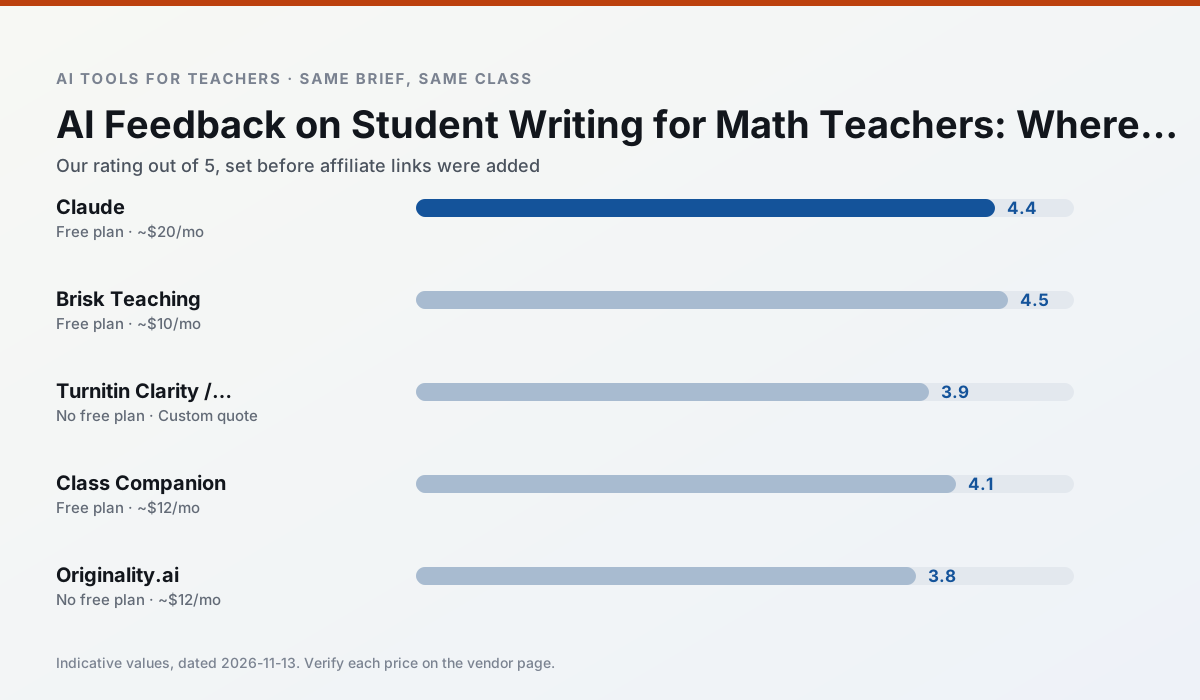
Side by side
Comparison table
Ratings reflect our timed classroom workflow, not vendor claims. Prices are indicative — verify on the vendor site.
| Tool | Best for | Free tier | Indicative paid plan | Standout feature | Our rating | Verdict | Try the tool |
|---|---|---|---|---|---|---|---|
| Claude | rubric creation · feedback on writing | Yes — Usage-limited | ~$20 /user/mo | Very large context window | 4.4 / 5 | Strong option | Try free |
| Brisk Teaching | feedback on writing · grading | Yes — Limited actions per month | ~$10 /user/mo | Works inside Google Docs | 4.5 / 5 | Top pick | Try free |
| Turnitin Clarity / Feedback Studio | feedback on writing · academic integrity | No ongoing free plan | Custom quote | Similarity reports | 3.9 / 5 | Situational | Try free |
| Class Companion | grading · feedback on writing | Yes — Limited assignments | ~$12 /user/mo | Handwriting recognition | 4.1 / 5 | Situational | Try free |
| Originality.ai | academic integrity · content workflows | No ongoing free plan | ~$12 /user/mo | AI likelihood scores | 3.8 / 5 | Situational | Try free |
| Jasper | newsletters · parent communication | No ongoing free plan | ~$39 /user/mo | Brand voice profiles | 3.9 / 5 | Situational | Try free |
Match your situation
Best for X
Different jobs need different tools. Here is what we would open first in each case.
Claude has the shortest path from opening a tab to a usable draft, which matters more than the feature count on a Monday.
On the daily cycle, Brisk Teaching saves the most edit time per task; the paid tier mostly buys more runs rather than better ones.
Nothing on Turnitin Clarity / Feedback Studio's free tier is a teaser demo; the limits are documented and a normal week fits inside them.
Class Companion is the student-facing option here with boundaries a teacher can actually set and supervise.
Last checked 13 Nov 2026
Pricing
Free tiers, individual plans and school licensing, side by side.
| Tool | Free plan | Individual / paid | School & district | Billing note | Verify |
|---|---|---|---|---|---|
| Claude | $0 — Usage-limited | ~$20 /user/mo | ~$25+ /user/mo | Indicative — verify on vendor site | Vendor |
| Brisk Teaching | $0 — Limited actions per month | ~$10 /user/mo | Custom quote | Indicative — verify on vendor site | Vendor |
| Turnitin Clarity / Feedback Studio | No ongoing free tier | Custom quote | Custom quote | LMS-wide deployment | Vendor |
| Class Companion | $0 — Limited assignments | ~$12 /user/mo | Custom quote | Indicative — verify on vendor site | Vendor |
| Originality.ai | No ongoing free tier | ~$12 /user/mo | Custom quote | Indicative — verify on vendor site | Vendor |
| Jasper | No ongoing free tier | ~$39 /user/mo | ~$59+ /user/mo | Indicative — verify on vendor site | Vendor |
Editorial rule: pricing is re-checked every 2–3 months and the top 50 pages are refreshed every 6 months. See our funding policy.
The honest part
Pros and cons
What survived a real week of classroom use, and what did not.
Pros
- Handles full unit plans and long rubrics
- Nuanced, less generic prose
- Good at structured document output
Cons
- No teacher-specific templates
- Fewer classroom integrations
- Consumer plan not suitable for student data
Pros
- No copy-paste between tools
- Fast inline feedback on student drafts
- Gentle learning curve
Cons
- Chrome-first workflow
- Extension permissions need IT approval
- Free quota is tight
Pros
- Already licensed at many schools
- Consistent institutional workflow
- Detailed revision history
Cons
- Individual teachers cannot buy it
- AI detection remains contested
- Heavy administrative setup
Pros
- Useful where work is done on paper
- Fast, specific comments
- Good math support
Cons
- Scan quality affects accuracy
- Narrow use case
- Feedback still needs teacher review
Pros
- Useful for content publishing QA
- Fast bulk scanning
- Transparent credit model
Cons
- AI detection produces false positives
- Should never be sole evidence of misconduct
- Not a teaching tool
In the classroom
Use cases
Five concrete workflows, with the tool we would open for each one.
A weekly family newsletter from bullet notes
Newsletters fail on length, not tone. Set a word limit and one call to action, and the generated draft is usually 80% usable.
Recommended: ClaudeRegrouping students after an assessment
Summarise anonymised results into skill groups, then generate one activity per group. Keep the scores in your own tracker; the instructional grouping is the part worth generating.
Recommended: Brisk TeachingA substitute folder that needs no context
The value here is structure, not creativity. Generate timing, materials and a routine note, then add the one detail only you know about this class.
Recommended: Turnitin Clarity / Feedback StudioA question bank from a PDF or article
Feed a non-identifiable source and ask for items tagged by difficulty with the misconception behind each distractor. Spot-check every answer key; numerical items are least reliable.
Recommended: Class CompanionA five-minute exit ticket set
Ask for one recall, one application and one reasoning item, then delete the second recall question every generator sneaks in.
Recommended: Originality.ai
Questions teachers ask us
FAQ
Direct answers, also published as FAQPage structured data for search and AI assistants.
Can AI do feedback on student writing at mixed-grade level?
Which tool is best for feedback on student writing?
What is the biggest risk?
Sources & further reading
Our recommendation
Try Originality.ai free for your next feedback on student writing task
AI-detection and plagiarism scanning for publisher and admin workflows. Start on the free tier, run one real math lesson, and only consider upgrading if the quota is what stops you. Disclosure: we may earn a commission (25% recurring) at no extra cost to you.
Some links on this page are affiliate links. We may earn a commission at no extra cost to you. Our rankings are editorial and never pay-to-play. Never enter student PII into a free consumer account.
Keep reading
Related comparisons in this cluster.
Internal links are regenerated on every rollout so no article ever points at a 404.