The short answer
- Quizizz is our default pick for teachers who need to build a balanced question set quickly; Kahoot! is better when differentiation is the bottleneck.
- Quizizz handles the broad case; Kahoot! handles the narrow one. Anything beyond that pair should be justified by a recurring weekly job, not a feature demo.
- Every AI output for quiz generation needs a teacher review, especially standards codes, ELA accuracy, and anything in an IEP, assessment or family message.
- Trial one tool for a week of real quiz generation work before any purchase conversation; the quota is the honest test.
Start with MagicSchool AI on its free plan.
It was a Tuesday afternoon in October when I realized my eighth-grade ELA classes were drowning in recall questions. I was holding thirty copies of a reading comprehension check on The Tell-Tale Heart, and every single item asked who narrated the story or what time the police officers arrived. None of it tested whether students understood unreliable narration or pacing. Building a better question set from scratch would take forty minutes I did not have, which is why I finally caved and started testing AI quiz generation for ela teachers to see if machines could handle the cognitive heavy lifting.
The reality of using these tools in an English classroom is messy. AI is brilliant at generating surface-level plot checks in seconds, but it treats literary analysis like a trivia game. If you want conceptual depth, you have to steer the generation process with deliberate constraints. That friction is why teachers need a realistic map of what works, what breaks, and where the human still has to step in.
Best for daily use: QuestionWell
If your main bottleneck is writing standards-aligned question banks, QuestionWell is the strongest overall tool for daily use. You paste a non-identifiable source text or a specific learning objective, and the tool outputs a batch of multiple-choice items tagged by standard. It saves the most time on question writing, particularly when you need to spin up a quick check after introducing a new short story.
The catch is that QuestionWell is a single-purpose tool, and question quality varies wildly depending on the complexity of your source text. If you feed it a dense piece of historical context, the distractors it generates can be wildly obvious. You still have to spend five minutes vetting the output before pushing it to your learning management system.
Prompt: Generate five multiple-choice questions based on the attached excerpt from Narrative of the Life of Frederick Douglass. Include one recall, two application, and two reasoning items. Tag each question with a common student misconception for every incorrect distractor.
AI Output: Produced five items with clear tags, but included two overlapping recall questions and one distractor that was practically a second correct answer.
Teacher Edits:
- Deleted the redundant recall question entirely.
- Rewrote the tricky distractor so it targeted the actual student misunderstanding about tone rather than vocabulary.
Best for quick setup: Kahoot!
When you need high energy and instant engagement before a unit test, Kahoot! remains the default choice. Teachers love it because the training time is practically zero and students already know the interface inside and out. The AI-assisted question generation feature lets you pull together a review lesson from a pasted topic in minutes.
The downside is that the platform's time pressure heavily favors rapid recall over deep reasoning. It is a fantastic tool for vocabulary retention or grammar rules, but trying to force students to analyze metaphor under a twenty-second countdown is an exercise in frustration. Furthermore, the free tier limits player counts, and you will need to remind younger students to use safe nicknames instead of real names for privacy. For more on structuring quick assessments, read our guide on AI exit tickets for ELA teachers.
Best for schools and districts: Quizizz
Quizizz occupies a similar space to Kahoot! but excels in reporting and low-end device compatibility, making it our pick for schools and districts. Students can work at their own pace or compete in live games, and the platform integrates smoothly with existing district rosters.
The student familiarity with Quizizz is a massive asset when you have a substitute teacher and need a low-friction assignment. However, writing high-quality AI questions through their generator still requires rigorous human review. The gamification elements can also distract students who rush through reading passages just to climb the leaderboard. Advanced analytics and deeper reporting features are locked behind paid tiers, which run around $15 per user monthly on an indicative basis.
Best free option: Brisk Teaching
If you refuse to add another separate tab to your browser, Brisk Teaching handles AI quiz generation and feedback directly inside Google Docs and Slides. Because it operates as a Chrome extension, there is no tedious copy-pasting between separate generator sites and your instructional materials.
The free tier offers a limited number of actions per month, which works well if you only use it for weekly checks. The learning curve is gentle, but the extension requires IT approval because it reads document content directly. Always review your district's data privacy agreement and scope before installing extension-based tools. If you are exploring broader AI integrations, our overview of the best AI tools for teachers 2026 highlights how browser-based workflows compare to standalone apps.
Other tools in the mix: Khanmigo and Curipod
Khanmigo brings a nonprofit, education-first design to the table, acting more like a tutor than a simple quiz maker. It provides strong scaffolding, though its utility for English teachers leans heavily toward writing feedback and Socratic questioning rather than rapid quiz assembly. It requires student accounts to unlock its full value, and availability varies by region.
On the interactive side, Curipod turns a simple topic into a live presentation with embedded student-response slides in minutes. It is exceptional for quick checks for understanding because it does not require student accounts for basic use. The limitation is that Curipod focuses entirely on lesson delivery rather than deep offline planning, and your classroom needs reliable devices for every student to make the interactive prompts worthwhile.
When AI quiz generation fails
Every teacher eventually trusts an AI generator too much, and the results are rarely pretty. Last term, I generated a reading check on poetry structure and pushed it straight to a quiz tool without reading the answer key. Halfway through the period, three students raised their hands to point out that the generator had marked two different options as correct. Numerical and structural items are notoriously unreliable when generated by basic models, often because the underlying logic treats poetry as a math puzzle.
Another common failure happens when you try to generate a five-minute exit ticket set. The AI almost always sneaks in a second recall question disguised as an application item. My fix is simple: I explicitly ask for one recall, one application, and one reasoning item in the prompt, and then I automatically delete whatever extra recall question sneaks past the filter.
Quiz generation tools save hours of formatting and brainstorming, but they are sous-chefs, not head chefs. Keep your hand on the editorial steering wheel, and your assessments will actually measure what matters.
FAQ
Can AI do quiz generation at mixed-grade level?
It can produce a first draft and a structure. The level judgement, the standards check and the tone are teacher decisions.
Which tool is best for quiz generation?
Quizizz on the evidence in this article, with Kahoot! as the second opinion. Neither replaces the review step.
What is the biggest risk?
A confident, plausible output that nobody checked. The five checks below exist for that reason.
Sources
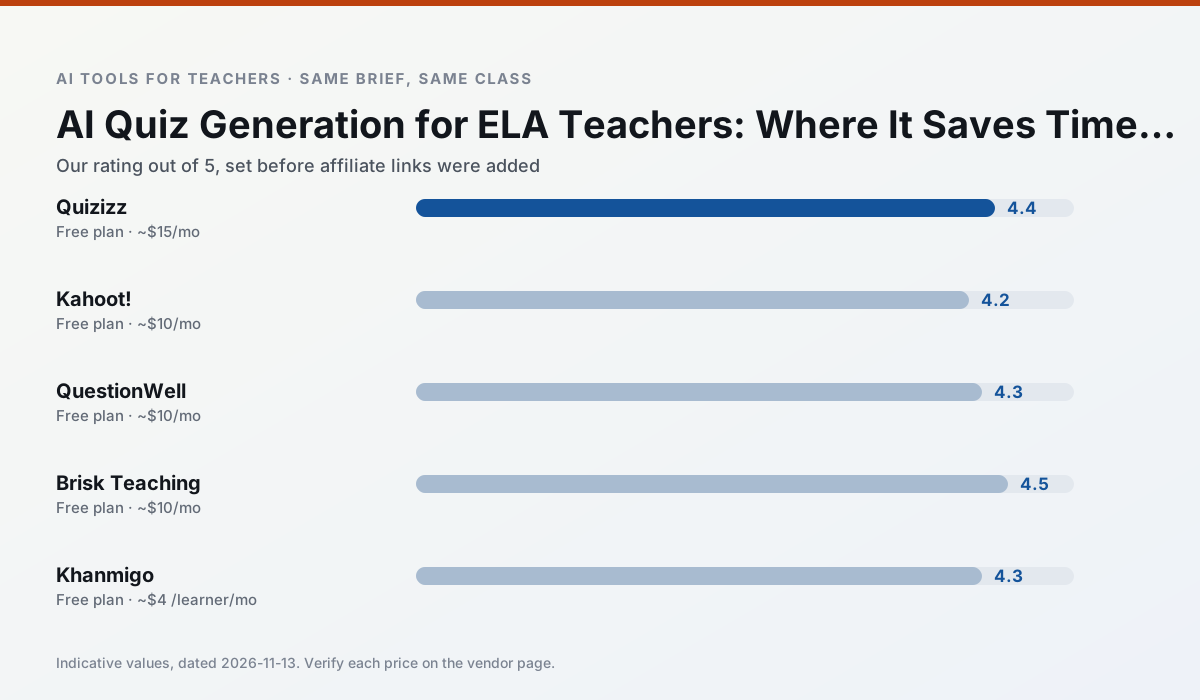
Side by side
Comparison table
Ratings reflect our timed classroom workflow, not vendor claims. Prices are indicative — verify on the vendor site.
| Tool | Best for | Free tier | Indicative paid plan | Standout feature | Our rating | Verdict | Try the tool |
|---|---|---|---|---|---|---|---|
| Quizizz | quiz generation · formative assessment | Yes — Core quiz creation | ~$15 /user/mo | AI question generator | 4.4 / 5 | Strong option | Try free |
| Kahoot! | quiz generation · review lessons | Yes — Limited player count | ~$10 /user/mo | AI question builder | 4.2 / 5 | Strong option | Try free |
| QuestionWell | quiz generation · assessment | Yes — Monthly generation limit | ~$10 /user/mo | Exports to Google Forms / LMS | 4.3 / 5 | Strong option | Try free |
| Brisk Teaching | feedback on writing · grading | Yes — Limited actions per month | ~$10 /user/mo | Works inside Google Docs | 4.5 / 5 | Top pick | Try free |
| Khanmigo | math practice · student tutoring | Yes — US teacher accounts, subject to eligibility | ~$4 /learner/mo | Socratic tutoring rather than answers | 4.3 / 5 | Strong option | Try free |
| Curipod | formative assessment · exit tickets | Yes — Limited lessons per month | ~$12 /user/mo | Live polls and word clouds | 4.4 / 5 | Strong option | Try free |
Match your situation
Best for X
Different jobs need different tools. Here is what we would open first in each case.
For a school rollout, Quizizz offers the paperwork and the admin console; the classroom features are standard by comparison.
Kahoot! runs in a browser tab with no extension, no student accounts and no onboarding call, so you can test it in a free period.
QuestionWell is the one we would open on a normal planning day because the first output is editable rather than restructurable, and the free plan covers a single teacher's routine.
Nothing on Brisk Teaching's free tier is a teaser demo; the limits are documented and a normal week fits inside them.
Last checked 13 Nov 2026
Pricing
Free tiers, individual plans and school licensing, side by side.
| Tool | Free plan | Individual / paid | School & district | Billing note | Verify |
|---|---|---|---|---|---|
| Quizizz | $0 — Core quiz creation | ~$15 /user/mo | Custom quote | Indicative — verify on vendor site | Vendor |
| Kahoot! | $0 — Limited player count | ~$10 /user/mo | Custom quote | Indicative — verify on vendor site | Vendor |
| QuestionWell | $0 — Monthly generation limit | ~$10 /user/mo | Custom quote | Indicative — verify on vendor site | Vendor |
| Brisk Teaching | $0 — Limited actions per month | ~$10 /user/mo | Custom quote | Indicative — verify on vendor site | Vendor |
| Khanmigo | $0 — US teacher accounts, subject to eligibility | ~$4 /learner/mo | Custom quote | Indicative — verify on vendor site | Vendor |
| Curipod | $0 — Limited lessons per month | ~$12 /user/mo | Custom quote | Indicative — verify on vendor site | Vendor |
Editorial rule: pricing is re-checked every 2–3 months and the top 50 pages are refreshed every 6 months. See our funding policy.
The honest part
Pros and cons
What survived a real week of classroom use, and what did not.
Pros
- Students already know the interface
- Good reporting
- Works on low-end devices
Cons
- Writing high-quality AI questions still needs review
- Gamification can distract
- Advanced analytics are paid
Pros
- Instant engagement
- Very low training time
- Strong brand familiarity
Cons
- Less depth for higher-order assessment
- Paid tiers needed for larger classes
- Time pressure suits recall more than reasoning
Pros
- Saves the most time on question writing
- Clean export workflow
- Good objective tagging
Cons
- Single-purpose tool
- Question quality varies by source text
- Limited student-facing features
Pros
- No copy-paste between tools
- Fast inline feedback on student drafts
- Gentle learning curve
Cons
- Chrome-first workflow
- Extension permissions need IT approval
- Free quota is tight
Pros
- Education-first design
- Strong nonprofit trust signal
- Good math scaffolding
Cons
- Availability varies by region
- Less useful for admin paperwork
- Requires student accounts for full value
In the classroom
Use cases
Five concrete workflows, with the tool we would open for each one.
A substitute folder that needs no context
The value here is structure, not creativity. Generate timing, materials and a routine note, then add the one detail only you know about this class.
Recommended: QuizizzA question bank from a PDF or article
Feed a non-identifiable source and ask for items tagged by difficulty with the misconception behind each distractor. Spot-check every answer key; numerical items are least reliable.
Recommended: Kahoot!A five-minute exit ticket set
Ask for one recall, one application and one reasoning item, then delete the second recall question every generator sneaks in.
Recommended: QuestionWellAn IEP present-levels first draft
Use aggregated, anonymised data only. Ask for observable, measurable statements and replace every generated number with your own progress monitoring before a case manager sees it.
Recommended: Brisk TeachingA weekly family newsletter from bullet notes
Newsletters fail on length, not tone. Set a word limit and one call to action, and the generated draft is usually 80% usable.
Recommended: Khanmigo
Questions teachers ask us
FAQ
Direct answers, also published as FAQPage structured data for search and AI assistants.
Can AI do quiz generation at mixed-grade level?
Which tool is best for quiz generation?
What is the biggest risk?
Sources & further reading
Our recommendation
Try MagicSchool AI free for your next quiz generation task
A large library of teacher-specific AI generators in one dashboard. Start on the free tier, run one real ELA lesson, and only consider upgrading if the quota is what stops you. Disclosure: we may earn a commission (30% recurring) at no extra cost to you.
Some links on this page are affiliate links. We may earn a commission at no extra cost to you. Our rankings are editorial and never pay-to-play. Never enter student PII into a free consumer account.
Keep reading
Related comparisons in this cluster.
Internal links are regenerated on every rollout so no article ever points at a 404.