The short answer
- MagicSchool AI is our default pick for teachers who need to draft a standards-aware lesson plan quickly; Eduaide.Ai is better when differentiation is the bottleneck.
- Start with MagicSchool AI on its free plan, keep Eduaide.Ai as the second opinion, and do not open a card until the quota, not the feature list, is what stops you.
- Every AI output for lesson planning needs a teacher review, especially standards codes, Health accuracy, and anything in an IEP, assessment or family message.
- Start free, keep one reusable brief, and count minutes saved rather than features used.
Start with MagicSchool AI on its free plan.
Thirty-four ninth graders are staring at you while you try to explain how stress impacts the cardiovascular system using a textbook printed in 2012. You need a better way to teach it, but your planning period was eaten by an IEP meeting and a parent phone call. This is usually when teachers turn to tools meant to speed up the workflow. AI lesson planning for health teachers is supposed to fix this crunch, but health education has specific landmines that generic software misses. If a machine hallucinates a historical date in a social studies plan, a student might lose a point on a quiz. If a machine hallucinates nutritional data or anatomy facts during a unit on public health, kids leave the room with bad science.
The Reality of Health Lesson Planning With AI
When you are building a curriculum that touches on substance use, mental health, and human development, generic tools will not cut it. You need platforms that understand pedagogy without drowning you in administrative fluff. MagicSchool AI has become a staple for many educators because its purpose-built template library saves time on formatting. At around $12 per user per month for the paid tier alongside a workable free option, it provides a safe sandbox for generating standard-aligned activities. Eduaide.Ai offers a similarly low entry price at around $10 per user per month with a daily generation cap, and its clean interface makes it particularly strong for parent-facing writing and resource curation. If you need maximum flexibility for mixed-ability classes, ChatGPT remains the most adaptable option at about $20 per user per month, though it demands sharper prompting skills and has no built-in standards alignment. For visual explainers, Fliki handles text-to-video conversions at roughly $21 per user per month, while ElevenLabs provides natural voiceovers for about $5 per user per month to support accessibility. Meanwhile, Canva for Education remains effectively free for verified teachers, offering a massive template library alongside integrated design and writing tools. When used carefully, these systems change how you build units, but they require a steady editorial hand.
Building Question Banks and Differentiated Content
One of the most reliable uses for these platforms is turning dense source material into leveled practice. When you feed a non-identifiable health article or PDF into an assistant like ChatGPT, you can ask for items tagged by difficulty, complete with the misconception behind each distractor. This approach works well for checking reading comprehension on complex topics like public health policy or hormonal changes. However, you must spot-check every single answer key. Numerical items, such as statistics on chronic illness or dietary guidelines, are the least reliable and frequently require manual correction.
Prompt: Act as a high school health teacher. Read this article on sleep hygiene and generate five multiple-choice questions for ninth-grade students. Tag each by difficulty (easy, medium, hard) and include the specific student misconception behind each wrong distractor.
First draft received: Five questions with clear tags and plausible distractors, though two questions relied on outdated adolescent sleep science numbers.
Edit one: Replaced the generalized sleep duration statistics with current guidelines from the American Academy of Pediatrics.
Edit two: Rewrote one distractor that was too obviously incorrect so it genuinely tested a common student myth about weekend catch-up sleep.
Crafting Substitute Plans and Exit Tickets
Substitute folders are notoriously tedious to assemble, especially when you are out unexpectedly. The trick with AI-generated sub plans is using them for structure rather than creativity. You ask the tool for timing, material lists, and a predictable classroom routine, and then you add the one unhinged detail only you know about third-period behavior. For daily checks for understanding, a five-minute exit ticket set can be spun up quickly. You ask for one recall item, one application item, and one reasoning item, and then you delete the second recall question that every single generator sneaks in out of habit.
This workflow keeps your assessment data sharp without demanding a complete redesign of your class routine. If you want to dive deeper into how quick assessments work across different subjects, take a look at our guide on ai-exit-tickets-for-ela-teachers-guide. You can also explore broader strategies in the main best-ai-tools-for-teachers-2026 overview.
Two Things That Went Wrong in Real Use
Even with solid prompts, these systems will occasionally trip you up. Here is what happened in a real classroom and how it was fixed.
First, during a unit on nutrition, a popular generator produced a glowing lesson plan that categorized certain fad diets as medically sound for teenagers. Because the output looked clean and professional, it nearly made it into the printed student packet before a closer read caught the dangerous nutritional advice. The fix was establishing a strict rule: any lesson plan touching human physiology or nutrition must be cross-referenced with established public health guidelines before it touches a printer.
Second, an attempt to use an AI voice generator to create accessible audio versions of health articles resulted in a pronunciation disaster when the software mangled complex medical terminology and anatomical names. Instead of sounding helpful, the audio track became a distraction that led to giggling across the room. The fix involved switching to a platform with manual phonetic spelling controls and listening to the full audio file at double speed before assigning it to students who needed accommodations.
Writing for Parents and Managing Privacy
Communicating with families about sensitive health topics requires a delicate touch. You can use Eduaide.Ai or MagicSchool AI to draft plain, warm parent emails in multiple languages, but you must keep specific student incidents completely out of the prompt. Draft the general update without names, translate the text, and then back-translate the important sentences to check meaning. When dealing with formal paperwork, such as IEP present-levels first drafts, you must use aggregated and anonymized data only. Ask the model for observable, measurable statements, but replace every generated number with your own exact progress monitoring before a case manager or parent ever lays eyes on the document. AI is a useful assistant for the blank-page panic, but the final judgment on what is safe, accurate, and ethical in a health classroom rests entirely with you.
FAQ
Can AI do lesson planning at mixed-grade level?
It can produce a first draft and a structure. The level judgement, the standards check and the tone are teacher decisions.
Which tool is best for lesson planning?
MagicSchool AI on the evidence in this article, with Eduaide.Ai as the second opinion. Neither replaces the review step.
What is the biggest risk?
A confident, plausible output that nobody checked. The five checks below exist for that reason.
Sources
- MagicSchool AI. (2026). Feature Overview and Educator Toolsets. Retrieved from https://www.magicschool.ai
- Eduaide.Ai. (2026). Resource Generator and Pedagogical Assistant Documentation. Retrieved from https://www.eduaide.ai
- OpenAI. (2026). ChatGPT Education and Privacy Guidelines. Retrieved from https://openai.com
- Fliki. (2026). Text-to-Video and Voiceover Capabilities. Retrieved from https://fliki.ai
- ElevenLabs. (2026). Voice Generation and Text-to-Speech Specifications. Retrieved from https://elevenlabs.io
- Canva. (2026). Canva for Education Safety and Design Features. Retrieved from https://www.canva.com/education
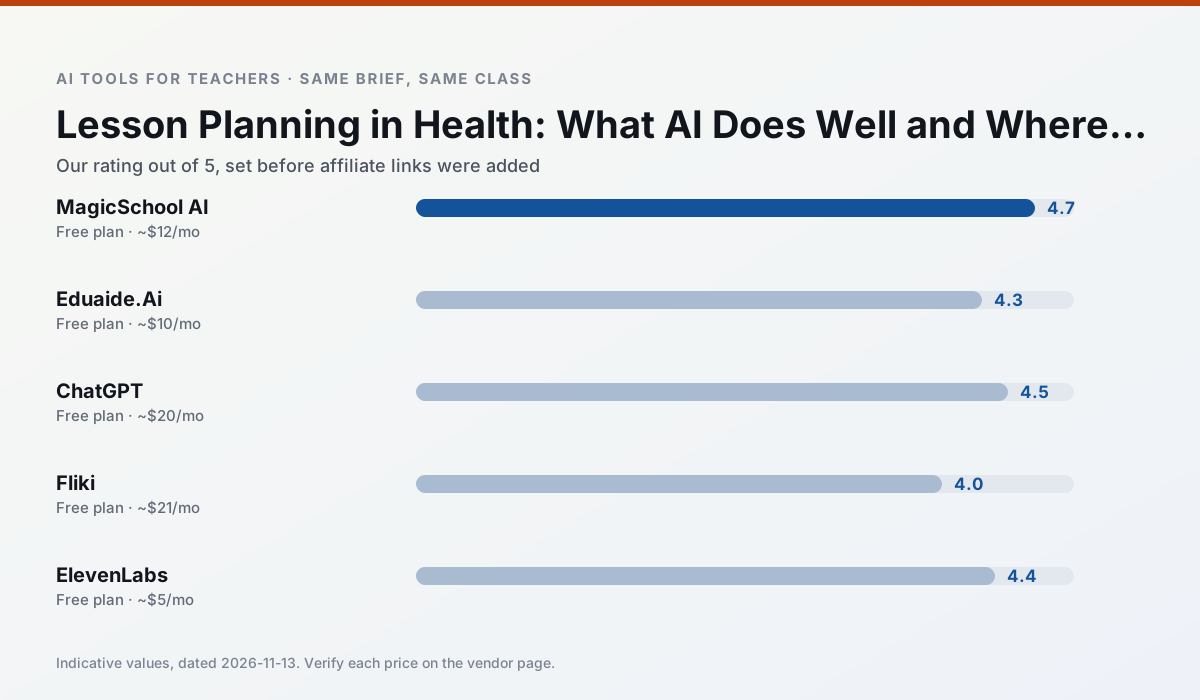
Side by side
Comparison table
Ratings reflect our timed classroom workflow, not vendor claims. Prices are indicative — verify on the vendor site.
| Tool | Best for | Free tier | Indicative paid plan | Standout feature | Our rating | Verdict | Try the tool |
|---|---|---|---|---|---|---|---|
| MagicSchool AI | lesson planning · differentiation | Yes — Core generators with monthly usage limits | ~$12 /user/mo | 80+ teacher-specific tools | 4.7 / 5 | Top pick | Try free |
| Eduaide.Ai | lesson planning · rubric creation | Yes — Daily generation cap | ~$10 /user/mo | Resource library | 4.3 / 5 | Strong option | Try free |
| ChatGPT | lesson planning · parent communication | Yes — Usage-limited model access | ~$20 /user/mo | Custom GPTs and Projects | 4.5 / 5 | Top pick | Try free |
| Fliki | video lessons · audio lessons | Yes — Watermarked, limited minutes | ~$21 /user/mo | Blog/text to video | 4.0 / 5 | Situational | Try free |
| ElevenLabs | accessibility · reading intervention | Yes — Monthly character quota | ~$5 /user/mo | Very natural voices | 4.4 / 5 | Strong option | Try free |
| Canva for Education | slide decks · worksheets | Yes — Verification required | ~$13 /user/mo | Thousands of education templates | 4.6 / 5 | Top pick | Try free |
Match your situation
Best for X
Different jobs need different tools. Here is what we would open first in each case.
For anything students touch directly, MagicSchool AI offers the supervision controls and logging that IT will ask about first.
Eduaide.Ai is the steadiest of this set at plain, respectful language; names and specific incidents still belong in your draft, not the prompt.
ChatGPT keeps the same task across levels, which is what makes a differentiated set defensible in moderation.
Fliki has the shortest path from opening a tab to a usable draft, which matters more than the feature count on a Monday.
Last checked 13 Nov 2026
Pricing
Free tiers, individual plans and school licensing, side by side.
| Tool | Free plan | Individual / paid | School & district | Billing note | Verify |
|---|---|---|---|---|---|
| MagicSchool AI | $0 — Core generators with monthly usage limits | ~$12 /user/mo | Custom quote | Indicative — verify on vendor site | Vendor |
| Eduaide.Ai | $0 — Daily generation cap | ~$10 /user/mo | Custom quote | Indicative — verify on vendor site | Vendor |
| ChatGPT | $0 — Usage-limited model access | ~$20 /user/mo | ~$25+ /user/mo | Indicative — verify on vendor site | Vendor |
| Fliki | $0 — Watermarked, limited minutes | ~$21 /user/mo | ~$66 /user/mo | Indicative — verify on vendor site | Vendor |
| ElevenLabs | $0 — Monthly character quota | ~$5 /user/mo | ~$22 /user/mo | Indicative — verify on vendor site | Vendor |
| Canva for Education | $0 — Verification required | ~$13 /user/mo | Custom quote | Indicative — verify on vendor site | Vendor |
Editorial rule: pricing is re-checked every 2–3 months and the top 50 pages are refreshed every 6 months. See our funding policy.
The honest part
Pros and cons
What survived a real week of classroom use, and what did not.
Pros
- Widest purpose-built template library
- Strong free tier for individual teachers
- Fast to learn with almost no prompting skill
Cons
- Outputs still need standards review
- Best features sit behind the paid tier
- District approval can be slow
Pros
- Very low entry price
- Good worksheet and rubric output
- Clean, uncluttered UI
Cons
- Smaller template set than MagicSchool
- Less polished export options
- Limited integrations
Pros
- Most flexible option available
- Huge community of teacher prompt libraries
- Strong multilingual support
Cons
- Requires prompt skills for consistent results
- No built-in standards alignment
- District privacy review usually required
Pros
- No avatar needed
- Good for explainer visuals
- Simple editor
Cons
- Minute-based limits
- Output can look generic
- Price jumps between tiers
Pros
- Excellent for accessible audio versions
- Low entry price
- Fast generation
Cons
- Quota-based billing
- Voice cloning consent considerations
- Not a teaching platform
In the classroom
Use cases
Five concrete workflows, with the tool we would open for each one.
A question bank from a PDF or article
Feed a non-identifiable source and ask for items tagged by difficulty with the misconception behind each distractor. Spot-check every answer key; numerical items are least reliable.
Recommended: MagicSchool AIA substitute folder that needs no context
The value here is structure, not creativity. Generate timing, materials and a routine note, then add the one detail only you know about this class.
Recommended: Eduaide.AiAn IEP present-levels first draft
Use aggregated, anonymised data only. Ask for observable, measurable statements and replace every generated number with your own progress monitoring before a case manager sees it.
Recommended: ChatGPTA five-minute exit ticket set
Ask for one recall, one application and one reasoning item, then delete the second recall question every generator sneaks in.
Recommended: FlikiA parent email in two languages
Draft in plain, warm language with no names, translate, then back-translate the important sentences to check meaning. Keep specific incidents out of the prompt and add them yourself.
Recommended: ElevenLabs
Questions teachers ask us
FAQ
Direct answers, also published as FAQPage structured data for search and AI assistants.
Can AI do lesson planning at mixed-grade level?
Which tool is best for lesson planning?
What is the biggest risk?
Sources & further reading
Our recommendation
Try MagicSchool AI free for your next lesson planning task
A large library of teacher-specific AI generators in one dashboard. Start on the free tier, run one real Health lesson, and only consider upgrading if the quota is what stops you. Disclosure: we may earn a commission (30% recurring) at no extra cost to you.
Some links on this page are affiliate links. We may earn a commission at no extra cost to you. Our rankings are editorial and never pay-to-play. Never enter student PII into a free consumer account.
Keep reading
Related comparisons in this cluster.
Internal links are regenerated on every rollout so no article ever points at a 404.