The short answer
- Eduaide.Ai is our default pick for teachers who need to write criterion-referenced rubrics quickly; Claude is better when differentiation is the bottleneck.
- Free-tier reality for this shortlist: Eduaide.Ai: Yes — Daily generation cap; Claude: Yes — Usage-limited; Gradescope: Yes — Limited courses. Treat every paid figure as indicative until you have read the vendor page; only the free quota is something you can test yourself this week.
- Every AI output for rubric creation needs a teacher review, especially standards codes, music accuracy, and anything in an IEP, assessment or family message.
- Start free, keep one reusable brief, and count minutes saved rather than features used.
Start with Synthesia on its free plan.
At 4:15 PM on a Tuesday, I was staring at thirty jazz ensemble self-assessments and realizing my rubric was completely useless. I had written "demonstrates good swing feel" on the board, which meant absolutely nothing to a freshman trumpet player who just wanted to know why they got a C. Translating subjective musicality into objective criteria is the hardest part of our jobs, and general-purpose lesson generators usually suggest things like "uses appropriate tone quality" without defining what that actually sounds like in room 214. If you teach music, you need tools that understand the difference between intonation, blend, phrasing, and stylistic execution. We have tested six different platforms to see which ones actually help build a useful music rubric and which ones just waste your planning period. For a broader look at classroom tech, check our guide on AI tools for teachers 2026.
The Reality of Scoring Artistry
Music teachers live in the gray area between measurable technique and artistic expression. When you ask an AI to build a rubric for a high school choir performance, it defaults to corporate education speak. It will suggest categories like "engagement" or "effort," which have no business being on a music assessment. You are grading pitch accuracy, rhythmic precision, vowel modification, and stage deportment. To get a usable rubric, you have to feed the system precise parameters about your ensemble level and specific repertoire. If you want to see how domain-specific prompts change the output, take a look at our breakdown of AI essay feedback for history teachers.
Eduaide.Ai for Structured Layouts
Eduaide.Ai is my top pick when I need parent-facing writing and clean, uncluttered rubric tables without a steep learning curve. The free tier has a daily generation cap, while the paid plan runs around $10 per user per month. Its teaching-resource library is stacked with well-formatted templates.
Prompt: Create a four-level rubric for a high school wind ensemble concert performance focusing on intonation, rhythmic accuracy, dynamic contrast, and stage etiquette. Use descriptive, non-judgmental language for each level from novice to advanced.
Output: A clean four-column table with performance descriptors. The intonation category was surprisingly specific about cents-sharp tendencies, but dynamic contrast was far too generic, using phrases like "plays loudly and softly."
Edits:
- Replaced the vague dynamic contrast descriptor with specific references to our concert piece's sub-piano and fortissimo sections.
- Adjusted the formatting to match our school's standard 100-point grading scale rather than the 4-point scale the AI generated.
The template set is smaller than what you get with MagicSchool, and export options are a bit basic, but it gets a rubric onto your screen faster than almost anything else. Confirm your data retention settings if you are putting any student details into the system, though for pure rubric generation, you do not need student names anyway.
Claude for Nuanced Ensemble Rubrics
Claude handles long-context planning better than almost any other model on the market. It is priced around $20 per user per month for the consumer plan, with a usage-limited free tier. When I dropped our entire state festival adjudication sheet into Claude and asked it to break down a subset for our mid-year concert band assessment, the prose was remarkably human.
The downside is that Claude has no teacher-specific templates. You are staring at a blank chat window, which can feel intimidating if you just want a quick form. It also lacks classroom integrations. You must use an approved workspace tier if your district requires strict data privacy compliance, as the consumer plan is not suitable for student data. Yet, if you teach mixed-ability classes where your rubric needs to scaffold for both beginners and section leaders simultaneously, Claude's long-context reasoning is unmatched.
Gradescope for Paper Assessments
Gradescope is the heavy artillery of assessment. It is built for AI-assisted rubric grading on scanned and handwritten worksheets, making it the best option for student-safe deployments in large programs. Pricing is custom quote only, and it has a limited free tier for courses.
If you teach three sections of 70-student concert bands and you are trying to grade written theory finals or composition portfolios on paper, Gradescope saves an immense amount of time. It applies your rubric consistently across hundreds of submissions and generates detailed item analytics so you can see that your entire second-period trumpet section missed the question about secondary dominants. The catch is that setup effort is real, pricing is opaque, and it is absolute overkill for an elementary general music classroom. Because it handles actual student work, a full Data Privacy Agreement and FERPA review are mandatory before you upload anything.
Canva for Education and Visual Layouts
Canva for Education is effectively free for verified teachers, with a paid tier around $13 per user per month for extended features. While it is primarily a design suite, its AI writing and image features make it the best free option when you need to turn a dry rubric into an anchor chart or a handout that students will actually read.
The massive template library means your rubric does not have to look like a boring spreadsheet. You can drag your generated text straight into a polished graphic organizer that fits right on a music stand. Account verification can occasionally be slow, and it is very easy to accidentally make your slides look cluttered if you lean too hard on the design elements. Remember that the education tier has specific student data terms, so read them carefully before uploading class lists.
Synthesia and Gamma for Teacher Content
Synthesia turns a script into a presenter-led video with AI avatars, priced around $29 per user per month with no free ongoing tier. It is brilliant if you need to record a video demonstrating how a rubric works for parents who missed back-to-school night, but the cost is hard to justify for a single teacher, and avatar video can easily feel impersonal to teenagers. Do not use student likenesses with this tool under any circumstances.
Gamma generates presentation decks and documents from a single prompt for about $10 per user per month, with a credit-limited free generation tier. It is the fastest path from a bulleted outline to a slide deck explaining your jazz improvisation rubric to an ensemble. Design control is limited, and credits run out fast, but it is a reliable content tool as long as you treat it as a design assistant rather than a data repository.
What Went Wrong in Real Use
Using these tools in a real music department taught me where the guardrails need to be. First, when I used an AI generator to build a theory question bank from a PDF of our textbook, the numerical items on transposition were completely wrong. The AI hallucinated interval distances on half the answer key, meaning I had to hand-check every single question before printing. Second, when I tried to use Gamma to generate a quick presentation on vocal health rubrics, the credits vanished halfway through a slide deck because I kept asking it to refine the fonts, leaving me to finish the layout manually five minutes before rehearsal started.
AI is a drafting partner, not a department chair. Let it handle the formatting and the initial vocabulary brainstorming, but keep your hands firmly on the musical standards.
FAQ
Can AI do rubric creation at mixed-grade level?
It can produce a first draft and a structure. The level judgement, the standards check and the tone are teacher decisions.
Which tool is best for rubric creation?
Eduaide.Ai on the evidence in this article, with Claude as the second opinion. Neither replaces the review step.
What is the biggest risk?
A confident, plausible output that nobody checked. The five checks below exist for that reason.
Sources
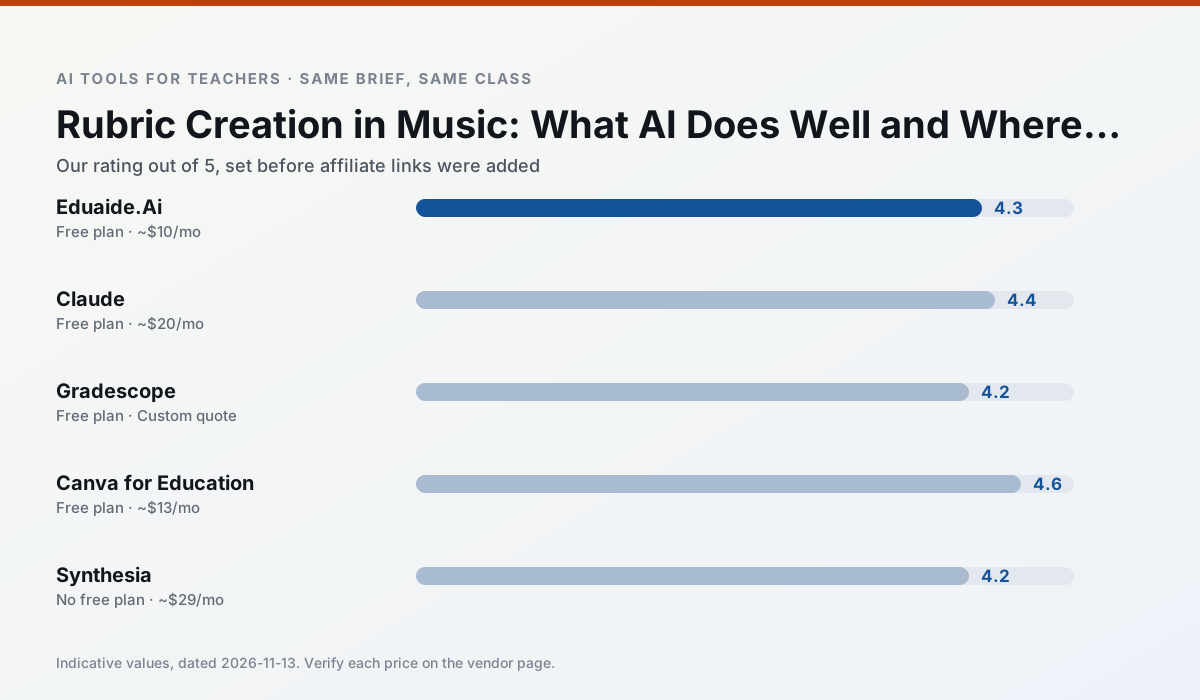
Side by side
Comparison table
Ratings reflect our timed classroom workflow, not vendor claims. Prices are indicative — verify on the vendor site.
| Tool | Best for | Free tier | Indicative paid plan | Standout feature | Our rating | Verdict | Try the tool |
|---|---|---|---|---|---|---|---|
| Eduaide.Ai | lesson planning · rubric creation | Yes — Daily generation cap | ~$10 /user/mo | Resource library | 4.3 / 5 | Strong option | Try free |
| Claude | rubric creation · feedback on writing | Yes — Usage-limited | ~$20 /user/mo | Very large context window | 4.4 / 5 | Strong option | Try free |
| Gradescope | grading · rubric creation | Yes — Limited courses | Custom quote | Bubble sheet and handwriting capture | 4.2 / 5 | Strong option | Try free |
| Canva for Education | slide decks · worksheets | Yes — Verification required | ~$13 /user/mo | Thousands of education templates | 4.6 / 5 | Top pick | Try free |
| Synthesia | flipped lessons · video lessons | No ongoing free plan | ~$29 /user/mo | 140+ languages | 4.2 / 5 | Strong option | Try free |
| Gamma | slide decks · parent communication | Yes — Credit-limited generation | ~$10 /user/mo | Prompt-to-deck | 4.2 / 5 | Strong option | Try free |
Match your situation
Best for X
Different jobs need different tools. Here is what we would open first in each case.
Eduaide.Ai has the strongest tone control for family emails and report comments, provided you still read the message aloud before sending.
For three reading groups and one text, Claude needs the least manual relabelling of vocabulary and questions.
Gradescope is the student-facing option here with boundaries a teacher can actually set and supervise.
If there is no budget, start with Canva for Education: free plan with clearest quota is the least punishing free tier here.
Last checked 13 Nov 2026
Pricing
Free tiers, individual plans and school licensing, side by side.
| Tool | Free plan | Individual / paid | School & district | Billing note | Verify |
|---|---|---|---|---|---|
| Eduaide.Ai | $0 — Daily generation cap | ~$10 /user/mo | Custom quote | Indicative — verify on vendor site | Vendor |
| Claude | $0 — Usage-limited | ~$20 /user/mo | ~$25+ /user/mo | Indicative — verify on vendor site | Vendor |
| Gradescope | $0 — Limited courses | Custom quote | Custom quote | LMS integration and support | Vendor |
| Canva for Education | $0 — Verification required | ~$13 /user/mo | Custom quote | Indicative — verify on vendor site | Vendor |
| Synthesia | No ongoing free tier | ~$29 /user/mo | Custom quote | Indicative — verify on vendor site | Vendor |
| Gamma | $0 — Credit-limited generation | ~$10 /user/mo | ~$20 /user/mo | Indicative — verify on vendor site | Vendor |
Editorial rule: pricing is re-checked every 2–3 months and the top 50 pages are refreshed every 6 months. See our funding policy.
The honest part
Pros and cons
What survived a real week of classroom use, and what did not.
Pros
- Very low entry price
- Good worksheet and rubric output
- Clean, uncluttered UI
Cons
- Smaller template set than MagicSchool
- Less polished export options
- Limited integrations
Pros
- Handles full unit plans and long rubrics
- Nuanced, less generic prose
- Good at structured document output
Cons
- No teacher-specific templates
- Fewer classroom integrations
- Consumer plan not suitable for student data
Pros
- Large time savings on paper assessments
- Consistent rubric application
- Detailed item analytics
Cons
- Overkill for elementary classrooms
- Institutional pricing is opaque
- Setup effort is real
Pros
- Effectively free for verified teachers
- Huge template library
- No design skills needed
Cons
- AI features are capped
- Easy to produce cluttered slides
- Account verification can be slow
Pros
- No camera or editing skills required
- Excellent multilingual voice output
- Easy updates to existing videos
Cons
- Cost is hard to justify for a single teacher
- Avatar video can feel impersonal
- No free ongoing tier
In the classroom
Use cases
Five concrete workflows, with the tool we would open for each one.
Regrouping students after an assessment
Summarise anonymised results into skill groups, then generate one activity per group. Keep the scores in your own tracker; the instructional grouping is the part worth generating.
Recommended: Eduaide.AiA weekly family newsletter from bullet notes
Newsletters fail on length, not tone. Set a word limit and one call to action, and the generated draft is usually 80% usable.
Recommended: ClaudeAn IEP present-levels first draft
Use aggregated, anonymised data only. Ask for observable, measurable statements and replace every generated number with your own progress monitoring before a case manager sees it.
Recommended: GradescopeA five-minute exit ticket set
Ask for one recall, one application and one reasoning item, then delete the second recall question every generator sneaks in.
Recommended: Canva for EducationA question bank from a PDF or article
Feed a non-identifiable source and ask for items tagged by difficulty with the misconception behind each distractor. Spot-check every answer key; numerical items are least reliable.
Recommended: Synthesia
Questions teachers ask us
FAQ
Direct answers, also published as FAQPage structured data for search and AI assistants.
Can AI do rubric creation at mixed-grade level?
Which tool is best for rubric creation?
What is the biggest risk?
Sources & further reading
Our recommendation
Try Synthesia free for your next rubric creation task
Turn a script into a presenter-led video with AI avatars. Start on the free tier, run one real music lesson, and only consider upgrading if the quota is what stops you. Disclosure: we may earn a commission (25% recurring) at no extra cost to you.
Some links on this page are affiliate links. We may earn a commission at no extra cost to you. Our rankings are editorial and never pay-to-play. Never enter student PII into a free consumer account.
Keep reading
Related comparisons in this cluster.
Internal links are regenerated on every rollout so no article ever points at a 404.