The short answer
- Eduaide.Ai is our default pick for teachers who need to write criterion-referenced rubrics quickly; Claude is better when differentiation is the bottleneck.
- Pricing is where these pages date fastest. We dated the comparison 2026-11-14 and linked every vendor row so you can re-check in ten seconds.
- Every AI output for rubric creation needs a teacher review, especially standards codes, ELA accuracy, and anything in an IEP, assessment or family message.
- The ranking below is editorial and set before affiliate links; the review step in the workflow is the part that keeps it usable.
Start with Writesonic on its free plan.
By the fourth period on a Tuesday in November, writing four distinct analytic rubrics for an argumentative essay unit feels like an administrative punishment. You need separate scales for evidence, reasoning, counterclaims, and MLA citation mechanics, and you need them to sound like an English teacher wrote them, not a generic algorithm. If you are looking at how AI rubric creation for ela teachers actually holds up in a real classroom, the short answer is that it saves hours on the initial drafting phase, but it will hallucinate grade-level expectations if you do not feed it your exact standards.
Using generative tools for grading criteria requires a specific workflow. You cannot simply type "make an essay rubric" and expect a masterpiece. The results are usually too vague to use for actual grading, offering useless descriptors like "shows some understanding." To get anything usable, you have to constrain the model with your state standards, your specific anchor texts, and a clear breakdown of what failure looks like alongside what excellence looks like.
Finding the right tool for ELA standards
When testing different platforms for building English rubrics, the feature sets vary wildly. Eduaide.Ai is our top pick for student-safe deployments, offering a clean, uncluttered UI with a dedicated lesson, rubric, and worksheet generation library. Its free tier comes with a daily generation cap, while paid plans run around $10 per user per month. It is straightforward and keeps you from wading through endless menus, though its export options are less polished than some enterprise alternatives.
If you need something to parse long-context documents like entire novel units or extensive departmental writing guides, Claude handles long-form text exceptionally well. At roughly $20 per user per month for the paid tier, with a usage-limited free tier, it produces nuanced prose that avoids the robotic tone of cheaper writing assistants. However, it lacks teacher-specific templates, and consumer plans are never suitable for handling student data. You must use an approved workspace tier for any school-related documents.
For budget-conscious educators who just want standard templates, Writesonic sits around $16 per user per month with a limited free trial. It ranks as our choice for quick setup because of its sheer volume of templates and low friction to start. The catch is that its output is often generic, and the credit system can feel overly complicated when you are trying to spin up a quick rubric between classes. It is not purpose-built for education, which shows in the vocabulary it generates.
When you are managing large cohorts of paper assessments and need consistent rubric application across multiple sections, Gradescope changes the workflow entirely. It uses AI-assisted rubric grading for scanned and handwritten work, offering detailed item analytics and massive time savings on paper assessments. It is ranked as our best option for mixed-ability classes, though institutional pricing is opaque, setup effort is real, and it is definite overkill for elementary classrooms. Because it handles actual student work, a full DPA and FERPA review is mandatory before implementation.
Prompt: Create a 4-point analytic rubric for a 9th-grade literary analysis essay focusing on textual evidence and commentary. Include rows for Claim, Evidence, Commentary, and Conventions.
First return: A generic grid with descriptors like "student uses good quotes" and "student explains well."
Edit 1: Added constraints: "Replace vague words with active verbs and specific middle-school writing benchmarks, requiring at least two embedded quotes per body paragraph."
Edit 2: Inserted a negative constraint: "Do not include percentage weights for individual rows; keep point values raw on a 16-point total scale."
Where automated rubric generation breaks down
AI-generated rubrics fail most often when applied to creative or voice-driven writing. If you ask an assistant to grade personal narratives or poetry, it tends to standardize the artistic choices right out of the student work. It rewards safe, formulaic structures because that is what training data prioritizes. Teachers using these tools for ELA need to consciously inject criteria for voice, risk-taking, and structural subversion into their prompts, otherwise every student essay will read like a five-paragraph clone.
Another recurring issue is grade inflation built right into the prompt responses. Default AI rubrics are pathologically kind. They treat a lack of capitalization as a minor stylistic choice rather than a foundational error, unless you explicitly tell the system to penalize mechanics harshly. When testing Writesonic and Eduaide.Ai for grammar-heavy writing assessments, the initial outputs routinely placed baseline competency at a passing C-grade, even when the student text lacked a clear thesis statement.
Managing long-term curriculum records
If you want to store and iterate on your rubrics year after year alongside your lesson plans and reading lists, Notion AI provides a flexible workspace for about $10 per user per month, with limited AI usage on the free tier. It excels at team collaboration and long-term curriculum records, making it easy to link your rubrics directly to your assignment handouts and anchor texts. The setup time is significant, and the AI add-on pricing has shifted multiple times, but it beats hunting through local folders for last year's files. For broader writing tasks outside the classroom, Grammarly handles high-stakes parent emails, newsletters, and reports for roughly $12 per user per month, catching tone errors before they hit your inbox. Just make sure to disable text collection on school devices and check your district's data privacy agreement.
For a deeper dive into how writing instruction tools compare across subjects, take a look at our comprehensive guide on the best AI tools for teachers, or explore our specific breakdown of AI essay feedback for history teachers. Rubric generation is only the first step in the grading cycle, and pairing your rubrics with targeted formative assessments will keep your workload sustainable.
What went wrong in real use
Two distinct failures happened during a three-week trial of AI rubric workflows. First, a rubric generated for a comparative poetry essay included a row for "correct use of MLA citation," completely ignoring the fact that the assignment specifically required Chicago style formatting. The prompt had omitted the citation style due to a hasty copy-paste, and the model defaulted to the most common internet baseline. The fix was establishing a personal prompt template that forces style selection before any generation begins.
Second, an attempt to use a consumer-tier chat interface to organize student performance data against a newly generated rubric resulted in a privacy violation warning from district IT. Even though names were stripped, the combination of specific reading scores and demographic notes triggered automated flags. Moving forward, all student data stays entirely out of consumer models, using AI strictly for the structural creation of blank rubrics and instructional frameworks, never for processing actual student performance metrics. Read more about ethical deployment strategies in our guide on AI exit tickets for ELA teachers.
FAQ
Can AI do rubric creation at mixed-grade level?
It can produce a first draft and a structure. The level judgement, the standards check and the tone are teacher decisions.
Which tool is best for rubric creation?
Eduaide.Ai on the evidence in this article, with Claude as the second opinion. Neither replaces the review step.
What is the biggest risk?
A confident, plausible output that nobody checked. The five checks below exist for that reason.
Sources
- Eduaide.Ai features and tier structures via Eduaide.Ai Pricing
- Claude capabilities and workspace notes via Anthropic Pricing & Enterprise Privacy
- Gradescope assessment workflows via Gradescope Product Overview
- Writesonic generation limits via Writesonic Plans
- Notion AI workspace tools via Notion Pricing
- Grammarly writing assistant data via Grammarly Edu Privacy
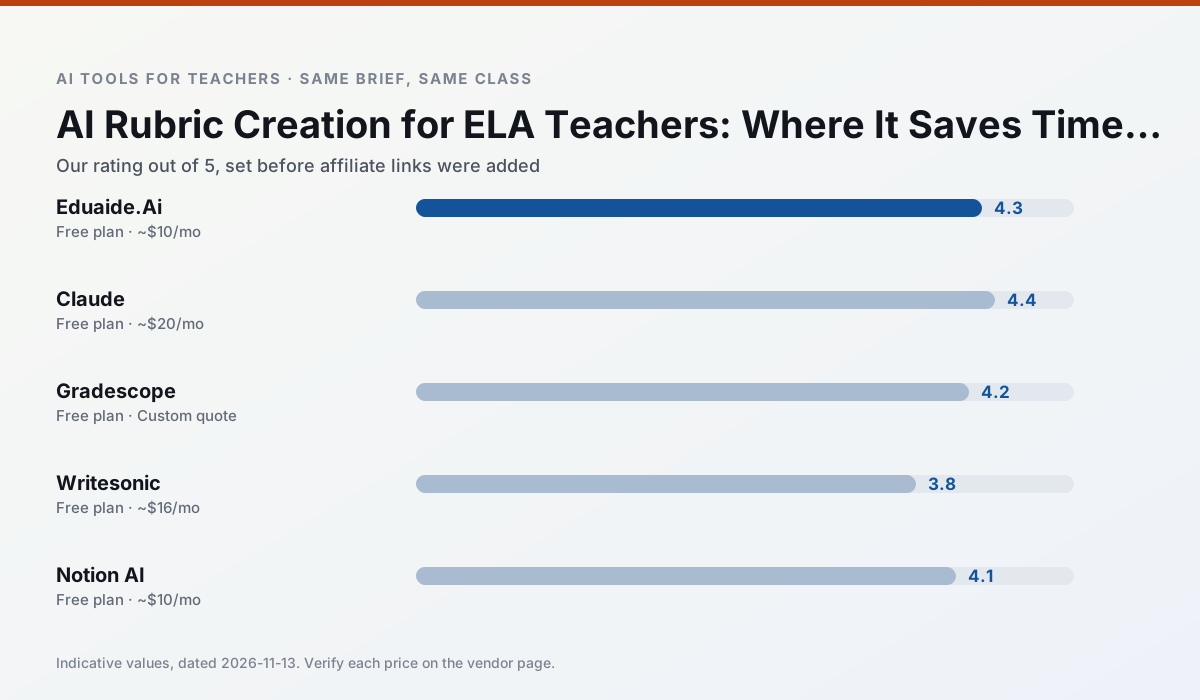
Side by side
Comparison table
Ratings reflect our timed classroom workflow, not vendor claims. Prices are indicative — verify on the vendor site.
| Tool | Best for | Free tier | Indicative paid plan | Standout feature | Our rating | Verdict | Try the tool |
|---|---|---|---|---|---|---|---|
| Eduaide.Ai | lesson planning · rubric creation | Yes — Daily generation cap | ~$10 /user/mo | Resource library | 4.3 / 5 | Strong option | Try free |
| Claude | rubric creation · feedback on writing | Yes — Usage-limited | ~$20 /user/mo | Very large context window | 4.4 / 5 | Strong option | Try free |
| Gradescope | grading · rubric creation | Yes — Limited courses | Custom quote | Bubble sheet and handwriting capture | 4.2 / 5 | Strong option | Try free |
| Writesonic | newsletters · parent communication | Yes — Limited credits | ~$16 /user/mo | Article and email generators | 3.8 / 5 | Situational | Try free |
| Notion AI | curriculum mapping · unit planning | Yes — Limited AI usage | ~$10 /user/mo | Linked databases | 4.1 / 5 | Situational | Try free |
| Grammarly | parent communication · report card comments | Yes — Core grammar and tone checks | ~$12 /user/mo | Tone adjustments | 4.3 / 5 | Strong option | Try free |
Match your situation
Best for X
Different jobs need different tools. Here is what we would open first in each case.
Eduaide.Ai is built around teacher-monitored student spaces and audit logs rather than a consumer chat account, which is a different approval conversation.
Family-facing drafts from Claude need the fewest rewrites for warmth without overpromising, which is the usual failure mode.
For three reading groups and one text, Gradescope needs the least manual relabelling of vocabulary and questions.
Writesonic runs in a browser tab with no extension, no student accounts and no onboarding call, so you can test it in a free period.
Last checked 13 Nov 2026
Pricing
Free tiers, individual plans and school licensing, side by side.
| Tool | Free plan | Individual / paid | School & district | Billing note | Verify |
|---|---|---|---|---|---|
| Eduaide.Ai | $0 — Daily generation cap | ~$10 /user/mo | Custom quote | Indicative — verify on vendor site | Vendor |
| Claude | $0 — Usage-limited | ~$20 /user/mo | ~$25+ /user/mo | Indicative — verify on vendor site | Vendor |
| Gradescope | $0 — Limited courses | Custom quote | Custom quote | LMS integration and support | Vendor |
| Writesonic | $0 — Limited credits | ~$16 /user/mo | ~$49 /user/mo | Indicative — verify on vendor site | Vendor |
| Notion AI | $0 — Limited AI usage | ~$10 /user/mo | ~$8 /user/mo | Indicative — verify on vendor site | Vendor |
| Grammarly | $0 — Core grammar and tone checks | ~$12 /user/mo | ~$15 /user/mo | Indicative — billed annually | Vendor |
Editorial rule: pricing is re-checked every 2–3 months and the top 50 pages are refreshed every 6 months. See our funding policy.
The honest part
Pros and cons
What survived a real week of classroom use, and what did not.
Pros
- Very low entry price
- Good worksheet and rubric output
- Clean, uncluttered UI
Cons
- Smaller template set than MagicSchool
- Less polished export options
- Limited integrations
Pros
- Handles full unit plans and long rubrics
- Nuanced, less generic prose
- Good at structured document output
Cons
- No teacher-specific templates
- Fewer classroom integrations
- Consumer plan not suitable for student data
Pros
- Large time savings on paper assessments
- Consistent rubric application
- Detailed item analytics
Cons
- Overkill for elementary classrooms
- Institutional pricing is opaque
- Setup effort is real
Pros
- Cheaper than enterprise writing suites
- Many templates
- Reasonable free trial
Cons
- Generic classroom output
- Credit system is confusing
- Limited education context
Pros
- Great for long-term curriculum records
- Strong team collaboration
- Flexible structure
Cons
- Setup time is significant
- AI add-on pricing changed more than once
- Not purpose-built for lesson generation
In the classroom
Use cases
Five concrete workflows, with the tool we would open for each one.
Regrouping students after an assessment
Summarise anonymised results into skill groups, then generate one activity per group. Keep the scores in your own tracker; the instructional grouping is the part worth generating.
Recommended: Eduaide.AiA weekly family newsletter from bullet notes
Newsletters fail on length, not tone. Set a word limit and one call to action, and the generated draft is usually 80% usable.
Recommended: ClaudeA question bank from a PDF or article
Feed a non-identifiable source and ask for items tagged by difficulty with the misconception behind each distractor. Spot-check every answer key; numerical items are least reliable.
Recommended: GradescopeA substitute folder that needs no context
The value here is structure, not creativity. Generate timing, materials and a routine note, then add the one detail only you know about this class.
Recommended: WritesonicAn IEP present-levels first draft
Use aggregated, anonymised data only. Ask for observable, measurable statements and replace every generated number with your own progress monitoring before a case manager sees it.
Recommended: Notion AI
Questions teachers ask us
FAQ
Direct answers, also published as FAQPage structured data for search and AI assistants.
Can AI do rubric creation at mixed-grade level?
Which tool is best for rubric creation?
What is the biggest risk?
Sources & further reading
Our recommendation
Try Writesonic free for your next rubric creation task
Budget-friendly AI writing and content generation. Start on the free tier, run one real ELA lesson, and only consider upgrading if the quota is what stops you. Disclosure: we may earn a commission (varies) at no extra cost to you.
Some links on this page are affiliate links. We may earn a commission at no extra cost to you. Our rankings are editorial and never pay-to-play. Never enter student PII into a free consumer account.
Keep reading
Related comparisons in this cluster.
Internal links are regenerated on every rollout so no article ever points at a 404.