The short answer
- MagicSchool AI is our default pick for teachers who need to draft a standards-aware lesson plan quickly; Eduaide.Ai is better when differentiation is the bottleneck.
- Pricing is where these pages date fastest. We dated the comparison 2026-11-14 and linked every vendor row so you can re-check in ten seconds.
- Every AI output for lesson planning needs a teacher review, especially standards codes, social studies accuracy, and anything in an IEP, assessment or family message.
- Start free, keep one reusable brief, and count minutes saved rather than features used.
Start with MagicSchool AI on its free plan.
Last October, I spent three hours trying to build a document-based question set on the Industrial Revolution. By midnight, I had four generic multiple-choice questions, a primary source that was far too dense for my ninth-graders, and a splitting headache. When I finally started using AI lesson planning for social studies teachers, I did not find a robotic teaching assistant that magically solved curriculum design. Instead, I found a decent digital intern that needs a very firm hand.
If you teach history, government, or economics, your planning challenges are specific. You deal with sensitive primary sources, complex state standards, and the endless demand for reading scaffolding. General writing assistants fall short here unless you know how to prompt them. This guide looks at how six common tools actually perform in a humanities classroom as of November 2026, breaking down where they genuinely save time and where they fail flat.
The Reality of Standards and Source Material
Social studies instruction relies heavily on context, perspective, and source analysis. When you feed a complex historical text into a tool like QuestionWell, it can spin out a set of multiple-choice items and tag them by difficulty in seconds. This is a massive time-saver compared to writing distractors from scratch. The catch is that you must spot-check every single answer key. The AI will occasionally miss historical nuance or build a distractor that is technically true but irrelevant to the core question.
When working with non-identifiable source texts, QuestionWell remains a go-to for standard question generation, costing around $10 per month on its paid tier with a monthly free limit. If you need broader resource libraries, Eduaide.Ai offers solid worksheets and rubrics for roughly $10 per user per month, and its clean interface makes it particularly useful for parent-facing writing tasks. Both require you to bring the pedagogical judgment. The software supplies the scaffolding, but you supply the historical accuracy.
Scaffolding Reading and Writing Across Abilities
Differentiation in a mixed-ability history class is exhausting. You might have three reading levels in a single room during a unit on the Civil Rights Movement. ChatGPT, running on its free tier or a paid plan around $20 per user per month, remains the most flexible option for adapting a single primary source into multiple Lexile levels. It handles multilingual requests smoothly, making it ideal if you need to draft a parent email in two languages. Always draft in plain, warm language without names, translate it, and then check the tone yourself.
For teachers who live inside Google Docs or Slides, Brisk Teaching operates as a browser extension priced around $10 per user per month. It brings AI feedback directly into student documents without the tedious copy-pasting between tabs. The limitation is its tight free quota and the fact that your district IT department must approve extension permissions. If your school has strict data privacy policies, always check the vendor's data handling stance before installing extensions that read active browser tabs.
Building Low-Prep Review and Exit Tickets
Sometimes you do not need a deep pedagogical overhaul; you just need a five-minute exit ticket set before the bell rings. When prompting an AI for these, ask specifically for one recall item, one application item, and one reasoning item. Generators love to sneak in a second recall question, so be prepared to delete it.
For active review, Kahoot! brings instant engagement with an AI-assisted question generator. At roughly $10 per user per month for paid tiers alongside a free option with limited player capacity, it requires almost zero training time.
Prompt: "Create a 4-question exit ticket on the causes of the American Revolution. Include one recall question, one application question, and two reasoning questions that require students to evaluate primary source motives."
What came back: The tool provided four solid questions, but both reasoning prompts used nearly identical phrasing about taxation, and it included an unrequested fifth true-or-false question.
Two edits that made it usable: I deleted the extra true-or-false item and rewrote the second reasoning prompt to focus on Loyalist versus Patriot perspectives rather than repeating the tax theme.
Where the Tools Fall Short
Every teacher who tries AI lesson planning for social studies teachers eventually hits a wall with administrative paperwork. Writing IEP present-levels first drafts is a high-stakes task where generic AI fails completely. If you use aggregated, anonymised data with a structured dashboard like MagicSchool AI—which costs roughly $12 per user per month and offers the widest purpose-built template library—you can generate observable, measurable statements. However, you must replace every generated number with your own hard data before a case manager sees the document.
MagicSchool AI is also our top pick for student-safe deployments because of its robust controls and straightforward interface, though its best features sit behind the paywall. Similarly, building a substitute folder that needs no context can save your morning when you wake up sick. The trick is to generate the timing, materials, and routine notes using a structured template, then manually add the one specific behavioral detail only you know about third period.
To explore how these workflows connect to other humanities tasks, read our guide on AI essay feedback for history teachers. If you are looking for broader software comparisons, our roundup of the best AI tools for teachers provides a complete ecosystem overview. AI will not teach your students, and it will not write a flawless curriculum. But when used as a blunt instrument to break through the blank-page panic, it can buy you back your weekends.
FAQ
Can AI do lesson planning at mixed-grade level?
It can produce a first draft and a structure. The level judgement, the standards check and the tone are teacher decisions.
Which tool is best for lesson planning?
MagicSchool AI on the evidence in this article, with Eduaide.Ai as the second opinion. Neither replaces the review step.
What is the biggest risk?
A confident, plausible output that nobody checked. The five checks below exist for that reason.
Sources
- MagicSchool AI. Vendor pricing, feature sets, and privacy documentation. https://www.magicschool.ai
- Eduaide.Ai. Platform features, generation caps, and resource library details. https://www.eduaide.ai
- OpenAI. ChatGPT tier structures, model capabilities, and privacy guidelines. https://openai.com
- Kahoot!. Quiz generation features, player limits, and pricing tiers. https://kahoot.com
- QuestionWell. Question generation mechanics, export workflows, and objective tagging. https://www.questionwell.ai
- Brisk Teaching. Browser extension permissions, inline feedback features, and pricing models. https://briskteaching.com
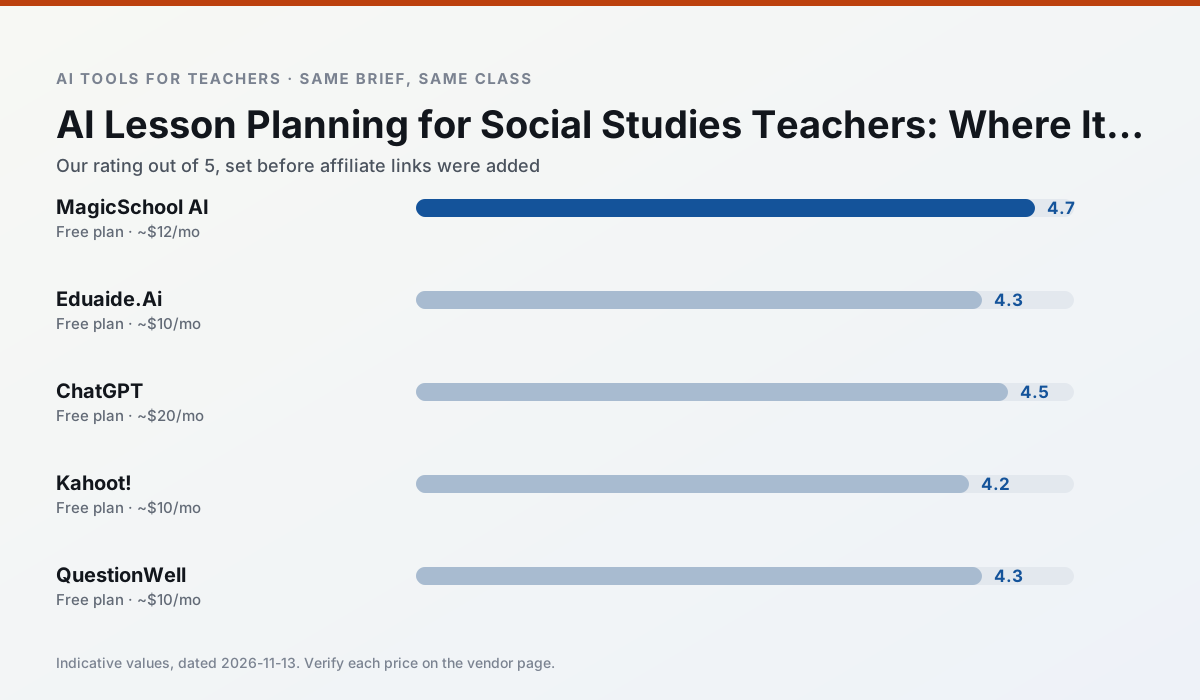
Side by side
Comparison table
Ratings reflect our timed classroom workflow, not vendor claims. Prices are indicative — verify on the vendor site.
| Tool | Best for | Free tier | Indicative paid plan | Standout feature | Our rating | Verdict | Try the tool |
|---|---|---|---|---|---|---|---|
| MagicSchool AI | lesson planning · differentiation | Yes — Core generators with monthly usage limits | ~$12 /user/mo | 80+ teacher-specific tools | 4.7 / 5 | Top pick | Try free |
| Eduaide.Ai | lesson planning · rubric creation | Yes — Daily generation cap | ~$10 /user/mo | Resource library | 4.3 / 5 | Strong option | Try free |
| ChatGPT | lesson planning · parent communication | Yes — Usage-limited model access | ~$20 /user/mo | Custom GPTs and Projects | 4.5 / 5 | Top pick | Try free |
| Kahoot! | quiz generation · review lessons | Yes — Limited player count | ~$10 /user/mo | AI question builder | 4.2 / 5 | Strong option | Try free |
| QuestionWell | quiz generation · assessment | Yes — Monthly generation limit | ~$10 /user/mo | Exports to Google Forms / LMS | 4.3 / 5 | Strong option | Try free |
| Brisk Teaching | feedback on writing · grading | Yes — Limited actions per month | ~$10 /user/mo | Works inside Google Docs | 4.5 / 5 | Top pick | Try free |
Match your situation
Best for X
Different jobs need different tools. Here is what we would open first in each case.
For anything students touch directly, MagicSchool AI offers the supervision controls and logging that IT will ask about first.
Family-facing drafts from Eduaide.Ai need the fewest rewrites for warmth without overpromising, which is the usual failure mode.
ChatGPT produces levelled versions from one source in a single pass, which is the highest-value differentiation shortcut we tested at this level.
Kahoot! runs in a browser tab with no extension, no student accounts and no onboarding call, so you can test it in a free period.
Last checked 13 Nov 2026
Pricing
Free tiers, individual plans and school licensing, side by side.
| Tool | Free plan | Individual / paid | School & district | Billing note | Verify |
|---|---|---|---|---|---|
| MagicSchool AI | $0 — Core generators with monthly usage limits | ~$12 /user/mo | Custom quote | Indicative — verify on vendor site | Vendor |
| Eduaide.Ai | $0 — Daily generation cap | ~$10 /user/mo | Custom quote | Indicative — verify on vendor site | Vendor |
| ChatGPT | $0 — Usage-limited model access | ~$20 /user/mo | ~$25+ /user/mo | Indicative — verify on vendor site | Vendor |
| Kahoot! | $0 — Limited player count | ~$10 /user/mo | Custom quote | Indicative — verify on vendor site | Vendor |
| QuestionWell | $0 — Monthly generation limit | ~$10 /user/mo | Custom quote | Indicative — verify on vendor site | Vendor |
| Brisk Teaching | $0 — Limited actions per month | ~$10 /user/mo | Custom quote | Indicative — verify on vendor site | Vendor |
Editorial rule: pricing is re-checked every 2–3 months and the top 50 pages are refreshed every 6 months. See our funding policy.
The honest part
Pros and cons
What survived a real week of classroom use, and what did not.
Pros
- Widest purpose-built template library
- Strong free tier for individual teachers
- Fast to learn with almost no prompting skill
Cons
- Outputs still need standards review
- Best features sit behind the paid tier
- District approval can be slow
Pros
- Very low entry price
- Good worksheet and rubric output
- Clean, uncluttered UI
Cons
- Smaller template set than MagicSchool
- Less polished export options
- Limited integrations
Pros
- Most flexible option available
- Huge community of teacher prompt libraries
- Strong multilingual support
Cons
- Requires prompt skills for consistent results
- No built-in standards alignment
- District privacy review usually required
Pros
- Instant engagement
- Very low training time
- Strong brand familiarity
Cons
- Less depth for higher-order assessment
- Paid tiers needed for larger classes
- Time pressure suits recall more than reasoning
Pros
- Saves the most time on question writing
- Clean export workflow
- Good objective tagging
Cons
- Single-purpose tool
- Question quality varies by source text
- Limited student-facing features
In the classroom
Use cases
Five concrete workflows, with the tool we would open for each one.
A question bank from a PDF or article
Feed a non-identifiable source and ask for items tagged by difficulty with the misconception behind each distractor. Spot-check every answer key; numerical items are least reliable.
Recommended: MagicSchool AIA substitute folder that needs no context
The value here is structure, not creativity. Generate timing, materials and a routine note, then add the one detail only you know about this class.
Recommended: Eduaide.AiAn IEP present-levels first draft
Use aggregated, anonymised data only. Ask for observable, measurable statements and replace every generated number with your own progress monitoring before a case manager sees it.
Recommended: ChatGPTA five-minute exit ticket set
Ask for one recall, one application and one reasoning item, then delete the second recall question every generator sneaks in.
Recommended: Kahoot!A parent email in two languages
Draft in plain, warm language with no names, translate, then back-translate the important sentences to check meaning. Keep specific incidents out of the prompt and add them yourself.
Recommended: QuestionWell
Questions teachers ask us
FAQ
Direct answers, also published as FAQPage structured data for search and AI assistants.
Can AI do lesson planning at mixed-grade level?
Which tool is best for lesson planning?
What is the biggest risk?
Sources & further reading
Our recommendation
Try MagicSchool AI free for your next lesson planning task
A large library of teacher-specific AI generators in one dashboard. Start on the free tier, run one real social studies lesson, and only consider upgrading if the quota is what stops you. Disclosure: we may earn a commission (30% recurring) at no extra cost to you.
Some links on this page are affiliate links. We may earn a commission at no extra cost to you. Our rankings are editorial and never pay-to-play. Never enter student PII into a free consumer account.
Keep reading
Related comparisons in this cluster.
Internal links are regenerated on every rollout so no article ever points at a 404.