The short answer
- Claude is our default pick for teachers who need to give actionable draft feedback quickly; Brisk Teaching is better when differentiation is the bottleneck.
- Free-tier reality for this shortlist: Claude: Yes — Usage-limited; Brisk Teaching: Yes — Limited actions per month; Turnitin Clarity / Feedback Studio: No ongoing free plan. Treat every paid figure as indicative until you have read the vendor page; only the free quota is something you can test yourself this week.
- Every AI output for feedback on student writing needs a teacher review, especially standards codes, Esl accuracy, and anything in an IEP, assessment or family message.
- Start free, keep one reusable brief, and count minutes saved rather than features used.
Start with ElevenLabs on its free plan.
At 4:15 on a Tuesday afternoon, my desk is buried under thirty-two drafts of an argumentative paragraph about neighborhood gentrification. Half of my writers are English Language Learners sitting at WIDA levels two and three. Their syntax is a tangle of direct translations from Spanish and Cantonese, and their verbs are all over the place. If I write marginal notes on every single run-on sentence and dangling modifier, I will still be sitting here when the night custodian turns off the lights. This is the moment every ESL teacher looks for shortcuts. We want AI feedback on student writing for esl teachers that actually moves the needle without erasing student voice or drowning us in generic praise.
The Reality of Automated Margin Notes
Let us be honest about what machine feedback does well and where it falls flat. Tools like Brisk Teaching live right inside Google Docs, which saves you from the tedious copy-paste dance between browser tabs. At roughly $10 a user per month with a tight free tier, Brisk is our top pick for mixed-ability classes because it lets you generate inline comments tailored to specific language proficiency bands. Yet, a browser extension reads your students' documents directly, meaning your school IT department has to clear the permissions and you need to review every DPA. The feedback it returns is fast, but it often misses cultural context and idiom. It will flag a perfectly acceptable colloquialism as a grammatical error simply because it does not match rigid standard American syntax.
Prompt typed into Brisk Teaching:
"Review this paragraph from a WIDA Level 3 ESL student about community parks.
Provide 3 constructive inline comments focusing on subject-verb agreement and transition words.
Keep the tone encouraging and use simple vocabulary."

What came back:
1. "Great job! Consider using 'furthermore' instead of 'also'."
2. "Check your verb here: 'the children plays' should be 'the children play'."
3. "Try to write a more complex compound sentence."

Two edits that made it usable:
1. Replaced the formal transition suggestion ("furthermore") with a natural one ("also" or "plus") because pushing advanced academic transitions too early creates unnatural student prose.
2. Rewrote the third comment to point directly to the student's own idea about the park swings instead of giving a vague grammar command.
When Long-Context Models Make Sense
When you step away from inline margin notes and need to handle heavy planning, parent communication, or multi-page writing rubrics, Anthropic's Claude is the heavy lifter. Priced at roughly $20 a user per month on paid tiers with a usage-limited free option, Claude is our top pick for parent-facing writing because its prose is remarkably nuanced and far less robotic than standard outputs. It does not have teacher-specific templates or direct classroom integrations, and you must never paste identifiable student data into a consumer plan. But if you feed it an anonymized set of writing samples along with your state language proficiency descriptors, it will generate structured feedback reports that actually sound like a thoughtful human educator wrote them.
Institutional Safeguards and Student-Safe Deployments
Not every school lets teachers experiment with consumer-grade chat windows, and rightly so. For districts prioritizing airtight compliance, Turnitin Clarity and Feedback Studio provide the institutional safety net we need. While individual teachers cannot buy a license, and the pricing requires a custom institutional quote, it remains the gold standard for student-safe deployments and detailed revision histories. The built-in similarity checking and structured feedback workflows are already licensed at many secondary schools. The catch is that AI detection remains contested, and the administrative setup is heavy. You trade pedagogical flexibility for institutional grade security and seamless integration with existing learning management systems.
Paper Drafts and Hybrid Classrooms
Not all of our students compose directly on Chromebooks. Many newcomers and students with accommodation plans still write their rough drafts by hand on lined paper, especially during high-stakes writing assessments. Class Companion fills that specific niche by offering AI feedback on handwritten and scanned student work for around $12 a user per month, alongside a limited free assignment tier. It is our top free option for teachers who need fast, specific comments on paper artifacts. The limitation is entirely mechanical. If a student's handwriting resembles spider tracks or the scanner glass has a smudge, the accuracy drops sharply. You still have to sit with the scan and verify that the AI did not misread a cursive "n" as an "u" before you hand the paper back.
Three reading levels from one source text: Paste a vetted text, ask for supported, core and extension versions, then check the vocabulary list by hand. Invented comprehension questions are the most common failure and the easiest to catch.
Bridging the Audio Gap for Developing Readers
Writing and reading are two sides of the same coin in an ESL classroom. If our language learners cannot hear the cadence and rhythm of natural English, their written output suffers. ElevenLabs offers natural-sounding AI voiceover and text-to-speech for roughly $5 a user per month with a monthly character quota. It is exceptionally fast for generating accessible audio versions of reading passages, but it is fundamentally a media tool rather than a teaching platform. You must be careful with consent considerations if you ever explore voice cloning features. For creating listening comprehension tracks that match a modified reading passage, though, it bridges the gap between text on a screen and auditory processing.
Organizing Staff Training and Professional Development
Sometimes the writing challenge in an ESL department is not about student drafts at all. It is about training general education content teachers on how to scaffold writing assignments for emerging bilinguals. Colossyan builds training and explainer videos directly from documents and scripts at roughly $27 a user per month with no permanent free tier. It is exceptionally strong for creating staff training modules and compliance exports, but it is less suited to K-12 student-facing content. If you need to turn a dense district language policy document into a five-minute video briefing for your department meeting, it handles the conversion quickly while you focus on the actual pedagogy required by the 2026-11-13 standards. For a broader look at how these tools fit into daily workflows, check our guide on AI tools for teachers and our breakdown of AI essay feedback for history teachers.
Where We Must Draw the Line
The temptation with all of these tools is to let them do 100 percent of the heavy lifting. That is the exact trap we must avoid. When an AI rewrites an ESL student's paragraph into polished, native-sounding prose, the student learns nothing, and the teacher loses all authentic data on where the learner's interlanguage actually sits. Use these platforms to catch mechanical patterns, suggest alternative vocabulary, and save yourself from carpal tunnel syndrome during grading season. But keep your red pen handy to verify the tone, protect student privacy, and ensure that every piece of feedback honors the real human voice behind the awkward phrasing.
FAQ
Can AI do feedback on student writing at mixed-grade level?
It can produce a first draft and a structure. The level judgement, the standards check and the tone are teacher decisions.
Which tool is best for feedback on student writing?
Claude on the evidence in this article, with Brisk Teaching as the second opinion. Neither replaces the review step.
What is the biggest risk?
A confident, plausible output that nobody checked. The five checks below exist for that reason.
Sources
- Anthropic. "Claude Pricing and Workspace Security." Anthropic Documentation, 2026.
- Brisk Teaching. "Brisk Chrome Extension Features and Privacy Overview." Brisk Help Center, 2026.
- Turnitin. "Feedback Studio and Clarity Institutional Specifications." Turnitin Product Guides, 2026.
- Class Companion. "Evaluating Handwritten Assignments with AI." Class Companion Resources, 2026.
- ElevenLabs. "Text-to-Speech Quotas and Voice Generation Guidelines." ElevenLabs Safety Portal, 2026.
- Colossyan. "Document-to-Video Generation for Training." Colossyan Creator Hub, 2026.
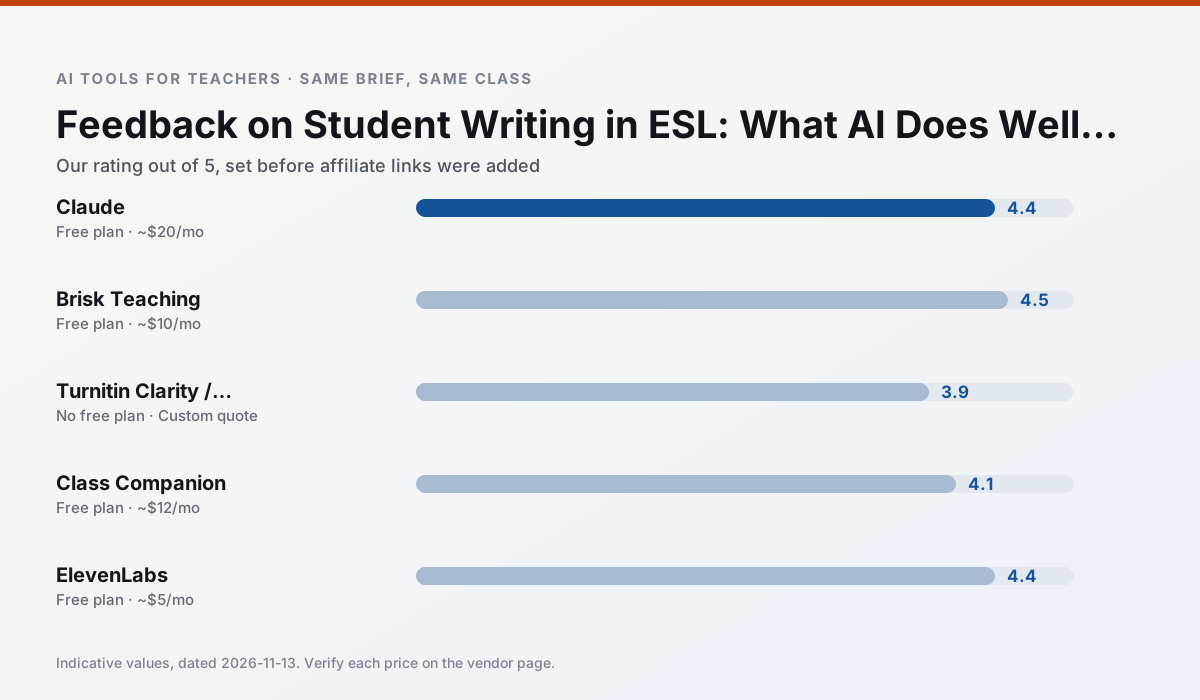
Side by side
Comparison table
Ratings reflect our timed classroom workflow, not vendor claims. Prices are indicative — verify on the vendor site.
| Tool | Best for | Free tier | Indicative paid plan | Standout feature | Our rating | Verdict | Try the tool |
|---|---|---|---|---|---|---|---|
| Claude | rubric creation · feedback on writing | Yes — Usage-limited | ~$20 /user/mo | Very large context window | 4.4 / 5 | Strong option | Try free |
| Brisk Teaching | feedback on writing · grading | Yes — Limited actions per month | ~$10 /user/mo | Works inside Google Docs | 4.5 / 5 | Top pick | Try free |
| Turnitin Clarity / Feedback Studio | feedback on writing · academic integrity | No ongoing free plan | Custom quote | Similarity reports | 3.9 / 5 | Situational | Try free |
| Class Companion | grading · feedback on writing | Yes — Limited assignments | ~$12 /user/mo | Handwriting recognition | 4.1 / 5 | Situational | Try free |
| ElevenLabs | accessibility · reading intervention | Yes — Monthly character quota | ~$5 /user/mo | Very natural voices | 4.4 / 5 | Strong option | Try free |
| Colossyan | PD materials · video lessons | No ongoing free plan | ~$27 /user/mo | PDF/PPT-to-video | 4.1 / 5 | Situational | Try free |
Match your situation
Best for X
Different jobs need different tools. Here is what we would open first in each case.
Family-facing drafts from Claude need the fewest rewrites for warmth without overpromising, which is the usual failure mode.
Brisk Teaching keeps the same task across levels, which is what makes a differentiated set defensible in moderation.
Turnitin Clarity / Feedback Studio is built around teacher-monitored student spaces and audit logs rather than a consumer chat account, which is a different approval conversation.
Nothing on Class Companion's free tier is a teaser demo; the limits are documented and a normal week fits inside them.
Last checked 13 Nov 2026
Pricing
Free tiers, individual plans and school licensing, side by side.
| Tool | Free plan | Individual / paid | School & district | Billing note | Verify |
|---|---|---|---|---|---|
| Claude | $0 — Usage-limited | ~$20 /user/mo | ~$25+ /user/mo | Indicative — verify on vendor site | Vendor |
| Brisk Teaching | $0 — Limited actions per month | ~$10 /user/mo | Custom quote | Indicative — verify on vendor site | Vendor |
| Turnitin Clarity / Feedback Studio | No ongoing free tier | Custom quote | Custom quote | LMS-wide deployment | Vendor |
| Class Companion | $0 — Limited assignments | ~$12 /user/mo | Custom quote | Indicative — verify on vendor site | Vendor |
| ElevenLabs | $0 — Monthly character quota | ~$5 /user/mo | ~$22 /user/mo | Indicative — verify on vendor site | Vendor |
| Colossyan | No ongoing free tier | ~$27 /user/mo | Custom quote | Indicative — verify on vendor site | Vendor |
Editorial rule: pricing is re-checked every 2–3 months and the top 50 pages are refreshed every 6 months. See our funding policy.
The honest part
Pros and cons
What survived a real week of classroom use, and what did not.
Pros
- Handles full unit plans and long rubrics
- Nuanced, less generic prose
- Good at structured document output
Cons
- No teacher-specific templates
- Fewer classroom integrations
- Consumer plan not suitable for student data
Pros
- No copy-paste between tools
- Fast inline feedback on student drafts
- Gentle learning curve
Cons
- Chrome-first workflow
- Extension permissions need IT approval
- Free quota is tight
Pros
- Already licensed at many schools
- Consistent institutional workflow
- Detailed revision history
Cons
- Individual teachers cannot buy it
- AI detection remains contested
- Heavy administrative setup
Pros
- Useful where work is done on paper
- Fast, specific comments
- Good math support
Cons
- Scan quality affects accuracy
- Narrow use case
- Feedback still needs teacher review
Pros
- Excellent for accessible audio versions
- Low entry price
- Fast generation
Cons
- Quota-based billing
- Voice cloning consent considerations
- Not a teaching platform
In the classroom
Use cases
Five concrete workflows, with the tool we would open for each one.
An IEP present-levels first draft
Use aggregated, anonymised data only. Ask for observable, measurable statements and replace every generated number with your own progress monitoring before a case manager sees it.
Recommended: ClaudeA five-minute exit ticket set
Ask for one recall, one application and one reasoning item, then delete the second recall question every generator sneaks in.
Recommended: Brisk TeachingA question bank from a PDF or article
Feed a non-identifiable source and ask for items tagged by difficulty with the misconception behind each distractor. Spot-check every answer key; numerical items are least reliable.
Recommended: Turnitin Clarity / Feedback StudioA substitute folder that needs no context
The value here is structure, not creativity. Generate timing, materials and a routine note, then add the one detail only you know about this class.
Recommended: Class CompanionThree reading levels from one source text
Paste a vetted text, ask for supported, core and extension versions, then check the vocabulary list by hand. Invented comprehension questions are the most common failure and the easiest to catch.
Recommended: ElevenLabs
Questions teachers ask us
FAQ
Direct answers, also published as FAQPage structured data for search and AI assistants.
Can AI do feedback on student writing at mixed-grade level?
Which tool is best for feedback on student writing?
What is the biggest risk?
Sources & further reading
Our recommendation
Try ElevenLabs free for your next feedback on student writing task
Natural-sounding AI voiceover and text-to-speech for learning materials. Start on the free tier, run one real Esl lesson, and only consider upgrading if the quota is what stops you. Disclosure: we may earn a commission (22% recurring) at no extra cost to you.
Some links on this page are affiliate links. We may earn a commission at no extra cost to you. Our rankings are editorial and never pay-to-play. Never enter student PII into a free consumer account.
Keep reading
Related comparisons in this cluster.
Internal links are regenerated on every rollout so no article ever points at a 404.