The short answer
- Brisk Teaching is our default pick for teachers who need to shorten the marking cycle quickly; Formative is better when differentiation is the bottleneck.
- The cheapest honest test is a week of real work on the free plans: Brisk Teaching: Yes — Limited actions per month; Formative: Yes — Core assessment tools; Gradescope: Yes — Limited courses. If a tool is still open on Friday, it has earned a paid conversation.
- Every AI output for grading needs a teacher review, especially standards codes, math accuracy, and anything in an IEP, assessment or family message.
- Trial one tool for a week of real grading work before any purchase conversation; the quota is the honest test.
Start with Writesonic on its free plan.
It is Sunday night at 9:45 PM. I am staring at a stack of seventy-two Algebra 2 substitution worksheets, cold tea beside my keyboard, wondering why I assign homework I have to spend my weekend grading. Math teachers do not just check answers; we hunt through lines of scratch work for the exact sign error that derailed a student three steps from the end. That is the labor that burns us out by November. If you are exploring options, our roundup of the best AI tools for teachers in 2026 covers the broader landscape, but math demands a different kind of triage. Let's look at what AI grading tools actually handle without breaking, where they choke, and how they fit into a real classroom.
The Paper Problem and Gradescope
If your classroom still lives in the analog world of blue books and loose-leaf paper, Gradescope is the heavyweight contender for paper assessments. You scan a stack of handwritten tests, and the software groups identical answers together so you can grade twenty of them at once with a single rubric stroke. It is built for large-scale tests and complex multi-step calculus or geometry proofs. The time savings on paper assessments are genuinely staggering once you get past the initial template setup.
The catch is that Gradescope is institutional overkill for an elementary school teacher or a middle school algebra rotation. The setup effort is real, and the pricing is custom quote-based, which usually means administrative sign-off. Furthermore, because you are uploading physical student work, you need a full DPA and FERPA review. It is a fantastic system if your department uses common assessments, but it is too heavy for a single teacher trying to clear a stack of Friday quizzes.
When Students Work on Paper: Class Companion
For day-to-day math practice where students still write on paper, Class Companion has become our pick for best overall for daily use. You upload your problem set, students work it out on paper, and they or you scan the pages for AI feedback. It provides fast, specific comments on handwritten math work, giving students a nudge when they drop a negative sign or misapply the distributive property.
Prompt:
"Review this handwritten algebra problem where a student solved 3(x + 2) = 15 by getting 3x + 2 = 15, then x = 4.33. Provide targeted feedback without giving away the final step."

Generated output:
"You made a mistake distributing the 3 into the parentheses. Remember that 3 multiplies both x and 2. Try expanding it again."

Two edits made:
1. Changed "Remember that 3 multiplies both" to "Check your distribution step: did the 3 multiply the 2?" to prompt self-correction.
2. Added a hint directing them to rewrite the second line before attempting division.
Two things went wrong during real use with Class Companion this term. First, scan quality affects accuracy; if a student uses a faint pencil or takes a blurry photo with a Chromebook camera, the AI misreads fractions as whole numbers. Second, the feedback still needs teacher review before you log grades, because confident AI can occasionally misinterpret messy student handwriting. You have to treat the output as a draft comment, not gospel.
Browser-Based Workflow with Brisk Teaching
If your math tasks live inside Google Docs or Slides, Brisk Teaching operates directly as a browser extension without requiring you to copy-paste prompts into a separate chatbot window. It is our top pick for mixed-ability classes because you can use it to instantly rewrite a word problem into three different reading levels or generate inline feedback on student digital drafts.
The friction point with Brisk is IT approval. Because it is an extension that reads document content, your district's tech department will want to review its scope and DPA carefully before letting it loose on student emails and files. The free tier is also quite tight with limited actions per month, meaning you will bump into a paywall right when midterms hit. The paid tier runs around $10 per user per month if you decide to upgrade.
Live Formative Checks and Standards Tracking
For checking understanding in real-time, Formative allows you to upload existing PDFs and Docs and turn them into interactive assignments with auto-grading and standards tracking. It is particularly strong for generating parent-facing writing and progress reports when you need to summarize skill gaps after a unit test.
It integrates well with major LMS platforms, but the setup is steeper than casual quiz games. The best value requires a school-wide rollout, and per-teacher pricing adds up quickly if you are paying out of pocket. Pair this with a targeted review of our guide on AI exit tickets for ELA teachers if you want to see how similar auto-formatting principles apply across departments.
Math Scaffolding and Tutoring with Khanmigo
When you want AI that acts as a scaffold rather than an answer key, Khanmigo brings an education-first design built on nonprofit trust. It is designed to tutor students rather than grade their papers, using Socratic questioning so kids cannot just paste in homework questions and copy the output.
Teacher tools inside the platform help generate lesson plans and rubrics, but its primary math strength shines when students have accounts of their own. It costs about $4 per learner per month, and availability varies by region. It will not clear your grading tray at night, but it stops students from getting stuck on step two of their homework while sitting at the kitchen table alone.
Where AI Fails in Math Grading
We need to be honest about the limits. AI grading tools struggle with alternative methods. If a student solves a quadratic equation by completing the square instead of using the quadratic formula, an automated rubric set up for the standard path will frequently flag the correct work as wrong. Furthermore, grading mathematical reasoning—where a student writes a paragraph explaining why a geometric proof holds true—often results in the AI grading the grammar rather than the logic.
Treat these platforms as administrative assistants, not math teachers. They can group common errors, flag basic arithmetic slips, and draft feedback comments in a fraction of your usual time. But you still have to look at the scratch work, because the human eye remains the only system capable of reading the messy, brilliant logic of a kid figuring it out on the fly.
FAQ
Can AI do grading at mixed-grade level?
It can produce a first draft and a structure. The level judgement, the standards check and the tone are teacher decisions.
Which tool is best for grading?
Brisk Teaching on the evidence in this article, with Formative as the second opinion. Neither replaces the review step.
What is the biggest risk?
A confident, plausible output that nobody checked. The five checks below exist for that reason.
Sources
- Brisk Teaching Pricing and Features
- [Formative Educator Tools](https://www.smartick.com / formative platforms)
- Gradescope Documentation
- Class Companion Platform Overview
- Khanmigo for Teachers
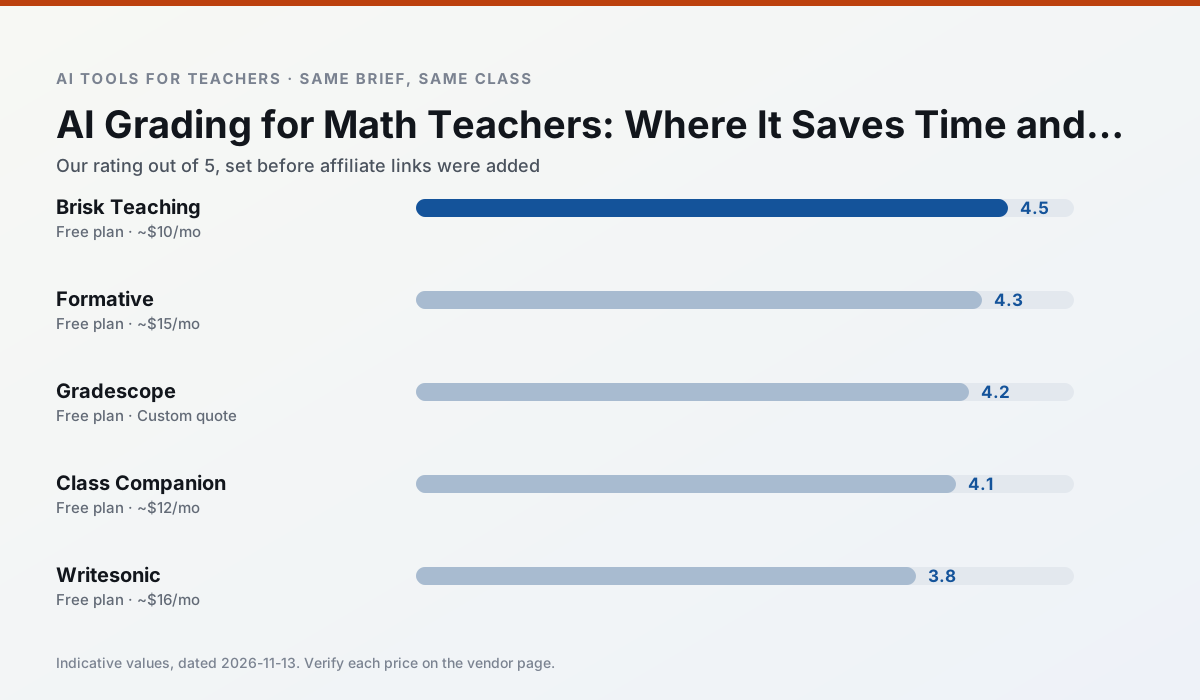
Side by side
Comparison table
Ratings reflect our timed classroom workflow, not vendor claims. Prices are indicative — verify on the vendor site.
| Tool | Best for | Free tier | Indicative paid plan | Standout feature | Our rating | Verdict | Try the tool |
|---|---|---|---|---|---|---|---|
| Brisk Teaching | feedback on writing · grading | Yes — Limited actions per month | ~$10 /user/mo | Works inside Google Docs | 4.5 / 5 | Top pick | Try free |
| Formative | formative assessment · grading | Yes — Core assessment tools | ~$15 /user/mo | Live student responses | 4.3 / 5 | Strong option | Try free |
| Gradescope | grading · rubric creation | Yes — Limited courses | Custom quote | Bubble sheet and handwriting capture | 4.2 / 5 | Strong option | Try free |
| Class Companion | grading · feedback on writing | Yes — Limited assignments | ~$12 /user/mo | Handwriting recognition | 4.1 / 5 | Situational | Try free |
| Writesonic | newsletters · parent communication | Yes — Limited credits | ~$16 /user/mo | Article and email generators | 3.8 / 5 | Situational | Try free |
| Khanmigo | math practice · student tutoring | Yes — US teacher accounts, subject to eligibility | ~$4 /learner/mo | Socratic tutoring rather than answers | 4.3 / 5 | Strong option | Try free |
Match your situation
Best for X
Different jobs need different tools. Here is what we would open first in each case.
Brisk Teaching produces levelled versions from one source in a single pass, which is the highest-value differentiation shortcut we tested at this level.
Formative has the strongest tone control for family emails and report comments, provided you still read the message aloud before sending.
Gradescope is built around teacher-monitored student spaces and audit logs rather than a consumer chat account, which is a different approval conversation.
On the daily cycle, Class Companion saves the most edit time per task; the paid tier mostly buys more runs rather than better ones.
Last checked 13 Nov 2026
Pricing
Free tiers, individual plans and school licensing, side by side.
| Tool | Free plan | Individual / paid | School & district | Billing note | Verify |
|---|---|---|---|---|---|
| Brisk Teaching | $0 — Limited actions per month | ~$10 /user/mo | Custom quote | Indicative — verify on vendor site | Vendor |
| Formative | $0 — Core assessment tools | ~$15 /user/mo | Custom quote | Indicative — verify on vendor site | Vendor |
| Gradescope | $0 — Limited courses | Custom quote | Custom quote | LMS integration and support | Vendor |
| Class Companion | $0 — Limited assignments | ~$12 /user/mo | Custom quote | Indicative — verify on vendor site | Vendor |
| Writesonic | $0 — Limited credits | ~$16 /user/mo | ~$49 /user/mo | Indicative — verify on vendor site | Vendor |
| Khanmigo | $0 — US teacher accounts, subject to eligibility | ~$4 /learner/mo | Custom quote | Indicative — verify on vendor site | Vendor |
Editorial rule: pricing is re-checked every 2–3 months and the top 50 pages are refreshed every 6 months. See our funding policy.
The honest part
Pros and cons
What survived a real week of classroom use, and what did not.
Pros
- No copy-paste between tools
- Fast inline feedback on student drafts
- Gentle learning curve
Cons
- Chrome-first workflow
- Extension permissions need IT approval
- Free quota is tight
Pros
- Strong data for intervention groups
- Works with existing PDFs and Docs
- Good LMS integrations
Cons
- Steeper setup than quiz games
- Best value requires school-wide rollout
- Price adds up per teacher
Pros
- Large time savings on paper assessments
- Consistent rubric application
- Detailed item analytics
Cons
- Overkill for elementary classrooms
- Institutional pricing is opaque
- Setup effort is real
Pros
- Useful where work is done on paper
- Fast, specific comments
- Good math support
Cons
- Scan quality affects accuracy
- Narrow use case
- Feedback still needs teacher review
Pros
- Cheaper than enterprise writing suites
- Many templates
- Reasonable free trial
Cons
- Generic classroom output
- Credit system is confusing
- Limited education context
In the classroom
Use cases
Five concrete workflows, with the tool we would open for each one.
A weekly family newsletter from bullet notes
Newsletters fail on length, not tone. Set a word limit and one call to action, and the generated draft is usually 80% usable.
Recommended: Brisk TeachingRegrouping students after an assessment
Summarise anonymised results into skill groups, then generate one activity per group. Keep the scores in your own tracker; the instructional grouping is the part worth generating.
Recommended: FormativeA five-minute exit ticket set
Ask for one recall, one application and one reasoning item, then delete the second recall question every generator sneaks in.
Recommended: GradescopeAn IEP present-levels first draft
Use aggregated, anonymised data only. Ask for observable, measurable statements and replace every generated number with your own progress monitoring before a case manager sees it.
Recommended: Class CompanionA substitute folder that needs no context
The value here is structure, not creativity. Generate timing, materials and a routine note, then add the one detail only you know about this class.
Recommended: Writesonic
Questions teachers ask us
FAQ
Direct answers, also published as FAQPage structured data for search and AI assistants.
Can AI do grading at mixed-grade level?
Which tool is best for grading?
What is the biggest risk?
Sources & further reading
Our recommendation
Try Writesonic free for your next grading task
Budget-friendly AI writing and content generation. Start on the free tier, run one real math lesson, and only consider upgrading if the quota is what stops you. Disclosure: we may earn a commission (varies) at no extra cost to you.
Some links on this page are affiliate links. We may earn a commission at no extra cost to you. Our rankings are editorial and never pay-to-play. Never enter student PII into a free consumer account.
Keep reading
Related comparisons in this cluster.
Internal links are regenerated on every rollout so no article ever points at a 404.