The short answer
- Eduaide.Ai is our default pick for teachers who need to write criterion-referenced rubrics quickly; Claude is better when differentiation is the bottleneck.
- Start with Eduaide.Ai on its free plan, keep Claude as the second opinion, and do not open a card until the quota, not the feature list, is what stops you.
- Every AI output for rubric creation needs a teacher review, especially standards codes, STEM accuracy, and anything in an IEP, assessment or family message.
- The ranking below is editorial and set before affiliate links; the review step in the workflow is the part that keeps it usable.
Start with Fliki on its free plan.
At 4:15 PM on a Tuesday, staring at a stack of seventy-two robotics design notebooks, the last thing any STEM teacher wants to do is invent a four-tier grading scale for cable management and solder joint integrity. We have all tried to hack together a rubric from three different Google search results, ending up with boxes that say "good effort" versus "needs improvement," which tells a high school physics student absolutely nothing about why their circuit board failed. AI rubric creation for stem teachers has become the fastest way to get a functional draft on paper, but the technology has distinct boundaries. If you ask an assistant to grade an engineering logbook without human oversight, you will spend more time fixing hallucinations than you would have spent writing the rubric from scratch.
Using AI for rubric creation requires treating the tool like a bright first-year teaching assistant who needs clear boundaries. You provide the standards, the context, and the specific failure modes you saw last semester. The machine provides the parallel structure and the parallel prose. Across a term of testing various platforms, certain tools fit specific classroom jobs much better than others, which helps when you are trying to cut down planning time without lowering academic rigor.
Finding the Right Tool for STEM Rubrics
When evaluating platforms for STEM assessment work, you have to look past the marketing fluff about automated grading. Eduaide.Ai stands out as the best free option for teachers who want to jump in without requesting a district purchase order. Its free tier operates on a daily generation cap, which is usually enough to sketch out a standard-aligned rubric during prep period. The interface is clean and uncluttered, making it easy to generate worksheets and rubrics alongside your lesson plan. The template set is smaller than some competitors, and export options can feel a bit basic, but it gets a solid rubric into your hands in under two minutes. Just remember to confirm data retention settings if you are pasting anonymized student descriptions into any web tool.
For daily planning and complex engineering tasks, Claude is the best overall for daily use. Because it handles long-context inputs remarkably well, you can paste an entire three-page project prompt, your state’s science standards, and last year’s common student errors into the prompt window. The prose it generates feels less generic and far more nuanced than what you get from standard classroom app wrappers. It is particularly good at structured document output, breaking down criteria into clear categories like methodology, data collection, and safety protocols. Keep in mind that consumer plans are not suitable for student data, and you should always use an approved workspace tier if your school district requires FERPA compliance.
If you are swimming in paper lab reports and handwritten calculations, Gradescope is the best for quick setup. It is built specifically for AI-assisted rubric grading on scanned and handwritten assessments. You grade one student submission, and the system clusters similar answers, allowing you to apply rubric points across dozens of papers at once. It yields massive time savings on paper assessments and provides detailed item analytics that show you exactly which conceptual physics question your third period missed. However, it is complete overkill for elementary classrooms, institutional pricing is opaque, and the setup effort requires real upfront time. Because it handles actual student work, a full DPA and FERPA review is mandatory before rolling it out.
A Worked Example for Engineering Design
Building a rubric for a bridge-building load test requires specific criteria that account for both math and craftsmanship. Here is what happens when you prompt an assistant for a high school physics design rubric.
Prompt typed into Claude: Act as a high school physics teacher. Create a 4-point analytic rubric for a balsa wood bridge project. Criteria must include:
- Structural Efficiency (load held divided by bridge mass).
- Construction Quality (glue joints, symmetry, member alignment).
- Engineering Documentation (free-body diagrams, tension/compression analysis calculations). Use clear, observable descriptors for levels 4 (Exceeds), 3 (Meets), 2 (Approaching), and 1 (Beginning). Avoid vague terms like "good understanding."
What came back: A clean, four-column markdown table with distinct point values. Level 4 for documentation stated: "Calculations include accurate free-body diagrams with all external forces labeled. Math for tension and compression is error-free and clearly linked to specific structural joints." Level 2 for construction stated: "Glue joints show excess pooling or gaps. Symmetry is noticeably flawed, which may cause torque under load."
The two edits that made it usable:
- The AI originally suggested a tolerance of zero millimeter deviation for symmetry, which is impossible for teenagers working with balsa wood and wood glue. I edited the Level 4 construction descriptor to allow for a minor tolerance threshold before dropping a tier.
- I added a specific penalty clause for safety violations during the destructive testing phase, as the machine omitted safety glasses and floor clearance protocols entirely.
Where AI Rubrics Break Down in Science Classrooms
Two major issues routinely pop up when you rely too heavily on automated rubric generation without teacher oversight. The first failure happens with algorithmic math expectations. When generating rubrics for multi-step chemistry stoichiometry labs, AI tools frequently assign point values to steps that are scientifically redundant while ignoring critical safety or unit conversion checks. You have to manually audit the math criteria to ensure students are being graded on conceptual understanding rather than just calculator keystrokes.
The second issue involves equity in open-ended design challenges. If you ask an assistant to score creativity or alternative problem-solving paths in a coding or robotics unit, the rubric defaults to a rigid path that penalizes students who found a clever workaround the model didn't anticipate. To fix this, I always add a catch-all criterion row explicitly rewarding justified divergence from the baseline design.
Other multimedia tools sit on the periphery of this workflow. If you need to turn a complex lab safety script into a presenter-led video with AI avatars, Synthesia offers multilingual voice output, but at roughly $29 per user per month, the cost is hard to justify for a single classroom teacher, and avatar videos can feel strangely impersonal. For quick explainer visuals without avatars, Fliki offers text-to-video capabilities around $21 a month, though it functions best as a content tool and should never touch student PII. If you just need clean audio versions of your lab procedures for accessibility, ElevenLabs provides natural-sounding text-to-speech starting around $5 a month, making it easy to generate read-aloud versions of your newly minted rubrics. Just remember never to clone a student's or colleague's voice without explicit written consent.
Putting It Into Practice
Getting started with AI-assisted assessment does not mean overhauling your entire gradebook on a Sunday night. Pick one upcoming lab or project, run it through the best practices outlined in our guide on the best AI tools for teachers, and build your rubric there. For more ideas on managing formative checks alongside your summative grading, take a look at our companion piece on AI exit tickets for ELA teachers. Keep your standards close, keep your safety rules closer, and let the machine handle the layout work so you can get home before dark.
FAQ
Can AI do rubric creation at mixed-grade level?
It can produce a first draft and a structure. The level judgement, the standards check and the tone are teacher decisions.
Which tool is best for rubric creation?
Eduaide.Ai on the evidence in this article, with Claude as the second opinion. Neither replaces the review step.
What is the biggest risk?
A confident, plausible output that nobody checked. The five checks below exist for that reason.
Sources
- Eduaide.Ai pricing and feature documentation (edu aide.ai)
- Anthropic Claude usage tiers and model specifications (anthropic.com)
- Gradescope pricing, FERPA compliance, and workflow documentation (gradescope.com)
- Fliki text-to-video plans and feature limits (fliki.ai)
- ElevenLabs voice generation pricing and guidelines (elevenlabs.io)
- Synthesia avatar and video creation plans (synthesia.io)
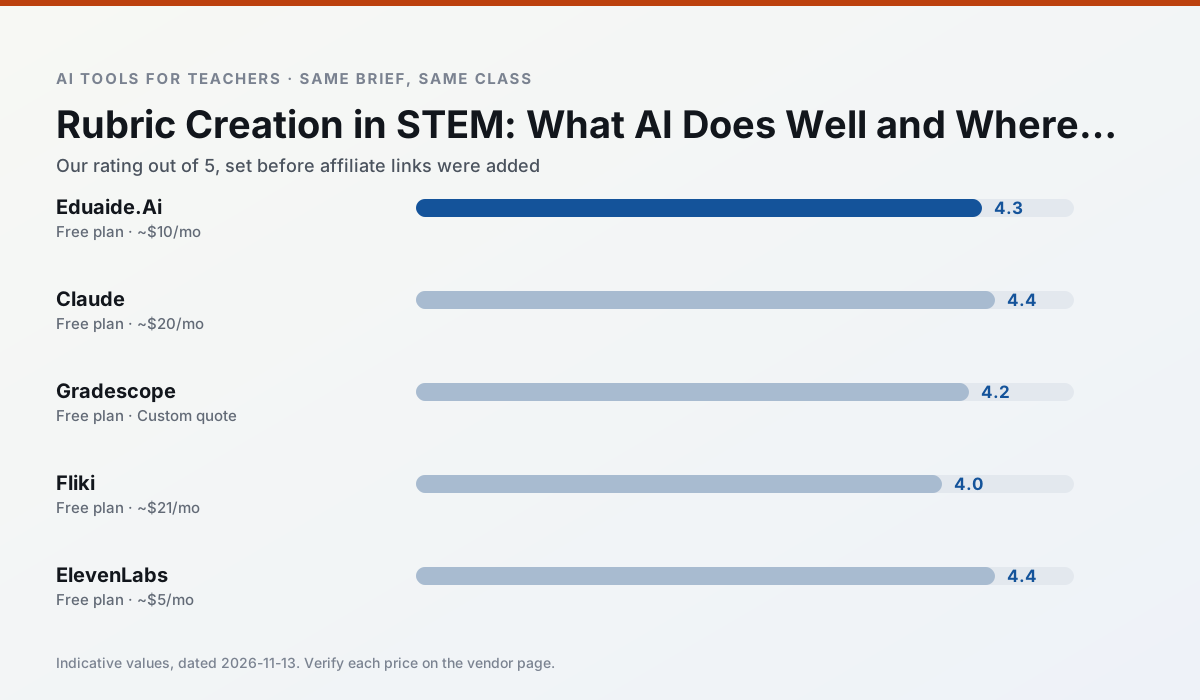
Side by side
Comparison table
Ratings reflect our timed classroom workflow, not vendor claims. Prices are indicative — verify on the vendor site.
| Tool | Best for | Free tier | Indicative paid plan | Standout feature | Our rating | Verdict | Try the tool |
|---|---|---|---|---|---|---|---|
| Eduaide.Ai | lesson planning · rubric creation | Yes — Daily generation cap | ~$10 /user/mo | Resource library | 4.3 / 5 | Strong option | Try free |
| Claude | rubric creation · feedback on writing | Yes — Usage-limited | ~$20 /user/mo | Very large context window | 4.4 / 5 | Strong option | Try free |
| Gradescope | grading · rubric creation | Yes — Limited courses | Custom quote | Bubble sheet and handwriting capture | 4.2 / 5 | Strong option | Try free |
| Fliki | video lessons · audio lessons | Yes — Watermarked, limited minutes | ~$21 /user/mo | Blog/text to video | 4.0 / 5 | Situational | Try free |
| ElevenLabs | accessibility · reading intervention | Yes — Monthly character quota | ~$5 /user/mo | Very natural voices | 4.4 / 5 | Strong option | Try free |
| Synthesia | flipped lessons · video lessons | No ongoing free plan | ~$29 /user/mo | 140+ languages | 4.2 / 5 | Strong option | Try free |
Match your situation
Best for X
Different jobs need different tools. Here is what we would open first in each case.
Eduaide.Ai's free plan is the most usable in this comparison: a quota that survives a normal week. Not enough for a department, enough for one teacher to decide.
On the daily cycle, Claude saves the most edit time per task; the paid tier mostly buys more runs rather than better ones.
Gradescope runs in a browser tab with no extension, no student accounts and no onboarding call, so you can test it in a free period.
Fliki is the option IT is least likely to block: single sign-on, admin removal of AI features and an agreement on file.
Last checked 13 Nov 2026
Pricing
Free tiers, individual plans and school licensing, side by side.
| Tool | Free plan | Individual / paid | School & district | Billing note | Verify |
|---|---|---|---|---|---|
| Eduaide.Ai | $0 — Daily generation cap | ~$10 /user/mo | Custom quote | Indicative — verify on vendor site | Vendor |
| Claude | $0 — Usage-limited | ~$20 /user/mo | ~$25+ /user/mo | Indicative — verify on vendor site | Vendor |
| Gradescope | $0 — Limited courses | Custom quote | Custom quote | LMS integration and support | Vendor |
| Fliki | $0 — Watermarked, limited minutes | ~$21 /user/mo | ~$66 /user/mo | Indicative — verify on vendor site | Vendor |
| ElevenLabs | $0 — Monthly character quota | ~$5 /user/mo | ~$22 /user/mo | Indicative — verify on vendor site | Vendor |
| Synthesia | No ongoing free tier | ~$29 /user/mo | Custom quote | Indicative — verify on vendor site | Vendor |
Editorial rule: pricing is re-checked every 2–3 months and the top 50 pages are refreshed every 6 months. See our funding policy.
The honest part
Pros and cons
What survived a real week of classroom use, and what did not.
Pros
- Very low entry price
- Good worksheet and rubric output
- Clean, uncluttered UI
Cons
- Smaller template set than MagicSchool
- Less polished export options
- Limited integrations
Pros
- Handles full unit plans and long rubrics
- Nuanced, less generic prose
- Good at structured document output
Cons
- No teacher-specific templates
- Fewer classroom integrations
- Consumer plan not suitable for student data
Pros
- Large time savings on paper assessments
- Consistent rubric application
- Detailed item analytics
Cons
- Overkill for elementary classrooms
- Institutional pricing is opaque
- Setup effort is real
Pros
- No avatar needed
- Good for explainer visuals
- Simple editor
Cons
- Minute-based limits
- Output can look generic
- Price jumps between tiers
Pros
- Excellent for accessible audio versions
- Low entry price
- Fast generation
Cons
- Quota-based billing
- Voice cloning consent considerations
- Not a teaching platform
In the classroom
Use cases
Five concrete workflows, with the tool we would open for each one.
Regrouping students after an assessment
Summarise anonymised results into skill groups, then generate one activity per group. Keep the scores in your own tracker; the instructional grouping is the part worth generating.
Recommended: Eduaide.AiA weekly family newsletter from bullet notes
Newsletters fail on length, not tone. Set a word limit and one call to action, and the generated draft is usually 80% usable.
Recommended: ClaudeThree reading levels from one source text
Paste a vetted text, ask for supported, core and extension versions, then check the vocabulary list by hand. Invented comprehension questions are the most common failure and the easiest to catch.
Recommended: GradescopeA Monday morning lesson plan in twelve minutes
The twelve minutes come from not rewriting the skeleton. Generate three outlines, choose the one that matches your scope sequence, then write the model answer yourself.
Recommended: FlikiA parent email in two languages
Draft in plain, warm language with no names, translate, then back-translate the important sentences to check meaning. Keep specific incidents out of the prompt and add them yourself.
Recommended: ElevenLabs
Questions teachers ask us
FAQ
Direct answers, also published as FAQPage structured data for search and AI assistants.
Can AI do rubric creation at mixed-grade level?
Which tool is best for rubric creation?
What is the biggest risk?
Sources & further reading
Our recommendation
Try Fliki free for your next rubric creation task
Text-to-video with stock media and AI voiceover. Start on the free tier, run one real STEM lesson, and only consider upgrading if the quota is what stops you. Disclosure: we may earn a commission (varies) at no extra cost to you.
Some links on this page are affiliate links. We may earn a commission at no extra cost to you. Our rankings are editorial and never pay-to-play. Never enter student PII into a free consumer account.
Keep reading
Related comparisons in this cluster.
Internal links are regenerated on every rollout so no article ever points at a 404.