The short answer
- Quizizz is our default pick for teachers who need to build a balanced question set quickly; Kahoot! is better when differentiation is the bottleneck.
- Pricing is where these pages date fastest. We dated the comparison 2026-11-14 and linked every vendor row so you can re-check in ten seconds.
- Every AI output for quiz generation needs a teacher review, especially standards codes, social studies accuracy, and anything in an IEP, assessment or family message.
- Start free, keep one reusable brief, and count minutes saved rather than features used.
Start with Colossyan on its free plan.
It was 8:15 on a Tuesday morning, and my seventh-grade social studies classes were about to walk in for a unit test on the Silk Road. I realized I had accidentally printed version A of the quiz for all four periods, meaning the kids in period two would have the answers from period one before their backpacks even hit the floor. I needed a fresh, standards-aligned assessment on ancient trade routes, geography, and cultural diffusion, and I needed it before the bell rang in twenty minutes. That morning panic is why I started testing AI quiz generation for social studies teachers, and it is why I am still figuring out where these tools actually save time and where they create more grading mess than they solve.
The Real Cost of Automated Question Banks
Writing multiple-choice questions that test actual historical reasoning rather than rote memorization takes hours. You have to craft plausible distractors that target common student misconceptions about things like feudalism or the causes of the American Revolution. AI quiz generation for social studies teachers helps bypass the blank-page paralysis, but it comes with a catch. The model will happily generate a question about the Magna Carta that sounds deeply academic while containing a factually incorrect answer key.
Take QuestionWell, which has become my go-to choice for the best free option when building these assessments. You paste in an excerpt about the Industrial Revolution, select your grade level, and it outputs a clean bank of standards-aligned questions. It saves the most time on question writing, but the output still demands a careful read before you push it to students.
Prompt: "Generate 5 multiple-choice questions about the causes of the American Revolution for 8th grade, focusing on economic policies and taxation without representation. Include 4 options per question and clear answer rationales."
First draft: The AI returned four standard recall questions and one bizarre distractor about the Stamp Act being signed in Paris. The rationales were vague, simply stating "Option B is correct."
Two edits that made it usable: I added a strict constraint to anchor questions in primary source excerpts rather than general summaries, and I explicitly commanded the model to write distractors based on specific student misconceptions, such as confusing the Sugar Act with the Tea Act.
Quick Setup Versus Deep Assessment
When you need an activity that gets kids moving and talking at the end of a block, you reach for platforms with high student familiarity. Quizizz remains the best for quick setup because students already know the interface, and the reporting features do a decent job of highlighting which specific standard your class missed. The free tier covers core quiz creation, while paid tiers running around $15 per user per month unlock advanced analytics. The catch is that writing high-quality AI questions inside the platform still needs your review, and the built-in gamification can sometimes distract students from the actual content if they are rushing just to top the leaderboard.
For whole-class review games, Kahoot! is the industry standard for schools and districts, costing roughly $10 per user per month for paid tiers, though the free version limits player counts. It provides instant engagement and requires very low training time because kids have used it for years. However, the time pressure of a live game suits quick recall far better than historical reasoning. If your goal is to test whether students can analyze why a treaty failed, a fast-paced clicking game will only tell you who has the quickest trigger finger.
Branching Out Into Teacher-Facing Video Tools
Assessment is only part of the job. Sometimes you need to explain a complex historical context or brief your department on new curriculum standards without spending your entire Sunday filming and editing. While not traditional quiz tools, platforms designed for instructional video creation have entered the conversation for daily use. Colossyan, priced around $27 per user per month with no permanent free plan, has emerged as our best overall for daily use when it comes to turning documents and scripts into structured explainer videos. It is remarkably strong for staff training and compliance work, featuring fast document-to-video conversion and clean LMS exports, though it is less suited for direct student-facing K-12 lessons.
If you are trying to reach multilingual families in your school community, video translation tools change the math entirely. HeyGen costs around $29 per user per month on a limited credit plan, offering best-in-class lip-sync translation that makes it useful for sending video updates to families who speak languages other than English at home. The catch is that credit-based pricing can be confusing, and voice cloning raises serious consent questions that require careful school district oversight. Synthesia runs at a similar price point of roughly $29 per user per month with no ongoing free tier, turning scripts into presenter-led videos using AI avatars. It eliminates the need for a camera or editing skills, but the avatar video can feel impersonal for classroom use, and the cost is hard for an individual teacher to justify out of pocket.
Where AI Fails in Social Studies Classrooms
Every tool on this list has a breaking point where the technology falls apart under the weight of actual classroom realities. Question generation fails when the source text is too broad, leading the AI to invent historical context or hallucinate dates. Gamified quiz platforms fail when you try to grade higher-order writing or source analysis through a multiple-choice format.
If you want to move beyond simple quizzes and look at how AI handles written work, read our guide on AI essay feedback for history teachers. When you are wrapping up a unit and need to check understanding quickly, pairing these tools with ideas from our breakdown of AI exit tickets for ELA teachers can help you capture student thinking before the bell rings.
AI quiz generation is a powerful drafting partner, not an instructional designer. Use it to build your first draft, trim the fat, fix the historical inaccuracies, and keep your hands firmly on the steering wheel of your curriculum.
FAQ
Can AI do quiz generation at mixed-grade level?
It can produce a first draft and a structure. The level judgement, the standards check and the tone are teacher decisions.
Which tool is best for quiz generation?
Quizizz on the evidence in this article, with Kahoot! as the second opinion. Neither replaces the review step.
What is the biggest risk?
A confident, plausible output that nobody checked. The five checks below exist for that reason.
Sources
- Quizizz. (2026). Interactive Learning Platform and Quiz Creation Features. Retrieved from https://quizizz.com/
- Kahoot! (2026). Game-Based Learning and Assessment Tools. Retrieved from https://kahoot.com/
- QuestionWell. (2026). AI Question Bank Generation for Teachers. Retrieved from https://www.questionwell.ai/
- Colossyan. (2026). AI Video Creator for Training and Education. Retrieved from https://www.colossyan.com/
- HeyGen. (2026). AI Video Generation and Translation Platform. Retrieved from https://www.heygen.com/
- Synthesia. (2026). AI Video Generation with Virtual Avatars. Retrieved from https://www.synthesia.io/
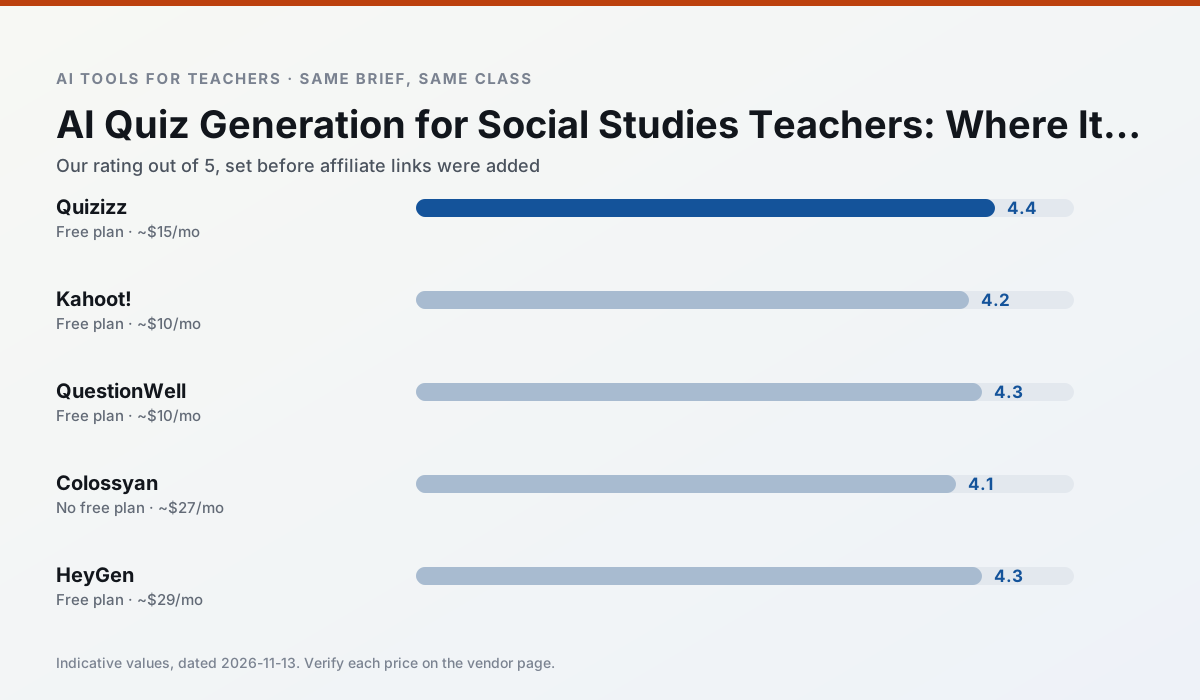
Side by side
Comparison table
Ratings reflect our timed classroom workflow, not vendor claims. Prices are indicative — verify on the vendor site.
| Tool | Best for | Free tier | Indicative paid plan | Standout feature | Our rating | Verdict | Try the tool |
|---|---|---|---|---|---|---|---|
| Quizizz | quiz generation · formative assessment | Yes — Core quiz creation | ~$15 /user/mo | AI question generator | 4.4 / 5 | Strong option | Try free |
| Kahoot! | quiz generation · review lessons | Yes — Limited player count | ~$10 /user/mo | AI question builder | 4.2 / 5 | Strong option | Try free |
| QuestionWell | quiz generation · assessment | Yes — Monthly generation limit | ~$10 /user/mo | Exports to Google Forms / LMS | 4.3 / 5 | Strong option | Try free |
| Colossyan | PD materials · video lessons | No ongoing free plan | ~$27 /user/mo | PDF/PPT-to-video | 4.1 / 5 | Situational | Try free |
| HeyGen | video lessons · translation | Yes — Limited credit plan | ~$29 /user/mo | Video translation | 4.3 / 5 | Strong option | Try free |
| Synthesia | flipped lessons · video lessons | No ongoing free plan | ~$29 /user/mo | 140+ languages | 4.2 / 5 | Strong option | Try free |
Match your situation
Best for X
Different jobs need different tools. Here is what we would open first in each case.
Setup cost is one login for Quizizz; everything else can wait until you know the tool is useful.
For a school rollout, Kahoot! offers the paperwork and the admin console; the classroom features are standard by comparison.
Nothing on QuestionWell's free tier is a teaser demo; the limits are documented and a normal week fits inside them.
Colossyan is the one we would open on a normal planning day because the first output is editable rather than restructurable, and the free plan covers a single teacher's routine.
Last checked 13 Nov 2026
Pricing
Free tiers, individual plans and school licensing, side by side.
| Tool | Free plan | Individual / paid | School & district | Billing note | Verify |
|---|---|---|---|---|---|
| Quizizz | $0 — Core quiz creation | ~$15 /user/mo | Custom quote | Indicative — verify on vendor site | Vendor |
| Kahoot! | $0 — Limited player count | ~$10 /user/mo | Custom quote | Indicative — verify on vendor site | Vendor |
| QuestionWell | $0 — Monthly generation limit | ~$10 /user/mo | Custom quote | Indicative — verify on vendor site | Vendor |
| Colossyan | No ongoing free tier | ~$27 /user/mo | Custom quote | Indicative — verify on vendor site | Vendor |
| HeyGen | $0 — Limited credit plan | ~$29 /user/mo | Custom quote | Indicative — verify on vendor site | Vendor |
| Synthesia | No ongoing free tier | ~$29 /user/mo | Custom quote | Indicative — verify on vendor site | Vendor |
Editorial rule: pricing is re-checked every 2–3 months and the top 50 pages are refreshed every 6 months. See our funding policy.
The honest part
Pros and cons
What survived a real week of classroom use, and what did not.
Pros
- Students already know the interface
- Good reporting
- Works on low-end devices
Cons
- Writing high-quality AI questions still needs review
- Gamification can distract
- Advanced analytics are paid
Pros
- Instant engagement
- Very low training time
- Strong brand familiarity
Cons
- Less depth for higher-order assessment
- Paid tiers needed for larger classes
- Time pressure suits recall more than reasoning
Pros
- Saves the most time on question writing
- Clean export workflow
- Good objective tagging
Cons
- Single-purpose tool
- Question quality varies by source text
- Limited student-facing features
Pros
- Strong for staff training, not just lessons
- Good compliance/LMS export
- Fast document-to-video
Cons
- No permanent free plan
- Higher price point
- Less suited to K-12 student-facing content
Pros
- Best-in-class lip-sync translation
- Useful for multilingual families
- Generous trial credits
Cons
- Credit-based pricing is confusing
- Voice cloning raises consent questions
- Overkill for everyday lessons
In the classroom
Use cases
Five concrete workflows, with the tool we would open for each one.
Regrouping students after an assessment
Summarise anonymised results into skill groups, then generate one activity per group. Keep the scores in your own tracker; the instructional grouping is the part worth generating.
Recommended: QuizizzA weekly family newsletter from bullet notes
Newsletters fail on length, not tone. Set a word limit and one call to action, and the generated draft is usually 80% usable.
Recommended: Kahoot!A parent email in two languages
Draft in plain, warm language with no names, translate, then back-translate the important sentences to check meaning. Keep specific incidents out of the prompt and add them yourself.
Recommended: QuestionWellRubric and feedback comments in one pass
Reorder the workflow so the rubric is yours and the comments are generated. Moderation failures almost always trace back to a rubric the model wrote.
Recommended: ColossyanThree reading levels from one source text
Paste a vetted text, ask for supported, core and extension versions, then check the vocabulary list by hand. Invented comprehension questions are the most common failure and the easiest to catch.
Recommended: HeyGen
Questions teachers ask us
FAQ
Direct answers, also published as FAQPage structured data for search and AI assistants.
Can AI do quiz generation at mixed-grade level?
Which tool is best for quiz generation?
What is the biggest risk?
Sources & further reading
Our recommendation
Try Colossyan free for your next quiz generation task
Training and explainer videos built from documents and scripts. Start on the free tier, run one real social studies lesson, and only consider upgrading if the quota is what stops you. Disclosure: we may earn a commission (25–50% recurring) at no extra cost to you.
Some links on this page are affiliate links. We may earn a commission at no extra cost to you. Our rankings are editorial and never pay-to-play. Never enter student PII into a free consumer account.
Keep reading
Related comparisons in this cluster.
Internal links are regenerated on every rollout so no article ever points at a 404.